SeleniumBase UC Mode Proxy Not Working: Causes and Fixes
The complaint is always the same: UC Mode beats Cloudflare without a proxy and fails with one, or the IP simply never changes. Both symptoms have concrete causes — and neither is a SeleniumBase bug.
Search seleniumbase uc mode proxy and you land on the same three pages: a Stack Overflow question where the IP never changes across three different proxy services, GitHub issue seleniumbase/SeleniumBase#3046 ("UC mode doesn't work with proxy", filed August 2024 on version 4.29.9, closed as unable to reproduce), and a discussion thread where the maintainer's answer is two sentences long: proxies with authentication need a Chrome extension, and you may simply have a bad proxy. Both halves of that answer are correct, and together they explain almost every failure. Here is the long version, plus the debug order that finds the cause.
Two different failures that look identical
Before changing anything, work out which problem you have, because the fixes share nothing. Failure A: the exit IP never changes. Your script runs, pages load, and the target sees your real address — the proxy was never in the path. Failure B: the proxy works and the site blocks you. UC Mode sails through Cloudflare with no proxy, then hits a challenge loop the moment you add one, which is exactly what issue #3046 describes. Failure A is a plumbing problem. Failure B is an IP reputation problem. Treating one as the other is why these threads run for pages.
Why authenticated proxies need an extension — and why that matters in UC Mode
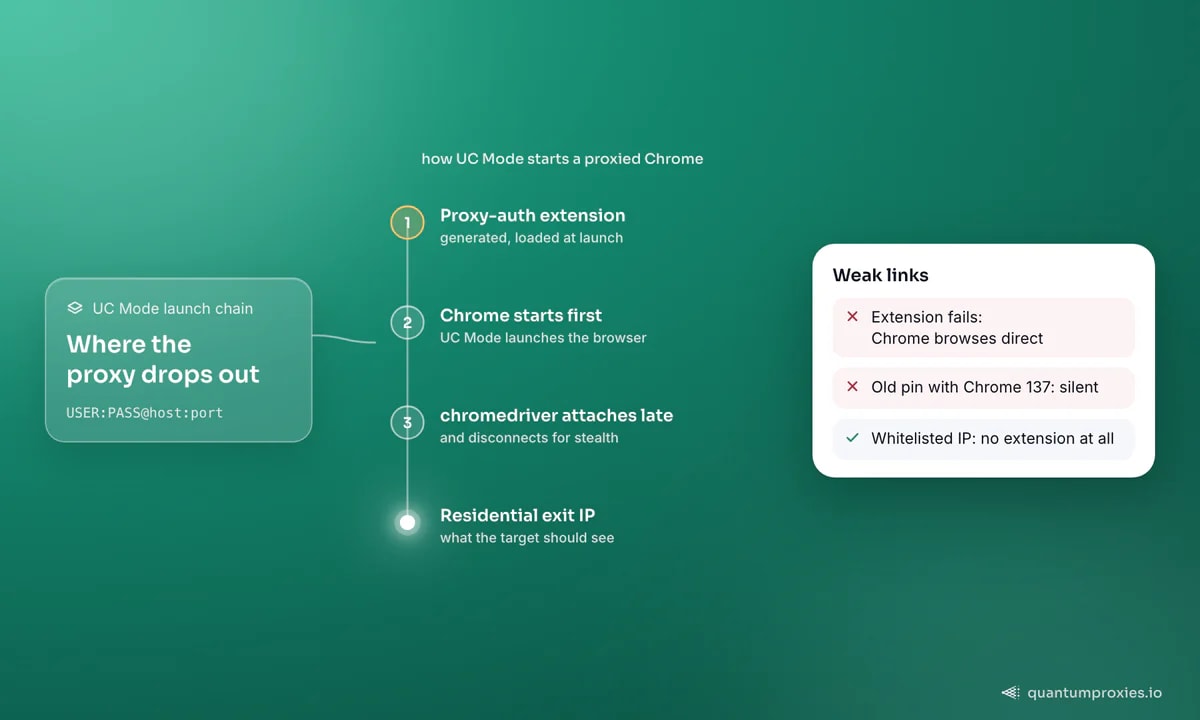
Chrome has no command-line way to supply proxy credentials. The --proxy-server flag silently discards any user:pass@ you embed, and the resulting 407 challenge surfaces as a native dialog that WebDriver cannot touch. So when you pass a proxy string containing credentials, SeleniumBase generates a small Chrome extension on the fly, writes it to a temporary folder, and loads it at launch so it can answer the challenge for you. That is the mechanism the maintainer refers to, and the same one described in our guide to authenticated proxies in Selenium.
UC Mode adds moving parts around that: it launches Chrome first, attaches a patched chromedriver afterwards, and disconnects the driver during stealthy actions. The extension has to load before any of that happens, and if it does not, nothing raises an exception — Chrome browses directly, and you get Failure A. The usual cause is version drift. Chrome 137 changed extension behaviour enough to break proxy authentication until SeleniumBase shipped an update, so an old pinned version plus a current Chrome fails silently every time. Upgrade first, debug second.
SeleniumBase UC Mode proxy formats that actually work
Format mistakes account for a surprising share of "proxy ignored" reports. SeleniumBase takes the proxy as a plain string, with or without credentials, in both the Driver and SB managers and on the command line:
from seleniumbase import Driver, SB

# Authenticated: SeleniumBase builds a proxy-auth extension for this
driver = Driver(uc=True, proxy="USER:PASS@residentialpremium.quantumproxies.io:8080")

# IP-whitelisted: no credentials, no extension
with SB(uc=True, proxy="residentialboson.quantumproxies.io:PORT") as sb:
    sb.uc_open_with_reconnect("https://httpbin.org/ip", 4)
    print(sb.get_text("body"))     # must NOT be your own IP

# Same thing from pytest:
#   pytest test_x.py --uc --proxy=USER:PASS@residentialpremium.quantumproxies.io:8080
Three rules that follow from this. Do not wrap the string in http:// and credentials at the same time unless you have verified your version handles it — USER:PASS@HOST:PORT is the documented shape. Do not expect SOCKS5 with credentials to work at all: that is a Chromium limitation, identical to the one we cover for Playwright SOCKS5 authentication, and no framework patches around it. And if your password contains @ or :, rotate it to something alphanumeric rather than debugging a parser.
The fix that removes the whole failure class
If the machine running your scraper has a stable public IP, authenticate it instead of the request. Register the address with your provider — every QuantumProxies plan supports IP whitelisting alongside user:pass — then pass a bare host:port. No credentials means no extension: one fewer component that breaks on a Chrome update, one fewer file loaded into a browser you want to keep unremarkable. On a VPS this is the highest-value change in this post.
The limit is topological, not technical: whitelisting authenticates a machine, so autoscaled containers, CI runners and anything behind a rotating NAT still need credentials. For those, keep the extension path and keep SeleniumBase current.
Verify the exit IP before you blame UC Mode
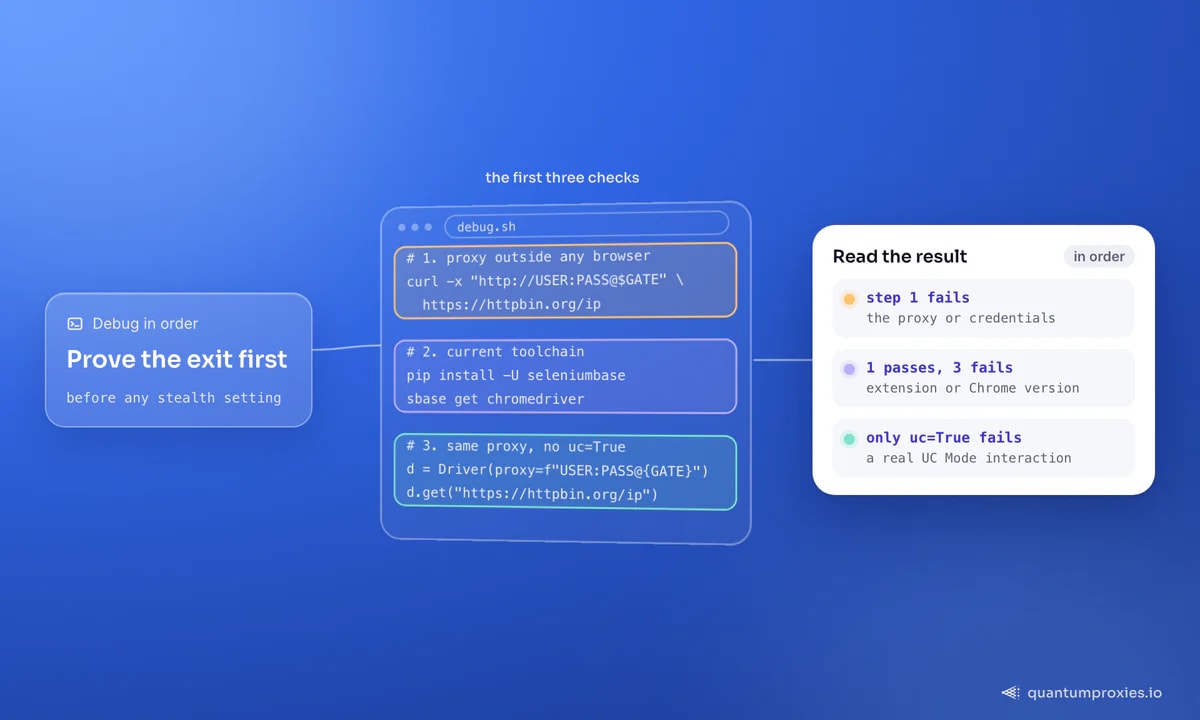
This is step zero and most people skip it. Prove the traffic leaves through the proxy, in isolation, before you touch a stealth setting. Test the same credentials outside the browser first — if curl cannot use them, no framework will:
# 1. Does the proxy work at all, outside any browser?
curl -x http://USER:PASS@residentialpremium.quantumproxies.io:8080 https://httpbin.org/ip

# 2. Is the toolchain current? (Chrome 137+ broke older extension handling)
pip install -U seleniumbase && sbase get chromedriver

# 3. Does the proxy work WITHOUT the stealth patches?
python -c "from seleniumbase import Driver; \
d=Driver(proxy='USER:PASS@residentialpremium.quantumproxies.io:8080'); \
d.get('https://httpbin.org/ip'); \
print(d.find_element('tag name','body').text); d.quit()"
If step 1 fails, the problem is the proxy or the credentials. If step 1 passes and step 3 fails, the problem is the extension or the Chrome version. If both pass and only uc=True fails, then — and only then — is it a UC Mode interaction. Knowing which exit you actually got matters as much as knowing that you got one: our free IP quality checker reports the address, its type and its reputation, which is the difference between "the proxy works" and "the proxy will get through".
When the proxy works and Cloudflare still wins
This is Failure B, and it is not a bug in anything. UC Mode makes the browser look human; it cannot make the network look residential. Route a stealth browser through a datacenter subnet that a hundred other scrapers already burned and you get the hard version of the challenge — the one that never resolves however many times you click it. No browser framework solves that, because the verdict is made before the fingerprint is even read. Our notes on Cloudflare error 1020 and on avoiding CAPTCHAs while scraping both land in the same place: the CAPTCHA is a symptom, IP reputation is the cause.
Three things change the outcome. Move to residential IPs: real household addresses across 200+ countries carry reputation a datacenter range cannot. Use a sticky session for anything with a login or a cart, since rotation mid-flow reads as session hijacking, and rotating exits for wide stateless crawls. And match the exit country to the locale you emulate — a German exit with an en-US locale and a New York timezone scores as an anomaly.
Two environment details close the loop. UC Mode is detectable in headless mode, so on Linux use the virtual display (xvfb=True) rather than headless=True — that is why several "works on Windows, crashes on Ubuntu" reports resolve once the display is fixed, and why PyAutoGUI-based helpers like uc_gui_click_captcha() need a display to click anything. And test incognito=True both ways with an auth proxy: extensions and incognito are a fragile pair, and your credentials ride in an extension.
The debug checklist, in order
- Verify the exit IP changed. Load an IP echo endpoint and read it. Everything below is pointless until this passes.
- Test the proxy outside the browser with curl or requests, using the exact same credentials.
- Upgrade SeleniumBase and the driver. Chrome 137's extension changes broke proxy auth on older versions.
- Drop
uc=Truetemporarily. If the proxy works in plain mode, you have isolated the interaction. - Switch to IP whitelisting if the box has a fixed address — this removes the extension from the picture entirely.
- Use xvfb, not headless, on Linux; UC Mode is detectable headless and the CAPTCHA helpers need a display.
- Only now change stealth settings: toggle incognito, raise
reconnect_time, then change proxy type.
CDP Mode, the documented successor to plain UC Mode, changes none of this: the proxy constraints come from Chrome, not the framework, so the same checklist applies. For the cross-framework view of who supports authenticated proxies, our anti-detect framework proxy map lays it out side by side.
Frequently asked questions
Why is my IP not changing with SeleniumBase UC Mode?
Almost always because the proxy-auth extension did not load, so Chrome browsed directly. Nothing raises an error when that happens. Upgrade SeleniumBase, confirm the proxy string is USER:PASS@HOST:PORT, and test the same credentials with curl. If the machine has a stable public IP, whitelist it and drop the credentials entirely.
Why does UC Mode bypass Cloudflare without a proxy but not with one?
Because your own connection has a clean reputation and the proxy exit does not. Shared datacenter ranges are heavily flagged, and a flagged IP gets the hard challenge that no automation can clear. Move the job to residential or mobile exits and test again before changing any stealth setting — the browser was never the problem.
Does SeleniumBase UC Mode work with SOCKS5 proxies?
Without credentials, yes. With credentials, no — Chromium has never implemented SOCKS5 username/password authentication, so no Selenium-family framework can add it. Use the HTTP endpoint of the same gateway with credentials, or whitelist your IP and keep the SOCKS5 endpoint unauthenticated.
Can I run UC Mode with a proxy in headless mode?
You can, but you should not. UC Mode is detectable in headless mode, and the CAPTCHA helper methods need a real display because they drive the mouse through PyAutoGUI. On a Linux server use xvfb=True for a virtual display instead; that combination is what the maintained examples target.
How do I use proxy rotation with SeleniumBase?
Point at a rotating gateway rather than managing a list: each new connection gets a different exit from the pool, with no code changes. For flows that must keep one identity across several pages, request a sticky session in the username parameters so the exit holds for the session window, and start a fresh driver per identity.
UC Mode is not fighting your proxy. It is stacking a stealth launch sequence on top of a credential mechanism Chrome never designed for automation, and then a burnt IP finishes the job. Remove the extension by whitelisting, verify the exit before you touch anything else, and give the browser an IP that was not already spent.