Cloudflare Error 1020 Access Denied: What Triggers It, What Fixes It
Error 1020 is not a CAPTCHA and not a rate limit. It is a rule someone wrote, matching something about your request — and the Ray ID tells you which.
Cloudflare error 1020 Access Denied is one of the clearest blocks on the modern web, once you know how to read it. It is not an HTTP status code — it is a Cloudflare 1xxx error page, normally served with a 403 — and per Cloudflare's own support documentation it means one thing: access was denied by a firewall rule. Not a global bot score, not a rate limiter, not a challenge you failed. Somebody who runs the site wrote a rule, and your request matched it. That determines everything about how you respond.
What error 1020 actually is
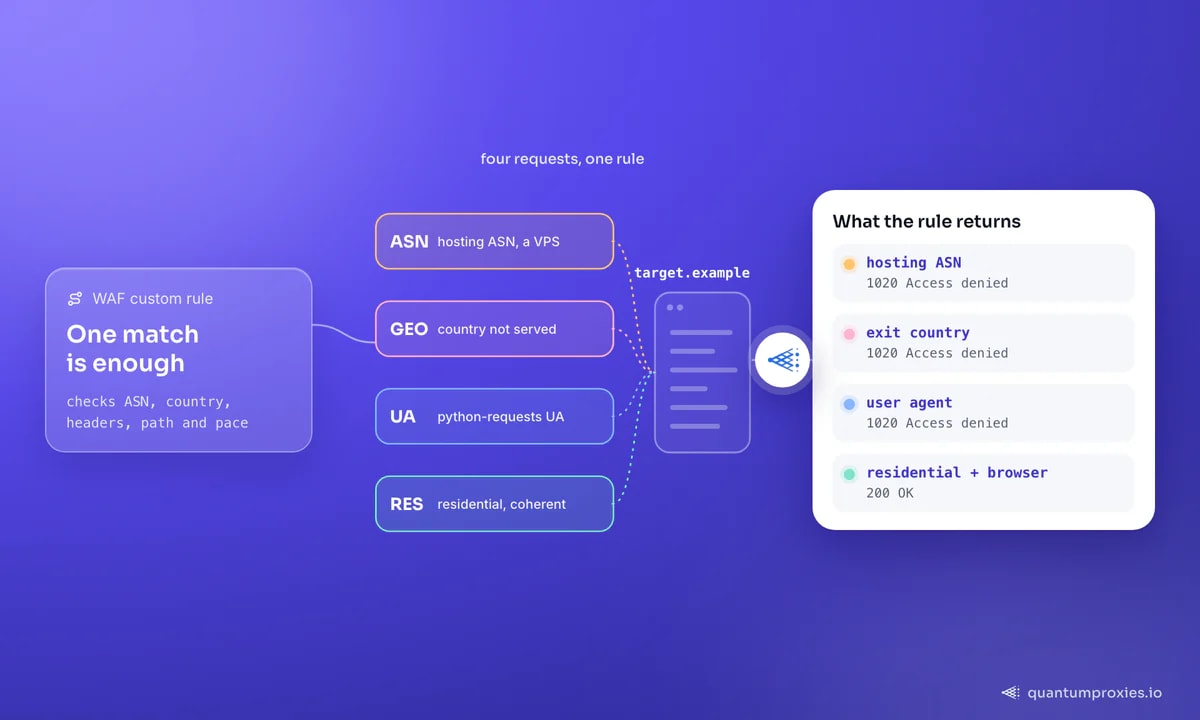
Cloudflare's documentation gives the common cause as a client or browser blocked by a Cloudflare customer's firewall rules — the WAF custom rules configured in that site's own dashboard. The owner picks the criteria: a country, an ASN, a user agent pattern, a URL path, a header signature, a request threshold, or a combination. Cloudflare enforces it at the edge. The advice for visitors is equally direct: send the site owner a screenshot of the 1020 you received, because only they can see which rule fired.
Two consequences follow. A 1020 is site-specific: the same client can be denied on one Cloudflare-protected domain and welcomed on the next, because rules are not shared. And it is deterministic rather than probabilistic — a rule either matches or it does not. Work out which of your signals matched and you change exactly that one.
1020 versus the other Cloudflare blocks
Getting the code right saves you from applying the wrong fix. The 1xxx family separates cleanly:
- 1020 Access denied — a WAF custom rule matched. Site-specific and deterministic.
- 1015 You are being rate limited — volume, not identity. Slow down and spread the load; the pacing arithmetic is in our guide to 429 too many requests.
- 1010 Browser signature banned — your client's fingerprint was recognised as automation. Headless browsers with unpatched signatures land here.
- 1006 / 1007 / 1008 — the visitor's IP address itself has been banned, usually via IP Access Rules.
- 1009 Country or region banned — geographic rule. Change the exit country and the block disappears entirely.
- A challenge or Turnstile page — not a 1xxx error at all. It is an invitation to prove you are a browser, and challenge responses carry a
cf-mitigatedheader rather than an error number.
If what you are seeing is an interstitial rather than a denial, the mechanics are different and so is the answer — see how Cloudflare challenges actually work in 2026.
What trips 1020 for scrapers and automation
Owners write these rules from templates, so the same handful of criteria recur across sites. In rough order of how often they catch automated traffic:
- Hosting ASN. Blocking whole cloud and hosting ranges is a one-click rule, and it is the single most common reason a script gets 1020 on a VPS while a laptop on home broadband loads the page fine.
- IP or range reputation. As one long-running community thread puts it, the range you are on has seen abuse — the rule may predate you by months.
- User agent. Rules matching
curl,python-requests,Go-http-client, empty user agents or known scraper strings are trivial to write and widely deployed. - Country. Sites serving one market frequently deny everything else. Your exit country may be the entire cause.
- Path. Rules guarding
/wp-login.php,/admin,/apior/searchdeny anything that touches them from an unexpected source. - Header anomalies. A missing
Accept-Language, a claimed Chrome user agent with noSec-Fetch-*headers, or a mismatch between declared language and exit geography. - Request pattern. Rules that count hits per minute per IP and then deny rather than challenge, which produces a 1020 that looks like a rate limit but never expires on its own.
Read your own block: the Ray ID
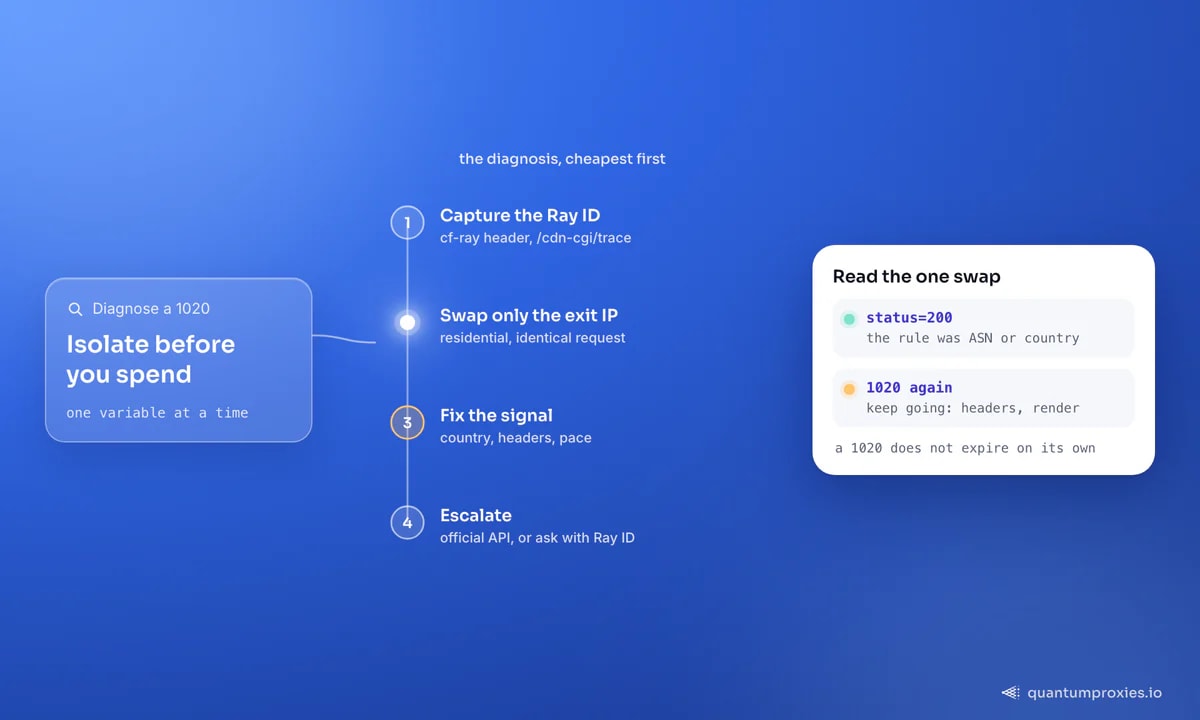
Every Cloudflare response carries a cf-ray header, and the 1020 page prints the same Ray ID on screen. It is the transaction ID for your request in the site's security event log — the one thing that lets an owner tell you which rule fired. Capture it before you start experimenting.
# Capture the evidence: status, Ray ID, and Cloudflare's view of your geo
curl -sS -o /tmp/block.html -D - https://target.example/page \
  | grep -iE 'HTTP/|cf-ray|cf-mitigated|server:'

# Then confirm what the edge thinks of your exit IP
curl -sS https://target.example/cdn-cgi/trace
The /cdn-cgi/trace endpoint exists on every Cloudflare-fronted domain and returns your visible IP, detected country and serving colo. It is the quickest way to confirm your exit geography is what you think it is — a surprising number of 1020s are country rules firing because the exit landed somewhere unexpected. Our free IP quality score checker finishes the picture: whether that address is already flagged in proxy and blacklist databases.
The legitimate routes through
There is no clever trick that unwrites someone else's firewall rule, and pretending otherwise wastes your time. What you can do is stop matching it. In ascending order of cost:
- Change the exit network. If the rule targets hosting ASNs or a burned range, a residential or mobile IP simply does not match it. This resolves more 1020s than everything else combined.
- Change the exit country to one the site serves, when the trace endpoint shows a geographic mismatch.
- Make the client coherent. A current browser user agent, the full
Acceptchain, a language that matches the exit geography, and theSec-Fetch-*headers a real navigation carries. The detail is in the 403 fix ladder. - Slow down and keep sessions. Rules that count requests per IP stop matching when the count stays low, and rendering only helps once the network and header layers are already clean.
- Use the official route. Many protected sites publish an API, a data feed or a partner programme. It is cheaper than all of the above and it does not break.
- Ask. If you have a legitimate business reason, send the owner your Ray ID and request an allowlist entry. Cloudflare's own documented workflow is built around exactly that exchange.
For the first two, residential proxies are the direct instrument: 90M+ IPs across 200+ countries, per-request rotation or sticky sessions, HTTP and SOCKS5 on every plan, so changing ASN or country is a config line rather than a project. Nothing here is legal advice, and none of it overrides a site's terms of service — collect public data, respect what the owner has asked for, and use the sanctioned channel when one exists.
# Isolate the network variable in one command: identical request,
# residential exit instead of your hosting IP.
curl -sS -o /dev/null -w 'status=%{http_code}\n' \
  -x 'http://USER:PASS@residentialpremium.quantumproxies.io:8080' \
  -A 'Mozilla/5.0 (Windows NT 10.0; Win64; x64) AppleWebKit/537.36 (KHTML, like Gecko) Chrome/131.0.0.0 Safari/537.36' \
  -H 'Accept-Language: en-GB,en;q=0.9' \
  'https://target.example/page'

# 200 -> the rule was about your ASN or country.
# 1020 again -> keep going: headers, then rendering.
Let the Scraper API handle exits and rendering
If it is your own site showing 1020
Many people searching this error are site owners whose real customers are being denied. Cloudflare's fix is a three-step lookup: get a screenshot of the 1020 page from the visitor, search the Security Events log — under Security, then Events — for that Ray ID or client IP, and read which rule matched. From there you either narrow the rule so it stops catching legitimate traffic, or add the visitor's address to IP Access Rules as an allow entry.
Two things worth checking while you are in there. Overly broad ASN or country blocks cause most false positives, especially for mobile customers: CGNAT puts thousands of real subscribers behind one address, so blocking it blocks a crowd. And rules written years ago against the legacy Firewall Rules product still fire — review those before adding new ones on top.
Frequently asked questions
What does Cloudflare error 1020 access denied mean?
It means a Cloudflare firewall rule configured by the website's owner denied your request at the edge. It is delivered as an error page with a 403 status and a Ray ID rather than as its own HTTP code. Because the rule belongs to that specific site, the same client may be blocked there and accepted on other Cloudflare-protected domains.
How do I fix Cloudflare error 1020?
Stop matching the rule. Change the exit network from a hosting ASN to a residential IP, check your exit country against /cdn-cgi/trace, send a coherent browser header set, and slow the request rate. If you are a legitimate user of the service, send the owner your Ray ID and ask to be allowlisted — that is the workflow Cloudflare documents.
Is error 1020 the same as being rate limited?
No. Rate limiting on Cloudflare surfaces as error 1015, and it eases once the window passes. A 1020 is a firewall rule match and does not expire on its own — waiting changes nothing. A rule can be written to count requests, which makes the two look similar, but the remedy still has to be a change in what you send, not patience.
Why do I get 1020 on a VPS but not on my laptop?
Because hosting and cloud IP ranges are published and easy to block with one rule, while home broadband is not. Your laptop leaves through a consumer internet provider that the rule does not match. Routing the server's traffic through a residential exit reproduces the laptop's outcome without moving the code.
Can a VPN or free proxy fix error 1020?
Rarely, and often it makes things worse. Public VPN and free-proxy ranges are among the most heavily blocked address space on the internet, so you swap one matching signal for another. Clean residential or mobile addresses with a verified reputation are the difference; check any IP's fraud score before trusting it with a run.
Error 1020 is a rule someone wrote in a dashboard, and your request matched it. Capture the Ray ID, test one variable at a time — exit network first — and escalate only when the cheap answers are exhausted. An API key beats a firewall rule every day of the week.