Fix 429 Too Many Requests: Backoff, Budgets and IP Spreading
A 429 is the one block that tells you exactly how to fix it — if you read the response headers instead of just retrying. Here is the arithmetic behind safe scraping throughput.
HTTP 429 Too Many Requests is the most honest block a website can send you. Unlike a 403, it names the problem — you went too fast — and it frequently ships the cure in a response header. Yet the standard reaction is to wrap the call in a retry loop and hope, which converts a solvable pacing problem into a slow, block-generating mess. This guide treats 429 as what it is: an arithmetic problem with four levers. Read the response, pace to the published limit, back off correctly when you overshoot, and spread the remaining load across identities.
What 429 means, and when it is lying
A rate limiter counts requests per identity — usually an IP address, sometimes an API key or session cookie — inside a time window. Cross the threshold and you get 429 instead of content. Implementations differ: token buckets hand out a fixed allowance that refills on a schedule, sliding windows count over a rolling period rather than clock minutes, and tiered systems throttle at a soft limit before hard-blocking at a higher one. Which one you face determines whether a short pause is enough or whether you must wait out a whole window.
Now the caveat that saves hours: a 429 on your first request is not a rate limit. It is a bot response wearing a rate-limit costume. A widely-read Stack Overflow thread describes exactly this — a scraper's very first call returned a page reading "Misbehaving Content Scraper Please use robots.txt Your IP has been rate limited" along with the 429. Nothing had been exceeded; the server simply decided the client was a bot and picked that code. If you see 429 before you have sent any volume, treat it as a detection problem and work the header and IP checks in our guide to 403 forbidden errors instead.
Read the response before you change any code
Well-behaved servers tell you when to come back. Retry-After carries either a number of seconds or an HTTP date. Many APIs add X-RateLimit-Limit (the ceiling), X-RateLimit-Remaining (what is left in the current window) and X-RateLimit-Reset (when it refills). Those three turn reactive retrying into proactive pacing: you can slow down before the block instead of after it.
import requests

r = requests.get("https://target.example/api/items", timeout=20)
print(r.status_code)
for h in ("Retry-After", "X-RateLimit-Limit", "X-RateLimit-Remaining", "X-RateLimit-Reset"):
    if h in r.headers:
        print(f"{h}: {r.headers[h]}")

# No headers at all? The limit is undocumented - measure it:
# send a slow ramp (1 req/s, then 2, then 4) and note where 429 starts.
If nothing useful comes back, measure the limit yourself with a ramp: run at one request per second for a minute, then two, then four, and record the rate at which 429s appear. Ten minutes of measurement beats a week of guessing, and the number you find becomes the budget everything else is built on.
The pacing arithmetic
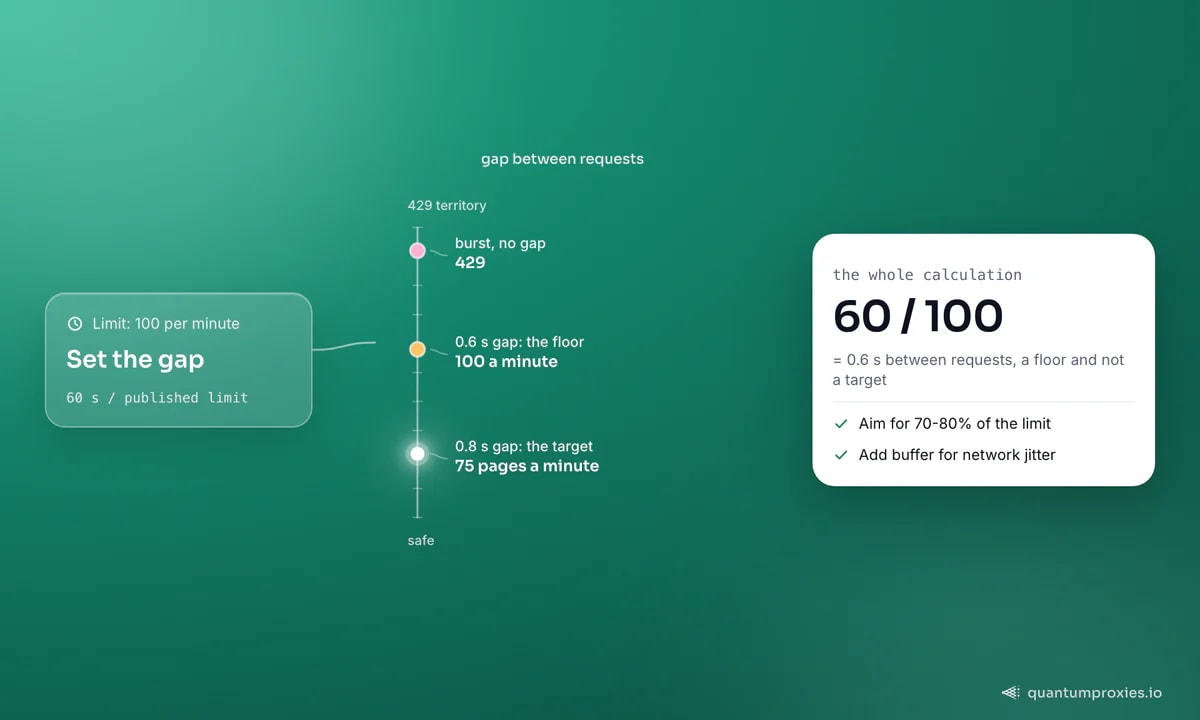
Take the documented limit and divide. A cap of 100 requests per minute means 60 / 100 = 0.6 seconds between requests as an absolute floor — and a floor is not a target. Network latency varies, your clock and the server's do not agree, and a burst at the window boundary can double your apparent rate. Aim for 70-80% of the limit: roughly 0.8 seconds per request in that example, which still gives you 75 pages a minute.
Concurrency follows from the same number. If you want 1.25 requests per second and each request takes 2 seconds round-trip, you need 1.25 x 2 = 2.5 in-flight requests — so a semaphore of 3, not the 50 your async code defaults to. Un-throttled asynchronous fan-out is the single most common cause of 429s: a hundred coroutines launched at once arrive as one instantaneous burst, no matter how polite the average looks. If you scrape with asyncio, the semaphore patterns in async Python scraping with httpx and aiohttp are the fix.
Backoff that works: exponential, capped, jittered
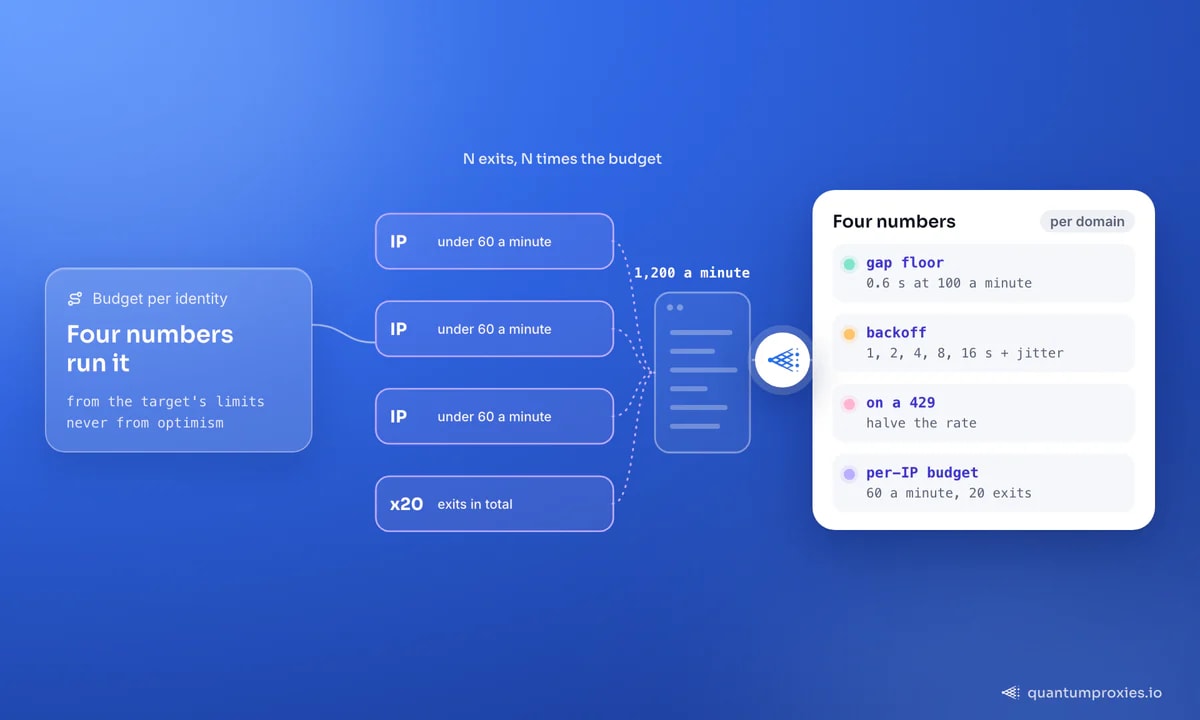
When you do hit a 429, honour Retry-After if present. Otherwise start at one second and double — 1, 2, 4, 8, 16 — up to a hard cap so a broken target cannot stall your queue forever. Then add jitter. Without randomisation, every worker that hit the wall at the same moment retries at the same moment, reproducing the burst that caused the problem.
import random, time, requests

def get_with_backoff(session, url, max_tries=6, cap=120.0):
    for attempt in range(max_tries):
        r = session.get(url, timeout=20)
        if r.status_code != 429:
            return r

        ra = r.headers.get("Retry-After", "")
        wait = float(ra) if ra.isdigit() else 2.0 ** attempt   # 1, 2, 4, 8, 16, 32
        wait = min(wait, cap)
        wait += random.uniform(0, wait * 0.3)                   # jitter: break the lockstep

        time.sleep(wait)
    raise RuntimeError(f"still 429 after {max_tries} attempts: {url}")
Better still, close the loop. Additive-increase/multiplicative-decrease gives you a scraper that finds the limit on its own and stays just under it: creep the rate up while responses are clean, halve it the instant a 429 lands. Keep one pacer per domain — limits are per-host, and one aggressive target should not slow the other forty.
class Pacer:
    """One per domain. Additive increase, multiplicative decrease."""
    def __init__(self, rps=2.0, floor=0.2, ceiling=8.0):
        self.rps, self.floor, self.ceiling = rps, floor, ceiling

    def ok(self):          # clean response: creep faster
        self.rps = min(self.ceiling, self.rps + 0.05)

    def throttled(self):   # 429: halve immediately
        self.rps = max(self.floor, self.rps / 2)

    @property
    def gap(self):
        return 1.0 / self.rps
Spreading load: the budget is per identity, not per project
Once you are pacing correctly and still need more throughput, the only lever left is identities. Because the counter is keyed to your IP, N exit IPs give you N times the budget — the arithmetic is that blunt. If a site tolerates 60 requests per minute per address and you need 1,200 pages a minute, that is 20 concurrent exits running comfortably below the cap, not one exit running twenty times over it.
This is what rotating proxies are actually for. A rotating gateway hands each request a different residential IP from a pool of 90M+ addresses across 200+ countries, so per-IP counters never fill. Two rules make the difference between spreading load and burning a pool: keep the per-IP rate below the limit even after rotation (rotation multiplies your budget, it does not remove it), and use sticky sessions for any flow that spans several requests — a login, a cart, a paginated result set — so the session does not break mid-way. When you need the same IP for a few minutes and a fresh one after that, the trade-offs are laid out in sticky versus rotating sessions.
Multiply your rate budget with residential IPs
Cheaper than more IPs: send fewer requests
- Deduplicate before fetching. Most crawl queues contain the same URL under tracking parameters and trailing slashes - canonicalise first.
- Use conditional GETs. Send If-Modified-Since or If-None-Match and a 304 costs you a fraction of the bandwidth and still counts as one request.
- Prefer JSON endpoints over rendered HTML. One API call often replaces ten page fetches, and API limits are usually documented.
- Cache aggressively during development. Re-running a parser against saved responses costs zero requests and zero blocks.
- Scrape off-peak in the target's local timezone. The same rate hurts a server less at 03:00 and gets throttled less often.
- Fetch only what changes. A daily full crawl of a catalogue that updates weekly is six wasted crawls.
Bandwidth discipline pays twice — fewer requests means fewer 429s and a smaller bill, which is the same argument we make in cutting proxy bandwidth costs. And if you would rather not build pacing infrastructure at all, the QuantumProxies Scraper API absorbs retries, rotation and per-domain throttling behind one endpoint that returns markdown, JSON or HTML.
Frequently asked questions
How do I avoid HTTP error 429 too many requests in Python?
Set a deliberate gap between requests based on the target's published limit, cap concurrency with a semaphore sized to rate times latency, honour Retry-After when it appears, and retry with exponential backoff plus jitter. If you need more throughput after that, spread requests across rotating proxy IPs rather than shortening the gap.
How long should I wait after a 429?
Exactly as long as Retry-After says, if the server sends it — it may be a seconds count or an HTTP date. Without that header, start at one second and double on each subsequent 429 up to a cap of a minute or two, adding random jitter so parallel workers do not retry in unison.
Do proxies fix 429 errors?
They multiply your budget, they do not remove the limit. Because counters are keyed to the client IP, spreading a run across many residential exits keeps each address under the threshold. But a pool being hammered at ten times the per-IP limit will still collect 429s — and burn its reputation. Pace first, then rotate.
Is a 429 the same as being banned?
No. A 429 is temporary by design and clears when the window resets, which is what distinguishes it from a 403 identity block. Ignoring it repeatedly is how it becomes permanent: sustained overshoot is exactly the signal that promotes a throttle into a longer-lived IP ban.
Why do I get 429 on the very first request?
Because nothing was actually counted. Some servers return 429 to any client they consider a bot, regardless of volume — the status code is just their chosen response. Check the response body: if it mentions robots.txt, scrapers or a firewall, fix your headers, TLS fingerprint and exit IP rather than your pacing.
Treat rate limits as a budget you spend deliberately. Measure the ceiling, run at 70-80% of it, back off with jitter when you overshoot, and buy more identities only once pacing is right. Done in that order, 429s stop being an error class and become a number in a config file.