Async Python Scraping With httpx, aiohttp and Proxies
Async turns a slow scraper into a fast one — and a fast scraper into a blocked one, unless you get proxies, semaphores and timeouts right. Here's the whole pattern for httpx and aiohttp, with code.
If your scraper spends most of its wall-clock time waiting on the network, async is the single biggest speed win available — and proxies are what keep that speed from getting you banned. This guide covers async Python scraping with httpx and aiohttp plus proxies end to end: how each library sets a proxy, how to cap concurrency with a semaphore, how to set timeouts that actually fire, and how to rotate IPs without shredding your sessions. All with runnable code and placeholder credentials you swap for your own.
Why async, and where proxies fit
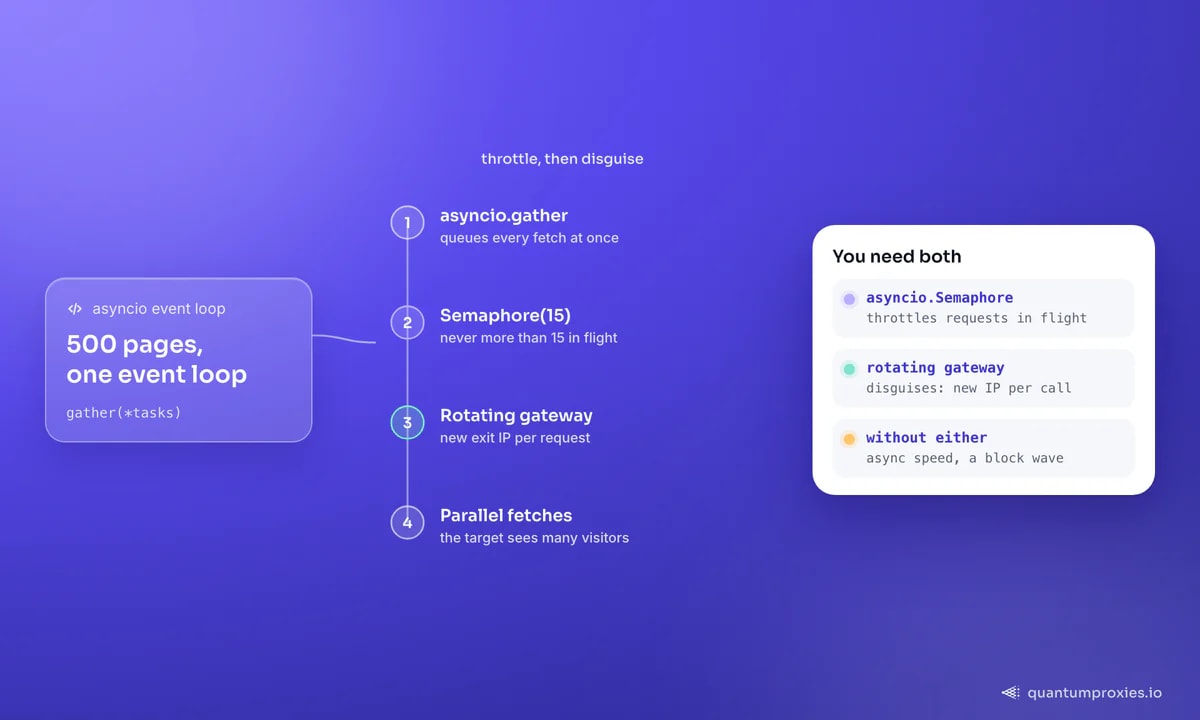
Standard requests is blocking: each call waits for the response before the next starts. Fetch 500 pages and you pay 500 round-trips back to back. Async fetches them concurrently on one event loop, so total time collapses toward the slowest single request instead of the sum. The catch: a burst of concurrent requests from one IP is exactly the signature anti-bot systems watch for. The fix isn't to slow down to a crawl — it's to spread traffic across a rotating proxy pool and throttle deliberately with a semaphore.
Set a proxy in httpx (async)
httpx is the pragmatic default because one client model does both sync and async, and it speaks HTTP/2. Note the modern API: it's a singular proxy= argument on the client, not the old proxies= dict — a common source of "why is my proxy ignored" confusion after an upgrade. Credentials go straight into the proxy URL.
import asyncio, httpx

PROXY = "http://USER:PASS@residentialpremium.quantumproxies.io:8080"

async def fetch(client, url):
    r = await client.get(url, timeout=httpx.Timeout(20.0))
    return url, r.status_code, r.text

async def main(urls):
    async with httpx.AsyncClient(proxy=PROXY, http2=True) as client:
        tasks = [fetch(client, u) for u in urls]
        return await asyncio.gather(*tasks)

urls = ["https://httpbin.org/ip"] * 5
print(asyncio.run(main(urls)))
One client, reused across every request, is the point — it keeps the connection pool warm so you skip repeated TLS handshakes through the proxy. Creating a fresh client per request is the most common async performance bug: it throws away connection reuse and cookie state on every call.
Set a proxy in aiohttp (per request)
aiohttp is asyncio-native and gives you the finest concurrency control, but its proxy convention differs: the proxy is passed per request on session.get(), not on the session. That's actually convenient for rotation. Two things bite people here — the default User-Agent is literally Python/3.x aiohttp/3.x, a dead giveaway you must override, and you should size the connection pool explicitly.
import aiohttp, asyncio

PROXY = "http://USER:PASS@residentialpremium.quantumproxies.io:8080"
HEADERS = {"User-Agent": "Mozilla/5.0 (Windows NT 10.0; Win64; x64) "
           "AppleWebKit/537.36 (KHTML, like Gecko) Chrome/132.0.0.0 Safari/537.36"}

async def fetch(session, url):
    timeout = aiohttp.ClientTimeout(total=30, connect=10, sock_read=20)
    async with session.get(url, proxy=PROXY, timeout=timeout) as resp:
        return url, resp.status, await resp.text()

async def main(urls):
    conn = aiohttp.TCPConnector(limit=20, limit_per_host=8)
    async with aiohttp.ClientSession(connector=conn, headers=HEADERS) as session:
        return await asyncio.gather(*(fetch(session, u) for u in urls))

print(asyncio.run(main(["https://httpbin.org/ip"] * 5)))
TCPConnector(limit=20, limit_per_host=8) caps total open connections and connections to any single host — a first line of politeness that stops one target absorbing your whole pool.
Cap concurrency with a semaphore
Firing unlimited concurrent requests is the fastest way to burn a proxy pool and trip rate limits. An asyncio.Semaphore is the throttle: it caps how many requests are in flight at once, regardless of how many tasks you queue. Set a global limit, and for aggressive jobs a per-domain limit too.
sem = asyncio.Semaphore(15)  # never more than 15 requests in flight

async def guarded_fetch(client, url):
    async with sem:
        return await fetch(client, url)

async def main(urls):
    async with httpx.AsyncClient(proxy=PROXY) as client:
        return await asyncio.gather(*(guarded_fetch(client, u) for u in urls))
The right number depends on the target's tolerance and your pool size, not on how fast your machine can go. Start conservative (10–20), watch your block rate, and raise it only while success stays high. On a single sticky IP, keep it in single digits.
Timeouts: model every phase
A proxied request fails in more places than a direct one — DNS resolution, connecting to the proxy, tunnel setup, connecting to the target, waiting for headers, and reading the body are all distinct stalls. A single blanket timeout hides which phase hung. aiohttp's ClientTimeout(total=, connect=, sock_read=) and httpx's Timeout() let you bound them separately. The one rule with no exceptions: never issue a request without a timeout, or one dead exit will hang a coroutine forever and quietly starve your event loop.
Rotate proxies without breaking sessions
There are two rotation strategies and picking the wrong one corrupts your data. Random per-request rotation is perfect for stateless page fetches. But it destroys any flow that depends on cookies, login or localisation, because request two lands on a different IP than request one. The clean split: rotate at the logical-unit boundary — one IP per crawl segment or per account — and use a rotating gateway that hands you a fresh exit automatically so your code never manages a list.
# rotating gateway: one endpoint, new exit IP per request
ROT = "http://USER:PASS@residentialpremium.quantumproxies.io:8080"

# sticky session: same IP for a multi-step flow, tag the session id
STICKY = "http://USER-sid-a1b2-ttl-30m:PASS@residentialpremium.quantumproxies.io:8080"

async def crawl_segment(urls):
    async with httpx.AsyncClient(proxy=ROT) as client:  # rotates per call
        return await asyncio.gather(*(fetch(client, u) for u in urls))
A rotating residential gateway is the pragmatic default for high-concurrency scraping: per-request rotation across 90M+ IPs in 200+ countries, with sticky sessions when a cart or login needs the same exit for a few minutes. If you're weighing residential against ISP or datacenter for the job, our guide to which proxy type to use lays out the trade-offs.
Get a rotating residential gateway
Retries, backoff and jitter
Dead exits and transient blocks are normal at scale, not exceptional. But naive retries make things worse: when 50 async tasks fail at the same instant and all retry immediately, you fire a synchronised burst that hammers the target harder than the original run. Add exponential backoff plus randomised jitter so retries spread out, cap the attempts, and rotate the IP on failure rather than reusing the burned one.
import random
from httpx import HTTPError

async def robust_fetch(client, url, tries=3):
    for attempt in range(tries):
        try:
            r = await client.get(url, timeout=httpx.Timeout(20.0))
            if r.status_code < 400 and looks_real(r.text):
                return r
        except HTTPError:
            pass
        # exponential backoff + jitter before the next attempt
        await asyncio.sleep((2 ** attempt) + random.uniform(0, 1))
    return None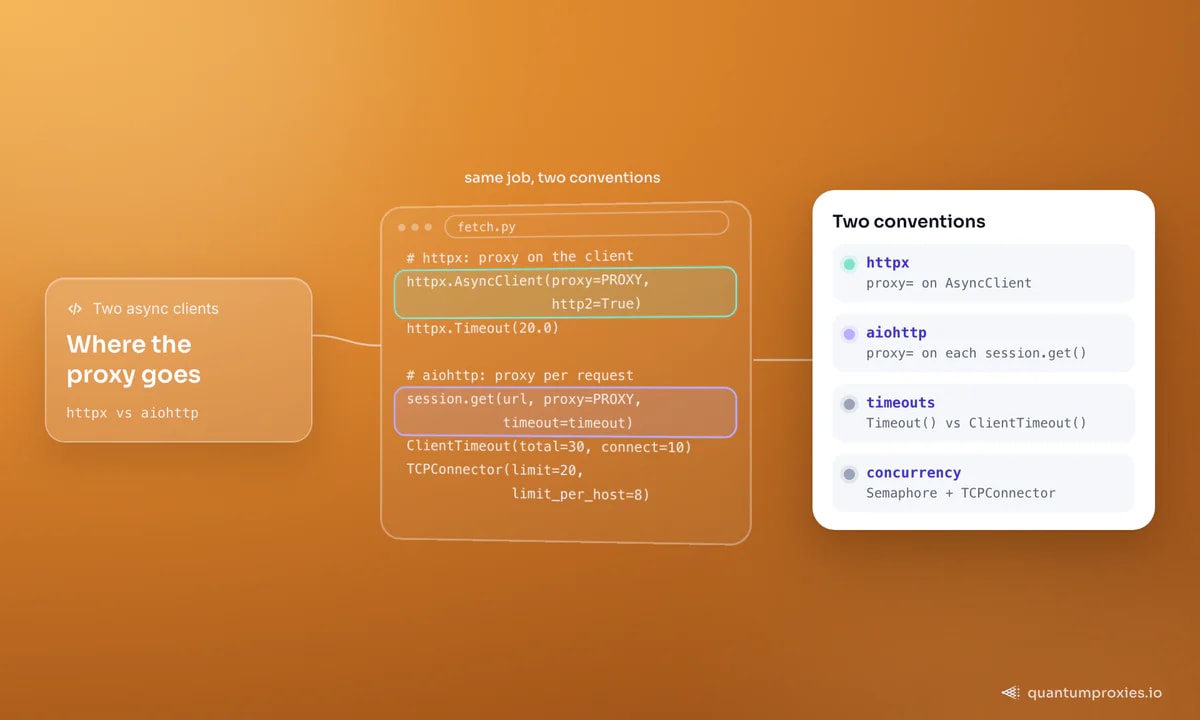
A 200 is not a success
The subtlest async scraping bug is treating HTTP 200 as done. Anti-bot systems return 200 with a CAPTCHA page, an access-denied notice, an empty result set or a JS challenge — so a proxy that scores "success" on status code alone is quietly feeding you blocked pages. Validate the content: check for a known element, a minimum length, or the absence of challenge markers before you trust a response. That's the looks_real() gate in the retry loop above.
When to stop hand-rolling the stack
The pattern above — async client, semaphore, timeouts, rotation, content validation — handles most targets cleanly. But once a site layers on Cloudflare, TLS fingerprinting or heavy client-side rendering, raw async HTTP starts losing regardless of your proxy, because a Python TLS handshake looks nothing like Chrome's. At that line a Scraper API that carries a real browser fingerprint, rotates IPs and renders JavaScript on demand is less code and a higher success rate than maintaining it all by hand. Our post on headless vs HTTP cost covers where that escalation pays off.
Frequently asked questions
How do I use a proxy with aiohttp?
Pass the proxy URL per request: session.get(url, proxy="http://user:pass@host:port"). Unlike requests, aiohttp does not take a proxies dict on the session. Always override the default User-Agent (Python/3.x aiohttp/3.x is an obvious bot signal) and set a ClientTimeout so a dead exit can't hang the coroutine.
Is httpx or aiohttp better for async scraping?
Reach for httpx as the default: one client works sync and async, HTTP/2 is built in, and the proxy is a single argument. Choose aiohttp when you want maximum concurrency control — explicit connection-pool caps and per-request proxies suit large, fast crawls. Both are fine; the proxy strategy matters more than the library.
How many concurrent requests should I run?
Not as many as your machine allows — as many as the target and your pool tolerate. Start with a semaphore of 10–20 in flight, watch the block and error rate, and only raise it while success stays high. On one sticky IP, stay in single digits. Wider IP rotation lets you run higher total concurrency safely.
Why does my async scraper get blocked when the sync one didn't?
Because concurrency concentrates the signal: many simultaneous requests from one IP is a classic bot pattern. Spread the load across a rotating pool, throttle with a semaphore, add jittered backoff on retries, and validate response content — a 200 can still be a challenge page. Speed without rotation is what got you blocked.
That's the full async pattern: pick a client, set the proxy the right way for it, cap concurrency with a semaphore, bound every timeout phase, rotate at the logical boundary, and never trust a bare 200. Get the proxy layer right first and most of the block list disappears before you hit it.