Headless Browser vs HTTP Requests: The Cost of Rendering
A headless browser is the most expensive tool in the scraping box — memory, CPU and latency all jump. Most of the time you don't need it. Here's how to tell, and how to escalate only when the page forces you to.
A headless browser feels like the safe choice — it runs JavaScript, handles sessions, behaves like a real user. It's also the single most expensive way to fetch a page. The question that decides your entire scraping bill isn't "headless browser vs HTTP requests" in the abstract; it's "does this page actually need rendering?" Most don't. This guide gives you a way to tell, a cheaper middle path most people skip, and a hybrid ladder that only escalates when a page forces it.
Where the cost difference actually comes from
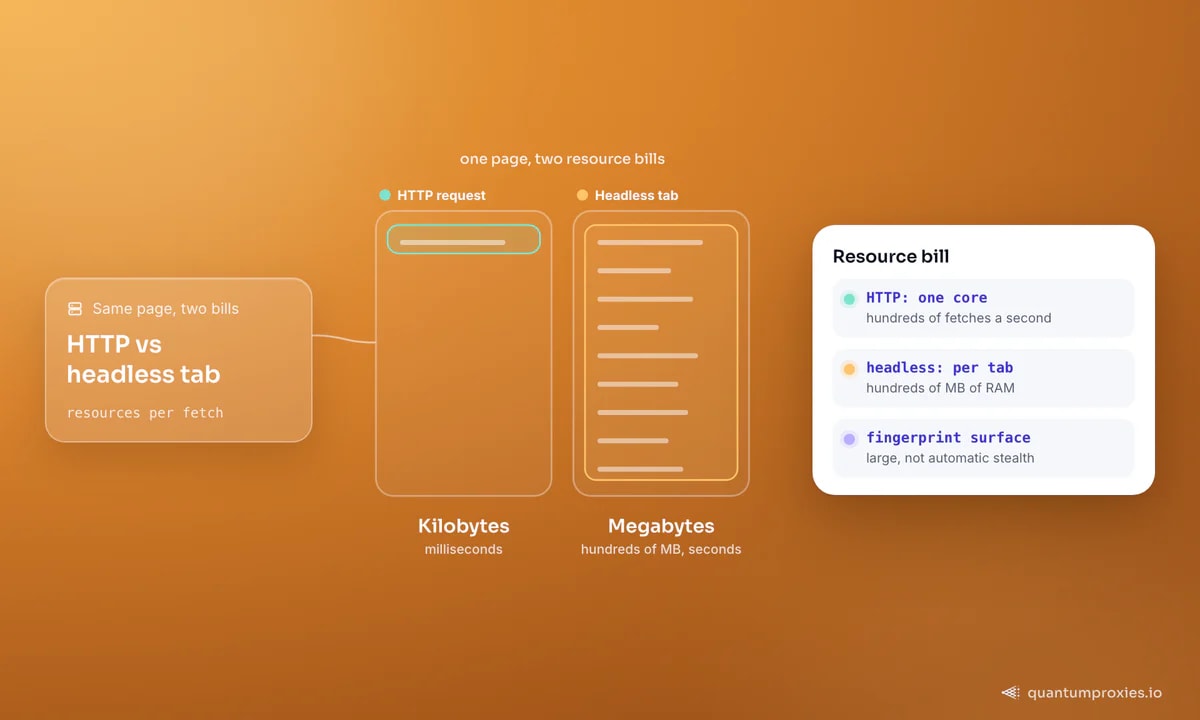
An HTTP request fetches HTML and stops. No JavaScript engine, no layout, no images or fonts unless you ask — kilobytes of text your parser reads in milliseconds. One core can push hundreds of these per second. A headless browser has to boot a full Chromium, download every asset the page references, execute the JavaScript, build the DOM and lay it out. That's hundreds of megabytes of RAM per active tab and a fetch measured in seconds, not milliseconds. Same page, the resource bill differs by an order of magnitude or more. Skipping the GUI (headless vs a visible browser) claws back some memory and CPU, but you're still paying for the entire rendering pipeline.
When you genuinely need a browser
You need to render when the data isn't in the initial HTML — when the server sends a near-empty shell and JavaScript fetches and injects the content after load. A raw GET can't see that, because the content simply isn't there yet. The tell is a one-line check: fetch the page and look at the raw HTML.
import requests

html = requests.get(url, timeout=15).text
print("price" in html, len(html))
# If your target data is present in the raw HTML -> no browser needed.
# If the body is a tiny shell and the data is missing -> it renders client-side.
If the data you want is already in that string, you never needed a browser — stop here and parse it. If the body is a skeleton and your data is absent, the page renders client-side and you have a choice to make, but rendering is not your only option. Our deeper walkthrough of the empty-page problem covers the detection step in detail.
The cheaper middle path: capture the XHR
Here's the step most guides skip. When a page renders client-side, the browser is fetching that data from a background API — an XHR or fetch call, usually returning clean JSON from a REST or GraphQL backend. You often don't need to render the page at all; you can call that endpoint directly. Open the browser dev tools, watch the Network tab, filter to XHR, and find the request that carries your data. Replay it with a plain HTTP client and you get structured JSON for the cost of one request.
import requests

# The endpoint the page's JavaScript calls behind the scenes.
# You found it in DevTools -> Network -> XHR/Fetch.
PROXY = "http://USER:PASS@residentialpremium.quantumproxies.io:8080"
api = "https://example.com/api/products?page=1"

r = requests.get(api,
    headers={"Accept": "application/json", "User-Agent": "Mozilla/5.0 ..."},
    proxies={"http": PROXY, "https": PROXY}, timeout=15)
for item in r.json()["results"]:
    print(item["title"], item["price"])
This is also more durable than DOM scraping: the underlying data request survives front-end redesigns that would break every CSS selector. When the endpoint is signed, obfuscated or guarded by a token that only the page can mint, you fall back to a browser — but you drive it to trigger the request and read the response, not to scrape the rendered DOM.
// Playwright: let the browser mint the request, then read its JSON response
const { chromium } = require('playwright');

const browser = await chromium.launch({
  proxy: { server: 'http://residentialpremium.quantumproxies.io:8080', username: 'USER', password: 'PASS' }
});
const page = await browser.newPage();
page.on('response', async (res) => {
  if (res.url().includes('/api/reviews')) {
    const data = await res.json();
    console.log(data.results.length, 'reviews captured');
  }
});
await page.goto(url, { waitUntil: 'networkidle' });
await browser.close();
If you do render, render carefully
When rendering is unavoidable, keep it lean. Wait for the specific element you need rather than a blanket sleep, block images and fonts to cut bandwidth, and reuse the browser across pages instead of relaunching it. And route it through a proxy — a browser leaks its IP just as readily as a script.
const page = await browser.newPage();
// Block heavy assets you don't need for the data
await page.route('**/*', (route) => {
  const type = route.request().resourceType();
  return ['image', 'font', 'media'].includes(type) ? route.abort() : route.continue();
});
await page.goto(url, { waitUntil: 'domcontentloaded' });
await page.waitForSelector('#product-price');   // gate on the real element
const price = await page.$eval('#product-price', el => el.textContent);
Headless has an evasion advantage worth naming: because it can click, scroll and fill forms like a person, it's less likely to be flagged than crude automation — but it also has a large fingerprint surface. Rendering is not automatic stealth. Clean IPs still matter, which is why the browser above launches behind a residential proxy.
Render on demand with the Scraper API
A hybrid escalation architecture
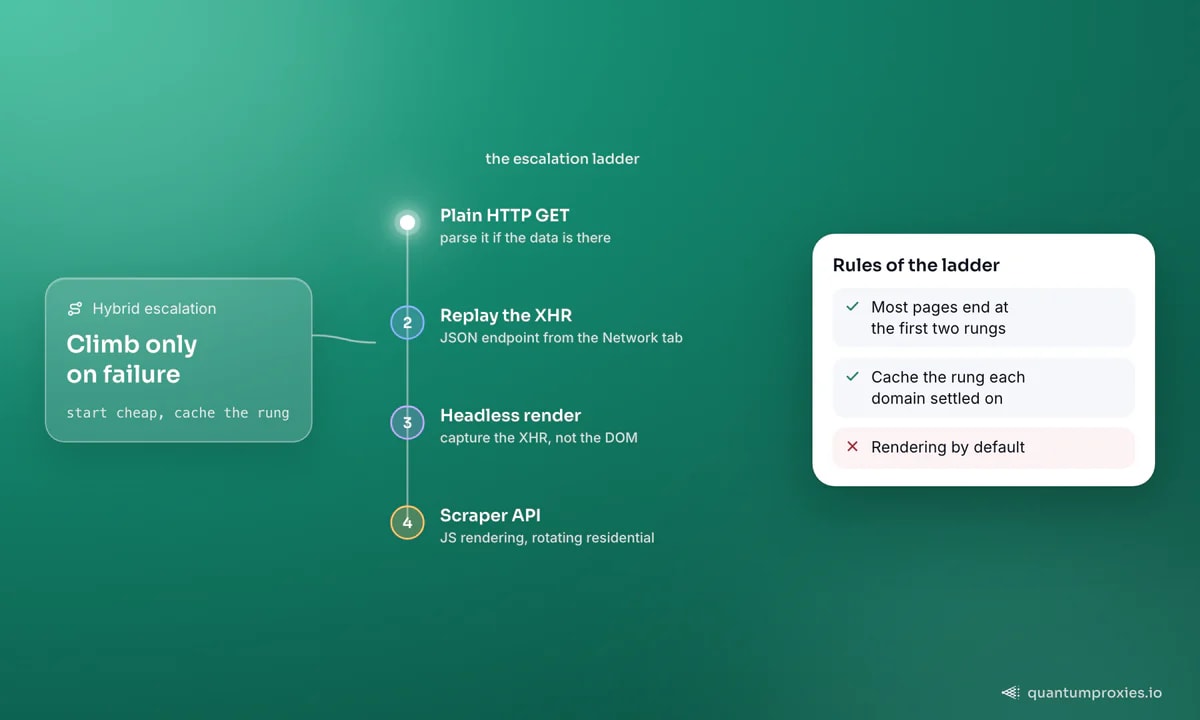
The winning pattern at scale isn't picking one tool — it's a ladder where each request starts cheap and escalates only on failure. Try plain HTTP first. If the data's missing, look for the XHR. If that's locked, render. If rendering gets blocked, hand it to a managed browser with proxies baked in. Route by target, and cache which rung each domain settled on so you stop paying for rendering on sites that never needed it.
- Fetch with a plain HTTP client. Parse if the data's there. Cheapest path — most pages end here.
- Data missing? Inspect the Network tab for the XHR/fetch call and replay the JSON endpoint directly.
- Endpoint signed or token-gated? Render with a headless browser, but capture the XHR response, not the DOM.
- Getting challenged or fingerprinted? Escalate to a Scraper API that renders JS behind rotating residential IPs.
- Record the rung each domain settled on. Never re-render a site that resolved at step one.
This is the same logic behind our large-scale scraping architecture guide, and it's where a managed Scraper API earns its keep: it makes the render-only-when-forced decision per request, so you get browser-grade results at closer to HTTP-grade cost.
Frequently asked questions
Is a headless browser slower than HTTP requests?
Almost always, yes — often by an order of magnitude. A headless browser boots Chromium, downloads every asset and runs the page's JavaScript before you get any data, so a fetch takes seconds. A plain HTTP request returns HTML in milliseconds. The browser only wins when the data literally isn't in the initial HTML and can't be reached via its background API.
How do I know if a site needs a headless browser?
Fetch the raw HTML with a plain request and search it for your target data. If it's present, no browser is needed. If the body is a small shell and the data is missing, the page renders client-side — but before reaching for a browser, check the Network tab for an XHR/fetch call that returns the data as JSON. You can often replay that directly.
Can I scrape JavaScript sites without a headless browser?
Frequently, yes. Client-side data comes from a background API the page calls. Find that request in dev tools, replay the endpoint with an HTTP client, and you get structured JSON at a fraction of the cost — and it's more stable than DOM scraping because it survives front-end redesigns. Rendering is only forced when the endpoint is signed or token-gated.
Does a headless browser avoid getting blocked?
Not by itself. A browser can mimic clicks and scrolls, which helps, but it also exposes a large fingerprint surface and still uses one IP. Without clean, rotating proxies and fingerprint hygiene, a headless browser gets blocked just like a script. Rendering is not stealth — IP quality and coherent fingerprints do the heavy lifting.
Rendering is a tool, not a default. Start with an HTTP request, reach for the hidden JSON before the browser, render only when the page truly forces it, and cache that decision so you never pay twice. Get the ladder right and your scraping bill can drop by an order of magnitude while your success rate goes up.