Scraper Returns an Empty Page? It's JavaScript. Here's How to Fix It
The body tag is empty in your scraper but full in DevTools. That's not a bug — it's client-side rendering. Here's how to tell, three ways to get the data, and how to avoid launching a browser you don't need.
You fetch the page, print the HTML, and the part you wanted is missing — an empty <body>, an empty node list, or a stub that says "JavaScript is required." Meanwhile the browser's inspector shows the data right there. This is not a scraper bug. It's a page that renders its content client-side with JavaScript, and your HTTP request only ever gets the empty shell that runs before the JavaScript does. Here's how to confirm that, three ways to get the data anyway, and how to avoid spinning up a headless browser you don't actually need.
Why the body is empty
A raw HTTP client — Python requests, Node fetch, cURL — downloads the HTML the server sends and stops. It doesn't execute JavaScript. Sites built on React, Vue, Angular or Next.js ship a near-empty HTML skeleton plus a bundle that fetches data and builds the DOM in the browser. Parsers like BeautifulSoup or Cheerio see the skeleton, so a selector that works perfectly in DevTools returns an empty array in your code. Cheerio returning [] on a React page is the canonical symptom; it does not run JavaScript, and it never will.
import * as cheerio from "cheerio";

const html = await (await fetch("https://shop.example.com/products")).text();
const $ = cheerio.load(html);

console.log($("div.product").length);
// 0  ->  the products are drawn by JavaScript, not in the HTML
Confirm it in ten seconds
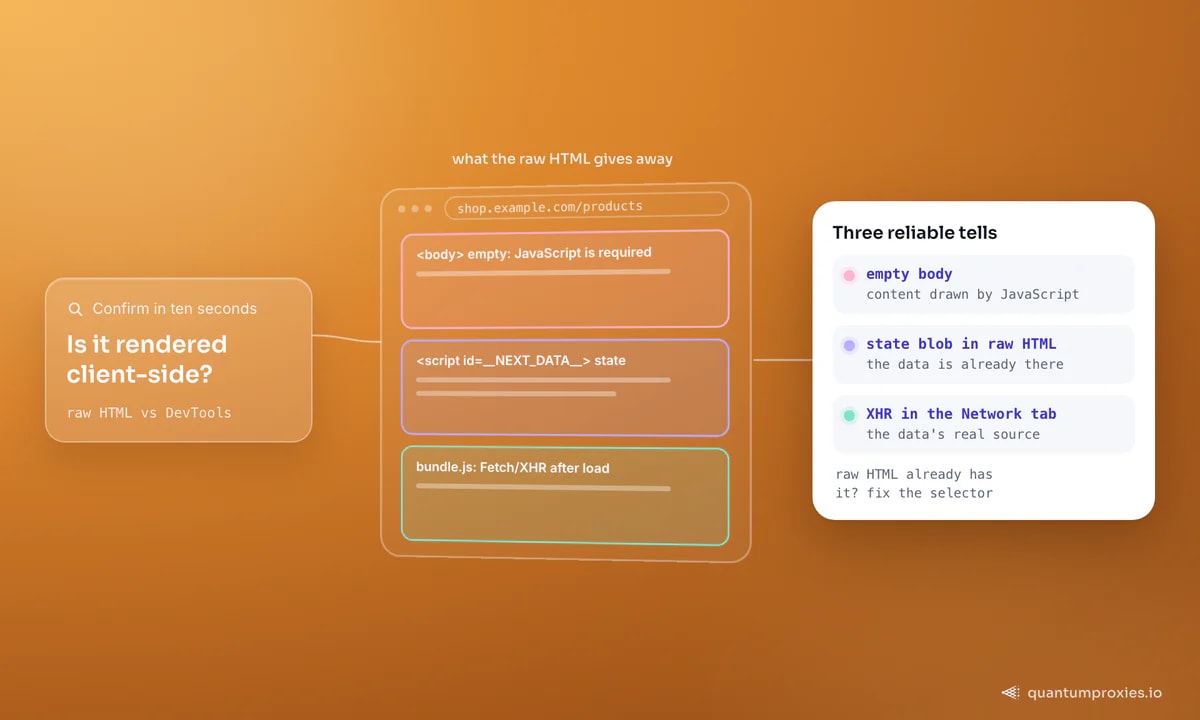
Before you reach for a browser, prove the diagnosis. Two quick checks tell you exactly what you're dealing with: compare the raw response to what the browser renders, and count elements in the console. If the console finds nodes the raw HTML doesn't contain, the content is client-side. If the raw HTML already has it, your selector or your headers are the problem, not rendering.
# does the raw response actually contain the data?
curl -s https://shop.example.com/products | grep -c 'class="product"'
# 0 -> not in the HTML  |  24 -> it IS there, fix your selector

# then, in the browser DevTools console on the same page:
# document.querySelectorAll('div.product').length   -> 24
One more branch to rule out: an empty body isn't always JavaScript. Sometimes the server withholds the content until you send the right headers or cookies — a session cookie, a referer, an Accept-Language, or a User-Agent that doesn't scream "script." If cURL returns a short page but your browser (which sends a full header set) returns a full one, try replaying the browser's request headers before you assume rendering. It's a five-minute test that can save you from launching a browser you never needed.
Fix 1: hit the hidden JSON API (fastest)
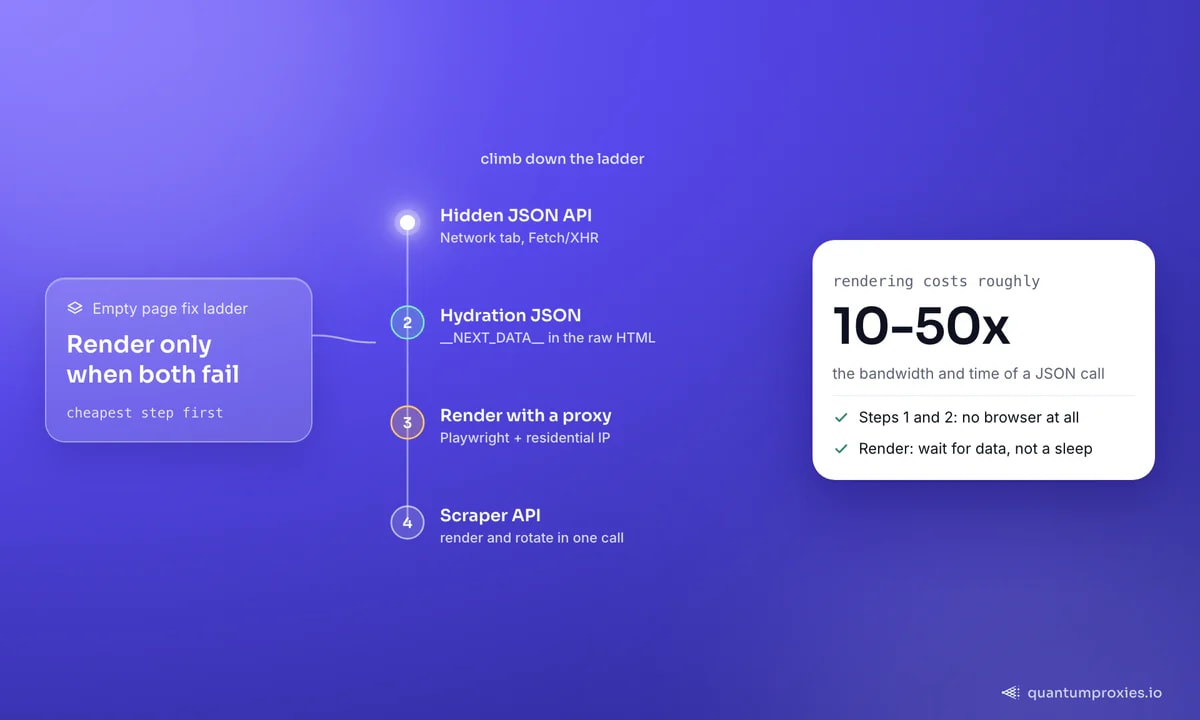
Here's the thing most people miss: if a page draws itself with JavaScript, the data arrives from somewhere — usually an internal JSON endpoint the frontend calls after load. Open the Network tab, filter to Fetch/XHR, reload, and look for the request that returns your data. Calling that endpoint directly is faster, lighter and far less brittle than parsing HTML, because you skip the whole browser and get structured JSON straight away. Sometimes the endpoint needs a token that the initial HTML embeds — grab it from the page, then call the API.
// 1) the SPA loads data from its own endpoint after paint
const res = await fetch("https://shop.example.com/api/catalog?page=1", {
  headers: { accept: "application/json", "user-agent": "Mozilla/5.0 (Windows NT 10.0; Win64; x64)" },
});
const { products } = await res.json();
console.log(products.length); // real data, no browser

// 2) if it needs a token, the initial HTML usually carries it
const page = await (await fetch("https://shop.example.com/")).text();
const token = page.match(/"s_token":\s*"([^"]+)"/)?.[1];
Fix 2: mine the hydration JSON
Even when there's no separate API call, frameworks embed the initial state directly in the HTML so the client can "hydrate" without a round trip. Next.js ships it in a <script id="__NEXT_DATA__"> tag; other stacks use window.__INITIAL_STATE__ or a similar blob. That JSON is in the raw response you already downloaded — no rendering required. Parse the script tag, and you often get the exact structured data the page would have displayed, cleaner than scraping the rendered DOM.
import * as cheerio from "cheerio";

const html = await (await fetch(url)).text();
const $ = cheerio.load(html);

const blob = $("#__NEXT_DATA__").html();      // Next.js embeds page state here
if (blob) {
  const data = JSON.parse(blob);
  const products = data.props.pageProps.products;
  console.log(products.length);               // structured, from static HTML
}
Between the hidden API and hydration mining, most "empty page" problems are solved without ever launching a browser. Our guide to scraping JavaScript-heavy sites goes deeper on finding these endpoints reliably.
A word of caution on both: hidden endpoints and state blobs are unofficial surfaces, so they change without warning. Wrap the parse in a check that fails loudly when the shape shifts — a missing key or a zero-length array should raise, not silently return nothing. That way a site restructuring its API shows up as a clear error in your logs instead of an empty dataset you don't notice for a week. Pin the User-Agent and headers you used when it worked, too; some of these endpoints quietly gate on them.
Fix 3: render — but treat it as the last resort
When the data is genuinely built in the DOM with no exposed JSON, you have to run the JavaScript. Playwright or Puppeteer drives a real browser, waits for the content, and hands you the finished HTML. It works everywhere, but it's the expensive option: rendering costs roughly 10-50x the bandwidth and time of a JSON call, and a headless browser on a datacenter IP gets blocked fast. Route it through a residential proxy and wait for the right signal, not a fixed sleep.
import { chromium } from "playwright";

const browser = await chromium.launch();
const context = await browser.newContext({
  proxy: { server: "http://residentialpremium.quantumproxies.io:8080", username: "USER", password: "PASS" },
});
const page = await context.newPage();
await page.goto(url, { waitUntil: "networkidle", timeout: 30000 });
await page.waitForSelector("div.product");     // wait for data, not a sleep
const html = await page.content();
await browser.close();
Render and rotate in one call with Scraper API
When rendering yourself stops being worth it
Running your own browser fleet means managing headless detection, proxy rotation, memory leaks and wait logic for every target. Once you're maintaining that, a Scraper API that renders JavaScript, rotates residential IPs and returns clean HTML, JSON or markdown in a single request is usually less code and a higher success rate — and it can run AI extraction on the rendered page so you skip selectors entirely. Our breakdown of rendering cost versus plain requests shows when to make that switch.
Frequently asked questions
Why is my web scraper returning an empty body?
Because the page renders its content with JavaScript after the HTML loads, and your HTTP client doesn't execute JavaScript. You receive the empty skeleton the server sends. Confirm by comparing the raw response (via cURL) to what DevTools shows — if the browser has data the raw HTML lacks, it's client-side rendering.
How do I scrape a JavaScript-rendered page without a browser?
Two ways avoid a browser entirely. Find the internal JSON endpoint the page calls in the Network tab and request it directly, or extract the hydration state embedded in the HTML (for example the __NEXT_DATA__ script tag). Both give you structured data faster and more reliably than rendering.
Does BeautifulSoup or Cheerio run JavaScript?
No. Both parse the HTML string you give them and neither executes JavaScript. On a React, Vue or Next.js page they only see the pre-render skeleton, which is why your selector returns an empty array. You need a rendered DOM (Playwright/Puppeteer) or the underlying JSON to get the data.
Why do I get a 'JavaScript is disabled' message when scraping?
The site serves a fallback for clients that don't run JavaScript, and your scraper looks like one. It's often paired with bot detection. Executing the page in a headless browser on a clean residential IP clears it; if it recurs, the target is fingerprinting the request, not just checking for JavaScript.
An empty page is a diagnosis, not a dead end. Confirm it's client-side, reach for the hidden API or hydration JSON first, and render only when the data has nowhere else to live. You'll write less code, use a fraction of the bandwidth, and get blocked far less often. If you'd rather not maintain any of it, the Scraper API handles rendering and rotation for you.