403 Forbidden in Web Scraping: The Fix Ladder That Actually Works
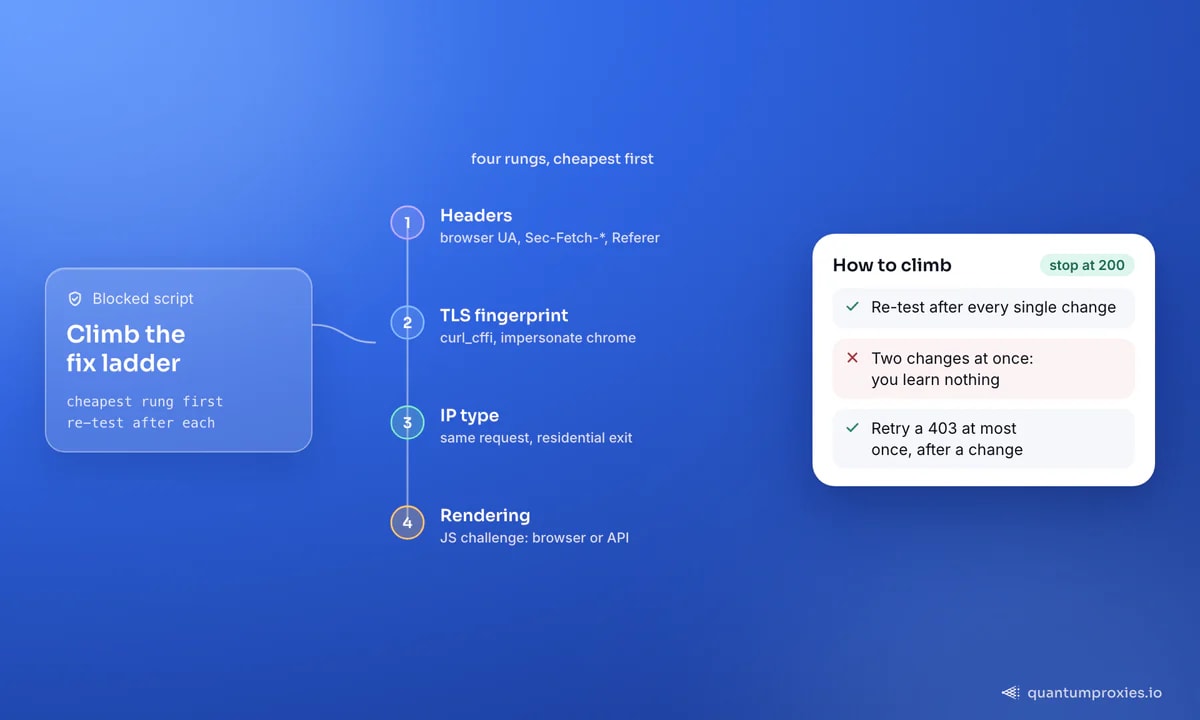
A 403 is not a permissions problem — it is a detection problem. Four rungs separate a blocked script from a 200, and most people stop at the first one.
A 403 forbidden error in web scraping almost never means what the status code says. HTTP 403 is defined as the server understanding your request and refusing to authorise it — but when it hits a scraper, it rarely has anything to do with permissions or a missing login. It means the site looked at your request, decided a machine sent it, and closed the door. That tells you what to change: not your credentials, but the shape of your traffic. Below is the fix ladder, cheapest rung first, with the checks that identify which rung you are stuck on.
403 vs 401 vs 429: what each one is telling you
Get the diagnosis right before you write code. A 401 Unauthorized asks for credentials — supplying them fixes it. A 403 Forbidden refuses regardless of credentials, so logging in changes nothing if bot detection triggered it. A 429 Too Many Requests is about volume and clears itself when the window resets; a 403 is about identity and persists until you change what your request looks like. If your scraper is getting 429s rather than 403s, the cure is pacing, not disguise — we cover that in fixing 429 too many requests.
Diagnose in 60 seconds, before changing any code
Three commands tell you nearly everything. Run the bare request, run it again with only a browser User-Agent swapped in, and then read the response body — the block reason is usually written in it.
# 1. Bare request: what does the target give a naked client?
curl -sS -o /dev/null -w '%{http_code}\n' https://target.example/page

# 2. Same request, browser User-Agent only
curl -sS -o /dev/null -w '%{http_code}\n' \
  -A 'Mozilla/5.0 (Windows NT 10.0; Win64; x64) AppleWebKit/537.36 (KHTML, like Gecko) Chrome/131.0.0.0 Safari/537.36' \
  https://target.example/page

# 3. Read the body and the response headers - the reason is in there
curl -sS -D - https://target.example/page | head -c 600
Interpret it like this. If step 2 returns 200, the whole problem is headers and you are done at rung 1. If the body mentions Cloudflare, a Ray ID or Error 1020, you are behind a WAF rule — see Cloudflare error 1020. A plain Apache or nginx Forbidden page usually means a server module such as mod_security, which has blocked known bot User-Agents since long before modern bot management existed. And if a browser on the same machine loads the page while your client does not, work through curl 403 but the browser works.
Rung 1: stop announcing yourself in the headers
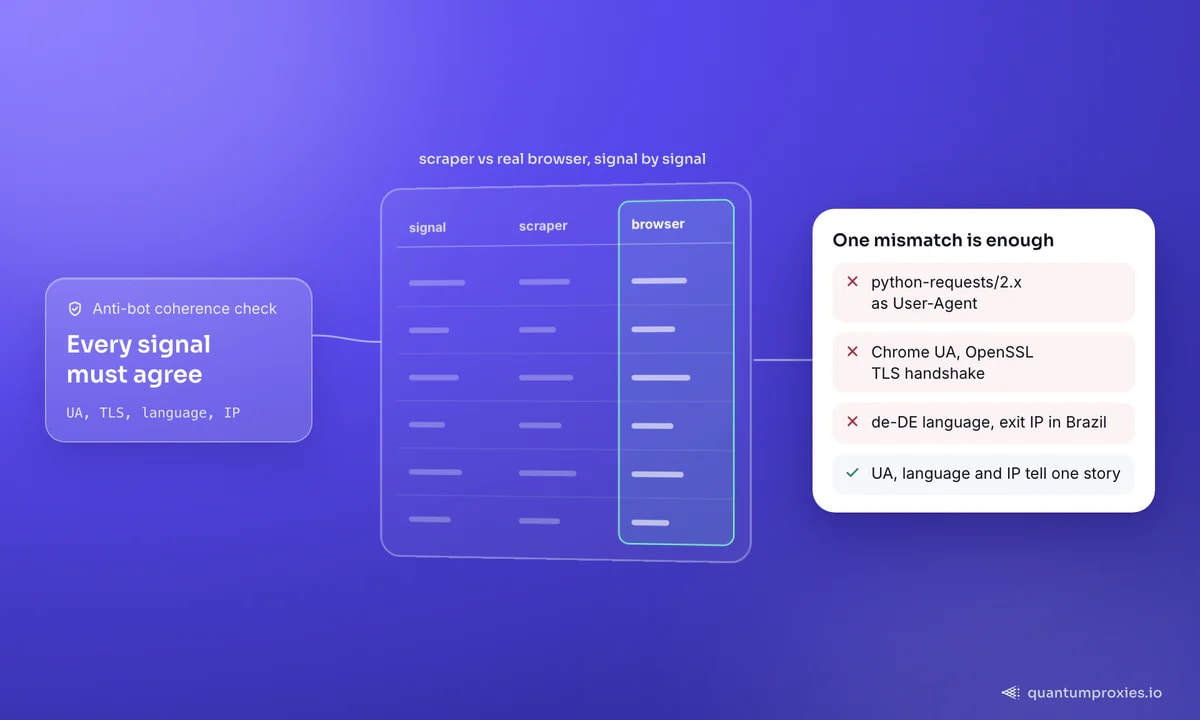
Python's urllib identifies itself as something like python-urllib/3.3.0; requests sends python-requests/2.x. Those strings are a confession, and the single most upvoted answer on the canonical Stack Overflow thread about 403s in Python scraping is simply: send a browser User-Agent instead. That still works on plenty of sites. But two things have changed since that answer was written. First, a bare Mozilla/5.0 is now itself a flag — commenters on that same thread report sites blocking it outright, because no real browser sends a two-token UA. Second, modern servers compare your whole header set, not one field.
Send a coherent set: a current browser UA, the matching Accept chain, a language, and the Sec-Fetch-* metadata headers Chromium adds to every navigation. Header order matters too on stricter targets — use an ordered mapping and put them in the sequence a browser uses.
import requests

HEADERS = {
    "User-Agent": (
        "Mozilla/5.0 (Windows NT 10.0; Win64; x64) AppleWebKit/537.36 "
        "(KHTML, like Gecko) Chrome/131.0.0.0 Safari/537.36"
    ),
    "Accept": (
        "text/html,application/xhtml+xml,application/xml;q=0.9,"
        "image/avif,image/webp,*/*;q=0.8"
    ),
    "Accept-Language": "en-GB,en;q=0.9",
    "Accept-Encoding": "gzip, deflate",   # add 'br' only if brotli is installed
    "Upgrade-Insecure-Requests": "1",
    "Sec-Fetch-Dest": "document",
    "Sec-Fetch-Mode": "navigate",
    "Sec-Fetch-Site": "none",
    "Sec-Fetch-User": "?1",
    "Connection": "keep-alive",
}

with requests.Session() as s:
    s.headers.update(HEADERS)
    r = s.get("https://target.example/page", timeout=20)
    print(r.status_code, len(r.content))
One coherence trap catches almost everyone: a UA claiming a US Chrome desktop, paired with Accept-Language: de-DE and an exit IP in Brazil, is a mismatch any decent system notices. Keep user agent, language and IP geography telling the same story.
Some 403s at this rung are even simpler: a missing Referer. Servers that only serve an asset when the request looks like it came from their own page will return 403 to a direct hit and 200 the moment you add the referring URL. It is a classic, and it costs one header to test.
Rung 2: the TLS fingerprint headers cannot fix
If perfect headers still return 403, the block happened before your headers were even read. Every HTTPS client announces its cipher suites, extensions, elliptic curves and ALPN in the TLS ClientHello, and that combination hashes into a JA3 or JA4 fingerprint. Python's requests, Go's net/http and stock curl each have a distinctive one that no anti-bot vendor has trouble telling apart from Chrome. Claiming to be Chrome 131 in a header while handshaking like OpenSSL is the loudest contradiction a scraper can make.
The fix is a client that impersonates a real browser at the TLS layer. In Python that is curl_cffi, a binding to a patched libcurl that reproduces browser ClientHellos:
# pip install curl_cffi
from curl_cffi import requests as cffi

proxy = "http://USER:PASS@residentialpremium.quantumproxies.io:8080"

r = cffi.get(
    "https://target.example/page",
    impersonate="chrome",              # Chrome JA3/JA4 + HTTP/2 settings
    proxies={"http": proxy, "https": proxy},
    timeout=20,
)
print(r.status_code)
Node has equivalents built on the same patched TLS stacks. If you want the full mechanics of why this single change flips a 403 to a 200 on protected sites, read how JA3/JA4 fingerprinting outs your scraper.
Rung 3: the IP is the message
Headers and TLS describe the client. The IP describes who is asking, and it is weighted heavily. Addresses in hosting and cloud ranges are published, easy to map by ASN, and carry a lower trust score before a single byte of your request is inspected — which is why a scraper on a VPS gets 403s that the same code on a home connection sails through. Residential addresses belong to consumer internet providers and are treated as people; mobile carrier IPs sit behind CGNAT with thousands of real subscribers each, which makes them the hardest of all to block wholesale.
So rung 3 is a swap, not a rewrite: send the same well-formed request from a residential exit. QuantumProxies runs 90M+ residential IPs across 200+ countries with per-request rotation or sticky sessions, HTTP and SOCKS5 on every plan, and pay-per-GB billing — one config line changes the ASN your target sees. Already on residential and still blocked? Check the pool's reputation with our free IP quality score checker: anything scoring above 75 is burned and will collect 403s no matter how good your headers are.
Skip the ladder: fetch any page with the Scraper API
Rung 4: rendering and challenges
The last rung is the expensive one. Some 403s are the visible half of a JavaScript challenge: the server ships a small script, expects an answer within seconds, and refuses everything that cannot execute it. No header set and no IP fixes that, because the test is whether you can run code. Options in ascending cost: a headless browser with a stealth patch set, a managed browser pool, or a scraping API that renders on demand. Rendering costs many times more per page than a plain HTTP request, so escalate only for the URLs that genuinely need it.
The QuantumProxies Scraper API collapses rungs 2 to 4 into one request: browser-grade TLS, residential exits, JavaScript rendering when a page needs it, and markdown, JSON or raw HTML back. That is the honest trade — you stop maintaining the ladder and pay per successful page instead.
Working the ladder in practice
- Re-test after every single change. Two changes at once and you learn nothing about which one worked.
- Cache the raw 403 body during development. Block pages carry Ray IDs, rule names and vendor fingerprints that name your opponent.
- Treat a 403 on the very first request as an identity problem; a 403 that appears after 200 good pages is a reputation or pacing problem.
- Retry a 403 at most once, and only after changing something. Hammering the same request from the same IP converts a soft block into a hard one.
- If a public API or feed exists for the same data, use it. It is cheaper than every rung above and it never breaks on a redesign.
Ban prevention is the sibling discipline: once you have a 200, keeping it is a matter of pacing, session hygiene and pool health rather than disguise.
Frequently asked questions
What causes a 403 forbidden error in web scraping?
Detection, in almost every case. The usual triggers are a default library User-Agent, an incomplete or contradictory header set, a datacenter IP with a poor reputation, request pacing that is too regular, or a TLS fingerprint that does not match the browser you claim to be. Genuine permission errors exist, but they return 403 to browsers too — test in one before assuming.
How do I bypass a 403 forbidden error in Python?
Work the ladder. Add a full browser header set to a requests.Session; if that fails, switch to a client that impersonates browser TLS such as curl_cffi; if that fails, route through a residential proxy; if the page ships a JavaScript challenge, render it or use a scraping API. Only escalate when the cheaper rung has actually been tested.
Why does httpx return 403 when my browser does not?
Same reason as requests: httpx sends a minimal header set and a Python TLS fingerprint. Copy the browser's exact request from DevTools, replay it with httpx, and the 403 usually disappears — which tells you the difference was headers. If it persists with identical headers, the block is at the TLS or IP layer.
How do I fix 403 forbidden in Scrapy?
Set a realistic DEFAULT_REQUEST_HEADERS plus USER_AGENT, keep ROBOTSTXT_OBEY honest about what you are allowed to fetch, enable AUTOTHROTTLE_ENABLED, and route requests through a rotating proxy middleware. Scrapy retries do not retry 403 by default — add it to RETRY_HTTP_CODES only if you rotate the IP between attempts.
A 403 is information, not a wall. It tells you which of four signals gave you away, and each rung of the ladder costs more than the one below it. Start at the cheapest, test after every change, and stop climbing the moment the status code turns 200.