curl Returns 403 but the Browser Works: Find the Missing Piece
The browser loads it. curl gets 403. The gap between those two requests is always finite and always findable — here is how to bisect it in five minutes.
You paste a URL into Chrome and the page loads. You paste the same URL into curl and get 403 Forbidden. Nothing about the resource changed between those two seconds, so the difference is entirely in the request — and a request is a finite, inspectable thing. This guide is a bisection procedure: replay exactly what the browser sent, then remove pieces until the 403 comes back. Whatever you removed last is your answer. The suspects, in the order they are usually guilty, are User-Agent, Referer, cookies, TLS fingerprint and JavaScript.
Step 0: prove the requests really are different
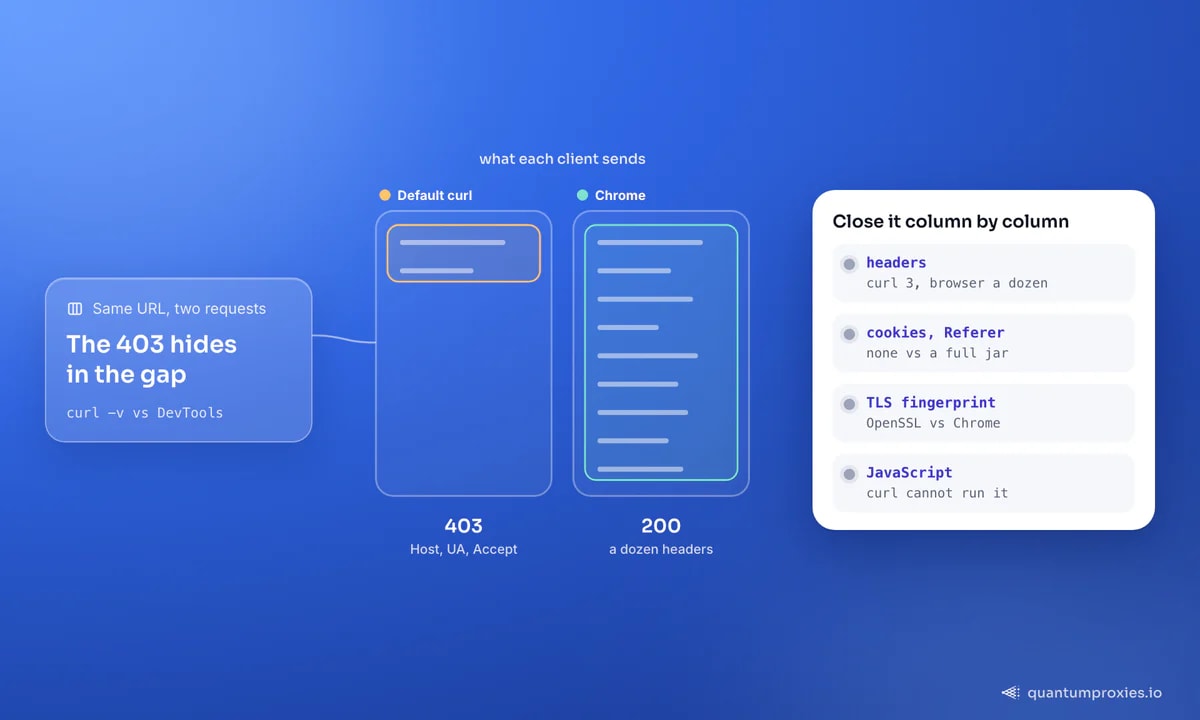
Before theorising, look at what curl actually sends. With -v you see the request line, every header, and the TLS handshake. A default curl request is startlingly thin — typically Host, User-Agent: curl/8.x and Accept: */*. A browser sends a dozen more.
# what you send, what you get back, and the TLS details
curl -v -o /dev/null https://target.example/page

# just the response headers, quickly
curl -sS -o /dev/null -D - https://target.example/page
Read the response headers as carefully as the status line. One of them settles the question outright in the most common case: Vary: User-Agent means the server deliberately serves different responses depending on who you claim to be. In a well-documented Stack Overflow case, curl -f against a plain Apache 2.4.38 host returned 403 while wget fetched the identical file with a 200 — and the successful response carried exactly that Vary: User-Agent header. Passing -A 'Wget/1.21.2' to curl fixed it instantly. The site owner had blacklisted curl's user agent after abuse; nothing else about the request mattered.
While you are reading output: curl: (22) The requested URL returned error: 403 is not a separate problem. Exit code 22 is what -f/--fail does with any HTTP error — the flag suppresses the body and fails the command. Drop -f temporarily so you can actually read the block page, which usually names the system that stopped you.
Step 1: Copy as cURL, the 30-second answer
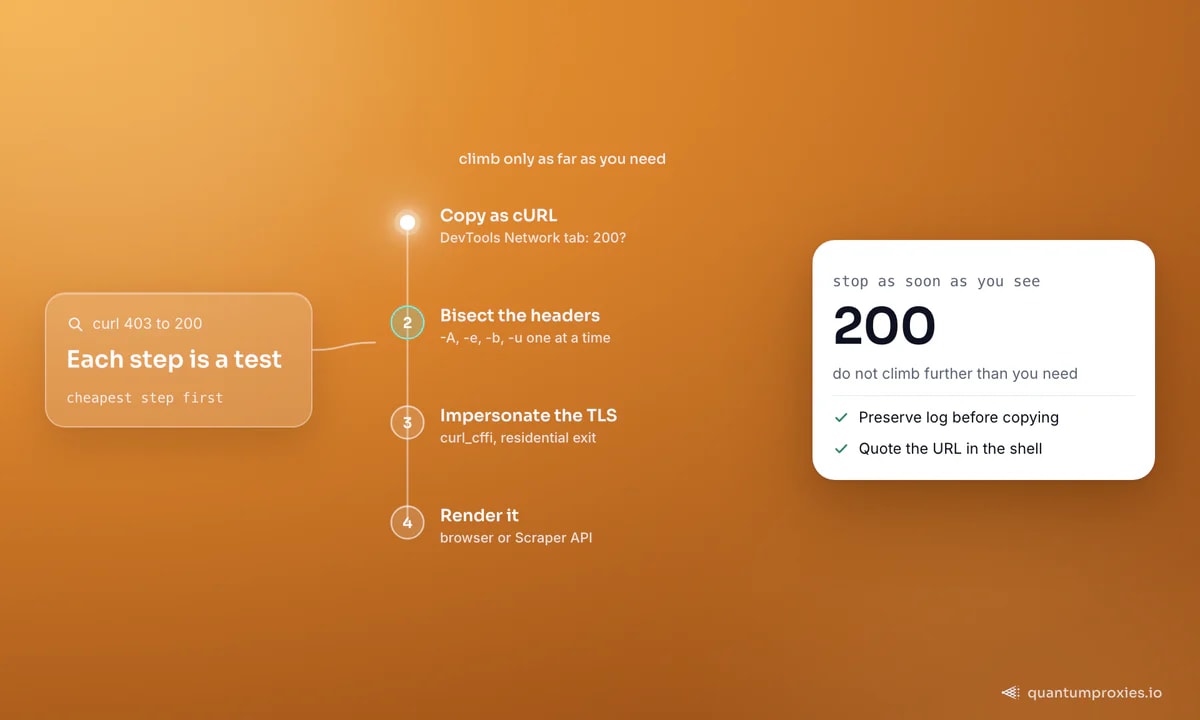
Both major browsers can hand you the exact request they just made. Open DevTools, go to the Network tab, right-click the request and choose "Copy as cURL". Chrome has shipped this since version 26 and Firefox since 31, and the output includes every header, every cookie and the referer. Paste it into your terminal: if it returns 200, your problem is definitively in the request shape, and step 2 finds which part.
One gotcha wastes a lot of time here. If the URL redirects, the Network panel clears on navigation and you copy the wrong request. Tick "Preserve log" in Chrome or "Persistent Logs" in Firefox first, so you can see both the request that redirected and the one that finally served content. Redirect chains matter: in a well-known Unix Stack Exchange thread the server checked the Referer, then bounced through a 302 to a location that checked nothing at all — which made the failure look random until the whole chain was visible.
Step 2: bisect the headers
Start from the working "Copy as cURL" command and delete headers one at a time, re-running after each deletion. The first deletion that brings the 403 back names your culprit. In practice it is nearly always one of four.
curl -sS -o /dev/null -w '%{http_code}\n' \
  -A 'Mozilla/5.0 (Macintosh; Intel Mac OS X 10_15_7) AppleWebKit/537.36 (KHTML, like Gecko) Chrome/131.0.0.0 Safari/537.36' \
  -H 'Accept: text/html,application/xhtml+xml,application/xml;q=0.9,*/*;q=0.8' \
  -H 'Accept-Language: en-GB,en;q=0.9' \
  -e 'https://target.example/' \
  -b 'session=abc123; consent=1' \
  -L \
'https://target.example/page'- User-Agent (
-A) — blocked outright, or the server branches on it. Test a current Chrome string, then wget's, then a nonsense one; the pattern of results tells you whether you are hitting a blacklist or an allowlist. - Referer (
-e) — assets and download links often return 403 unless the request looks like it came from the site's own page. The header is optional by spec, which is exactly why people forget it. - Cookies (
-b) — a consent, session or anti-bot cookie set on an earlier page. Confirm it in seconds: open the URL in a private window. If the browser also 403s there, cookies are your answer. - Authorization (
-u, or a bearer header) — signed or tokenised URLs frequently 403 when copied out of context, because the token was bound to a session or has already expired.
Two closing details for this rung. Quote the URL: a query string containing & or an access token gets mangled by your shell otherwise, and the resulting 403 has nothing to do with the server. And if you are debugging from PHP or Node rather than the shell, replicate the same header set there — libcurl's defaults inside PHP differ from the command-line tool's, which is why the identical request can pass in a terminal and fail in code. Our curl proxy recipes covers the flag syntax in full.
Step 3: when identical headers still return 403
If a byte-for-byte copy of the browser's headers still fails, the decision was made before your headers were parsed. Two layers sit underneath them.
TLS fingerprint. Your ClientHello — cipher suites, extensions, curve preferences, ALPN, plus the HTTP/2 settings frame that follows — hashes to a JA3 or JA4 value. curl built against OpenSSL produces one that no browser ever produces, and anti-bot systems compare it against your claimed User-Agent. Claiming to be Chrome while handshaking like OpenSSL is a contradiction they are built to catch. The fix is a client that reproduces browser handshakes: curl-impersonate at the command line, or curl_cffi from Python.
# pip install curl_cffi
from curl_cffi import requests

proxy = "http://USER:PASS@residentialpremium.quantumproxies.io:8080"

r = requests.get(
    "https://target.example/page",
    impersonate="chrome",          # browser ClientHello + HTTP/2 settings
    proxies={"http": proxy, "https": proxy},
    timeout=20,
)
print(r.status_code, r.headers.get("content-type"))
Your IP. The browser that works is usually on your home connection while curl runs on a VPS. Hosting ASNs are published and pre-scored, so the same request from a residential address is judged differently before it is even read. Swapping the exit is a one-line change with residential proxies — 90M+ IPs across 200+ countries, HTTP and SOCKS5 on every plan — and it is the fastest way to rule the network out. The mechanics of the fingerprint layer are in JA3/JA4 TLS fingerprinting.
Rule out the network with residential proxies
Step 4: the page needs a browser, not a client
Sometimes the 403 is not a judgement about you at all — it is the failure mode of a challenge you never attempted. A public GitHub discussion about link checkers hitting npmjs.com puts it plainly: curl cannot produce a valid challenge solution, so the request is blocked with a 403. The server issues a small JavaScript problem, waits a moment for the answer, and refuses anything that cannot execute it. No header set, no fingerprint and no IP passes a test that requires running code.
At that point you have three honest options: drive a real browser and pay the cost, find the JSON endpoint the page itself calls (often sitting in the same Network tab you already have open), or hand the URL to a service that renders on demand. The QuantumProxies Scraper API does the last one — browser-grade TLS, residential exits, JavaScript rendering only where a page needs it, and markdown, JSON or raw HTML back from one request. If what you get is an empty page rather than a forbidden one, that is a different diagnosis: see why your scraper returns an empty page. And if the block page carries a Cloudflare Ray ID, go to Cloudflare error 1020 instead.
Frequently asked questions
Why does curl get 403 when my browser does not?
Because curl sends roughly three headers, no cookies, no referer and a non-browser TLS fingerprint, while your browser sends a dozen headers, a cookie jar and a Chrome handshake. The server is refusing the request, not the resource. Replay the browser's exact request with "Copy as cURL", then remove headers one by one to find which difference matters.
Why does wget succeed where curl gets 403?
Almost always the User-Agent. Some servers blacklist curl's UA specifically after abuse while leaving wget's alone — a documented case showed a Vary: User-Agent response header confirming the server branches on it, and curl -A 'Wget/1.21.2' restored the 200. wget also sends Accept-Encoding and Connection by default, which occasionally matters too.
How do I set a User-Agent in curl?
Use -A 'string', or the equivalent -H 'User-Agent: string'. Prefer a complete, current browser string over a truncated Mozilla/5.0, which some servers now reject precisely because no real browser sends only two tokens. Pair it with matching Accept and Accept-Language values so the whole set stays coherent.
What does curl error 22 mean?
Exit code 22 is produced by -f/--fail whenever the server returns an HTTP error, and the message quotes the status — commonly 403. It is a reporting flag, not a distinct fault. Remove -f to see the response body, which usually explains the block far better than the exit code does.
Can a proxy fix a curl 403?
It fixes the subset caused by IP reputation or geography — a large subset when your script runs on a cloud host and your browser does not. It will not fix a missing referer, an absent cookie or a JavaScript challenge. Test headers first, since they cost nothing, then change the exit IP to isolate the network layer.
There is no mystery here, only a gap: the browser sent one request and you sent another. Copy the browser's, shrink it until it breaks, and you will always find the piece that mattered — usually a header, sometimes a fingerprint, occasionally a challenge that needs a real browser to answer.