curl With a Proxy: -x Syntax, Auth, SOCKS5 and Debug Recipes
One flag routes curl through any proxy — then auth, CONNECT tunnels, SOCKS5 DNS and environment variables decide whether it actually works. Every recipe you need, ready to paste.
Using curl with a proxy is a single flag: -x. But between that flag and a working scraping command sit five details that generate most of the Stack Overflow traffic on the topic — credential syntax, CONNECT tunnels, SOCKS5 DNS behaviour, environment variables that silently hijack requests, and error codes that all look alike until you read the verbose output. This is the complete, copy-paste reference: every syntax variant, every auth method, and the recipes you will actually reuse.
The -x flag: curl proxy syntax
# route one request through an HTTP proxy
curl -x http://residentialboson.quantumproxies.io:PORT https://ifconfig.me

# identical, long form
curl --proxy http://residentialboson.quantumproxies.io:PORT https://ifconfig.me
Two defaults worth knowing, straight from curl's own documentation: if you omit the scheme, curl assumes an HTTP proxy, and if you omit the port it assumes 1080 — a purely historical choice that matches almost no real proxy, so always write the port explicitly. The scheme prefix selects the proxy protocol: http:// for a standard HTTP proxy, https:// to encrypt the hop to the proxy itself, socks5:// or socks5h:// for SOCKS.
curl proxy authentication: three ways to send credentials
# 1) credentials inline in the proxy URL
curl -x http://USER:PASS@residentialpremium.quantumproxies.io:8080 https://ifconfig.me

# 2) separate flag -- keeps the URL readable
curl -x http://residentialpremium.quantumproxies.io:8080 -U USER:PASS https://ifconfig.me

# 3) special characters must be percent-encoded (p@ss! -> p%40ss%21)
curl -x "http://USER:p%40ss%21@residentialpremium.quantumproxies.io:8080" https://ifconfig.me
-U (capital) is proxy auth; lowercase -u authenticates against the target site — mixing them up is the classic mistake. A 407 Proxy Authentication Required always means the proxy rejected your credentials, never the target. Check for typos, unencoded symbols, or a provider expecting IP-whitelist auth instead of user:pass. With QuantumProxies residential proxies both modes work — whitelist your machine's IP and drop credentials entirely, or embed user:pass in the URL. The full 407 checklist lives in our 407 troubleshooting guide.
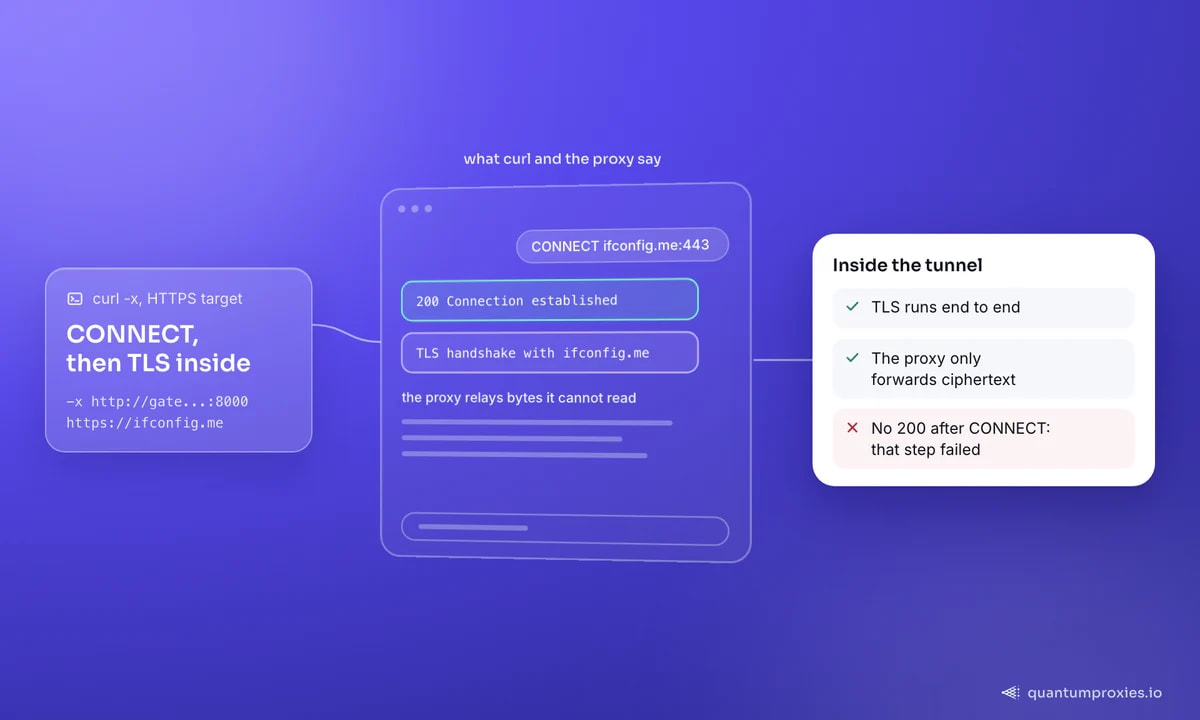
HTTPS targets and the CONNECT tunnel
When the target URL is https://, curl does not ask the proxy to fetch the page. It sends a CONNECT host:443 request, the proxy opens a raw TCP tunnel, and curl performs the TLS handshake directly with the target through it. That is why an HTTP proxy can carry HTTPS traffic without breaking encryption — it forwards ciphertext it cannot read or modify. In -v output you will see the CONNECT line followed by 200 Connection established; anything else at that step is your failure point. For non-HTTP protocols through an HTTP proxy, -p (--proxytunnel) forces the same tunnel behaviour.
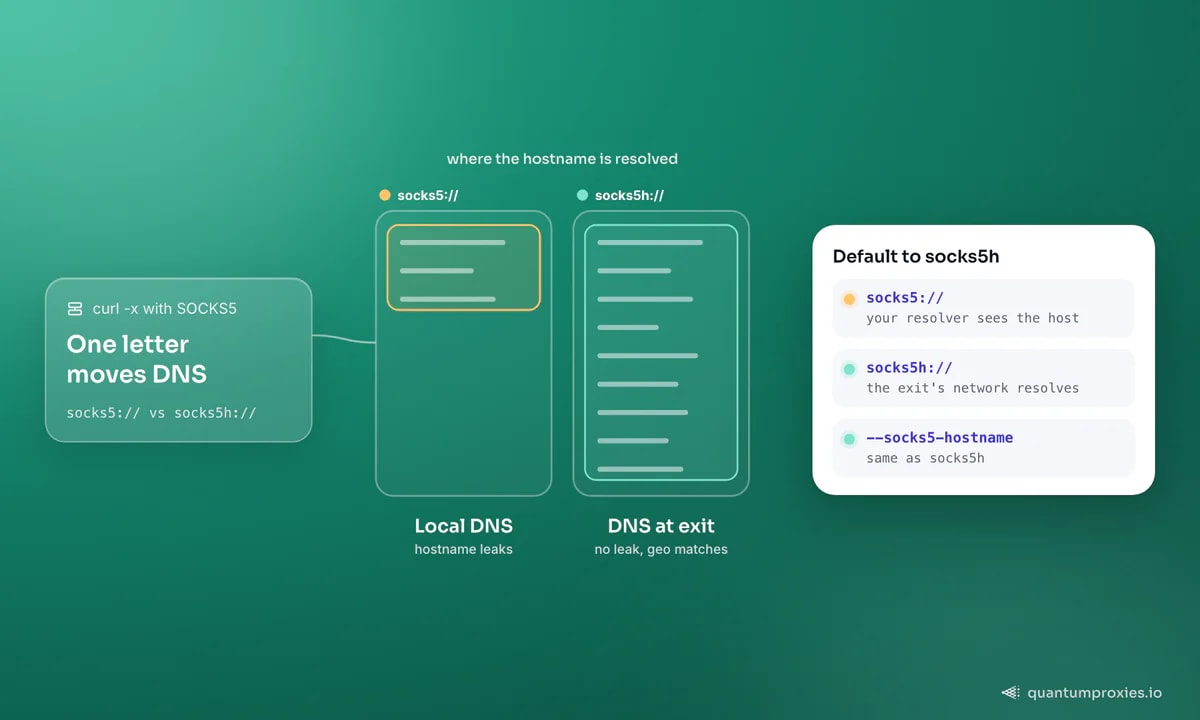
SOCKS5: one character changes where DNS happens
# SOCKS5, hostname resolved on YOUR machine
curl -x socks5://USER:PASS@residentialpremium.quantumproxies.io:1080 https://ifconfig.me

# SOCKS5h, hostname resolved BY THE PROXY -- use this for scraping
curl -x socks5h://USER:PASS@residentialpremium.quantumproxies.io:1080 https://ifconfig.me

# dedicated flag, same as socks5h
curl --socks5-hostname residentialpremium.quantumproxies.io:1080 -U USER:PASS https://ifconfig.me
With plain socks5://, your machine performs the DNS lookup locally — the target hostname leaks to your local resolver, and you may get an IP that geographically mismatches your exit. socks5h:// pushes resolution to the proxy, so DNS answers come from the exit's network. Every QuantumProxies plan includes SOCKS5 alongside HTTP on the same gateway. If you are unsure which protocol a given tool needs, our SOCKS5 vs HTTP comparison breaks it down.
Environment variables and .curlrc
# proxy every curl (and most CLI tools) in this shell
export http_proxy="http://USER:PASS@residentialpremium.quantumproxies.io:8080"
export https_proxy="http://USER:PASS@residentialpremium.quantumproxies.io:8080"
export NO_PROXY="localhost,127.0.0.1,.internal.example"

curl https://ifconfig.me                 # proxied automatically
curl --noproxy "*" https://ifconfig.me   # bypass for one call

# permanent default: add to ~/.curlrc
# proxy = "http://USER:PASS@residentialpremium.quantumproxies.io:8080"
One quirk documented in curl's man page trips everyone eventually: the variables can be upper or lower case and lowercase wins, except http_proxy, which curl honours in lowercase only — HTTP_PROXY is deliberately ignored for security reasons. On Windows the -x syntax is identical in cmd and PowerShell; set variables with set http_proxy=... or $env:http_proxy="...", and the config file is %APPDATA%\_curlrc. Remember these variables affect other tools too — a forgotten export in CI is a classic source of mystery traffic.
Debugging with -v: read the handshake, not the tea leaves
Add -v and curl narrates the entire proxy conversation. Match what you see to the cause:
Connected to residentialpremium.quantumproxies.io— you reached the proxy; any failure after this is auth or target-side.curl: (7) Failed to connect— wrong host/port, dead proxy, or a firewall blocking the port before the proxy ever answers.407 Proxy Authentication Required— credentials missing, wrong, or unencoded special characters in the URL.curl: (56) CONNECT aborted— the proxy refused the tunnel, usually because the target port isn't allowed (most proxies permit 443 and little else).- Tunnel opens but the site returns 403 — that's the target blocking you, not the proxy; test the exit with the free IP quality checker and see why curl gets 403 while a browser sails through.
Test the proxy before you trust it
Two thirty-second checks save hours of confused debugging later. First, confirm anonymity: hit https://httpbin.org/headers through the proxy and inspect what the target actually receives — a clean gateway adds no Via or X-Forwarded-For headers that would advertise proxying, while cheap or free proxies frequently inject both. Second, measure the overhead with -w timing variables (recipe below): a residential hop typically adds a few hundred milliseconds versus a direct request, which is normal; multi-second connect times mean a congested exit worth rotating away from. Bake both checks into CI for any pipeline that depends on proxies, and you will catch a misconfigured endpoint before it silently burns a scraping run — or your bandwidth budget, since usage bills per GB whether the responses were useful or not.
Quick recipes
# confirm the exit IP
curl -x http://USER:PASS@residentialpremium.quantumproxies.io:8080 https://ifconfig.me

# geo-target: choose the exit country in the username
curl -x "http://USER-country-de:PASS@residentialpremium.quantumproxies.io:8080" https://ifconfig.me

# sticky session: keep the same exit IP across calls
curl -x "http://USER-sid-a1b2c3-ttl-30m:PASS@residentialpremium.quantumproxies.io:8080" https://example.com

# POST JSON through the proxy
curl -x http://USER:PASS@residentialpremium.quantumproxies.io:8080 \
  -H "Content-Type: application/json" -d '{"q":"test"}' https://httpbin.org/post

# fetch a page: follow redirects, browser UA, save to file
curl -x http://USER:PASS@residentialpremium.quantumproxies.io:8080 -L -A "Mozilla/5.0" \
  -o page.html https://example.com

# measure the proxy overhead
curl -x http://USER:PASS@residentialpremium.quantumproxies.io:8080 -s -o /dev/null \
  -w "connect: %{time_connect}s  total: %{time_total}s\n" https://example.com
The username-suffix tricks work because the gateway parses targeting from credentials: country selection across 200+ locations, per-request rotation by default, sticky sessions when a flow needs one identity. When your one-liners grow into a script, the same endpoint drops straight into Python — our Python Requests proxy guide picks up exactly where curl leaves off.
Frequently asked questions
How do I use a SOCKS5 proxy with curl?
Pass it to -x with a SOCKS scheme: curl -x socks5h://user:pass@host:port https://target. Prefer socks5h:// over socks5:// so DNS resolves on the proxy rather than your machine. The older --socks5 and --socks5-hostname flags still work and do the same thing.
How do I make curl ignore the proxy?
For one request, add --noproxy "*". For a shell, unset http_proxy and https_proxy. To exempt specific hosts permanently, list them in NO_PROXY as comma-separated domains. If curl is proxying when you never asked it to, an environment variable or a ~/.curlrc line is almost certainly the culprit.
Why does curl return 407 Proxy Authentication Required?
The proxy rejected your credentials. Verify user and password, confirm you used -U (not -u, which targets the site), and percent-encode special characters like @ or !. If your provider authenticates by IP whitelist instead, authorize your machine's IP in the dashboard and send no credentials at all.
Does curl proxy syntax work on Windows?
Yes — -x, -U and the SOCKS schemes are identical, since curl has shipped with Windows 10 and later. Only the environment differs: set variables with set in cmd or $env: in PowerShell, and use %APPDATA%\_curlrc instead of ~/.curlrc for permanent settings.
How do I set a permanent proxy for curl?
Add a proxy = "http://user:pass@host:port" line to ~/.curlrc (or _curlrc on Windows) and every curl invocation uses it. Alternatively, export http_proxy and https_proxy from your shell profile to cover other tools too. Command-line -x always overrides both, so one-off exceptions stay easy.
That is the entire surface: -x plus a scheme, credentials that are encoded correctly, socks5h when you go SOCKS, environment variables you set deliberately, and -v whenever anything misbehaves. The commands above run as-is against any gateway — pair them with clean residential exits and curl becomes a genuinely capable scraping tool.