Python Requests Proxy Guide: Syntax, Auth, Rotation, Retries
The proxies dict is three lines of code, yet proxy errors in Requests fill a decade of Stack Overflow. Here is the full setup — syntax, auth, env vars, rotation, retries and SOCKS5 — with the sharp edges labelled.
Python Requests is still the default HTTP client for scraping and automation, and pointing it at a proxy is a three-line job: pass a proxies dictionary and every request exits from the proxy's IP instead of yours. Yet 'python requests proxy not working' has stayed a top search for over a decade — the original Stack Overflow question about the proxies dict dates to 2011, its top answer has 480+ votes, and it was still being edited in January 2026. The syntax has sharp edges: a missing scheme raises an exception, the wrong scheme inside the https key triggers SSL errors, and environment variables silently override code. This Python Requests proxy guide covers all of it: syntax, authentication, env vars, rotation, retries, SOCKS5 and the errors you will actually hit.
The proxies dict: Python Requests proxy syntax
The proxies argument maps a protocol to a proxy URL. Two keys cover normal scraping — one for plain HTTP targets, one for HTTPS targets — and both usually point at the same proxy:
import requests

proxies = {
    "http": "http://USER:PASS@residentialpremium.quantumproxies.io:8080",
    "https": "http://USER:PASS@residentialpremium.quantumproxies.io:8080",
}

r = requests.get("https://httpbin.org/ip", proxies=proxies, timeout=(5, 30))
print(r.json())  # {'origin': '<proxy exit IP>'}
Three rules prevent 90% of setup failures:
- The scheme is mandatory. Since Requests 2.0.0 a proxy URL without
http://raisesMissingSchema. Bareip:portstrings worked in 1.x and broke everywhere when 2.0 landed. - Use
http://inside thehttpskey. The key names the target protocol; the value names how you reach the proxy. Proxies accept plain HTTP and tunnel TLS through a CONNECT request. Writinghttps://there is the classic cause ofSSLError: UNEXPECTED_EOF_WHILE_READING. - Keys can target specific hosts. A key like
https://api.example.comroutes only that host through a given proxy — handy for sending one difficult domain through residential IPs while everything else goes direct.
Proxy authentication: username and password
Authenticated proxies use HTTP Basic auth embedded in the URL: http://USER:PASS@host:port. If the password contains @, : or /, URL-encode it first with urllib.parse.quote(password, safe="") — unencoded specials split the URL in the wrong place and produce auth failures that look like dead proxies. A 407 Proxy Authentication Required response means the proxy itself rejected you: wrong credentials, or an IP-whitelist plan called from an unregistered address. Both cases are dissected in our 407 troubleshooting guide. For anything beyond a one-off script, attach the proxies to a Session — you get connection pooling, cookie persistence and one place to configure everything:
import requests

session = requests.Session()
session.proxies = {
    "http": "http://USER:PASS@residentialpremium.quantumproxies.io:8080",
    "https": "http://USER:PASS@residentialpremium.quantumproxies.io:8080",
}
session.headers.update({"User-Agent": "Mozilla/5.0 (Windows NT 10.0; Win64; x64)"})

r = session.get("https://httpbin.org/ip", timeout=(5, 30))
print(r.status_code, r.json())
Environment variables and trust_env
Requests also reads proxy settings from the environment — the same variables curl and most Unix tools honour: HTTP_PROXY, HTTPS_PROXY, ALL_PROXY and NO_PROXY (a comma list of hosts to exclude, e.g. localhost,127.0.0.1,.internal). This is the cleanest way to proxy a third-party library that uses Requests under the hood without touching its code. Precedence runs explicit-beats-implicit: a proxies= argument on the call wins, then session.proxies, then the environment. Two related tools are worth knowing: session.trust_env = False switches off all environment lookup — the fix when a corporate proxy variable hijacks your scraper — and urllib.request.getproxies() returns OS-level proxy settings (including macOS and Windows system config) in exactly the dict shape Requests expects.
Rotation: one gateway beats a proxy list
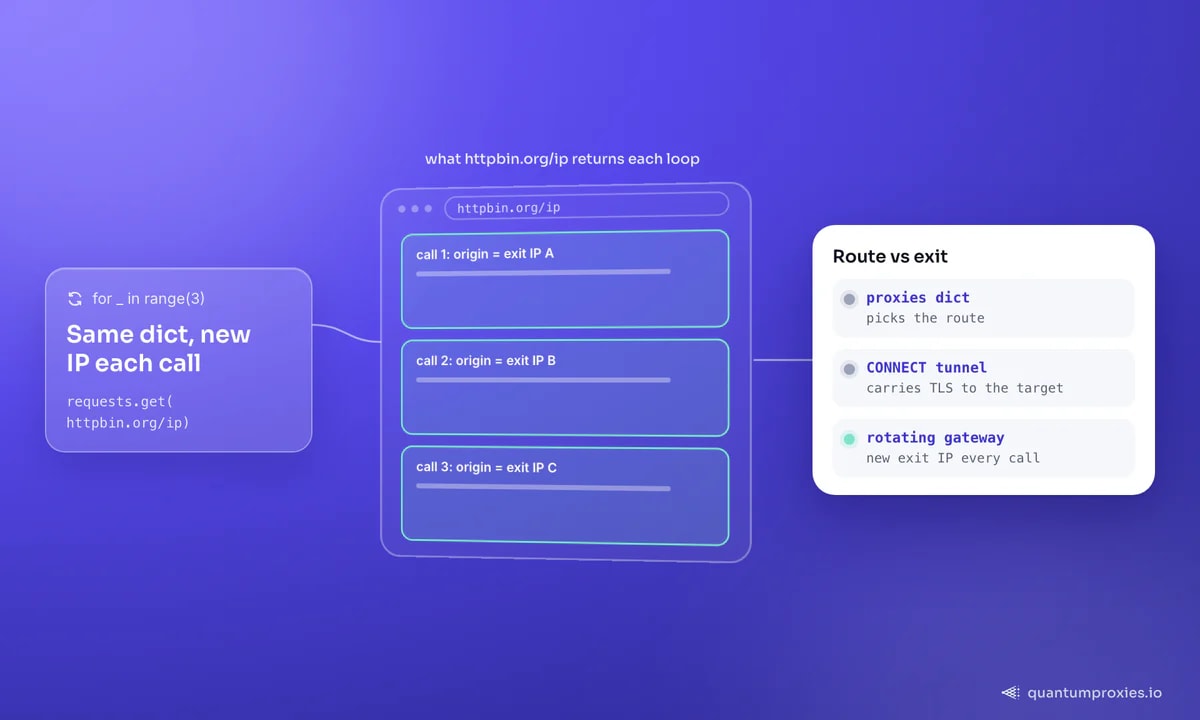
The traditional rotation recipe — load a list of IPs, random.choice() per request, prune the dead ones — is machinery you no longer need to build. A rotating gateway does it server-side: you configure one endpoint and the provider assigns a fresh exit IP from the pool on every request. Through rotating residential proxies that pool is 90M+ household IPs across 200+ countries, so a thousand requests look like a thousand different visitors without a single line of rotation logic:
import requests

proxies = {
    "http": "http://USER:PASS@residentialpremium.quantumproxies.io:8080",
    "https": "http://USER:PASS@residentialpremium.quantumproxies.io:8080",
}

for _ in range(3):
    r = requests.get("https://httpbin.org/ip", proxies=proxies, timeout=(5, 30))
    print(r.json()["origin"])  # a different exit IP on each iteration
When a flow spans several requests — login, add to cart, checkout — per-request rotation breaks the session. Sticky sessions solve that: a session parameter in the proxy username pins one exit IP for a set window, then rotates. Same endpoint, one string change. If you are scaling past simple loops, async Python with httpx or aiohttp multiplies throughput, and Scrapy's middleware system gives you rotation, retries and ban handling as framework config.
Retries and timeouts that survive bad exits
Even premium pools serve the occasional slow or dying exit, so production code needs two guards: a timeout on every request (Requests defaults to waiting forever) and automatic retries with backoff. The timeout takes a (connect, read) tuple — fail fast on unreachable proxies, allow slower page reads. Retries mount at the transport layer via urllib3:
import requests
from requests.adapters import HTTPAdapter
from urllib3.util.retry import Retry

retry = Retry(
    total=4,
    backoff_factor=1,  # exponential backoff between attempts
    status_forcelist=[429, 500, 502, 503, 504],
    allowed_methods=["GET", "HEAD"],
)

session = requests.Session()
session.mount("http://", HTTPAdapter(max_retries=retry))
session.mount("https://", HTTPAdapter(max_retries=retry))
session.proxies = {
    "http": "http://USER:PASS@residentialpremium.quantumproxies.io:8080",
    "https": "http://USER:PASS@residentialpremium.quantumproxies.io:8080",
}

r = session.get("https://httpbin.org/ip", timeout=(5, 30))
With a rotating gateway this combination is quietly powerful: each retry travels through a different exit IP automatically, so one flaky address can never fail a request four times in a row.
SOCKS5 proxies with Requests
SOCKS support is an extra: install it with pip install requests[socks]. Then the dict syntax is identical — only the scheme changes. Prefer socks5h:// over socks5://: the h pushes DNS resolution to the proxy, which stops DNS leaks from your real network and resolves geo-fenced hostnames from the exit's location. Every QuantumProxies plan exposes both HTTP and SOCKS5 proxies on the same gateway, so switching protocols is a scheme swap, not a new purchase:
proxies = {
    "http": "socks5h://USER:PASS@residentialpremium.quantumproxies.io:1080",
    "https": "socks5h://USER:PASS@residentialpremium.quantumproxies.io:1080",
}![Five Python Requests proxy mistakes and what each one causes: a missing scheme raises MissingSchema, https:// in the https key gives an SSLError, an unencoded password gets a 407, SOCKS needs the requests[socks] extra, and no timeout waits forever. The card: three rules prevent 90% of setup failures.](https://res.cloudinary.com/dmqliab0t/image/upload/f_auto,q_auto,w_1200/v1785335141/blog/generated/qp-b9-001-diag2.png)
Common Python Requests proxy errors, decoded
- MissingSchema — proxy URL lacks
http://. Mandatory since Requests 2.0.0. - ProxyError: Cannot connect to proxy — wrong host or port, or a dead proxy. Verify the endpoint with curl before blaming your code.
- SSLError / UNEXPECTED_EOF_WHILE_READING — usually
https://inside thehttpskey. Set the value's scheme tohttp://. - 407 Proxy Authentication Required — bad credentials, unencoded specials in the password, or an unwhitelisted source IP.
- ConnectTimeout / ReadTimeout — slow exit or slow target. Set
timeout=(5, 30)and let retries rotate to a fresh IP. - Proxy works in curl, fails in Python — an environment variable is overriding your dict. Print
session.proxiesand trytrust_env = False.
For a deeper walk through the stack traces and their root causes, see debugging ProxyError, SSLError and ConnectTimeout in Requests.
Frequently asked questions
How do I use a proxy with Python Requests?
Pass a proxies dictionary with http and https keys to any request method: requests.get(url, proxies={...}). Each value is a full proxy URL including scheme, and credentials embed as http://user:pass@host:port. Attach the same dict to a Session to apply it to every request automatically.
Why is my Python Requests proxy not working?
Check the four usual suspects in order: a missing http:// scheme in the proxy URL, https:// used inside the https key, special characters in the password that were not URL-encoded, and environment variables overriding your code. Test the same credentials with curl — if curl succeeds, the problem is in your dict.
Does Python Requests support SOCKS5 proxies?
Yes, after installing the extra dependency with pip install requests[socks]. Use the socks5h:// scheme in your proxies dict so DNS resolution happens on the proxy side — the plain socks5:// scheme resolves hostnames locally, which leaks DNS queries and can break geo-targeted scraping.
How do I set a proxy with environment variables?
Export HTTP_PROXY and HTTPS_PROXY with the full proxy URL, and optionally NO_PROXY for hosts to exclude. Requests picks them up automatically, which also proxies third-party libraries built on Requests. To make your code ignore the environment entirely, set session.trust_env = False.
That is the whole toolkit: a two-key dict, credentials in the URL, retries mounted once, and rotation handled by the gateway instead of your code. The one thing no syntax fixes is IP quality — a perfectly configured datacenter proxy still gets blocked where a residential exit sails through. Pair clean code with clean IPs and Requests will carry surprisingly large workloads.