Fix ProxyError, SSLError & ConnectTimeout in Requests
requests.exceptions.ProxyError is a symptom, not a cause. Here is the exception hierarchy decoded, each traceback matched to its real fix, and a health-check function that classifies failures and rotates around dead exits.
requests.exceptions.ProxyError is one of the least helpful error messages in Python: it fires for a dead proxy, wrong credentials, a bad scheme, an overloaded exit and a firewall block, all with nearly identical tracebacks. The trick to fixing it fast is knowing that ProxyError is not a root cause — it is a category. In the Requests source, ProxyError, SSLError and ConnectTimeout all subclass ConnectionError, and each one fires at a specific stage of the request lifecycle. Read the stage and you read the cause. This guide decodes the exception hierarchy, matches every common traceback to its real fix, and gives you a health-check function that classifies failures and rotates around dying exits automatically.
The requests exception hierarchy
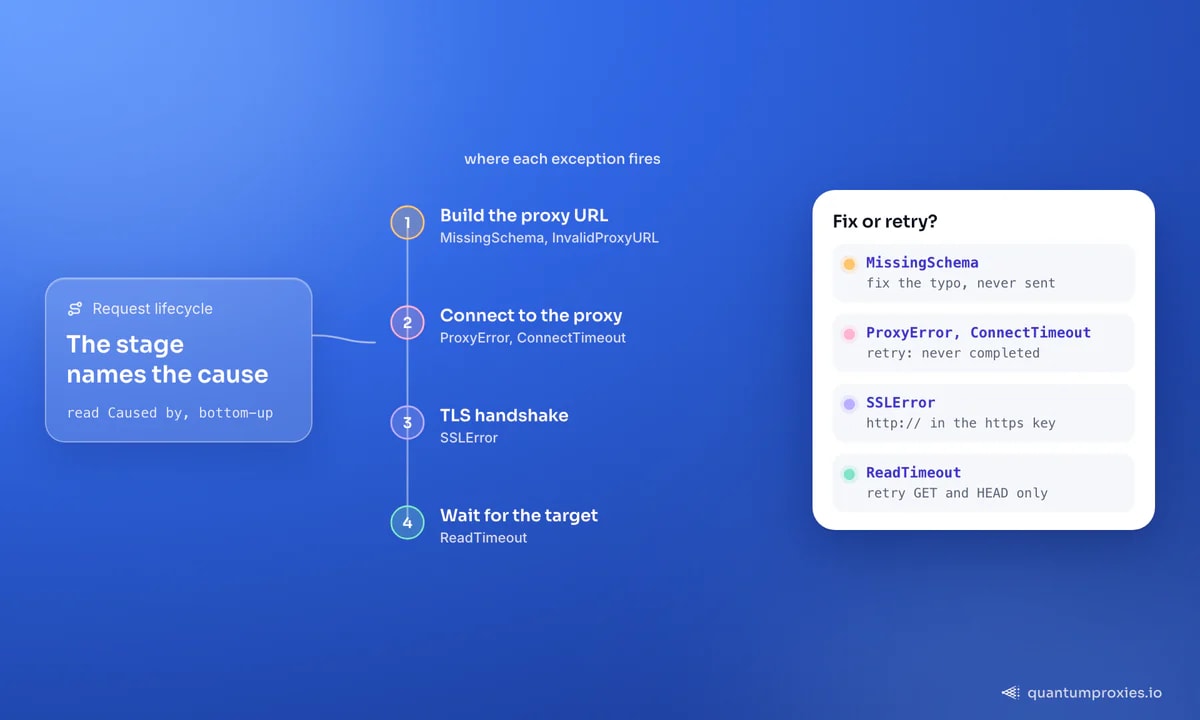
Every proxy-related error in Requests descends from RequestException. The useful branch for debugging is ConnectionError, because the three exceptions you actually hit all live under it:
- ProxyError — raised when the connection to the proxy itself fails: unreachable host, wrong port, refused connection, or a rejected
407. The message often nestsCannot connect to proxyinside anHTTPSConnectionPool(...)wrapper. - SSLError — the proxy connected, but the TLS handshake to the target failed. In proxy setups the usual trigger is
https://written inside thehttpskey instead ofhttp://. - ConnectTimeout — the proxy did not answer within the connect window. It subclasses both
ConnectionErrorandTimeout, and is explicitly documented as safe to retry. - ReadTimeout — the proxy connected and forwarded the request, but the target was too slow to respond. This is a target or exit-quality problem, not a config bug.
- MissingSchema / InvalidProxyURL — raised before any network call when the proxy URL is malformed. These are pure typos.
Because the first three share a parent, one except requests.exceptions.ConnectionError catches all of them for retry logic — while catching the subclasses individually lets you log why each failed. The clean setup that avoids most of these is covered in our Python Requests proxy guide; this post is about what to do once the traceback is already on screen.
One habit saves more time than any single fix: read the traceback from the bottom up. Requests wraps the underlying urllib3 failure, so the top frames describe where the call was made and the bottom frames describe what went wrong. The line you want is the innermost Caused by clause — it names the concrete failure (a refused connection, a certificate mismatch, a parsed-port error) that the outer ProxyError or ConnectionError is merely re-raising. Once you can read that line, the rest of this guide is a lookup table.
The classic ValueError before ProxyError
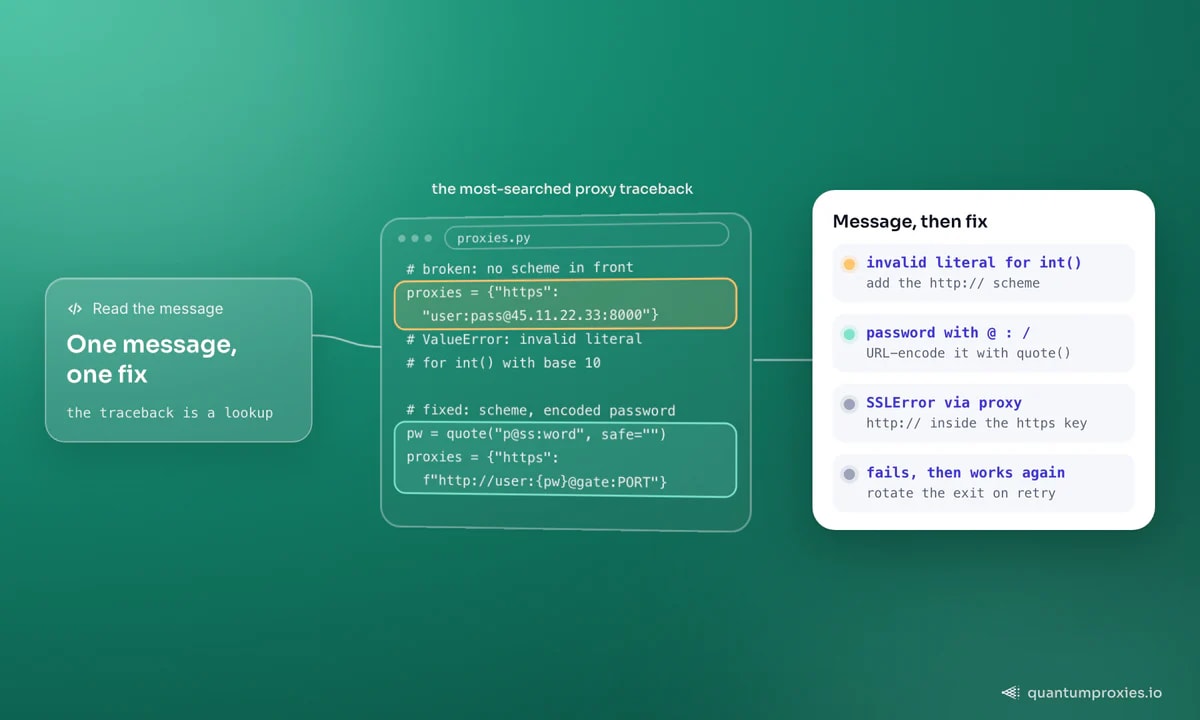
The single most-searched proxy traceback is not even a ProxyError — it is ValueError: invalid literal for int() with base 10, thrown deep inside urllib3. It happens when you embed credentials in the proxy value without a scheme, so the parser reads the text after the colon as a port number:
# Broken — no scheme, so 'pass@host' is parsed as host:port
proxies = {"https": "user:pass@45.11.22.33:8000"}
# -> ValueError: invalid literal for int() with base 10: 'pass@45.11.22.33'

# Fixed — scheme in front, password URL-encoded if it has @ : or /
from urllib.parse import quote
pw = quote("p@ss:word", safe="")
proxies = {
    "http":  f"http://user:{pw}@residentialpremium.quantumproxies.io:8080",
    "https": f"http://user:{pw}@residentialpremium.quantumproxies.io:8080",
}
A proxy health check that classifies failures
Instead of guessing, catch each exception type and turn it into a plain-English verdict. This function returns the exit IP on success and a labelled reason on failure — drop it in front of any scrape to confirm the proxy is alive before you burn requests on it. It works against any authenticated gateway, including residential proxies:
import requests

def check_proxy(proxies, url="https://httpbin.org/ip", timeout=(5, 20)):
    try:
        r = requests.get(url, proxies=proxies, timeout=timeout)
        r.raise_for_status()
        return True, r.json().get("origin")
    except requests.exceptions.ProxyError as e:
        return False, f"proxy unreachable or auth rejected: {e}"
    except requests.exceptions.SSLError as e:
        return False, f"TLS failed (https:// in the https key?): {e}"
    except requests.exceptions.ConnectTimeout:
        return False, "proxy did not answer within the connect window"
    except requests.exceptions.ReadTimeout:
        return False, "target too slow after connect (exit quality)"
    except requests.exceptions.RequestException as e:
        return False, f"other request error: {e}"

ok, detail = check_proxy(proxies)
print("OK" if ok else "FAIL", detail)
When curl works but Python throws ProxyError
If the same credentials succeed in curl but raise ProxyError in Python, an environment variable is almost always overriding your dict. Requests reads HTTP_PROXY, HTTPS_PROXY and NO_PROXY from the shell, and a stale corporate value silently reroutes every call. Print session.proxies to see what is really being used, then disable environment lookup entirely:
import requests

session = requests.Session()
session.trust_env = False          # ignore HTTP_PROXY / HTTPS_PROXY from the shell
session.proxies = {
    "http":  "http://USER:PASS@residentialpremium.quantumproxies.io:8080",
    "https": "http://USER:PASS@residentialpremium.quantumproxies.io:8080",
}
print(session.get("https://httpbin.org/ip", timeout=(5, 20)).json())
A 407 that survives correct credentials points at an IP-whitelist plan called from an unregistered address — the full list of causes is in our 407 Proxy Authentication Required guide.
Intermittent ProxyError: rotate, don't restart
The frustrating case is code that runs for twenty minutes, then throws ProxyError, then works again. That is not a bug in your script — it is a single exit IP dying or getting rate-limited mid-run. The fix is retry-with-rotation: wrap the call, catch ConnectionError, and let a rotating gateway hand you a fresh IP on the next attempt. Through rotating proxies every retry travels a different exit, so one dead address can never fail a request twice:
import requests

def get_with_rotation(url, proxies, attempts=4):
    last = None
    for _ in range(attempts):
        try:
            r = requests.get(url, proxies=proxies, timeout=(5, 20))
            if r.status_code not in (429, 500, 502, 503, 504):
                return r
            last = r.status_code
        except requests.exceptions.ConnectionError as e:  # Proxy/SSL/ConnectTimeout
            last = e
    raise RuntimeError(f"failed after {attempts} attempts: {last}")
If ProxyError persists across many fresh IPs, the problem has moved from your pool to the target: you are being blocked, not disconnected. That is a different fight — see the anti-ban checklist for pacing, headers and session hygiene.
There is one more distinction worth internalising, because it changes how you respond. A ProxyError or ConnectTimeout means the request never completed, so retrying it is safe even for a POST — nothing happened on the far side. A ReadTimeout, by contrast, means the target received your request and simply took too long to answer; retrying a non-idempotent write can double-submit. When you build the retry loop, treat connection-stage failures as freely retryable and read-stage failures as retryable only for GET and HEAD. That single rule prevents the subtle bug where a flaky proxy turns one checkout into three.
Frequently asked questions
What causes requests.exceptions.ProxyError: cannot connect to proxy?
The proxy host or port is wrong, the proxy is down, or a firewall is blocking the connection before any request leaves. Verify the endpoint with curl -x using the same credentials; if curl also fails, the proxy is unreachable, and if curl succeeds, an environment variable or a malformed dict in your Python is the culprit.
Why is ProxyError wrapped in HTTPSConnectionPool?
That wrapper just names the connection pool urllib3 used to reach the target — it is noise around the real message nested inside. Read the innermost Caused by clause: Cannot connect to proxy means a connection failure, while a 407 or SSL message inside the same pool points at authentication or a TLS/scheme problem instead.
How do I stop requests reading proxies from the environment?
Set session.trust_env = False on your Session, or pass trust_env=False equivalently, so Requests ignores HTTP_PROXY and HTTPS_PROXY. This is the fix when a proxy works in one shell but throws ProxyError in another, or when a corporate variable hijacks a scraper you did not configure to use a proxy.
Is ConnectTimeout safe to retry?
Yes — the Requests documentation marks ConnectTimeout as safe to retry because the request never reached the server, so no side effect could have occurred. Retry it, ideally through a rotating gateway so the next attempt uses a different, faster exit. ReadTimeout is riskier to retry blindly on non-idempotent methods like POST.
Once you stop treating ProxyError as a single fault and start reading it by lifecycle stage, the fixes are mechanical: scheme typos raise before the network, connect failures name a dead proxy, SSL errors name a wrong key, and intermittent failures want rotation, not a restart. Clean exits remove most of them entirely.