How to Avoid IP Bans While Web Scraping: The Full Checklist
IP bans are not bad luck - they are a trust score you can predict. Here is the full anti-ban stack: rotation, pacing, fingerprint coherence, IP hygiene and monitoring, in the order that matters.
An IP ban feels like bad luck, but it is a decision a site made from data it can see: your address, its history, and how your traffic behaves. Anti-bot systems assign every connection a trust score before you send a byte, then adjust it as you go. To avoid IP bans while web scraping you work that score in your favour - the right IPs, the right pace, a coherent fingerprint, and monitoring that pulls you out before a soft throttle becomes a hard block. Here is the full stack, in the order that actually moves the needle.
Why sites ban your IP in the first place
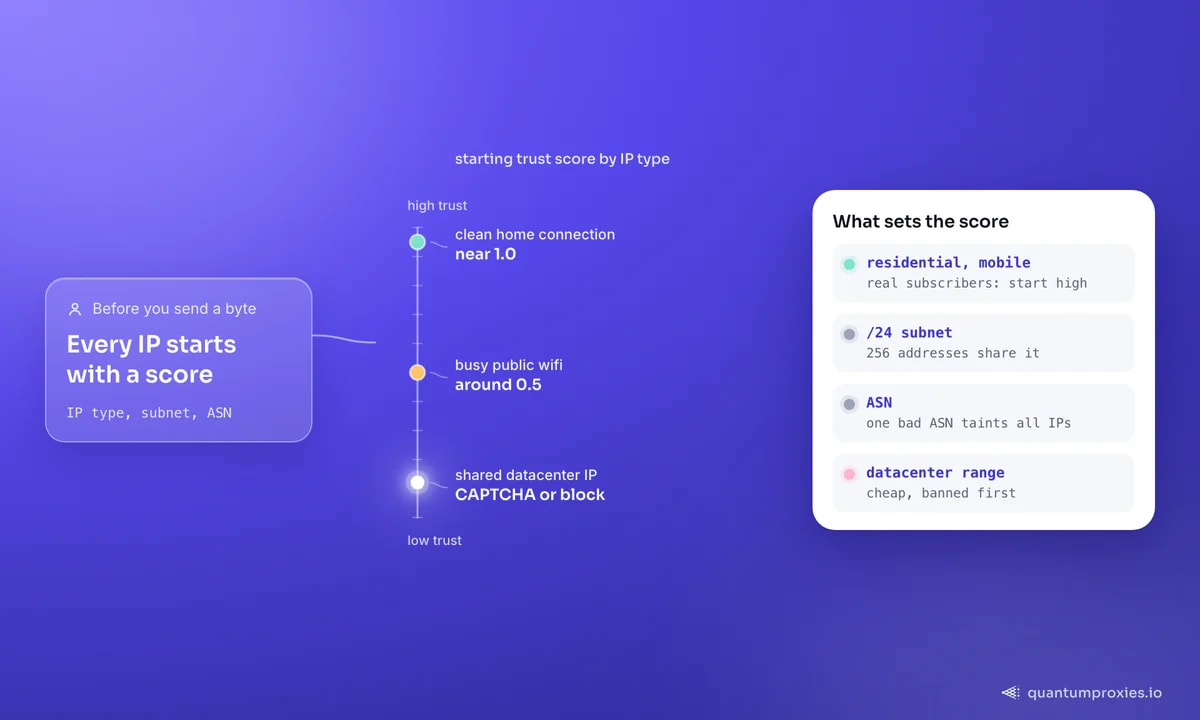
Detection starts with the address itself. IPs are sold in blocks, so reputation is contagious: a single /24 subnet is 256 addresses, and a few bad ones drag the whole block's score down. The same logic scales up to the Autonomous System Number (ASN) - misbehave from one datacenter ASN and every IP under it inherits the suspicion. On top of that, systems infer IP type from ownership metadata: a clean home connection might start near a trust score of 1.0, busy public wifi around 0.5, and a shared datacenter IP low enough to trigger CAPTCHAs or an outright block. That single fact - datacenter ranges are cheap and therefore disposable - is why they get banned first.
Rotate IPs, but rotate the right way
Rotation is the foundation, but rotating a small pool of low-trust IPs just spreads the same block around. Two things matter more than raw rotation speed: IP type and diversity. Use residential or mobile addresses so each request looks like a real subscriber, and spread across many subnets and ASNs so no single block accumulates a suspicious pattern. Geo matters too - a US retailer trusts a US residential exit far more than a foreign datacenter one, so match the exit country to the target.
A rotating residential gateway handles all three for you: per-request rotation across 90M+ IPs, 200+ countries for exit-geo matching, and a pool wide enough that subnet and ASN diversity is automatic. If you are new to why this beats a static list, our primer on IP rotation lays out the mechanics.
Pace your requests like a human
Even perfect IPs get flagged if the timing is robotic. Humans don't fire 40 requests a second at exact intervals. Cap concurrency to a sane budget per domain, add random jitter between requests, and spread bursts out. The goal is to stay under the site's rate limit and avoid the machine-gun signature that traffic-pattern analysis looks for:
import random, time, requests

proxies = {"http": "http://USER:PASS@residentialpremium.quantumproxies.io:8080",
           "https": "http://USER:PASS@residentialpremium.quantumproxies.io:8080"}

def polite_get(url):
    time.sleep(random.uniform(1.5, 4.0))   # jitter, not a fixed delay
    return requests.get(url, proxies=proxies, timeout=20)
Scrape during the target's off-peak hours where you can, and cache aggressively so you never re-fetch a page you already have. Our polite scraping guide goes deeper on adaptive pacing that still scales.
Make your fingerprint coherent
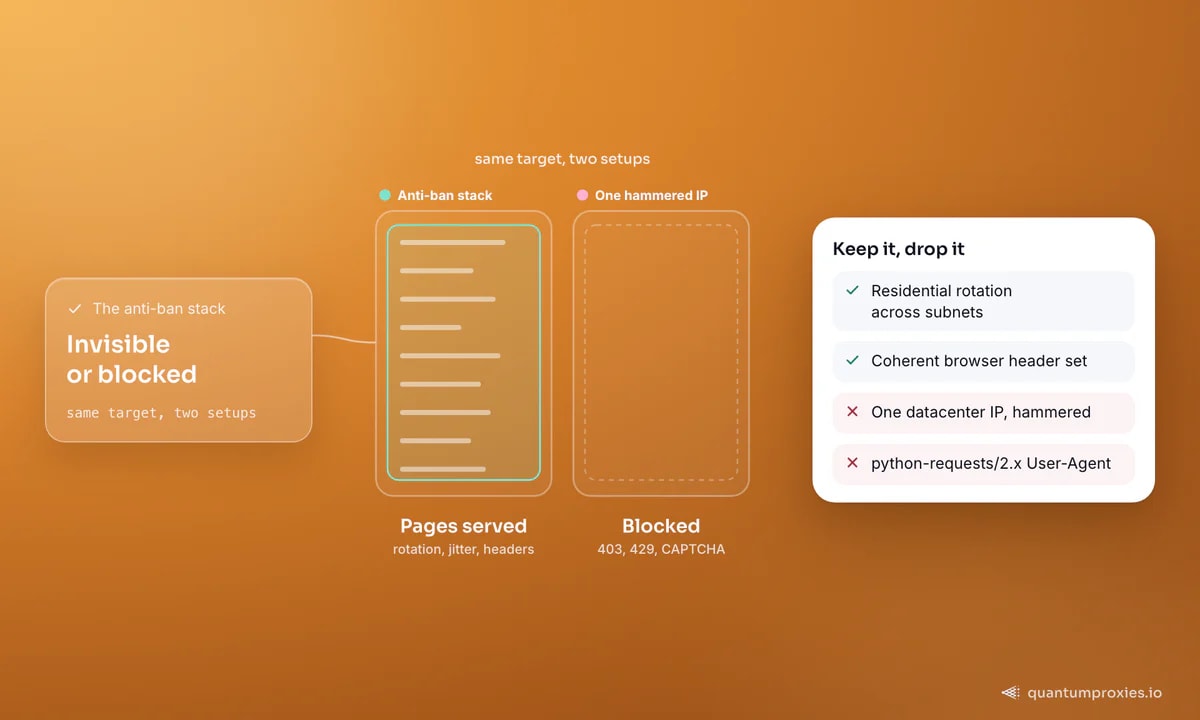
A clean IP with a bot fingerprint is still a bot. The fastest tell is the default library User-Agent - a request advertising python-requests/2.x or curl is an instant flag. Send a full, current browser header set, and keep it internally consistent: the User-Agent, Accept, Accept-Language and Client-Hints headers must all describe the same browser. Modern systems cross-check these, and a mismatch (Chrome UA with mobile Safari hints, say) blocks you faster than no header at all. Our note on User-Agent strategy explains why coherence beats a giant rotation list.
Sessions, cookies and honeypot traps
Two session-level pitfalls. First, honeypots: some sites plant links or form fields hidden with display:none or visibility:hidden that no human ever sees. Follow one and you self-identify as automated. Inspect the DOM and skip elements that aren't visible. Second, session continuity: a login and its follow-up calls should keep the same exit IP, so pin a sticky session for stateful flows and use fresh rotating IPs only for stateless page fetches. Bouncing a logged-in session across ten IPs is itself a ban signal.
Check IP quality before you burn it
Not all IPs in any pool are equally clean, and reputation shifts over time. Before you route serious volume through an address, check its fraud score and type. A free IP quality checker tells you whether an exit reads as residential or datacenter and whether it is already flagged - a two-second check that saves you from burning a job on a poisoned range. Our deep dive on IP quality scores explains what the number actually measures.
Check any IP's quality score for free
Monitor and back off automatically
Blocks are a signal, not a surprise. Track your rate of 403, 429 and CAPTCHA responses per target, and treat a rising block rate as a trigger to slow down, rotate harder, or pause. Retire an IP the moment it earns a hard block instead of retrying the same burned exit - a banned address does not recover on the next request:
from collections import deque

recent = deque(maxlen=50)  # rolling window of outcomes

def record(status):
    recent.append(status)
    blocked = sum(s in (403, 429) for s in recent)
    if blocked / len(recent) > 0.2:      # >20% blocked?
        raise RuntimeError("block rate high - slow down / rotate")
When to stop fighting and switch tools
If a target runs an aggressive anti-bot layer and your block rate stays high despite clean residential IPs and coherent headers, the bottleneck has moved past IP hygiene into TLS and JavaScript territory. A managed Scraper API that carries a real browser fingerprint, rotates IPs and renders pages is usually the better trade than escalating the DIY stack. And a candid note: if a site's terms clearly forbid it and offers an API, use the API - candour converts, and a lawsuit costs more than a subscription. This is practical guidance, not legal advice.
Frequently asked questions
How do I avoid getting my IP banned while scraping?
Route through rotating residential or mobile proxies so each request uses a different high-trust IP, match the exit country to the target, pace requests with random delays, and send a full, coherent browser header set. Then monitor your block rate and retire any IP that earns a hard block instead of retrying it.
What should I do if my IP is already banned?
Switch to a fresh IP from a clean pool - a rotating gateway does this automatically. If you were scraping a site that permits it and you weren't abusing resources, you can also email the site to ask them to lift a ban imposed in error. Going forward, rotate before you get banned, not after.
Do rotating proxies stop all IP blocks?
No. Rotation defeats volume-based bans, but a bot fingerprint, robotic pacing or a browserless TLS handshake will still get you blocked on a clean IP. Rotation is necessary, not sufficient - pair it with coherent headers, human-like pacing and, for hard targets, real browser rendering.
Are residential proxies better than datacenter for avoiding bans?
For ban avoidance, yes. Residential and mobile IPs come from real ISP subscribers, so they start with a high trust score and are rarely blacklisted. Datacenter IPs are cheap, allocated in contiguous blocks, and easy to flag by subnet - they get banned first. Use datacenter only on lenient targets.
Avoiding bans is not one trick - it is a stack. Clean rotating IPs, exit geo, human pacing, a coherent fingerprint, IP hygiene and monitoring, roughly in that order of impact. Get the first three right and most of the failure list never happens.