Best User Agents for Web Scraping in 2026: Why Coherence Wins
There is no magic user-agent string. In 2026 detection validates your whole identity - UA, Client Hints, TLS and IP together. One coherent Chrome beats a list of a thousand random UAs.
Search "best user agent for web scraping" and you'll find lists of a thousand strings to rotate. That advice is a decade out of date. In 2026 the single most important fact about user agents is that they are no longer evaluated alone - detection systems cross-check your User-Agent against your Client Hints, your TLS handshake, and your IP, and any mismatch flags you faster than a plain, honest header would. The best user agent is not a clever string; it's one current, real browser identity where every layer agrees. Here's how to build that, plus the strings to use and the ones that get you blocked on sight.
What a user agent is (and isn't) doing
The User-Agent header is a line of text in every HTTP request that names the browser, its version and the operating system. A typical Chrome string looks like Mozilla/5.0 (Windows NT 10.0; Win64; x64) AppleWebKit/537.36 (KHTML, like Gecko) Chrome/144.0.0.0 Safari/537.36. Sites read it to serve the right layout - and to spot bots. A request advertising python-requests/2.28.1 or curl/7.68.0 is a bot wearing a name tag; it earns instant blocks, empty responses or CAPTCHA redirects. But swapping in a real browser string is only step one, because the UA is now the least trusted signal of several.
Client Hints changed everything
Modern Chrome has been reducing what it puts in the User-Agent (UA reduction) and moving the detail into a set of headers called Client Hints: Sec-CH-UA, Sec-CH-UA-Mobile and Sec-CH-UA-Platform. This is the crux for scrapers. Detection now checks whether your UA and your Client Hints tell the same story. Claim to be Chrome 144 on Windows in the UA while your hints say mobile Safari, and you're blocked instantly - a mismatch is a louder signal than a missing header. So the job is not to rotate UAs; it's to ship a complete, internally consistent header set:
import requests

# One current Chrome identity - UA, Client Hints and Accept all agree
headers = {
    "User-Agent": "Mozilla/5.0 (Windows NT 10.0; Win64; x64) AppleWebKit/537.36 "
                  "(KHTML, like Gecko) Chrome/144.0.0.0 Safari/537.36",
    "Sec-CH-UA": '"Chromium";v="144", "Google Chrome";v="144", "Not?A_Brand";v="24"',
    "Sec-CH-UA-Mobile": "?0",
    "Sec-CH-UA-Platform": '"Windows"',
    "Accept": "text/html,application/xhtml+xml,application/xml;q=0.9,*/*;q=0.8",
    "Accept-Language": "en-US,en;q=0.9",
}
r = requests.get("https://httpbin.org/headers", headers=headers, timeout=15)
print(r.json()["headers"]["User-Agent"])  # confirm the server saw what you sent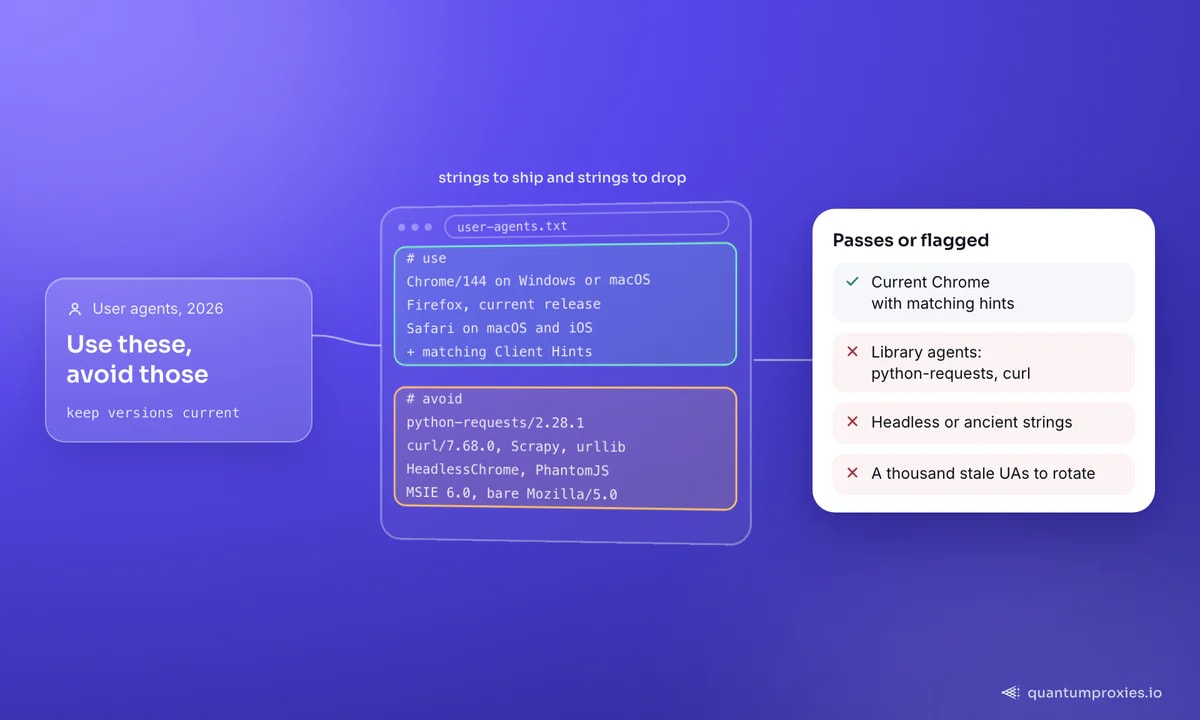
The user agents worth using in 2026
Because Chrome holds roughly 65% of the browser market, current Chrome strings blend in best - they're the safest default. Keep a small, fresh set rather than a giant stale one:
- Chrome (Windows/macOS/Linux): the highest-blend option; match the platform token to the OS you're claiming.
- Firefox: useful diversity when a site seems to be flagging too much Chrome traffic.
- Safari (macOS/iOS): valuable on Apple-heavy audiences and e-commerce.
- Mobile Chrome / Safari: for mobile-optimised content and APIs that serve different data to phones.
And the strings that flag you immediately: default library agents (python-requests, curl, Scrapy, urllib), headless identifiers (HeadlessChrome, PhantomJS), and malformed or ancient strings (an empty UA, a bare Mozilla/5.0, or MSIE 6.0). Always keep versions current - a Chrome string three years old is nearly as suspicious as no string at all.
Why rotating a thousand UAs backfires
The classic advice - collect a thousand user agents and rotate one per request - actively hurts you now, for two reasons. First, most big lists are stale, so you're rotating through strings that individually look outdated. Second, and more important, rotating only the UA leaves every other layer constant: your TLS fingerprint, your Client Hints, your IP and your request cadence don't change with the string. Detection sees a single machine's TLS handshake wearing forty different browser names - which is far more anomalous than one honest identity. If you must rotate, rotate the whole identity together, and keep the pool small and current:
import random

# A SMALL curated pool - each identity ships matching Client Hints
IDENTITIES = [
    {"ua": "Mozilla/5.0 (Windows NT 10.0; Win64; x64) AppleWebKit/537.36 (KHTML, like Gecko) Chrome/144.0.0.0 Safari/537.36",
     "platform": '"Windows"', "mobile": "?0"},
    {"ua": "Mozilla/5.0 (Macintosh; Intel Mac OS X 10_15_7) AppleWebKit/537.36 (KHTML, like Gecko) Chrome/144.0.0.0 Safari/537.36",
     "platform": '"macOS"', "mobile": "?0"},
]

def headers_for(i):
    return {
        "User-Agent": i["ua"],
        "Sec-CH-UA-Platform": i["platform"],
        "Sec-CH-UA-Mobile": i["mobile"],
        "Accept-Language": "en-US,en;q=0.9",
    }

h = headers_for(random.choice(IDENTITIES))  # rotate identities, never UA alone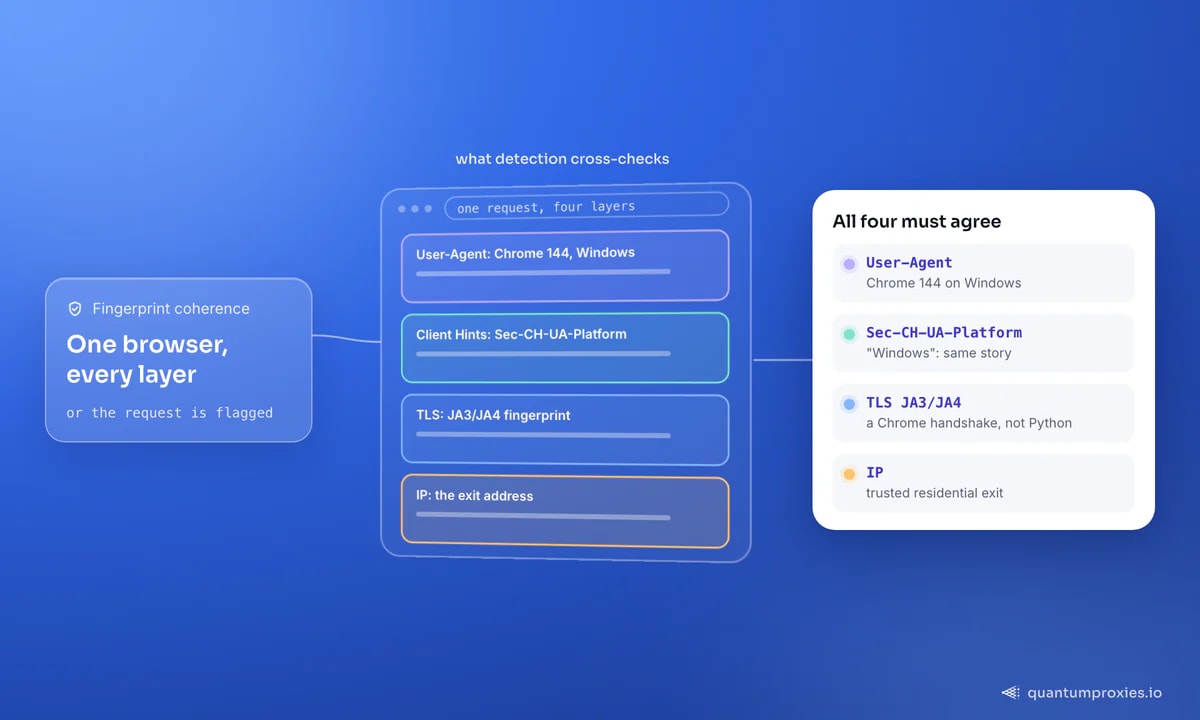
The layer below the header: TLS and IP
Even a perfect header set can lose to the handshake beneath it. Python and Go negotiate TLS in a way that doesn't match Chrome, producing a JA3/JA4 fingerprint that outs the request no matter what the UA claims - our guide on JA3/JA4 TLS fingerprinting explains the mismatch. This is also why the same URL can return 200 in a browser and 403 from curl, covered in why curl gets 403 when the browser works. The last layer is the IP: a coherent Chrome fingerprint from a flagged datacenter IP still fails. Pair your headers with a trusted residential exit and human pacing - the full stack is in our anti-ban checklist, and the detection signals in how websites detect proxies.
The practical upshot: spend your effort on freshness and coherence, not list size. A dozen current identities, each shipping matching Client Hints and paired with a real browser TLS profile, will outperform a scraped list of ten thousand strings. The big list gives you variety in the one field detection now trusts least; coherence gives you credibility in all of them at once.
When to stop managing headers by hand
Keeping UA strings current, matching Client Hints, aligning the TLS fingerprint and rotating trusted IPs is a maintenance treadmill. On hard targets it's cheaper to hand the whole fingerprint problem to a Scraper API that carries a real, coherent browser identity - headers, Client Hints, TLS and IP together - and updates it as browsers ship new versions. You send a URL; it handles the disguise.
Let the Scraper API handle the full fingerprint
Frequently asked questions
What is the best user agent for web scraping?
A current, real Chrome string on a common platform - Windows or macOS - kept up to date, because Chrome's ~65% market share means it blends in best. But the string only works when your Client Hints, TLS fingerprint and IP all describe the same browser. There is no single magic string; coherence is what matters.
Does rotating user agents prevent blocking?
Not on its own. Rotating the UA while your TLS fingerprint, Client Hints and IP stay constant is more suspicious, not less - detection sees one machine wearing many browser names. Rotate the whole identity together, keep the pool small and current, and pair it with trusted IPs and human pacing.
Which user agents should I avoid?
Default library strings (python-requests, curl, Scrapy, urllib), headless identifiers (HeadlessChrome, PhantomJS), and anything malformed or ancient - an empty UA, a bare Mozilla/5.0, or old MSIE strings. Each flags you as automated before any other signal is checked.
Do I need to send Client Hints?
For modern sites, yes. Chrome moved browser detail into Sec-CH-UA, Sec-CH-UA-Mobile and Sec-CH-UA-Platform, and detection checks these against your User-Agent. A UA with no Client Hints or, worse, contradictory ones is a common block trigger - send them and keep them consistent with your UA.
The best user agent for web scraping in 2026 is not a string you copy from a list of a thousand - it's a single current browser identity where the UA, Client Hints, TLS fingerprint and IP all agree. Get coherence right, rotate whole identities rather than strings, and back it with a trusted exit.