How Websites Detect Proxies: Every Signal, and How to Pass Each
Proxy detection isn't one check, it's a stack of them - and most 'undetectable' setups fail on the boring ones first. Here's every signal a site uses to spot a proxy, and the countermeasure for each.
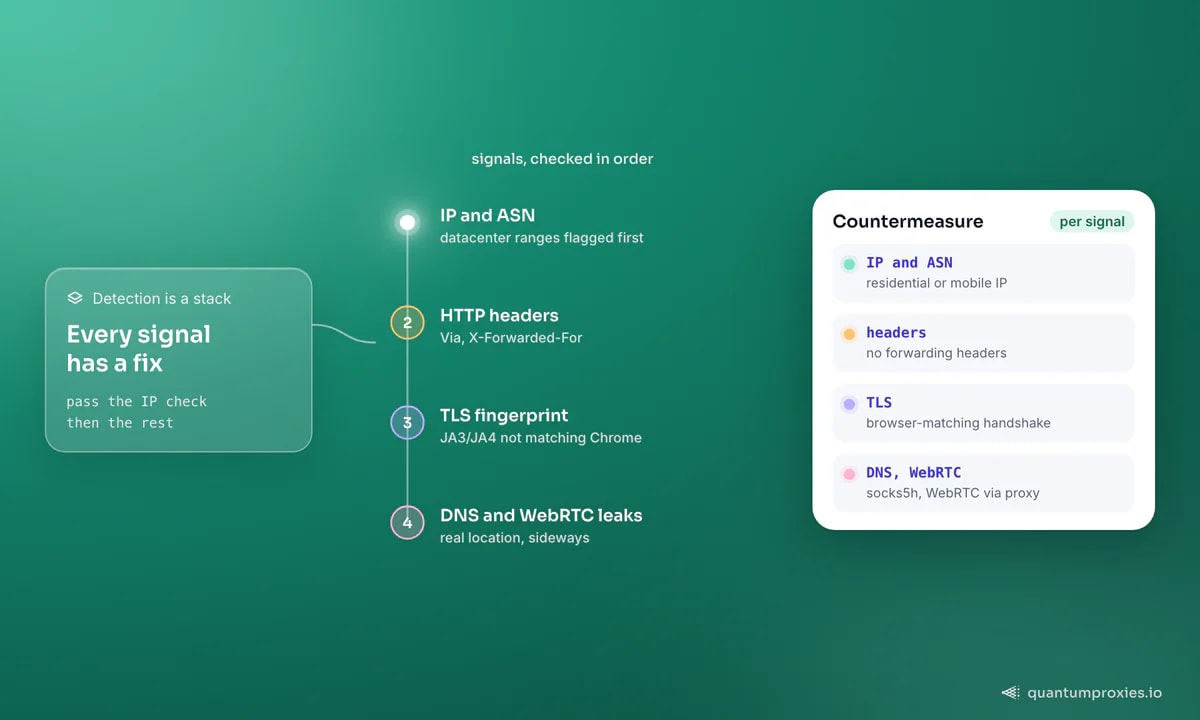
Sites don't detect proxies with a single clever trick. They run a stack of independent checks, and a connection has to pass all of them - so the setups people call "undetectable" usually fail on the boring signals first: a leaked header, a datacenter IP, a TLS fingerprint that doesn't match the browser it claims to be. Understanding how websites detect proxies layer by layer is the only way to reason about which ones you'll actually clear. Here's the full signal stack and the countermeasure for each.
Signal 1: the IP address and its ASN
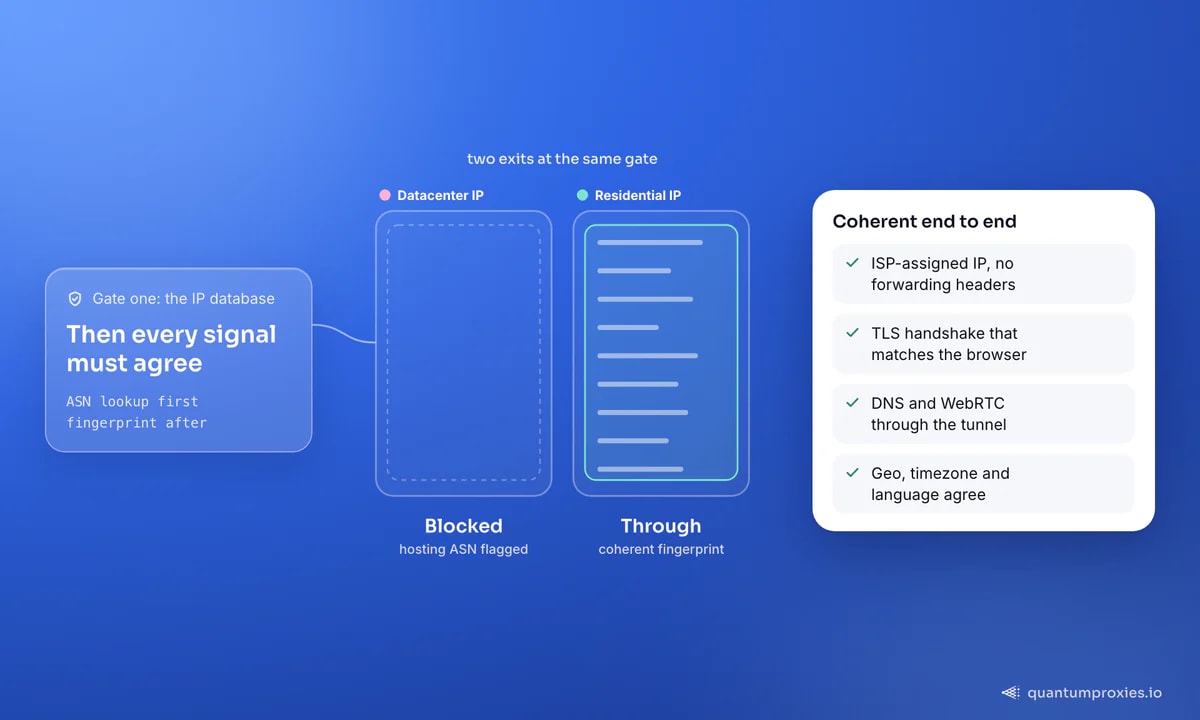
The first and cheapest check is looking the IP up in a database. Commercial services - MaxMind, spur.us, IP2Proxy, IPHub, proxycheck.io - classify addresses by their Autonomous System Number (ASN), the block an IP belongs to. Datacenter and hosting ASNs are trivially flagged, which is why a cloud-server IP gets blocked before any other check even runs. Residential and mobile IPs belong to consumer ISP ASNs, so they clear this gate by default. This single signal is why residential proxies succeed where datacenter IPs are dead on arrival - the ASN says "home broadband", not "AWS". Reverse DNS is a related check: a PTR record pointing at a hosting provider is another tell.
Signal 2: HTTP headers that announce a proxy
Badly configured proxies leak. Headers like Via, X-Forwarded-For, Forwarded and Proxy-Connection literally exist to declare that traffic passed through an intermediary, and a transparent proxy that forwards them hands the site a confession. Header order and coherence matter too: a request claiming to be Chrome but sending headers in a non-Chrome order is a fingerprint mismatch. The fix is a proxy that doesn't inject forwarding headers and a client that sends a header set consistent with the browser it's impersonating.
Signal 3: TLS and the JA3 fingerprint
Before any HTTP is sent, the TLS handshake exposes a fingerprint (JA3/JA4) built from the exact cipher suites and extensions your client offers. A Python or Go HTTP library produces a handshake that looks nothing like Chrome's - so a request with a Chrome user-agent but a Python TLS fingerprint is instantly incoherent, and no proxy fixes that, because it's happening below the proxy layer. This is why clean IPs still get blocked: the IP passed, the TLS didn't. Our deep-dive on JA3/JA4 TLS fingerprinting covers the impersonation libraries that make a client's handshake match a real browser.
Signal 4: DNS and WebRTC leaks
Even with a perfect IP, your real location can leak sideways. If DNS resolves on your machine instead of through the proxy, the resolver's location betrays you - which is exactly why SOCKS5 users should use the socks5h scheme so DNS goes through the tunnel. In a real browser, WebRTC is worse: it can reveal the true local and public IP directly to a page via a media API, straight past the proxy. Anti-detect setups disable WebRTC or route it through the proxy for this reason. Both are "side channel" leaks - the proxy is fine, but something around it isn't.
Signal 5: latency, geo and behavioural coherence
The subtler checks look for things that don't add up. A proxy inserts an extra network hop, and research techniques (the academic "BadPass"-style latency analysis) compare round-trip times to spot the two-hop signature - though this degrades against low-latency residential exits and mobile IPs. Geolocation coherence matters more in practice: if the IP says Germany but the browser's timezone, language headers and locale say New York, that mismatch is a strong flag. Mobile IPs are the hardest of all to block, because carrier-grade NAT means one address is shared by thousands of real users at once - blocking it would take out genuine customers. That's the logic behind why mobile proxies are trusted.
Check any IP's fraud score and proxy flags free
Putting it together: coherence beats any single trick
The through-line is coherence. Detection isn't one wall; it's a set of independent observations that either agree or don't. A residential IP with leaked proxy headers still fails. A clean IP with a Python TLS fingerprint still fails. The winning setup is boringly consistent end to end: an ISP-assigned IP, no forwarding headers, a browser-matching TLS handshake, DNS and WebRTC routed through the tunnel, and a geo/timezone/language stack that all points to the same place. Before you scrape a hard target, test your exit against a checker so you know which signals you're leaking. Our comparison of IP reputation vs device fingerprinting covers which layer to fix first.
It's also worth knowing that detection is rarely a hard yes-or-no. Most systems assign a risk score and act on thresholds: a slightly suspicious signal might just add friction - a CAPTCHA, a lighter version of the page - while a stack of red flags gets an outright block. That's why chasing a single "undetectable" trick is the wrong mental model. Every leak you close lowers the score, and below the threshold the site treats you like any other visitor. Fix the biggest signals first (IP type, then headers and TLS), re-test, and you'll usually find you're through without ever needing the exotic countermeasures people obsess over.
Frequently asked questions
How do websites detect proxies?
They run a stack of checks: looking the IP up in a proxy database by its ASN, inspecting HTTP headers for forwarding tells, fingerprinting the TLS handshake, watching for DNS and WebRTC leaks, and testing geo and latency coherence. A connection has to pass all of them. Most setups fail on the IP or header check before the subtler ones even matter.
Can residential proxies be detected?
Residential proxies clear the ASN check that kills datacenter IPs, but they're not automatically invisible. If your client leaks forwarding headers, sends a non-browser TLS fingerprint, or exposes its real IP via DNS or WebRTC, a site can still flag the session. Residential IPs remove the biggest signal; coherence across the rest is what keeps you clean.
How can I test if my proxy is detectable?
Run the exit IP through a fraud-score or proxy checker - it reports the ASN classification, whether the IP is on known proxy lists, and its reputation. Our free IP checker shows the fraud score and proxy flags a target site would see, so you can catch a burned IP before it burns your run.
Why do clean IPs still get blocked?
Because the IP is only one signal. A fresh residential IP paired with a Python or Go TLS fingerprint, leaked headers, or a geo/timezone mismatch is incoherent, and the site blocks on the contradiction, not the address. Fixing detection means aligning every layer - IP, headers, TLS and leaks - not just sourcing a better IP.
Proxy detection rewards consistency and punishes contradiction. Start with a residential or mobile IP to clear the database check, then make sure nothing around it disagrees - headers, TLS, DNS, WebRTC and geo all telling the same story. Test before you scale, and you'll know exactly which signal to fix instead of guessing.