TLS Fingerprinting (JA3/JA4): Why Clean IPs Still Get Blocked
Your residential IP is clean, your headers are perfect, and you still get a 403 on the first request. The tell is your TLS handshake — the fingerprint anti-bot systems read before any HTTP is exchanged.
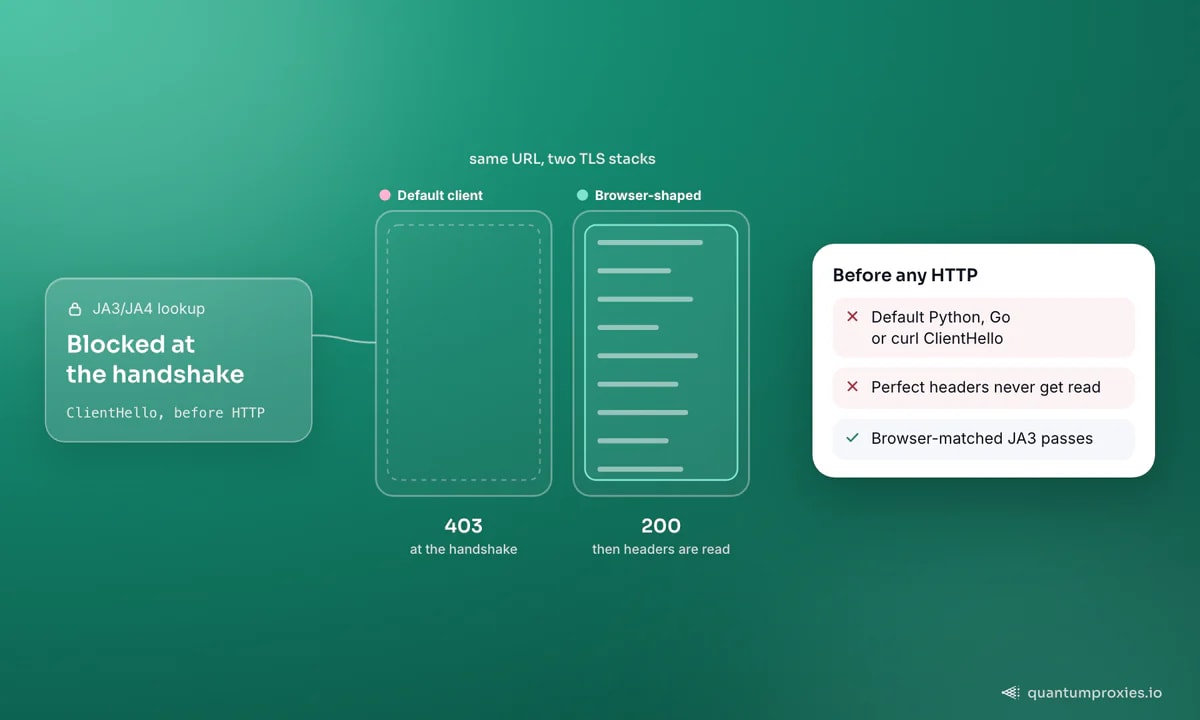
Here is a puzzle every scraper hits eventually: the residential IP is clean, the User-Agent is a current Chrome string, the headers are in perfect order — and the very first request comes back 403. Nothing you rotate fixes it. The reason is that the block happened before your headers were ever read. Modern anti-bot systems fingerprint your TLS handshake, and a default Python, Go or curl client announces itself as a bot in the ClientHello, one layer below HTTP. This is what JA3 and JA4 fingerprinting do, and why curl gets a 403 where the browser gets a 200 on the identical URL.
What TLS fingerprinting reads
Every HTTPS connection opens with a TLS handshake. The client sends a ClientHello that advertises, in a specific order, which TLS version it wants, which cipher suites it supports, which extensions it offers (SNI, ALPN, and more), which elliptic curves, and which point formats. None of that names your browser directly — but the exact combination and ordering is a near-unique signature of the software stack. Chrome's list differs from Firefox's, and both differ wildly from Python's requests or Go's net/http. Read the handshake, and you can guess the client before a byte of HTTP is exchanged.
JA3: five fields into one MD5 hash
JA3, published in 2017 by engineers at Salesforce, is the classic method. It takes five fields from the ClientHello — TLS version, ciphers, extensions, elliptic curves, and point formats — concatenates them, and runs the string through MD5. A concrete example: the fields
771,4865-4866-4867,0-11-10-35-16-5-13,29-23-24,0hash to e7d705a3286e19ea42f587b344ee6865 — a fingerprint that belongs to a standard curl build. Anti-bot vendors keep databases of these hashes. A request whose JA3 matches a known scraping library gets a stricter rate limit, a challenge, or an outright block. The most powerful check is correlation: if your User-Agent claims Chrome 120 but your JA3 says python-requests, that contradiction alone is enough to fail you.
Why JA3 gave way to JA4
JA3 has a weakness that broke it as a stable signal. From Chrome 110 and Firefox 114, browsers randomise the order of TLS extensions on every connection to resist fingerprinting. That means a real browser now produces a different JA3 hash each session — so raw JA3 throws false positives on genuine users. The industry response is JA3N (a normalised variant that sorts extensions before hashing, cancelling the randomisation) and JA4, a newer scheme from FoxIO built by JA3's own creator.
JA4 is more readable and harder to spoof. It uses a three-part a_b_c layout, for example t13d1516h2_8daaf6152771_e5627efa2ab1. The prefix alone tells a lot: t for TCP, 13 for TLS 1.3, d for a domain-based SNI, 15 cipher suites, 16 extensions, and h2 for HTTP/2 as the first ALPN — followed by two truncated hashes of the sorted ciphers and of the extensions plus signature algorithms. JA4 is one of a family: JA4S fingerprints the server, JA4H the HTTP headers, JA4X the certificate, and JA4T the raw TCP layer.
Why a clean IP does not save you
This is the part that trips up people who invest only in proxies. A pristine residential IP tells the site the traffic comes from a real network. A browser-mismatched TLS handshake tells it the traffic comes from a script. When those two signals disagree, the handshake wins, because it is far harder to fake by accident. You can rotate through a thousand clean exits and still fail every request if all thousand carry the same python-requests JA3. The IP and the fingerprint are separate axes — you have to get both right.
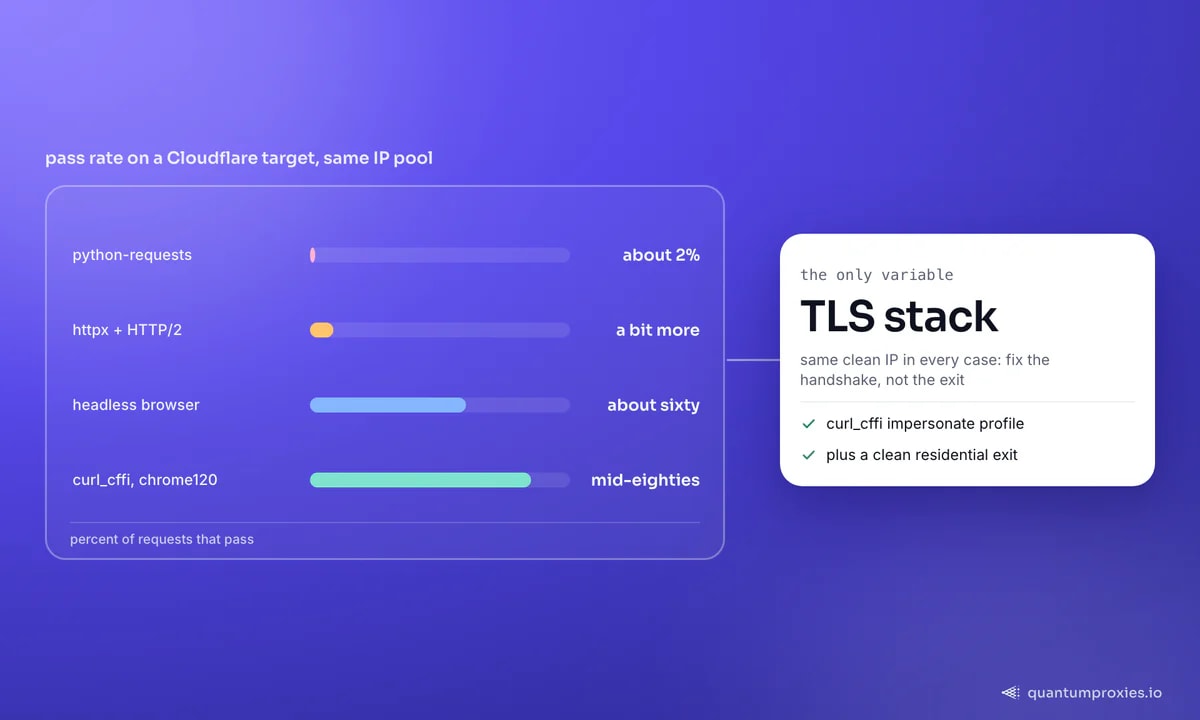
Concretely, that shows up in pass rates against a Cloudflare-protected target: a default requests client clears roughly two percent of requests, httpx with HTTP/2 does a little better, and a browser-matched client crosses into the mid-eighties. Same IP pool in every case. The variable is the TLS stack. Akamai raises the bar further by combining the TLS fingerprint with an HTTP/2 fingerprint — the SETTINGS frame values, window sizes and stream priorities — so even a correct JA3 can be caught if the HTTP/2 layer looks scripted. Our breakdown of why Akamai blocks most proxy traffic goes deeper on that stack.
The impersonation options that actually pass
You cannot bolt a browser handshake onto a standard client by tweaking cipher strings — the OpenSSL and urllib3 knobs simply do not expose every parameter JA3 reads. What works is a client that speaks the browser's exact TLS dialect:
- curl_cffi (Python) — bindings over curl-impersonate. One argument,
impersonate="chrome120", and your JA3 matches real Chrome. - curl-impersonate — a patched curl binary that reproduces Chrome and Firefox TLS and HTTP stacks from the command line.
- tls-client (Go) — an HTTP client with selectable browser profiles (Chrome, Firefox, Safari) at the handshake level.
- Real browser automation — Playwright, Puppeteer or Selenium use an actual browser engine, so the JA3 is genuine. The catch is other tells (the
navigator.webdriverflag, canvas and WebGL) still leak, so pass rates sit around sixty percent without extra hardening.
# curl_cffi: a browser-shaped handshake in two lines
from curl_cffi import requests

session = requests.Session(impersonate="chrome120")
r = session.get(
    "https://example.com",
    proxies={"https": "http://USER:PASS@residentialpremium.quantumproxies.io:8080"},
    timeout=20,
)
print(r.status_code)  # matched JA3 + a clean residential exit
Notice the proxy in that snippet. Impersonation and a clean exit are complementary, not alternatives: the browser-shaped handshake gets you past the TLS check, and a clean residential IP keeps the request off reputation blocklists. Pair them and you fix both axes at once.
Skip the TLS arms race with the Scraper API
When to hand the whole problem off
DIY impersonation works until the target rotates its detection, adds an HTTP/2 fingerprint, or requires JavaScript execution — then you are maintaining a browser-emulation library as a second job. A Scraper API carries a real, rotating browser fingerprint, matches the HTTP/2 layer, runs JS on demand and returns clean HTML, markdown or JSON from a single call. It turns the TLS arms race into someone else's problem while you get on with the data. For the wider picture of how sites flag automation, see our guide on every proxy-detection signal.
Frequently asked questions
What is a JA3 fingerprint?
A JA3 fingerprint is an MD5 hash of five fields taken from the TLS ClientHello — TLS version, cipher suites, extensions, elliptic curves and point formats. Because each software stack orders those fields differently, the hash identifies the client (Chrome, Firefox, curl, Python) before any HTTP data is exchanged.
What is the difference between JA3 and JA4?
JA3 hashes five ClientHello fields with MD5 and breaks when browsers randomise extension order. JA4, from FoxIO, sorts fields before hashing so it survives that randomisation, adds a human-readable metadata prefix, and covers QUIC/HTTP/3, ALPN and signature algorithms. JA4 is the more reliable modern signal; JA3N is a normalised stopgap for JA3.
Can I bypass TLS fingerprinting with proxies alone?
No. Proxies change the IP, not the handshake. If your TLS fingerprint matches a known scraping library, rotating exits will not help — every request still carries the bot signature. You need a client that reproduces a browser's TLS stack, then a clean proxy on top for IP reputation.
Does Python requests have a detectable TLS fingerprint?
Yes. requests uses urllib3 with a distinctive cipher and extension order that anti-bot vendors have catalogued, so its JA3 is a known-bot signature. Switch to curl_cffi with an impersonate profile to send a browser-matched handshake instead.
TLS fingerprinting moved the fight below HTTP, which is why header tricks and IP rotation stopped being enough on their own. Match the handshake, keep the exit clean, and the 403-on-request-one problem disappears. This is technical guidance, not a licence to ignore a site's terms — always scrape within the law and the target's rules.