407 Proxy Authentication Required: Every Cause and How to Fix It
HTTP 407 has exactly one meaning: the proxy in front of you refused your credentials. That single fact eliminates most of the wrong turns — here is the rest of the map.
HTTP 407 Proxy Authentication Required has exactly one meaning, and it is narrower than most people assume: a proxy sitting between you and the internet refused the request because it lacks valid credentials for the proxy itself. The target website was never contacted. It never saw your request, never made a decision, and cannot be the cause. Fixing a 407 therefore always means fixing your proxy configuration — and the list of things that can be wrong with it is short and completely enumerable. This guide walks the whole list, with the tool-specific fixes that trip people up most.
Read the Proxy-Authenticate header first
Per the HTTP specification (RFC 9110), a 407 must be accompanied by a Proxy-Authenticate header describing how to authenticate — typically something like Proxy-Authenticate: Basic realm="Access to internal site". Your client is then expected to repeat the request with a Proxy-Authorization header. That pairing is worth memorising, because it is what distinguishes 407 from its neighbour: a 401 comes from the origin server and pairs WWW-Authenticate with Authorization, while 407 comes from an intermediary and uses the Proxy- prefixed versions. If you are staring at a WWW-Authenticate header, you are debugging the wrong hop.
# See exactly which hop is refusing you, and what scheme it wants
curl -v -x http://USER:PASS@residentialpremium.quantumproxies.io:8080 https://httpbin.org/ip

# Response you are looking for on failure:
#   HTTP/1.1 407 Proxy Authentication Required
#   Proxy-Authenticate: Basic realm="..."
#
# Response you want on success: your exit IP, not your own
#   {"origin": "203.0.113.45"}
If curl -x with credentials returns your exit IP, the proxy and the credentials are both fine — and any 407 you still see in an application is that application's own configuration, not the proxy's. That single test splits the problem in half in about ten seconds.
Cause 1: the credentials are absent, wrong, or in the wrong place
The most common cause is also the dullest. Credentials belong in the proxy URL, before the host, in user:pass@host:port form — and the client library builds the Proxy-Authorization header from them. Copying an endpoint from a dashboard without the credentials, or pasting your account password instead of the proxy password (they are usually different), produces an immediate, permanent 407 on every request.
import requests

proxy = "http://USER:PASS@residentialpremium.quantumproxies.io:8080"
proxies = {"http": proxy, "https": proxy}

r = requests.get("https://httpbin.org/ip", proxies=proxies, timeout=15)
print(r.status_code, r.json())   # 200 and the exit IP = auth is correct
Check the port too. Providers expose different ports for rotating and sticky endpoints, and for HTTP versus SOCKS5; hitting the wrong one with valid credentials can still return 407 because that listener expects a different identity format. If you are unsure which protocol you are on, our explainer on SOCKS5 versus HTTP proxies lays out the differences.
Cause 2: special characters that were never percent-encoded
This one costs people entire afternoons. A proxy URL is a URL, so any reserved character in your username or password must be percent-encoded or the parser will split the string in the wrong place. A password containing @ ends the userinfo section early and your client tries to connect to a host that does not exist; a : splits username from password in the wrong spot.
@becomes%40— the single most common offender, because emails are used as usernames.:becomes%3A— otherwise it is read as the username/password separator.#becomes%23— everything after it is treated as a fragment and silently dropped./becomes%2Fand?becomes%3F— both end the authority section.- A literal space becomes
%20. If your password has one, change it instead.
from urllib.parse import quote

user = quote("team@example.com", safe="")   # team%40example.com
pwd  = quote("p@ss:w#rd", safe="")          # p%40ss%3Aw%23rd

proxy = f"http://{user}:{pwd}@residentialpremium.quantumproxies.io:8080"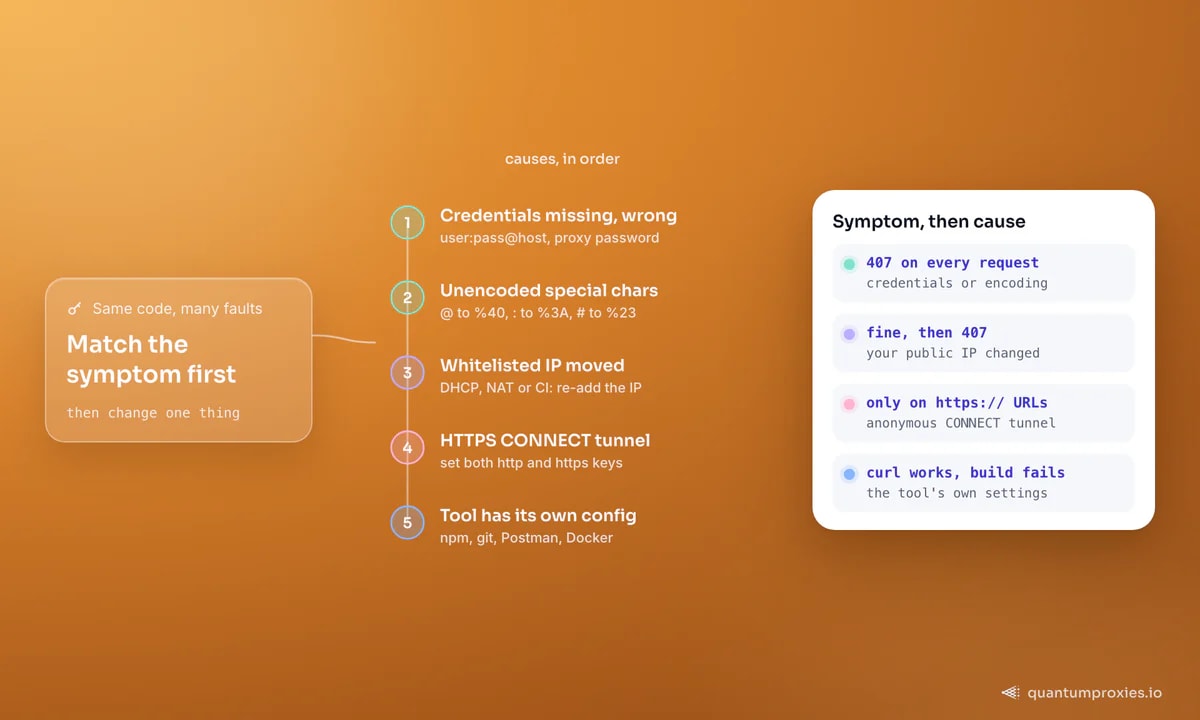
Cause 3: whitelist authentication and an IP that moved
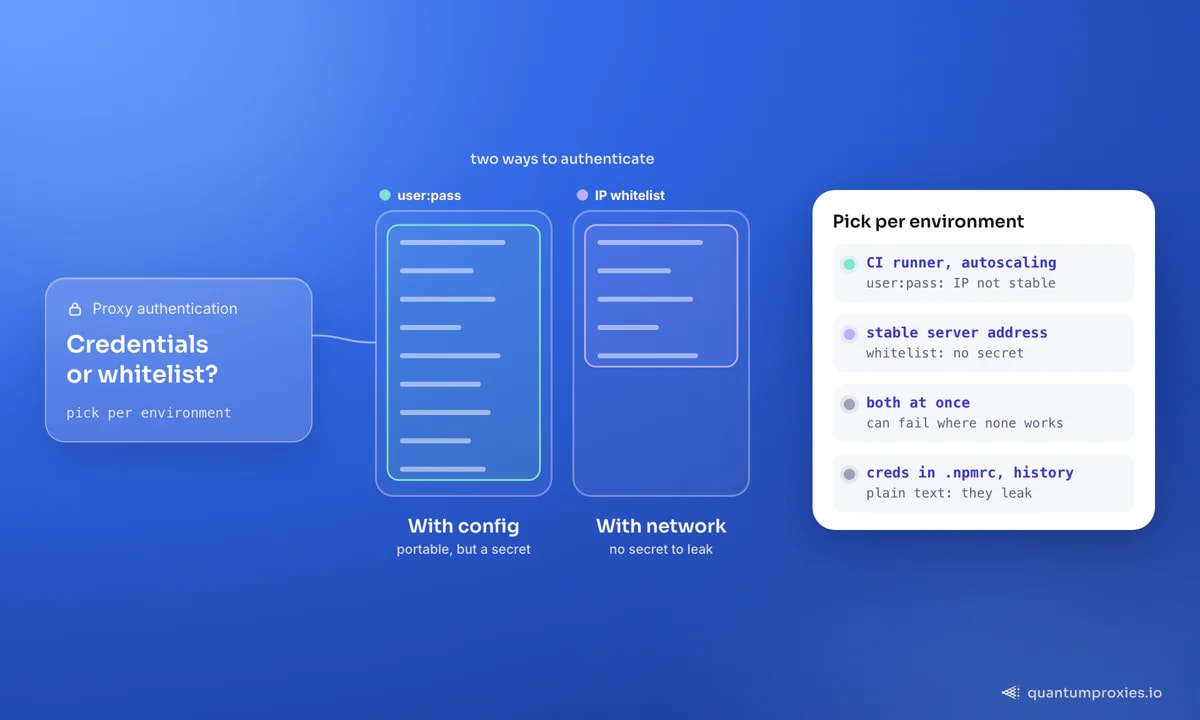
Most providers support two authentication modes: credentials in the URL, or IP whitelisting, where you authorise your server's public address in the dashboard and send no credentials at all. QuantumProxies supports both. The failure mode is specific and very recognisable: everything worked for weeks, then every request started returning 407 without a code change. That is your public IP changing — a DHCP lease renewal at the office, a new NAT gateway after a cloud redeploy, a mobile tether, or a CI runner that gets a fresh address on every job.
Confirm that before debugging anything else: fetch your current public address with curl -sS https://api.ipify.org, compare it to the whitelist, and re-add it if it differs. If your egress IP is not stable — CI runners and autoscaling groups rarely are — switch that environment to user:pass authentication, which travels with the configuration instead of the network. The other half of this trap is mixing modes: some gateways reject credentials on a whitelist-only endpoint, so sending both can fail where sending neither succeeds.
Cause 4: HTTPS goes through a CONNECT tunnel
A 407 that appears only on https:// URLs, often as the Python error OSError: Tunnel connection failed: 407 Proxy Authentication Required, has a structural cause. Plain HTTP requests are forwarded by the proxy, but HTTPS requests open a tunnel first with a CONNECT request — and that CONNECT carries its own Proxy-Authorization header. If your configuration only set an HTTP proxy, or set credentials on one scheme and not the other, the tunnel is attempted anonymously and refused before TLS even starts.
The rule is simple: always configure both schemes with the same credentials. In Python that means both keys in the proxies dict; at the shell it means HTTP_PROXY and HTTPS_PROXY; in npm it means proxy and https-proxy. Note that HTTPS_PROXY almost always takes an http:// scheme — the scheme describes how you talk to the proxy, not what you are fetching through it.
// Node 18+ with undici: one dispatcher covers http and https targets
import { ProxyAgent, fetch } from "undici";

const dispatcher = new ProxyAgent(
  "http://USER:PASS@residentialpremium.quantumproxies.io:8080"
);

const res = await fetch("https://httpbin.org/ip", { dispatcher });
console.log(res.status, await res.json());
Cause 5: the tool has its own proxy configuration
Environment variables are not universal. Plenty of tools read their own config file and ignore the shell entirely, which produces the maddening state where curl works and your build does not. A long-running GitHub Desktop issue is the textbook illustration: a developer behind a corporate proxy had set the proxy in .gitconfig and in the environment, yet sign-in still failed with a 407 and net::ERR_TUNNEL_CONNECTION_FAILED — because the git config only authenticated git, while the embedded browser doing the OAuth flow had no proxy credentials of its own. Every subsystem needs telling separately.
# shell-wide (respected by curl, wget, pip, most SDKs)
export HTTP_PROXY="http://USER:PASS@residentialpremium.quantumproxies.io:8080"
export HTTPS_PROXY="$HTTP_PROXY"
export NO_PROXY="localhost,127.0.0.1,.internal"

# npm - both keys, or https installs will 407
npm config set proxy       "$HTTP_PROXY"
npm config set https-proxy  "$HTTPS_PROXY"

# git
git config --global http.proxy  "$HTTP_PROXY"
git config --global https.proxy "$HTTPS_PROXY"

# apt - /etc/apt/apt.conf.d/95proxies
# Acquire::http::Proxy  "http://USER:PASS@residentialpremium.quantumproxies.io:8080";
# Acquire::https::Proxy "http://USER:PASS@residentialpremium.quantumproxies.io:8080";- Postman — Settings, Proxy, custom proxy configuration, then tick proxy auth and fill username and password. The system proxy toggle does not carry credentials.
- .NET / C# — a
WebExceptionreading "The remote server returned an error: (407)" means theWebProxyhas noCredentials; set them explicitly or use the default network credentials. - Java —
http.proxyUserandhttp.proxyPasswordsystem properties, plus anAuthenticator, since the JVM does not read the shell variables. - Browsers — a cached 407 can persist after you fix the credentials; hard-reload or clear the cache before assuming the fix failed.
- Docker — the daemon and the build both need proxy settings, and they are configured in different places.
One security note while you are editing all these files: credentials in a global git or npm config end up in plain text, and proxy URLs with embedded passwords leak into shell history, CI logs and error traces. On machines with a stable address, IP whitelisting avoids the secret entirely.
A 407 is never the target site's fault
It is worth restating, because it saves you from chasing ghosts. If you are getting 407s, no amount of rotating user agents, adding headers or changing exit countries will help — the request has not left your proxy yet. Blocks that come from the target look different: a 403 Forbidden means the site refused you, and a 429 Too Many Requests means you went too fast. Diagnose which of the three you actually have before writing any code. And if Python is throwing ProxyError or SSLError rather than a clean 407, our guide to debugging ProxyError in Requests covers the transport-level failures.
Frequently asked questions
How do I resolve 407 Proxy Authentication Required?
Put valid credentials in the proxy URL as http://user:pass@host:port, percent-encoding any reserved characters, and configure both the HTTP and HTTPS proxy settings. If your provider uses IP whitelisting instead, authorise your current public IP and send no credentials. Verify with curl -x against an IP echo service before touching your application code.
What does 407 Proxy Authentication Required mean?
It means an intermediary proxy refused the request for lack of valid proxy credentials. The response includes a Proxy-Authenticate header naming the scheme, and the client is expected to retry with Proxy-Authorization. It is distinct from 401, which comes from the destination server rather than the proxy in between.
How do I fix npm error 407?
Set both keys: npm config set proxy and npm config set https-proxy, each with the full http://user:pass@host:port URL. Registry traffic is HTTPS, so an HTTP-only setting fails at the CONNECT tunnel. Percent-encode special characters in the password, and check for a project-level .npmrc overriding your global one.
Why does Python raise Tunnel connection failed: 407?
Because the HTTPS request opened a CONNECT tunnel that carried no proxy credentials. Set both the http and https keys of the proxies dict to the same authenticated URL. Also check whether HTTP_PROXY or HTTPS_PROXY in the environment is overriding your dict — set session.trust_env = False to rule that out.
How do I set proxy authentication in Postman?
Open Settings, go to the Proxy tab, enable the custom proxy configuration, enter host and port, then tick the proxy auth box and add the username and password. Relying on the system proxy toggle is the usual mistake — it routes traffic through the proxy but never supplies credentials, so every request returns 407.
Five causes cover essentially every 407 in the wild: missing credentials, unencoded special characters, a whitelisted IP that changed, an unauthenticated CONNECT tunnel, and a tool with its own configuration. Work them in that order and the status code disappears — then you can start worrying about what the target site thinks of you.