SOCKS5 vs HTTP Proxy: The Real Differences & When to Use Each
SOCKS5 relays any TCP or UDP traffic and never reads it; an HTTP proxy understands the web and can shape it. Neither is 'better' — here is the layer-by-layer difference and a clear rule for choosing.
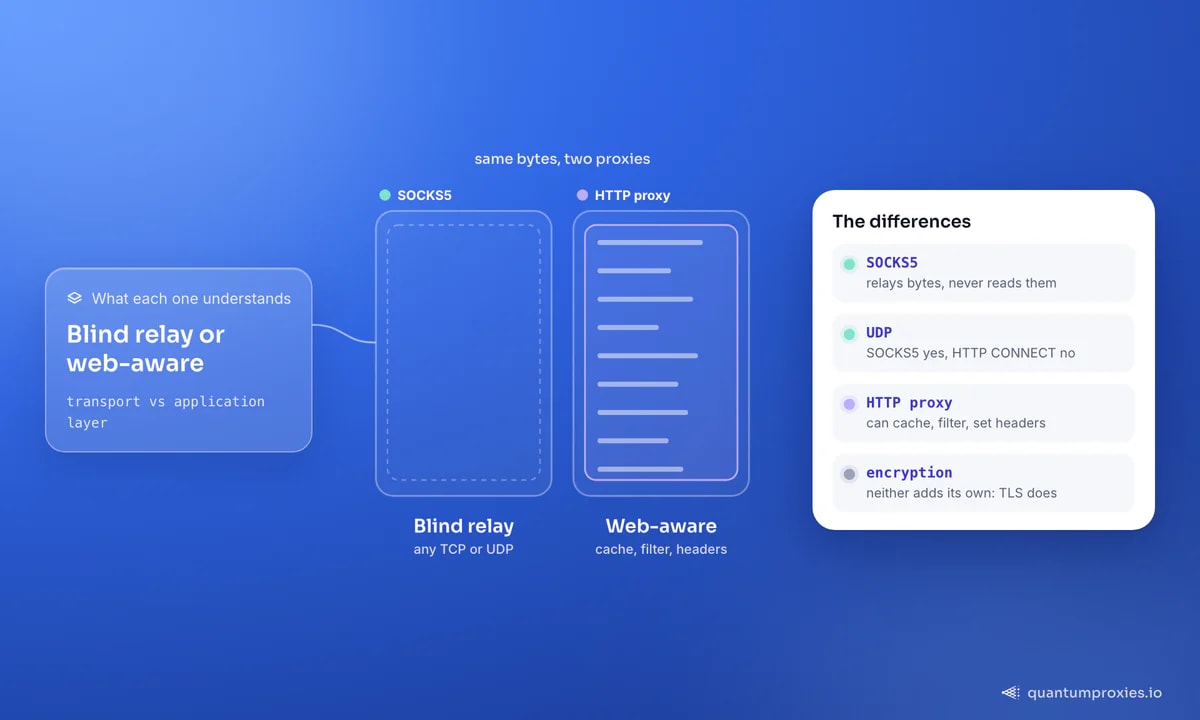
Ask which is better, SOCKS5 or HTTP, and you will get a dozen confident and contradictory answers. The reason is that they solve different problems at different layers of the network. A SOCKS proxy is essentially a low-level TCP relay: any TCP connection can travel through it, and it neither reads nor understands what it forwards. An HTTP proxy sits higher up — it understands HTTP requests, and through the CONNECT method it can also tunnel encrypted traffic, which makes its capability a superset of a plain SOCKS relay for web work. Choosing well is not about speed leaderboards; it is about matching the proxy to the traffic. This guide breaks down the layer, the encryption, the UDP question and tool compatibility, then gives you a rule you can apply without thinking.
The core difference: what each proxy understands
SOCKS operates near the transport layer and is protocol-agnostic. It takes your bytes and passes them to the destination, whether that is web traffic, email, a game protocol or a torrent — it does not interpret or modify anything. That is its strength and its limit: maximum flexibility, zero awareness. An HTTP proxy operates at the application layer and speaks the web's language. Because it understands requests, it can cache responses, filter content, and read or rewrite headers — capabilities a SOCKS proxy structurally cannot offer. For scraping, that awareness is useful: header control is part of looking human, a topic we dig into in how websites detect proxies.
Encryption, UDP and ports
Three technical distinctions decide most real cases:
- Encryption. Neither proxy type encrypts your traffic by itself — authentication is not encryption. With an HTTP proxy the CONNECT tunnel carries your existing TLS to an
https://target end-to-end, so the payload stays encrypted. SOCKS simply relays whatever you send; if it is already TLS, it stays TLS, but the proxy adds no protection of its own. - UDP. SOCKS5 handles both TCP and UDP, which matters for anything real-time — voice, video, games, some P2P. HTTP CONNECT is TCP-only, so UDP-based protocols cannot go through an HTTP proxy at all.
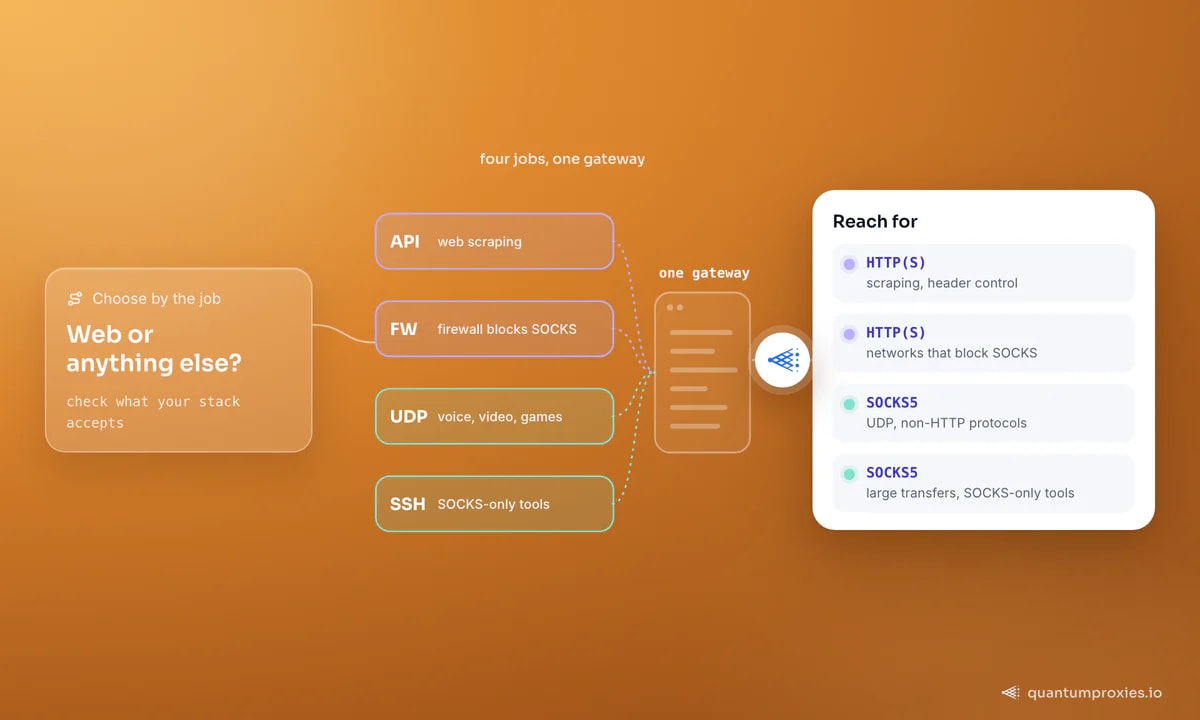
- Ports and firewalls. SOCKS runs on a dedicated service, and some corporate firewalls block it outright while permitting HTTP and HTTPS. An HTTP proxy can blend into normal web traffic, so it is the more reliable choice on locked-down networks.
- IPv4 and IPv6. SOCKS5 supports IPv6 as well as IPv4, useful when your targets or exits are v6.
SOCKS4 is worth a one-line dismissal: it predates SOCKS5 and lacks authentication and UDP support, so there is rarely a reason to choose it today. When people say 'SOCKS', they almost always mean SOCKS5.
Tool support is the other quiet decider. Almost every HTTP client, scraping framework and browser accepts an HTTP proxy with no plugins, whereas SOCKS sometimes needs an extra library — Python Requests, for instance, only speaks SOCKS after you install the socks extra. On the other side, several categories of software expect SOCKS specifically: many antidetect browsers, torrent clients and SSH tunnels are built around it, and a few specialised tools support nothing else. Before you commit a workflow to one protocol, check what your actual stack accepts, because the compatibility answer often makes the decision for you.
Speed: is SOCKS5 really faster?
SOCKS5 usually shows lower latency, and the reason is simple: it does less. It establishes a connection and shuttles bytes without parsing or modifying them, which trims per-request overhead and makes it a favourite for downloads, streaming and bulk transfers. An HTTP proxy does more work per request, but that work — header handling, caching, connection reuse — is exactly what lets it sustain a high volume of small web requests efficiently. So the honest answer is that SOCKS5 tends to win on raw throughput for large transfers, while a good HTTP proxy wins on requests-per-second for scraping. In practice the exit IP's quality and location affect your real-world speed far more than the protocol choice does.
Using each in practice
The syntax barely changes between them — only the scheme. In curl you switch with the proxy URL; note socks5h pushes DNS resolution to the proxy, which prevents DNS leaks and resolves geo-fenced hostnames from the exit's location:
# HTTP proxy
curl -x http://USER:PASS@residentialpremium.quantumproxies.io:8080 https://httpbin.org/ip

# SOCKS5 proxy (the trailing 'h' = resolve DNS on the proxy)
curl -x socks5h://USER:PASS@residentialpremium.quantumproxies.io:1080 https://httpbin.org/ip
Python Requests needs one extra install for SOCKS — pip install requests[socks] — then the proxies dict is identical apart from the scheme. More recipes are in our curl proxy guide and Python Requests proxy guide:
import requests  # after: pip install requests[socks]

proxies = {
    "http":  "socks5h://USER:PASS@residentialpremium.quantumproxies.io:1080",
    "https": "socks5h://USER:PASS@residentialpremium.quantumproxies.io:1080",
}
print(requests.get("https://httpbin.org/ip", proxies=proxies, timeout=15).json())
The good news is that you rarely have to commit up front. Every SOCKS5 proxy plan exposes HTTP and SOCKS5 on the same gateway, so switching protocols is a scheme swap rather than a new purchase — you can run scraping over HTTP and a specialised tool over SOCKS5 against the same credentials.
Frequently asked questions
Is SOCKS5 faster than an HTTP proxy?
Usually, yes, for raw throughput — SOCKS5 does less work per connection because it relays bytes without reading or modifying them, which lowers latency and suits large transfers and streaming. For high-volume web scraping, a good HTTP proxy can match or beat it on requests per second thanks to header handling and connection reuse. In reality, exit IP quality and location influence your measured speed more than the protocol.
Should I use SOCKS5 or HTTP for web scraping?
HTTP is the default for web scraping and APIs, because header and cookie control are part of passing as a real browser and tool support is broadest. Reach for SOCKS5 when a specific tool only speaks SOCKS, when you need non-HTTP protocols or UDP, or when you want DNS resolved proxy-side with socks5h. Many teams use HTTP for scraping and keep SOCKS5 available for edge cases.
Does SOCKS5 encrypt my traffic?
No. A SOCKS5 proxy does not add encryption — authentication protects who can use it, not the data in transit. If you connect to an https:// site, that traffic is already encrypted by TLS and stays that way through the proxy, but the SOCKS layer itself provides no confidentiality. For sensitive traffic, rely on TLS to the target rather than expecting the proxy to secure it.
What is the difference between SOCKS4 and SOCKS5?
SOCKS5 is the modern version and supports authentication, UDP traffic and IPv6; SOCKS4 is older and supports none of those. Because SOCKS5 also handles proxy-side DNS resolution and username/password auth, there is almost no reason to choose SOCKS4 today. When a provider or tool says 'SOCKS', assume SOCKS5 unless it explicitly states otherwise.
The rule is short: if it is the web, use HTTP; if it is anything else — UDP, another protocol, a SOCKS-only tool, or a firewall that permits nothing else — use SOCKS5. Since a single gateway gives you both, the smarter move is to stop debating and keep both in reach.