Playwright SOCKS5 Proxy Authentication: Why It Fails, 4 Fixes
Playwright accepts a socks5:// server and then refuses your username and password. The limitation is Chromium's, not Playwright's, and it has been open since 2021 — here are the four ways around it, ranked.
Playwright SOCKS5 proxy authentication does not exist, and knowing that up front saves an evening. Pass a socks5:// server together with a username and password and Playwright refuses before the browser ever navigates. The feature request that everybody lands on, microsoft/playwright#10567, was opened in November 2021, is still open, and still carries the P3-collecting-feedback label. The limitation is not Playwright's to fix: it lives in Chromium. This post shows the exact error strings, explains why no extension or config flag rescues you, and gives four fixes — the one-line HTTP swap, IP whitelisting, a local relay, and Firefox.
The error you are searching for
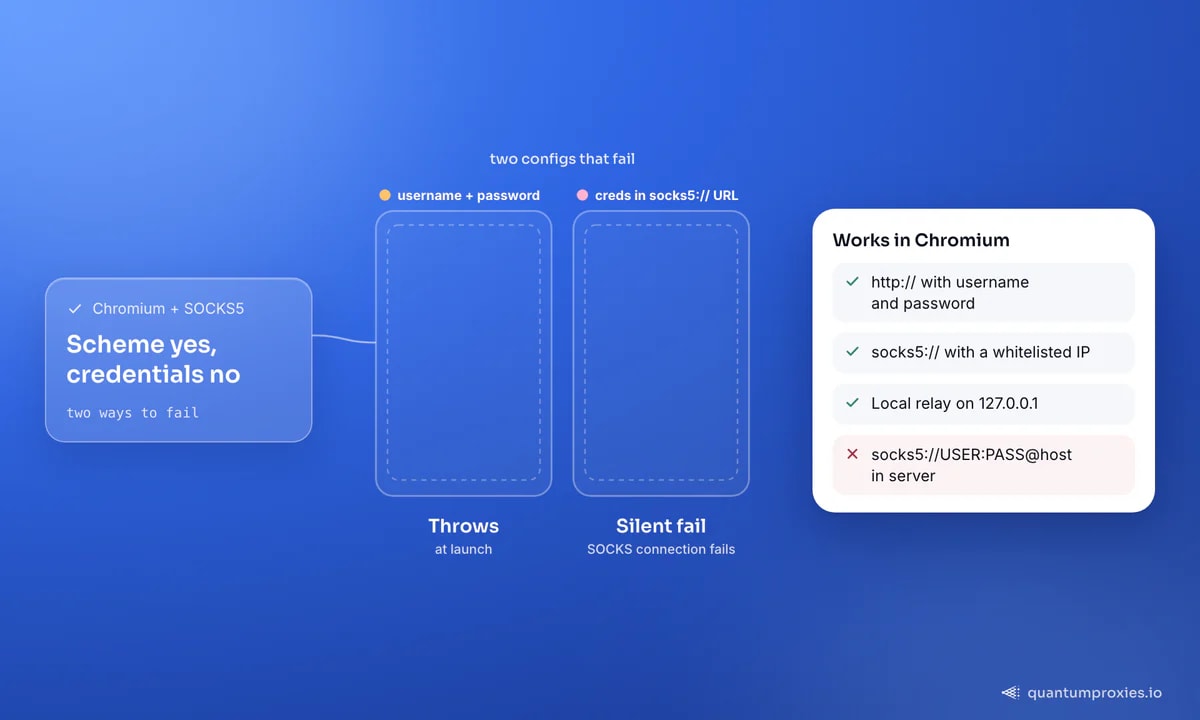
Every version of this problem produces one of two strings. In Node you get Error: Browser does not support socks5 proxy authentication; in Python, older releases prefix it with playwright._impl._api_types.Error: and newer ones with playwright._impl._errors.Error:. The message is the same, and it is thrown at launch, not at navigation:
const { chromium } = require('playwright');

// Fails immediately — no page is ever created
const browser = await chromium.launch({
  proxy: {
    server: 'socks5://residentialpremium.quantumproxies.io:1080',
    username: 'USER',
    password: 'PASS',
  },
});
// Error: Browser does not support socks5 proxy authentication

// Python raises the same thing:
// playwright._impl._errors.Error: Browser does not support
// socks5 proxy authentication
There is a quieter variant. If you drop the credential fields and stuff them into the server string instead — socks5://USER:PASS@host:1080 — nothing throws. Chromium simply ignores the userinfo part of the URL, tries an unauthenticated handshake, and the gateway rejects it. You then see net::ERR_SOCKS_CONNECTION_FAILED or a plain timeout on the first goto(), which sends people hunting for network bugs that are not there.
Where Playwright SOCKS5 proxy authentication actually breaks
Playwright's own documentation is explicit: the username and password fields on the proxy option are described as credentials to use "if HTTP proxy requires authentication". SOCKS is supported only as a scheme. Underneath, Chromium never implemented the username/password sub-negotiation from RFC 1929 for SOCKS5, which is why the Chromium issue tracker entry on SOCKS5 authentication (40323993) has collected years of comments, why the SwitchyOmega extension warns users the moment they select SOCKS5 with credentials, and why Brave and Edge behave identically. It is one engine, one gap, inherited by everything built on it.
This is also why the trick that rescues Selenium users does not help here. A Manifest V3 extension can answer a proxy challenge through chrome.webRequest.onAuthRequired, but that hook fires on HTTP 407 Proxy Authentication Required responses. A SOCKS5 handshake is a byte-level negotiation on the socket before any HTTP exists, so there is no event to intercept. And do not confuse the context option httpCredentials with proxy auth: it answers 401 challenges from the website you are visiting, never the proxy. For the full picture across stealth frameworks, our map of authenticated proxies in anti-detect frameworks covers who supports what.
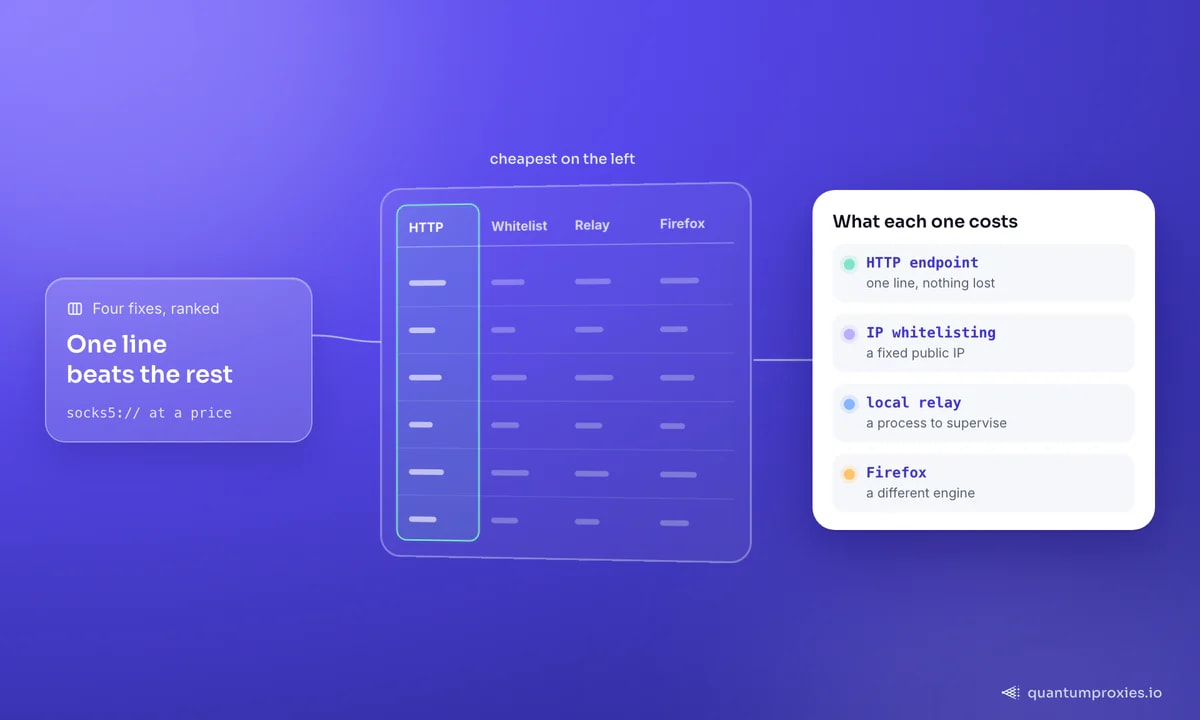
Fix 1: use the HTTP endpoint of the same gateway
This is the fix for roughly nine users in ten, and it is one line. Serious providers expose the same IP pool over both protocols on different ports — every QuantumProxies plan ships HTTP and SOCKS5 endpoints with the same credentials and the same session syntax. Switch the scheme and the port, keep everything else, and Playwright's native credential fields do their job:
from playwright.sync_api import sync_playwright

with sync_playwright() as p:
    browser = p.chromium.launch(proxy={
        # was: "socks5://residentialpremium.quantumproxies.io:1080"
        "server": "http://residentialpremium.quantumproxies.io:8080",
        "username": "USER",
        "password": "PASS",
    })
    page = browser.new_page()
    page.goto("https://httpbin.org/ip")
    print(page.text_content("body"))   # must be the proxy exit IP
    browser.close()
You lose nothing measurable. For browser traffic an HTTP proxy opens a CONNECT tunnel and carries the same encrypted bytes a SOCKS5 tunnel would; the differences between the two protocols matter for UDP and non-HTTP traffic, not for a page load. Our breakdown of SOCKS5 versus HTTP proxies has the detail. And because the proxy object is also accepted by newContext(), the same credentials give you per-context rotation exactly as described in our Playwright proxy integration guide.
Fix 2: IP whitelisting keeps socks5:// alive
If you genuinely need the SOCKS5 scheme — a proxy that only speaks SOCKS, a tool chain that assumes it — authenticate the machine instead of the request. Register the scraper's public IP with your provider, remove the credentials, and Chromium is happy because there is nothing to negotiate:
const { chromium } = require('playwright');

const browser = await chromium.launch({
  proxy: { server: 'socks5://residentialboson.quantumproxies.io:PORT' }, // no creds
});
const page = await browser.newPage();
await page.goto('https://httpbin.org/ip');
console.log(await page.textContent('body'));
await browser.close();
Whitelisting authenticates a machine, not a script, and that is the whole trade-off. A VPS or an office egress with a stable address works perfectly; ephemeral CI runners, autoscaled containers and anything behind a rotating NAT will fail the moment the address changes. Verify the exit before you trust a run — a silently direct connection looks exactly like a working proxy until your target starts blocking your own IP. Our free IP quality checker tells you what the exit actually is, not just that it responded.
Fix 3: a local relay that strips the credentials
When the IP cannot be whitelisted and the provider has no HTTP port, put a translator in front of the browser. The pattern is always the same: a local listener with no authentication forwards to the upstream SOCKS5 endpoint with credentials attached. With gost, that is a single command:
# Local no-auth HTTP listener -> authenticated upstream SOCKS5
gost -L=http://127.0.0.1:8080 \
     -F=socks5://USER:PASS@residentialpremium.quantumproxies.io:1080

# Playwright then points at the local hop, with no credentials:
#   proxy: { server: 'http://127.0.0.1:8080' }
Two rules. Bind the listener to 127.0.0.1, never 0.0.0.0 — a no-auth proxy reachable from the internet is an open relay that will be found and abused within hours. And treat the relay as a process you must supervise: if it dies, Chromium falls back to a connection error rather than a direct request, which is at least loud. This approach has become common enough that practitioners publish small purpose-built relays; we compare the options in our guide to SOCKS5 auth relay tools.
Fix 4: run Firefox instead of Chromium
Firefox implements SOCKS5 username/password authentication natively, which is the difference the Playwright issue thread keeps pointing at. Swap the browser type and the error disappears:
from playwright.sync_api import sync_playwright

with sync_playwright() as p:
    browser = p.firefox.launch(proxy={
        "server": "socks5://residentialpremium.quantumproxies.io:1080",
        "username": "USER",
        "password": "PASS",
    })
    page = browser.new_page()
    page.goto("https://httpbin.org/ip")
    print(page.text_content("body"))   # confirm the exit before trusting it
    browser.close()
Do the verification step, every time. Playwright not throwing is not proof the credentials were used — only an IP echo is. And be clear about what you are buying: a different rendering engine, a different fingerprint surface, and a stealth ecosystem that skews heavily Chromium. If your target already accepts Firefox this is free. If you picked Chromium for anti-bot reasons, switching engines to solve a proxy problem is the wrong trade — take fix 1 and keep your browser.
The decision, in one line each
- Provider has an HTTP port: use it. One line, native auth, same exits, no extra process.
- Fixed public IP: whitelist it and keep
socks5://with no credentials. - Neither: run a local relay bound to loopback and point Playwright at
127.0.0.1. - Already on Firefox: pass the credentials and verify the exit IP once.
- Never: credentials inside the
serverstring. Chromium drops them without a word.
Frequently asked questions
Does Playwright support SOCKS5 proxy authentication?
Not with Chromium. Playwright's proxy option documents username and password as HTTP(S) credentials, and Chromium has no SOCKS5 username/password implementation to hand them to, so the launch throws. Firefox in Playwright does support it. The tracking issue, microsoft/playwright#10567, has been open since November 2021 with no fix scheduled.
What does 'Browser does not support socks5 proxy authentication' mean?
It means you passed credentials alongside a socks5:// server to a Chromium launch. Playwright validates the combination and refuses rather than opening a browser that would silently ignore them. Either move to the gateway's HTTP port and keep the credential fields, or authenticate by IP whitelist and remove them entirely.
How do I use a SOCKS5 proxy with Playwright in Python?
Pass proxy={"server": "socks5://host:port"} with no username or password, and have the provider authorise your machine's public IP. If the IP is not stable, use the HTTP endpoint of the same gateway with credentials, or forward through a local relay. Always confirm the exit against an IP echo endpoint.
Can a Chrome extension add SOCKS5 authentication?
No. The extension trick used for authenticated HTTP proxies relies on chrome.webRequest.onAuthRequired, which fires on HTTP 407 responses. SOCKS5 authenticates during the socket handshake, before any HTTP request exists, so no extension API can see it. Proxy switcher extensions warn about this limitation for the same reason.
Is SOCKS5 faster than HTTP for Playwright scraping?
Not meaningfully. HTTPS traffic through an HTTP proxy uses a CONNECT tunnel, so both protocols carry the same encrypted stream with comparable overhead. SOCKS5's real advantages are UDP support and protocol neutrality, neither of which a browser page load uses. Pick whichever endpoint authenticates cleanly.
The short version: stop trying to make Chromium do something it has never done. Move the job to the HTTP endpoint, or whitelist and drop the credentials — and if you must keep socks5:// with a rotating egress, put a relay in the middle rather than a workaround in your code. Once authentication is out of the way, the thing that decides whether the run succeeds is the pool behind it: residential exits across 200+ countries, with per-request rotation or sticky sessions when a flow needs one identity.