SOCKS5 Proxy Auth Relay: Build One, or Skip It Entirely
Chrome and many automation tools still can't authenticate a SOCKS5 proxy. A tiny local relay fixes that by holding the credentials — here is a minimal working one, the ready-made tools, and the cases where you do not need it at all.
A SOCKS5 proxy auth relay is a small local process that answers a proxy's username/password challenge on your behalf, then hands your tool a plain, no-auth endpoint on 127.0.0.1. It exists to paper over a stubborn gap: Chromium has never supported authenticated SOCKS5 (tracked as Chromium bug 40829748), and plenty of automation tools accept only a bare host:port. A Reddit thread that made the rounds — someone frustrated enough to build a tiny relay because tools still could not handle authenticated SOCKS5 — is the whole genre in one sentence. This guide shows a minimal working relay, the ready-made tools, and, just as important, when you do not need one.
The pattern: no-auth in front, authenticated behind
Every relay in this space does the same thing. It listens locally with no authentication, and for each connection it opens the upstream leg using your real credentials. Your tool connects to 127.0.0.1 — no password needed — and the relay performs the SOCKS5 auth handshake to the SOCKS5 gateway. The credentials live in one place, on loopback, and never touch the tool's config. That matters for a second reason: SOCKS5 is not encrypted and transmits credentials in cleartext, so keeping the authenticated leg on your own machine, bound to 127.0.0.1, is the safe way to do this.
The one-command relay: gost
You rarely need to hand-write a relay. gost is an open-source tunnelling tool that implements the full SOCKS5 spec including username/password auth, and it turns the whole job into a single command. Expose a no-auth SOCKS5 listener locally and forward to your authenticated upstream:
# local no-auth SOCKS5 on :1080  ->  authenticated SOCKS5 upstream
gost -L socks5://:1080 -F socks5://USER:PASS@residentialpremium.quantumproxies.io:1080

# now point any tool at the loopback address, no credentials:
#   --proxy-server=socks5://127.0.0.1:1080   (Chrome, nodriver, zendriver)
If your tool speaks HTTP but not SOCKS5, the same command converts protocols — expose a local HTTP proxy that forwards to the authenticated SOCKS5 gateway. This is the clean answer to the recurring "convert SOCKS5 to HTTP proxy" question, and it beats the classic Privoxy config because gost handles the upstream auth in one place:
# local HTTP proxy on :8080  ->  authenticated SOCKS5 upstream
gost -L http://:8080 -F socks5://USER:PASS@residentialpremium.quantumproxies.io:1080

# Chrome/curl/anything with an HTTP proxy setting can now use 127.0.0.1:8080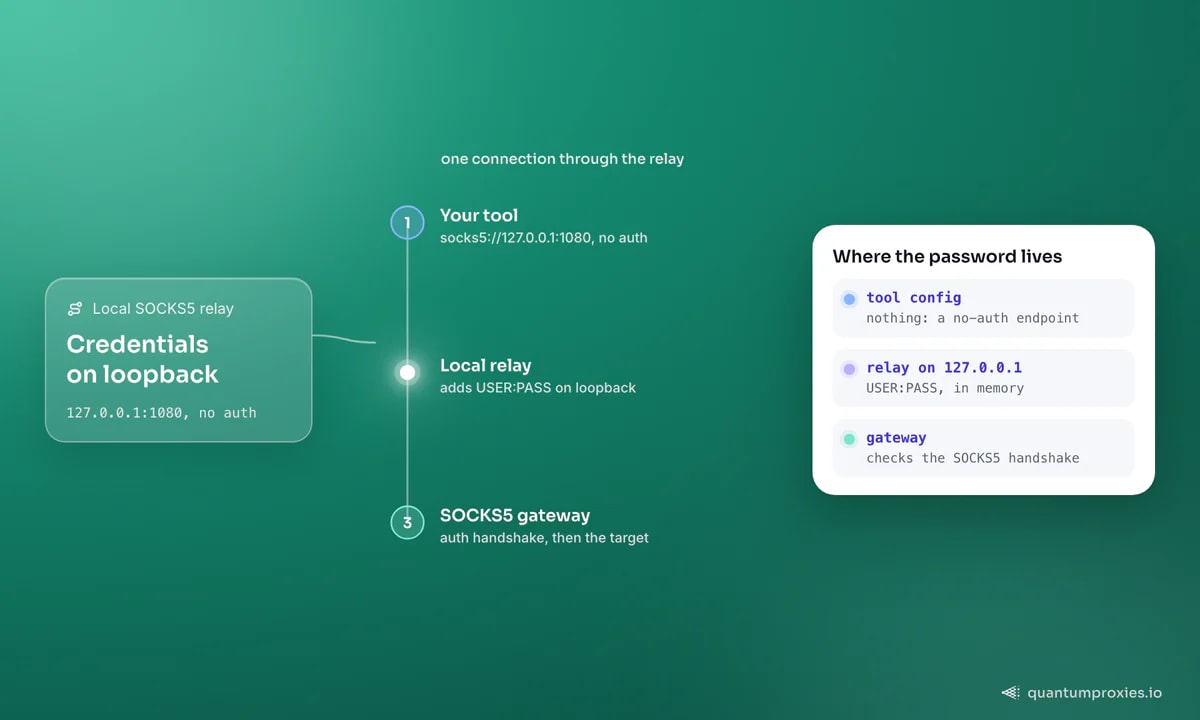
A minimal relay from scratch
If you would rather understand the moving parts, here is the smallest useful version in pure Python. It uses PySocks (pip install PySocks) to open the authenticated upstream leg and pipes bytes both ways. This particular sketch tunnels one target host — enough to scrape a single API through an authenticated SOCKS5 exit — which keeps it short and correct; a general SOCKS5 server that parses the client handshake is what tools like gost already do for you:
import asyncio, socks   # PySocks

UP_HOST, UP_PORT = "residentialpremium.quantumproxies.io", 1080   # your SOCKS5 gateway
UP_USER, UP_PASS = "USER", "PASS"
TARGET = ("example.com", 443)                        # the one host to reach

async def pipe(reader, writer):
    try:
        while data := await reader.read(65536):
            writer.write(data)
            await writer.drain()
    finally:
        writer.close()

async def handle(local_r, local_w):
    # open the upstream leg with SOCKS5 auth (PySocks is blocking -> a thread)
    up = await asyncio.to_thread(
        socks.create_connection, TARGET,
        proxy_type=socks.SOCKS5, proxy_addr=UP_HOST, proxy_port=UP_PORT,
        username=UP_USER, password=UP_PASS,
    )
    up_r, up_w = await asyncio.open_connection(sock=up)
    await asyncio.gather(pipe(local_r, up_w), pipe(up_r, local_w))

async def main():
    server = await asyncio.start_server(handle, "127.0.0.1", 1080)
    async with server:
        await server.serve_forever()

asyncio.run(main())
For a full local SOCKS5 server that any client can point at, the community socks-relay project on GitHub is a good reference: it runs a no-auth or user/pass listener and relays to another SOCKS5 server, in a couple of hundred lines built on PySocks. The socks-to-http-proxy project (Rust) does the HTTP-conversion job if you prefer a compiled binary. Either way you are running the same pattern gost gives you in one line.
When you do NOT need a relay
A relay is a hop you own, and often you can delete the whole problem instead. Skip it when any of these is true:
- Your provider has an HTTP endpoint. HTTP proxies authenticate with Basic auth in the URL, which almost every tool handles. Point at the HTTP gateway and the SOCKS5 auth headache disappears — the trade-offs are covered in SOCKS5 vs HTTP.
- IP whitelisting is available. Register your egress IP with the provider and there are no credentials to relay at all. Every QuantumProxies plan supports whitelisting alongside user:pass on its residential proxies — the simplest fix whenever your IP is stable.
- Your library already does SOCKS5 auth. curl, Python
requests[socks]andhttpx, and most HTTP clients speak authenticated SOCKS5 natively. The relay is only for tools that cannot — chiefly Chromium-based browsers.
# no relay needed — curl authenticates SOCKS5 directly (socks5h resolves DNS
# through the proxy, avoiding leaks):
curl -x socks5h://USER:PASS@residentialpremium.quantumproxies.io:1080 https://httpbin.org/ip

# and HTTP Basic proxy auth is even more widely supported:
curl -x http://USER:PASS@residentialpremium.quantumproxies.io:8080 https://httpbin.org/ip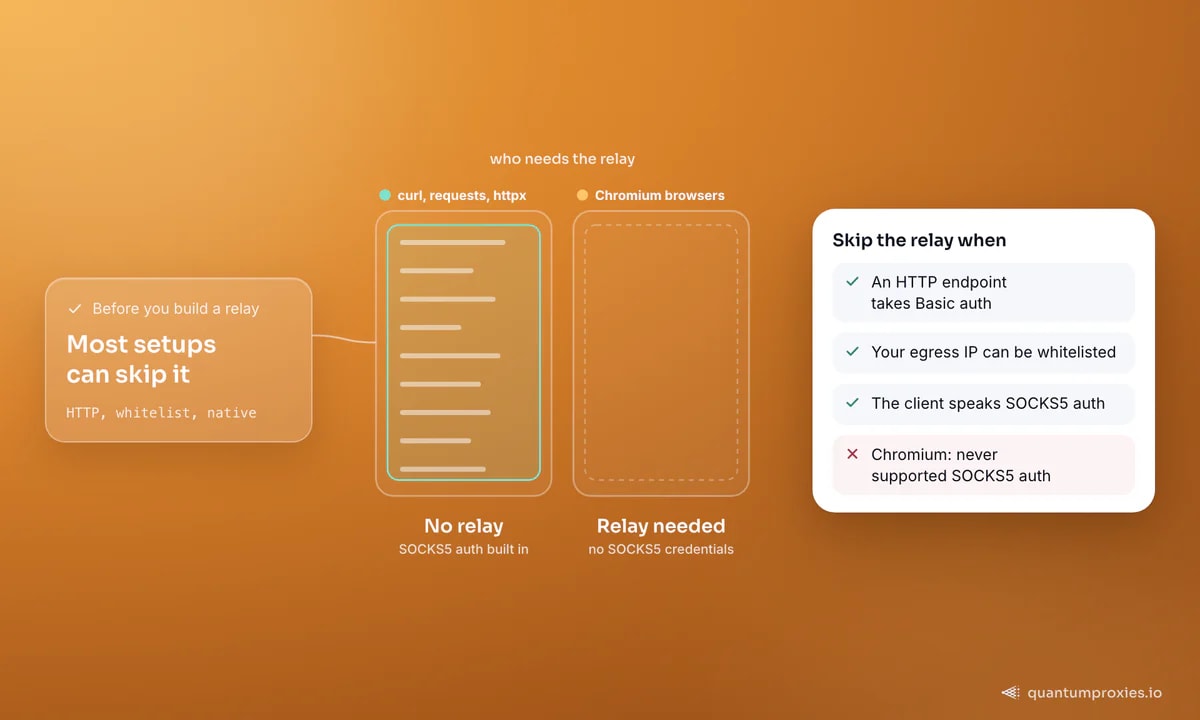
The honest downside
Running your own relay adds a failure point. It is another process to supervise: if it crashes, every request behind it fails, and a bare script gives you no restart, no health check and no logging unless you add them. It has no rotation of its own — it forwards to whatever single upstream you configured, so exit rotation still has to come from the gateway. It adds a hop of latency, and it holds plaintext credentials in memory, which is exactly why it must bind to 127.0.0.1 and never a public interface. For a laptop scraping one site, that is fine. For anything you page on, prefer a fix with no new moving parts — whitelisting or an HTTP endpoint — over a relay you now have to keep alive.
The same relay pattern shows up across the stealth ecosystem, because Chromium's SOCKS5 gap is shared by every browser built on it. If you are wiring this into a specific framework, see Playwright SOCKS5 authentication and our 407 troubleshooting guide for the errors you will hit along the way.
Frequently asked questions
What is a SOCKS5 proxy auth relay?
A small local process that listens with no authentication and forwards each connection to an upstream SOCKS5 proxy using your username and password. It lets tools that cannot send SOCKS5 credentials — chiefly Chromium-based browsers — reach an authenticated proxy by pointing at a loopback address like 127.0.0.1:1080. gost creates one in a single command.
How do I convert a SOCKS5 proxy to an HTTP proxy?
You cannot convert the proxy itself; you run an intermediary that speaks HTTP locally and SOCKS5 upstream. gost -L http://:8080 -F socks5://USER:PASS@host:port exposes a local HTTP proxy that forwards to the authenticated SOCKS5 gateway. Dedicated tools like socks-to-http-proxy and Privoxy do the same job if you prefer them.
Why can't Chrome use an authenticated SOCKS5 proxy?
Chromium has never implemented SOCKS5 username/password authentication — it is a long-standing limitation logged as Chromium bug 40829748. Unauthenticated SOCKS5 works through --proxy-server=socks5://host:port, but there is no way to supply credentials. A local relay or IP whitelisting is the standard fix, and a proxy-auth extension covers HTTP proxies.
Is it safe to send SOCKS5 credentials to a relay?
Only over loopback. SOCKS5 is not encrypted and transmits credentials in cleartext, so a relay must bind to 127.0.0.1 and never a public interface — that keeps the authenticated leg on your own machine. The encrypted tunnel to the target is established end-to-end for HTTPS regardless, so the relay only ever sees TLS bytes it cannot read.
Reach for a relay only when the tool leaves you no choice. gost is the one-line answer, PySocks the from-scratch one — but the fastest fix for most people is to whitelist an IP or use an HTTP endpoint and run nothing extra at all. Fewer moving parts, fewer 3 a.m. pages.