Playwright Proxy Integration: Browser, Context and Rotation
Playwright is the only major browser framework where authenticated proxies just work — credentials are first-class config. The leverage is in contexts: one browser, a different exit IP per job. Here is the full pattern.
Playwright is the only major browser automation framework where an authenticated proxy is a first-class citizen: username and password are plain config fields, no extension hacks, no auth dialogs, no wrapper libraries. That makes the basic Playwright proxy setup a five-line job in Node or Python. The real leverage sits one level deeper — per-context proxies let a single browser process run many isolated sessions, each with its own exit IP, which is the cheapest rotation architecture any framework offers. This guide covers both layers, the SOCKS5 and localhost gotchas, what proxying does to your bandwidth bill, and where stealth genuinely ends.
Playwright proxy at browser launch
Pass a proxy object to launch() and every page in the browser routes through it. Note the shape: the server URL carries no credentials — they go in separate username and password fields, which is how Playwright avoids the auth-popup problem that plagues Selenium and Puppeteer:
const { chromium } = require('playwright');

(async () => {
  const browser = await chromium.launch({
    proxy: {
      server: 'http://residentialpremium.quantumproxies.io:8080',
      username: 'USER',
      password: 'PASS',
    },
  });
  const page = await browser.newPage();
  await page.goto('https://httpbin.org/ip');
  console.log(await page.textContent('body')); // proxy exit IP
  await browser.close();
})();
The Python API mirrors it exactly:
from playwright.sync_api import sync_playwright

with sync_playwright() as p:
    browser = p.chromium.launch(proxy={
        "server": "http://residentialpremium.quantumproxies.io:8080",
        "username": "USER",
        "password": "PASS",
    })
    page = browser.new_page()
    page.goto("https://httpbin.org/ip")
    print(page.text_content("body"))
    browser.close()
If your credentials live in a standard http://user:pass@host:port string, split it with the URL class (new URL() in Node, urllib.parse in Python) rather than string surgery — passwords with special characters survive that way. One test-runner caveat: use.proxy in playwright.config.ts covers tests, but there are long-standing reports of config-level proxy settings being ignored in mixed setups, so for scraping scripts always set the proxy on launch() or the context directly.
Per-context proxies: rotation without new browsers
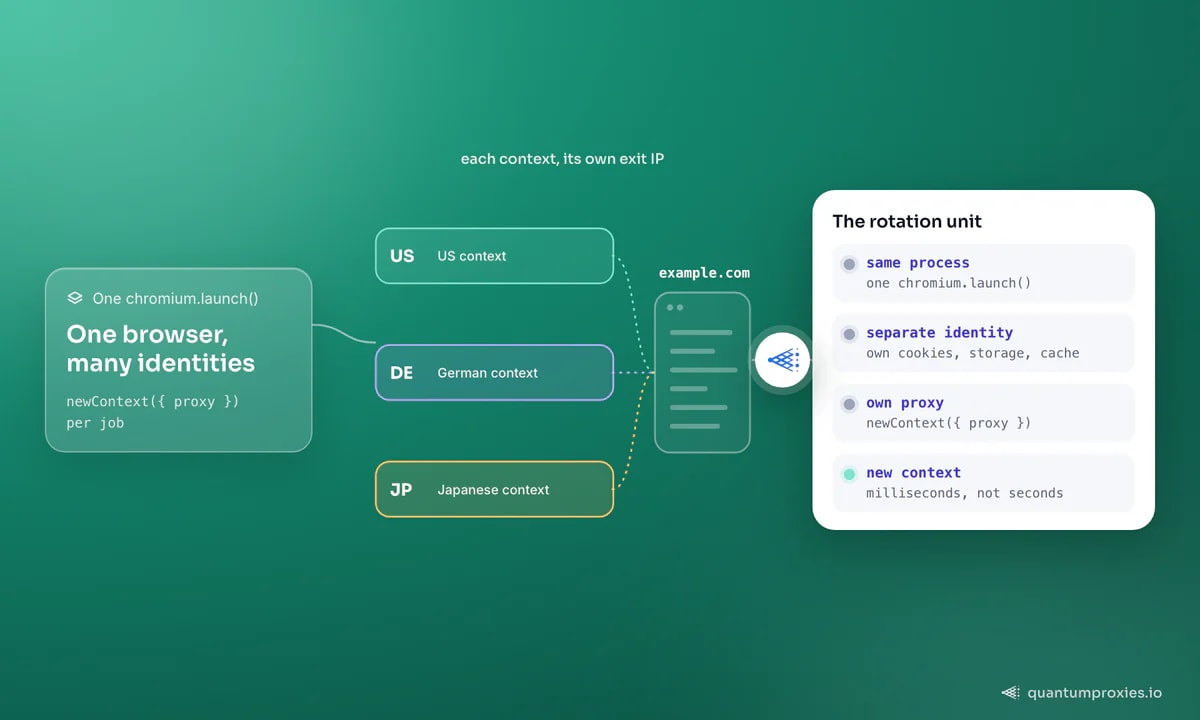
A BrowserContext is an isolated browser-within-the-browser: separate cookies, storage and cache, sharing only the process. Contexts accept their own proxy option, and creating one takes milliseconds versus seconds for a full launch — so the rotation pattern is one browser, context-per-job:
const { chromium } = require('playwright');

const PROXY = {
  server: 'http://residentialpremium.quantumproxies.io:8080',
  username: 'USER',
  password: 'PASS',
};

(async () => {
  const browser = await chromium.launch();
  const urls = ['https://example.com/a', 'https://example.com/b'];

  for (const url of urls) {
    const context = await browser.newContext({ proxy: PROXY });
    const page = await context.newPage();
    try {
      await page.goto(url, { timeout: 30000 });
      // ...extract...
    } finally {
      await context.close(); // frees cookies, cache, session
    }
  }
  await browser.close();
})();
Pointed at a rotating gateway, every context exits from a different IP in a 90M+ residential pool without any list management — that is what rotating proxies do server-side. When a job needs the same IP across several pages (login plus checkout), request a sticky session via the username parameters and the exit holds for the session window. Contexts also isolate failures: a banned exit dies with its context instead of poisoning the whole browser.
The same pattern gives you geo-targeting for free. Because the proxy is a context option, one browser can hold a US context, a German context and a Japanese context simultaneously — each seeing localized prices, search results and consent banners from a local exit IP. For price comparison and ad verification work, that replaces three cloud regions with three lines of configuration.
SOCKS5, bypass rules and the localhost trap
- SOCKS5 works, SOCKS5 auth does not. Chromium has no SOCKS credential support, so
server: 'socks5://...'connects only to unauthenticated endpoints. With authenticated SOCKS5 proxies, either switch to the HTTP port of the same gateway or whitelist your machine's IP so no credentials are needed. - Bypass hosts with
bypass: '*.internal.example.com, localhost'— traffic to those hosts goes direct. Useful when your script also talks to internal services that must not transit the proxy. - Localhost is special. Chromium skips proxies for loopback addresses by default, so testing against a local mock server appears to 'ignore' your proxy. That is the browser, not Playwright — test against an external endpoint like httpbin.org/ip instead.
- Proxy 'not working' checklist: credentials in the fields (not the server URL), scheme present on the server value, and the exit verified by loading an IP echo page before blaming the target site.
Cut the bandwidth before you scale
A rendering browser downloads everything — images, fonts, analytics, ad scripts — and through metered residential traffic you pay for all of it. Blocking non-essential resource types routinely cuts per-page transfer by half or more, and Playwright's routing makes it a one-liner on the context. More patterns in our guide to reducing proxy bandwidth costs:
await context.route('**/*', (route) => {
  const type = route.request().resourceType();
  if (type === 'image' || type === 'font' || type === 'media') {
    return route.abort();
  }
  return route.continue();
});
Measure the effect rather than assuming it: subscribe to the context's response events, sum transfer sizes for a sample of pages with and without the route, and you get your real per-page GB cost — the number that decides whether a crawl of a million pages is a rounding error or a budget line.
Stealth limits: what a proxy cannot fix
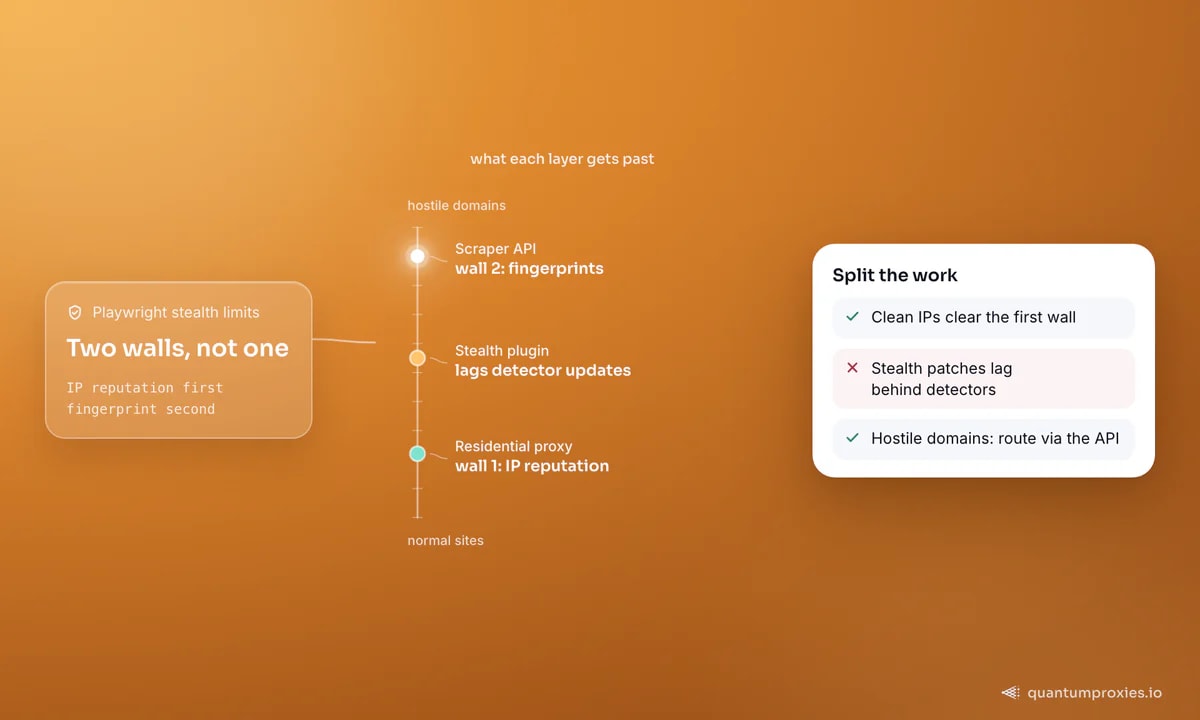
Be honest about the ceiling. A residential exit solves IP reputation — the first and biggest filter — but Playwright still presents automation tells above the network layer: headless rendering quirks, CDP artefacts, and fingerprint surfaces that anti-bot vendors probe directly. Stealth plugins patch some signals and lag behind detector updates on others; it is an arms race you inherit, not a setting you enable. The pragmatic split: run Playwright through residential proxies for the long tail of normal sites, and route the genuinely hostile domains through a Scraper API that manages fingerprints, rendering and retries as its whole job and hands back HTML, markdown or structured JSON. Your Playwright code keeps doing what it is uniquely good at — interaction flows — while fetch-and-parse jobs move to the API. The same calculus applies to Puppeteer and Selenium; no framework swap fixes a fingerprint problem.
Frequently asked questions
How do I set a proxy in Playwright Python?
Pass a proxy dict to launch(): p.chromium.launch(proxy={"server": "http://host:port", "username": "USER", "password": "PASS"}). The same dict works on browser.new_context() for per-context routing. Credentials always go in the separate fields, never inside the server URL.
Can Playwright use a different proxy per context?
Yes — pass a proxy option to each newContext() call. Contexts share nothing except the browser process, so two contexts with different proxies behave like two unrelated browsers to target sites. This is the standard rotation pattern: one launch, then a fresh context per job or per identity.
Does Playwright support SOCKS5 proxy authentication?
No. Playwright passes SOCKS5 to the browser, and Chromium has no mechanism for SOCKS credentials, so authenticated SOCKS5 endpoints fail. Use the HTTP(S) port of the same proxy gateway with username and password fields, or authenticate by IP whitelist and keep the SOCKS5 scheme.
What is the correct Playwright proxy format?
An object with a server field (scheme://host:port — http, https or socks5) plus optional username, password and bypass fields. Do not put credentials inside the server URL; Playwright expects them separately, and passwords with special characters only survive in the dedicated fields.
Why is my Playwright proxy not working on localhost?
Chromium bypasses proxies for loopback addresses by default, so requests to localhost or 127.0.0.1 go direct and appear to ignore your configuration. Verify the proxy against an external URL such as httpbin.org/ip. In test setups, also prefer setting the proxy at launch() rather than relying on config-file options.
Playwright's proxy story is the cleanest in the ecosystem: credentials as config, contexts as the rotation unit, routing as the bandwidth valve. Get the IP quality right underneath it and the framework fades into the background — which is exactly what good infrastructure should do.