Selenium Proxy Authentication: 4 Setups That Actually Work
Chrome pops an auth dialog Selenium cannot touch, and the credentials-in-URL trick silently fails. Here are the four setups that actually authenticate a proxy in Selenium — ranked by how little they will hurt.
Selenium proxy authentication is a trap disguised as a one-liner. The --proxy-server Chrome flag accepts a proxy address happily — and silently ignores any username and password you embed in it. Chrome then pops a native auth dialog that WebDriver cannot see, your script hangs, and the top Stack Overflow answer you find (113+ votes) solves it with a Manifest V2 extension that modern Chrome no longer loads. This guide covers the four setups that authenticate a proxy in Selenium today — IP whitelisting, a Manifest V3 extension, selenium-wire, and knowing when to hand the whole browser problem to an API.
Why basic Selenium proxy authentication fails
Three facts explain every failed attempt. First, Chromium strips credentials from --proxy-server=http://user:pass@host:port — the flag format simply has no credential support. Second, the proxy's 407 Proxy Authentication Required challenge surfaces as a native dialog, outside the DOM, where send_keys cannot reach. Third, the old DesiredCapabilities route (socksUsername / socksPassword) only ever applied to SOCKS proxies and never worked for HTTP ones — the config that 'looks right' and does nothing. So the real options all avoid the dialog entirely.
Method 1: IP whitelisting — zero code, zero dialogs
If your scraper runs from a machine with a stable public IP, skip credentials altogether: register that IP in your proxy provider's dashboard, and the gateway authenticates you by source address. Every QuantumProxies plan supports IP whitelisting alongside user:pass. The Selenium side becomes the plain flag — which has always worked fine without auth:
from selenium import webdriver

options = webdriver.ChromeOptions()
options.add_argument("--proxy-server=http://residentialboson.quantumproxies.io:PORT")
options.add_argument("--headless=new")

driver = webdriver.Chrome(options=options)
driver.get("https://httpbin.org/ip")
print(driver.find_element("tag name", "body").text)  # proxy exit IP
driver.quit()
Always verify the exit before trusting a run: load an IP-echo endpoint and confirm the address belongs to the proxy, because a misconfigured flag fails silently and Chrome just connects directly. The limit of whitelisting is topological: it authenticates a machine, not a script. Ephemeral cloud runners, containers behind NAT and CI machines with changing IPs need one of the methods below.
Method 2: a Manifest V3 Chrome extension
The classic fix generates a tiny Chrome extension that sets the proxy and answers the auth challenge via chrome.webRequest.onAuthRequired. The famous 2019 snippet uses Manifest V2, which Chrome has now retired — the modern version needs manifest_version: 3, a service worker, and the webRequestAuthProvider permission. This builds and loads one at runtime:
import json, os, tempfile
from selenium import webdriver

HOST, PORT = "residentialpremium.quantumproxies.io", "8080"
USER, PASS = "USER", "PASS"

manifest = {
    "name": "Proxy Auth", "version": "1.0", "manifest_version": 3,
    "permissions": ["proxy", "webRequest", "webRequestAuthProvider"],
    "host_permissions": ["<all_urls>"],
    "background": {"service_worker": "worker.js"},
}

worker = """
chrome.proxy.settings.set({
  value: { mode: "fixed_servers", rules: {
    singleProxy: { scheme: "http", host: "%s", port: parseInt("%s") },
    bypassList: ["localhost"] } },
  scope: "regular"
}, function() {});
chrome.webRequest.onAuthRequired.addListener(
  function(details) {
    return { authCredentials: { username: "%s", password: "%s" } };
  },
  { urls: ["<all_urls>"] },
  ["blocking"]
);
""" % (HOST, PORT, USER, PASS)

ext_dir = tempfile.mkdtemp()
with open(os.path.join(ext_dir, "manifest.json"), "w") as f:
    json.dump(manifest, f)
with open(os.path.join(ext_dir, "worker.js"), "w") as f:
    f.write(worker)

options = webdriver.ChromeOptions()
options.add_argument("--load-extension=" + ext_dir)
options.add_argument("--headless=new")
driver = webdriver.Chrome(options=options)
driver.get("https://httpbin.org/ip")
Two footguns. Extensions only load in the new headless mode — plain --headless fails with a cryptic 'failed to wait for extension background page' error, so --headless=new is mandatory. And loading an unpacked directory via --load-extension is more reliable across Chrome versions than packing a zip. If you would rather not maintain this, the selenium-authenticated-proxy package on PyPI generates the extension for you from a single proxy URL.
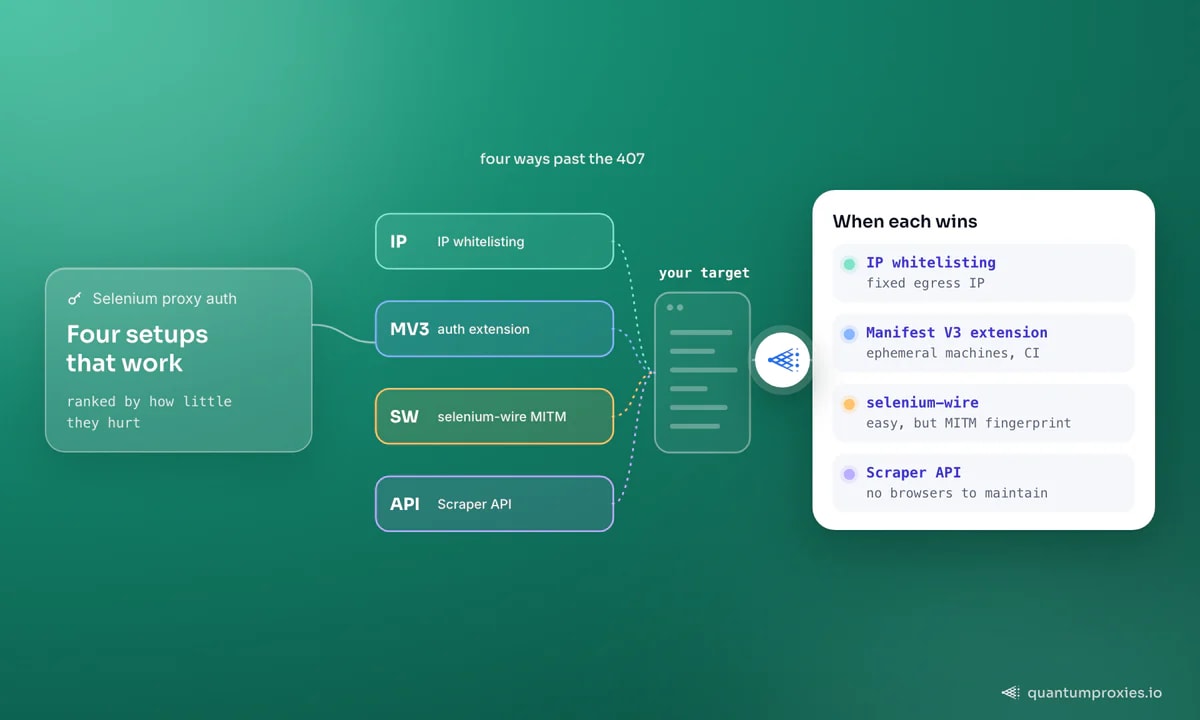
Method 3: selenium-wire, and its trade-offs
selenium-wire wraps WebDriver with a local man-in-the-middle proxy, which makes authenticated upstream proxies — including SOCKS5 — a plain options dict:
# pip install selenium-wire
from seleniumwire import webdriver

options = {
    "proxy": {
        "http": "http://USER:PASS@residentialpremium.quantumproxies.io:8080",
        "https": "http://USER:PASS@residentialpremium.quantumproxies.io:8080",
        "no_proxy": "localhost,127.0.0.1",
    }
}

driver = webdriver.Chrome(seleniumwire_options=options)
driver.get("https://httpbin.org/ip")
Know what you are buying. The project was archived by its maintainer in early 2024 and receives no updates, and because it decrypts traffic locally, the target sees selenium-wire's TLS handshake rather than Chrome's — a mismatch that JA3/JA4 fingerprinting systems flag even when your IP is spotless. It remains genuinely useful for request inspection during development and for Firefox, where the extension trick does not exist. For production scraping on protected sites, prefer methods 1-2, or move up a layer.
Firefox, and the auth gap
Firefox accepts an unauthenticated proxy cleanly through profile preferences (network.proxy.type = 1 plus host and port settings), but has no equivalent of Chrome's extension trick for answering the credential dialog from WebDriver. In practice, Firefox users pick IP whitelisting or selenium-wire. If your only reason for Firefox was its proxy handling, that reason no longer holds.
When to stop patching Selenium and switch to an API
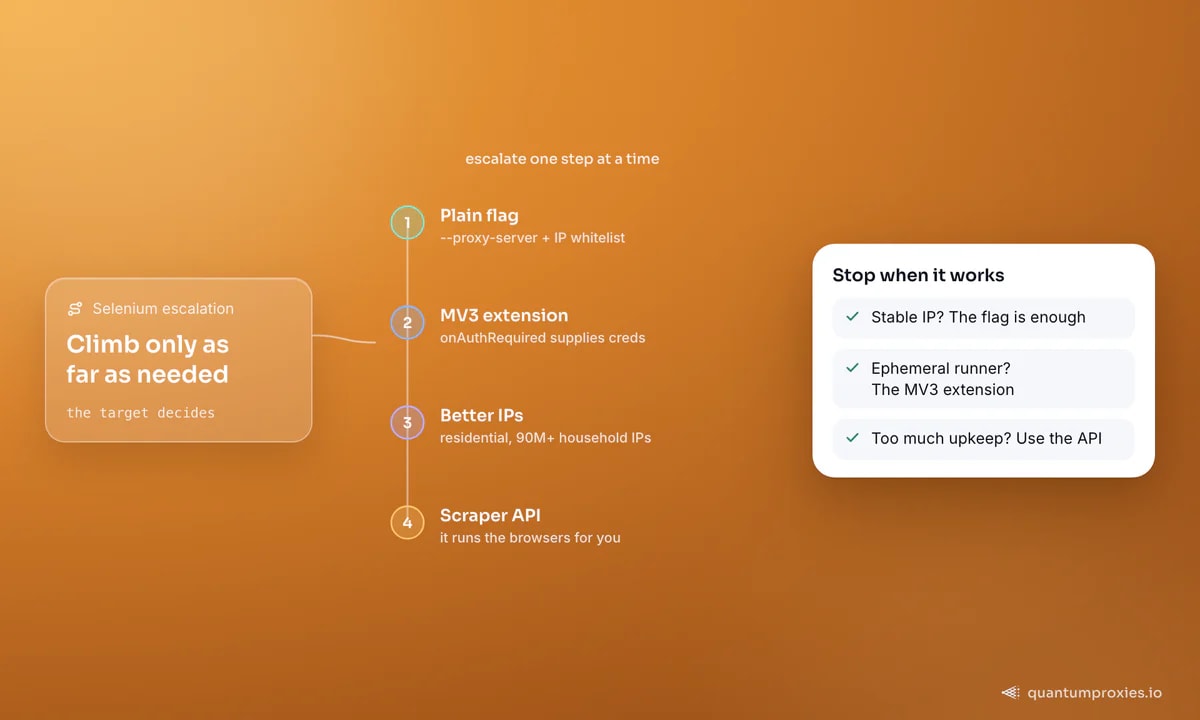
Auth is the first tax, not the last. A Chrome instance costs hundreds of MB of RAM, so a few dozen concurrent sessions saturate a server; ChromeDriver versions chase Chrome releases; and anti-bot vendors detect vanilla Selenium regardless of the IP behind it — navigator.webdriver and CDP artefacts give it away. Two upgrades change the economics. First, run your browsers through residential proxies so IP reputation stops being the reason you are blocked — 90M+ household IPs with per-request rotation or sticky sessions for logged-in flows. Second, when maintaining browsers stops being worth it, a Scraper API collapses the whole stack into one HTTP call: it renders JavaScript on demand, manages IPs and retries internally, and returns HTML, markdown or structured JSON. The same trade-off applies to Selenium's cousins — see our guides to Playwright proxy integration and Puppeteer proxy setup before assuming a framework switch will fix a detection problem.
Frequently asked questions
How do I set a proxy with authentication in Selenium ChromeDriver?
Either whitelist your machine's IP with the proxy provider and pass a plain --proxy-server flag, or load a small Manifest V3 extension that sets the proxy and supplies credentials through chrome.webRequest.onAuthRequired. Embedding user:pass@ in the flag does not work — Chromium ignores it.
Why does Chrome show a proxy login popup with Selenium?
The proxy answered with 407 and Chrome is asking a human for credentials. The dialog is native UI, invisible to WebDriver, so no selector or send_keys call can fill it. The fix is to authenticate before the dialog can appear: IP whitelisting, an auth extension, or a MITM layer like selenium-wire.
Does selenium-wire still work in 2026?
It still installs and functions for many workloads, but the project was archived in early 2024 and gets no maintenance. Its MITM design also replaces Chrome's TLS fingerprint with a Python one, which modern anti-bot systems detect. Treat it as a debugging tool, not the foundation of a production scraper.
How do I use an authenticated proxy with Firefox in Selenium?
Firefox profile preferences configure the proxy address but cannot answer the credential prompt, and there is no extension workaround as on Chrome. Use IP whitelisting so no credentials are needed, or route Firefox through selenium-wire, which handles the upstream authentication locally.
Does this work the same in Java and C#?
Yes — the mechanics live in Chrome, not the language binding. IP whitelisting plus --proxy-server is identical everywhere, and the Manifest V3 extension approach works from Java or C# by writing the same two files and adding --load-extension to ChromeOptions. Only selenium-wire is Python-specific; other languages substitute a local MITM proxy such as BrowserMob.
The short version: never fight the auth dialog. Whitelist when your IP is stable, generate an MV3 extension when it is not, keep selenium-wire for inspection work — and when browser maintenance outgrows the data it produces, promote the job to an API and keep your evenings.