Puppeteer Proxy Setup: Flags, Auth, Rotation and Reality
The launch flag is easy; the 407 that follows is where most Puppeteer proxy setups die. Here is the full pattern — page.authenticate, context rotation, proxy-chain — and the truth about per-page proxies and headless detection.
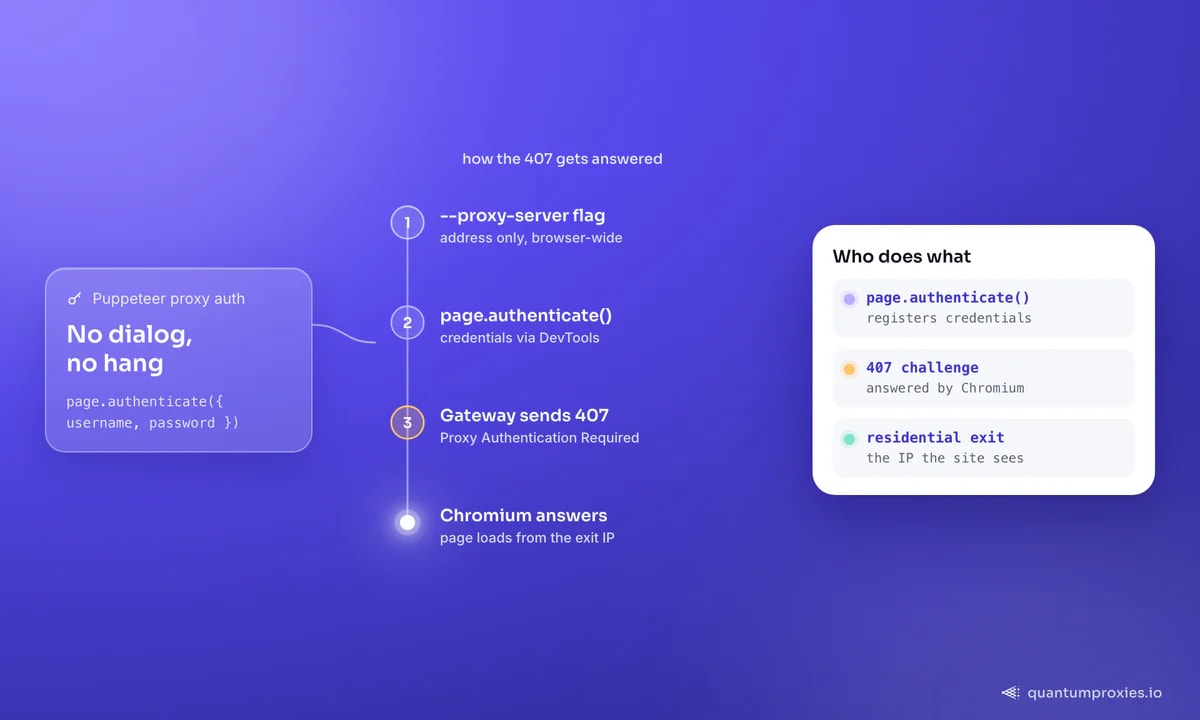
Puppeteer proxy setup starts with one launch flag and, for most people, stops one step later at a wall: the proxy answers 407 Proxy Authentication Required, because --proxy-server has no way to carry credentials. The fix is built in — page.authenticate() — but around it sits a minefield of half-working advice: npm packages that quietly reroute your traffic through Node.js, SOCKS schemes Chromium will not authenticate, and a localhost bypass that makes working proxies look dead. This guide walks the setup that holds up in production: flags, auth, rotation with browser contexts, proxy-chain for the awkward cases, and an honest section on headless detection.
Puppeteer proxy setup: the base pattern
The proxy is a Chromium launch argument, so it applies to the whole browser. Credentials go through page.authenticate(), which answers the proxy's 407 challenge via the DevTools protocol — call it before any navigation:
const puppeteer = require('puppeteer');

(async () => {
  const browser = await puppeteer.launch({
    args: ['--proxy-server=http://residentialpremium.quantumproxies.io:8080'],
  });
  const page = await browser.newPage();
  await page.authenticate({ username: 'USER', password: 'PASS' });

  await page.goto('https://httpbin.org/ip', { waitUntil: 'domcontentloaded' });
  console.log(await page.evaluate(() => document.body.innerText)); // exit IP
  await browser.close();
})();
Four details save hours of debugging:
- Build the flag with a template literal or concatenation, not plain quotes. A classic Stack Overflow bug:
"--proxy-server =..."in double quotes with an interpolation placeholder never substitutes the variable — and the stray space breaks parsing too. - Include the scheme.
--proxy-server=socks5://host:portfor SOCKS, otherwise Chromium assumes HTTP. - Do not embed
user:pass@in the flag. Chromium ignores it; onlypage.authenticate()(or IP whitelisting) authenticates. - Localhost bypasses the proxy. Chromium skips proxies for loopback URLs — a puzzle documented in Puppeteer issue #3711. Add
--proxy-bypass-list=<-loopback>if you genuinely need to proxy local traffic; otherwise just test against an external URL.
Rotating proxies with browser contexts
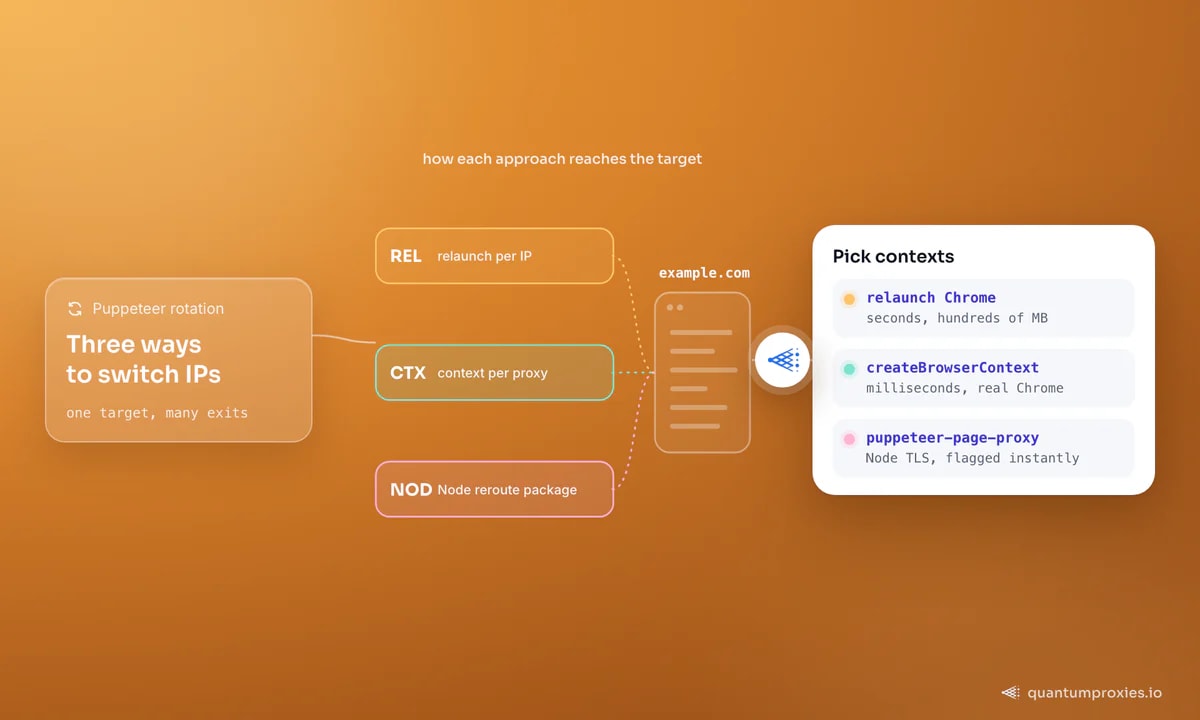
Relaunching Chrome per IP costs seconds and hundreds of MB each time. Browser contexts fix that: since Puppeteer v22 the API is browser.createBrowserContext() (replacing the old incognito variant), it accepts a proxyServer option, and a context is created in milliseconds with its own cookies and storage:
const puppeteer = require('puppeteer');

(async () => {
  const browser = await puppeteer.launch();
  const jobs = ['https://example.com/a', 'https://example.com/b'];

  for (const url of jobs) {
    const context = await browser.createBrowserContext({
      proxyServer: 'http://residentialpremium.quantumproxies.io:8080',
    });
    const page = await context.newPage();
    await page.authenticate({ username: 'USER', password: 'PASS' });
    try {
      await page.goto(url, { timeout: 30000 });
      // ...extract...
    } finally {
      await context.close();
    }
  }
  await browser.close();
})();
Against a rotating gateway, each context naturally exits from a different address in the pool — with rotating residential proxies that is 90M+ IPs across 200+ countries behind one hostname, and a sticky-session username parameter pins an exit when a multi-page flow needs continuity. This is the same context-per-job architecture we recommend for Playwright; Puppeteer just spells the auth step explicitly.
Two habits keep rotation honest. Log the exit IP per context during development — hit an IP-echo endpoint at context start and store it with your scraped rows, so when a target starts soft-blocking you can tell whether one exit or one fingerprint is the culprit. And bound your concurrency: each context is cheap, but every open page still holds renderer memory, so a semaphore around context creation beats an unbounded loop the first time a job list grows to thousands of URLs.
proxy-chain: the local bridge for awkward auth
Two cases break the flag-plus-authenticate pattern: authenticated SOCKS5 (Chromium has no SOCKS credential support at all) and tools that only accept a bare proxy URL with no auth step. The proxy-chain npm package solves both by starting a local, credential-free proxy that forwards to your authenticated upstream:
const puppeteer = require('puppeteer');
const proxyChain = require('proxy-chain');

(async () => {
  const upstream = 'http://USER:PASS@residentialpremium.quantumproxies.io:8080';
  const localUrl = await proxyChain.anonymizeProxy(upstream);
  // localUrl is something like http://127.0.0.1:54321 — no credentials needed

  const browser = await puppeteer.launch({
    args: ['--proxy-server=' + localUrl],
  });
  const page = await browser.newPage();
  await page.goto('https://httpbin.org/ip');

  await browser.close();
  await proxyChain.closeAnonymizedProxy(localUrl, true);
})();
Crucially, the page's requests still leave from Chrome itself — proxy-chain only relays bytes, so your TLS fingerprint stays a real browser's. That distinction is the next section.
Per-page proxies: the honest answer
Puppeteer has no native per-page proxy, and the popular workarounds — puppeteer-page-proxy, puppeteer-proxy — intercept every request and re-issue it from Node.js with an HTTP library, then feed the response back to the browser. Three consequences: the target now sees a Node TLS handshake instead of Chrome's, which JA3/JA4 fingerprinting flags instantly on protected sites; every request pays a round trip through Node; and both packages are effectively unmaintained, with installation broken out of the box per their own issue trackers. If you need different IPs for different pages, use one context per proxy as above — same effect, real Chrome traffic, supported API.
Headless detection reality
A proxy fixes the network layer; it cannot make headless Chrome invisible. The old headless mode announced itself with a HeadlessChrome User-Agent token; the new headless (Puppeteer's default since v22) shares the real browser's architecture and closes much of that gap, but detectors still probe navigator.webdriver, CDP side effects and rendering quirks — and stealth plugins patch yesterday's checks, not tomorrow's. Order your fixes by return on effort: a clean residential IP first, because reputation is the cheapest filter for sites to run and the one your code cannot fake; sane headers and pacing second (our guide on avoiding CAPTCHAs covers the trigger signals); and when a hardened target still wins, route that domain through a Scraper API that handles rendering, fingerprints and retries and returns clean HTML, markdown or JSON — one HTTP call instead of a fleet of patched browsers.
Frequently asked questions
How do I authenticate a proxy in Puppeteer?
Set the address with args: ['--proxy-server=http://host:port'] at launch, then call await page.authenticate({ username, password }) on every page before navigating. Credentials embedded in the flag URL are ignored by Chromium. For SOCKS5 with auth, bridge through proxy-chain instead, since Chromium cannot send SOCKS credentials.
Can Puppeteer use a different proxy per page?
Not natively — the launch flag is browser-wide. The supported equivalent is one browser context per proxy via browser.createBrowserContext({ proxyServer }), with pages inside each context. Packages that promise true per-page proxies reroute requests through Node.js, changing your TLS fingerprint and getting flagged by serious anti-bot systems.
Does Puppeteer support SOCKS5 proxies?
Yes for unauthenticated endpoints: pass --proxy-server=socks5://host:port. Authenticated SOCKS5 fails because Chromium has no SOCKS credential mechanism and page.authenticate() only answers HTTP 407 challenges. Workarounds: use the gateway's HTTP port with authentication, whitelist your IP, or run proxy-chain as a local bridge.
How do I rotate proxies in Puppeteer?
Create a fresh browser context per job with createBrowserContext({ proxyServer }) and point it at a rotating gateway — each context then exits from a new IP automatically, with no proxy list to manage. Relaunching the whole browser per IP also works but costs seconds and hundreds of MB of RAM per rotation.
Why does my Puppeteer proxy not work for localhost?
Chromium bypasses proxies for loopback addresses by design, so requests to localhost or 127.0.0.1 go direct — behaviour that surprised enough people to become a numbered Puppeteer issue. Add --proxy-bypass-list=<-loopback> to force proxying, or simply verify your proxy against an external IP-echo endpoint.
The durable pattern is small: flag for the address, page.authenticate() for the credentials, contexts for rotation, proxy-chain for the corner cases — and scepticism for any package that moves your requests out of the browser. Give that stack clean residential exits and Puppeteer stays boring, which is the highest compliment infrastructure can earn.