How to Avoid CAPTCHAs When Scraping (Cut the Signals, Not Solve)
Solving CAPTCHAs is slow, costs money, and treats the symptom. The durable fix is to never summon one: lower your risk score by cleaning the signals that trigger it.
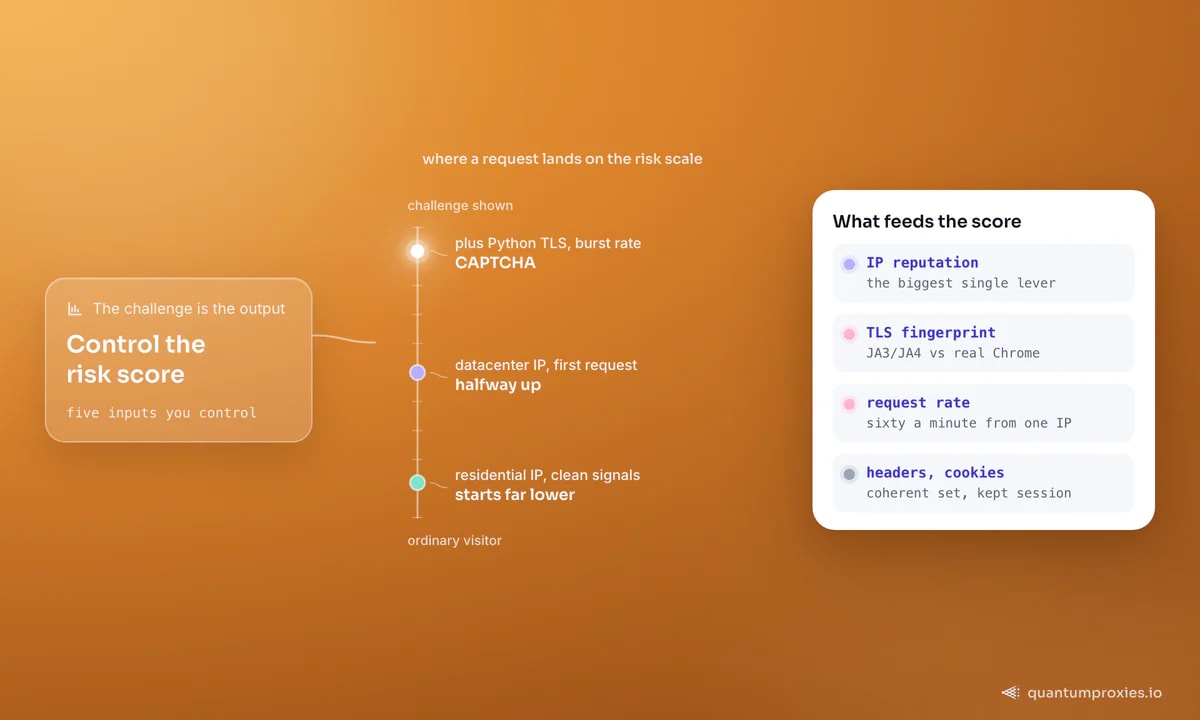
The instinct when a scraper hits a CAPTCHA is to reach for a solving service. It is the wrong instinct. A CAPTCHA is not a wall you break through - it is the visible output of a risk score that already decided you look automated. Solving it is slow, costs money per solve, and does nothing to lower that score, so the next request gets challenged again. The durable answer to how to avoid CAPTCHAs when scraping is to stop triggering them: clean the handful of signals that push your score into the red.
Why solving is the losing move
Consider how reCAPTCHA v2 actually works. The site embeds a public site key; solving the challenge writes a long token into a hidden g-recaptcha-response field that the server later verifies. That token is single-use by design - a replay-protection measure - so you cannot solve once and reuse it. Solving services (human farms or ML solvers) return a fresh token per challenge, which means you pay, and wait seconds, every single time the score stays high. You have automated the symptom, not removed the cause.
There is a subtler trap too: a challenge is shown precisely because the page owner does not want automated traffic on that route. If a documented API exists, use it. If not, the pragmatic goal is to look enough like an ordinary visitor that the risk engine never escalates. That is entirely about the signals you send.
Signal 1: IP quality is the biggest lever
The single strongest input is where the request comes from. Datacenter IP ranges are catalogued and pre-scored; a fresh request from one can start halfway up the risk scale before you send a byte of payload. Residential IPs - real household connections - start far lower. This is why the classic field advice is: run from residential IPs, and the moment a challenge appears, rotate to a new exit rather than hammering the burned one. A residential proxy pool with per-request rotation across 90M+ IPs makes that automatic - you never scrape a whole job from one address.
Before you trust any pool, measure it. Our free IP quality score checker shows the fraud/reputation score an anti-bot engine would assign an exit - a datacenter IP with a high fraud score is a CAPTCHA waiting to happen. If you want the full picture of why reputation beats fingerprint on most sites, our post on why fraud score matters goes deeper.
import requests

# Detect a challenge in the response and rotate the exit instead of retrying
CHALLENGE_MARKERS = ("g-recaptcha", "hcaptcha", "/cdn-cgi/challenge", "captcha-delivery")

def looks_challenged(resp):
    if resp.status_code in (403, 429, 503):
        return True
    body = resp.text[:20000].lower()
    return any(m in body for m in CHALLENGE_MARKERS)

def fetch(url):
    # rotating gateway hands out a new residential IP each request
    proxy = "http://USER:PASS@residentialpremium.quantumproxies.io:8080"
    r = requests.get(url, proxies={"http": proxy, "https": proxy}, timeout=20)
    if looks_challenged(r):
        return None  # burn this exit, the gateway rotates on the next call
    return r
Signal 2: your TLS fingerprint gives you away
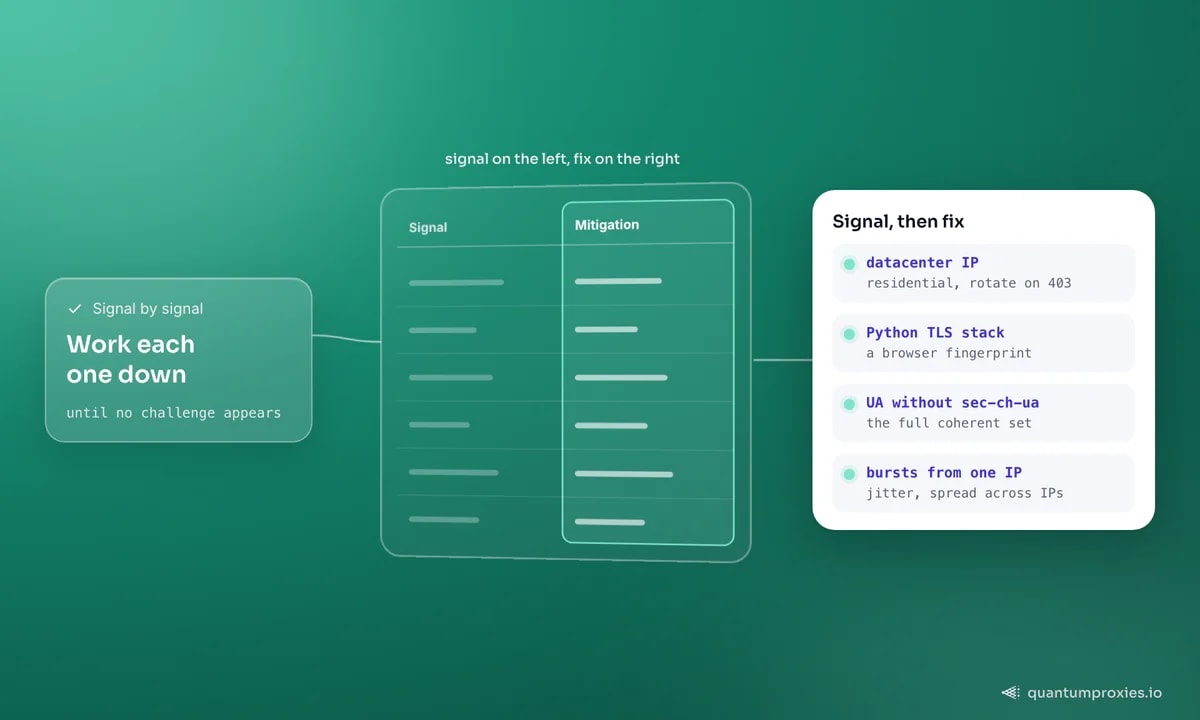
Even on a clean IP, the TLS handshake outs you. A raw request from Python's or Go's default stack produces a JA3/JA4 fingerprint that looks nothing like Chrome's - a real browser advertises a specific cipher order, extensions and ALPN values that scripting libraries do not replicate. Anti-bot engines hash that handshake and match it against known-bot signatures. The fix is to send a genuine browser fingerprint, either via a TLS-impersonation client or by running an actual browser engine. We cover the mechanics in how JA3/JA4 fingerprinting works.
Signal 3: header coherence
Headers must agree with each other and with the fingerprint. A request that claims to be Chrome 120 on Windows but omits the matching sec-ch-ua client hints, sends headers in the wrong order, or pairs a mobile User-Agent with a desktop TLS profile is trivially inconsistent. Do not just set a User-Agent - send the full coherent set a real browser would, and keep it consistent with the platform you are impersonating.
# Coherent header set that matches a Chrome-on-Windows fingerprint
headers = {
    "User-Agent": "Mozilla/5.0 (Windows NT 10.0; Win64; x64) "
                  "AppleWebKit/537.36 (KHTML, like Gecko) "
                  "Chrome/120.0.0.0 Safari/537.36",
    "Accept": "text/html,application/xhtml+xml,application/xml;q=0.9,*/*;q=0.8",
    "Accept-Language": "en-US,en;q=0.9",
    "sec-ch-ua": '"Not_A Brand";v="8", "Chromium";v="120", "Google Chrome";v="120"',
    "sec-ch-ua-platform": '"Windows"',
    "Upgrade-Insecure-Requests": "1",
}
Signal 4: behaviour and pace
Request frequency per IP is a primary rate signal. Sixty requests a minute from one address reads as a bot; the same sixty spread across sixty IPs reads as sixty people. Slow down, add jitter between requests, and spread volume across the pool. On JavaScript-heavy targets, behavioural scoring also watches for mouse movement, scroll and dwell time - if you are driving a headless browser, do not fire clicks instantly. Rotation reduces IP-based blocking; it does not excuse a machine-gun request pattern. The complete discipline is in our anti-ban checklist.
Signal 5: session and cookie continuity
There is a fifth, quieter signal: continuity. A request that arrives with no cookies, no referrer and no history looks like it materialised out of nowhere - which is exactly what a naive bot does. Real users accumulate a session: they land on a page, get cookies set, and carry them forward across clicks. Persist cookies within a session, enter through plausible pages rather than deep-linking cold into a protected route, and keep one identity for the length of a coherent flow. Rotating the IP mid-login does the opposite - it shreds continuity and pushes the score up - which is precisely why sticky sessions exist for stateful steps like carts and logins.
When a challenge is unavoidable
Some routes gate every visitor - a login wall, a checkout, an aggressively protected search. There, no amount of signal hygiene removes the challenge, and maintaining browser fingerprints, TLS impersonation and a clean pool by hand becomes its own project. That is the point to hand the whole stack to a Scraper API that carries a real browser fingerprint, rotates residential IPs and renders JavaScript on demand - you send a URL and get HTML or JSON back, challenge handling included. It is fewer moving parts than a home-grown solver farm and a higher success rate.
Start with clean residential IPs
Frequently asked questions
How do I avoid CAPTCHAs when web scraping?
Lower the risk score that triggers them. Scrape from residential IPs rather than flagged datacenter ranges, send a real browser TLS fingerprint with coherent headers, pace your requests and spread them across many IPs, and carry cookies within a session. When a challenge appears, rotate the exit instead of retrying the same burned IP.
Is it better to solve or to avoid CAPTCHAs?
Avoid them. Solving is per-challenge, costs money and time, and the reCAPTCHA token is single-use, so a persistently high risk score means you pay again on every request. Prevention fixes the cause once. Reserve solving for the rare route that challenges every visitor regardless of how clean your signals are.
Do residential proxies stop CAPTCHAs?
They remove the biggest single trigger - a bad IP reputation - but they are not a complete fix on their own. A residential IP paired with a Python default TLS fingerprint and a machine-gun request rate will still be challenged. Combine clean IPs with a browser fingerprint, coherent headers and sensible pacing.
Why do I get a CAPTCHA even on a residential IP?
Because IP is only one input. Your TLS/JA3 fingerprint, header coherence, request rate and lack of session cookies still feed the score. A once-flagged residential exit can also carry recent history. Check the exit with a free IP quality tool, send a real browser fingerprint, and slow the request rate before assuming the IP is the problem.
Stop treating the CAPTCHA as the obstacle. It is a readout of everything you sent before it appeared. Clean the IP, the fingerprint, the headers and the pace, and the readout stays green - no solver required.