Nodriver Proxy Authentication: The Three Fixes That Work
The top result for nodriver proxy authentication is a GitHub discussion, not a guide. nodriver has no native user:pass support — here are the three fixes that work, and the one-line shortcut most people miss.
Search nodriver proxy authentication and the top ten results are a GitHub discussion, a demo repo, a couple of Stack Overflow threads about a different library, and one Reddit post — no actual guide. The reason is simple: nodriver, the async CDP successor to undetected-chromedriver (that project has 12.8k GitHub stars and 1.3k forks), has no native way to pass user:pass to a proxy. Chrome ignores credentials embedded in a command-line flag, and nodriver does not paper over it. This guide is the page that discussion thread should have become: what works, what does not, and the three fixes that get an authenticated proxy running.
Plain proxy works; authenticated proxy does not
An unauthenticated proxy is a one-liner. Pass the address through browser_args and every request exits from the proxy IP:
import nodriver as uc

async def main():
    browser = await uc.start(
        browser_args=["--proxy-server=residentialboson.quantumproxies.io:PORT"],
    )
    page = await browser.get("https://httpbin.org/ip")
    print(await page.get_content())   # shows the proxy exit IP

uc.loop().run_until_complete(main())
Now add credentials — --proxy-server=http://USER:PASS@host:port — and it breaks. Chromium strips the USER:PASS@ segment because the flag format has no credential slot, then the proxy answers with 407 Proxy Authentication Required and Chrome raises a native login dialog that lives outside the DOM. nodriver cannot see or fill it. That 407 is the same wall covered in our guide to fixing 407 errors: the proxy is rejecting you, not the browser. So every real fix has to answer the challenge some other way.
Fix 1: IP whitelisting — no credentials, no dialog
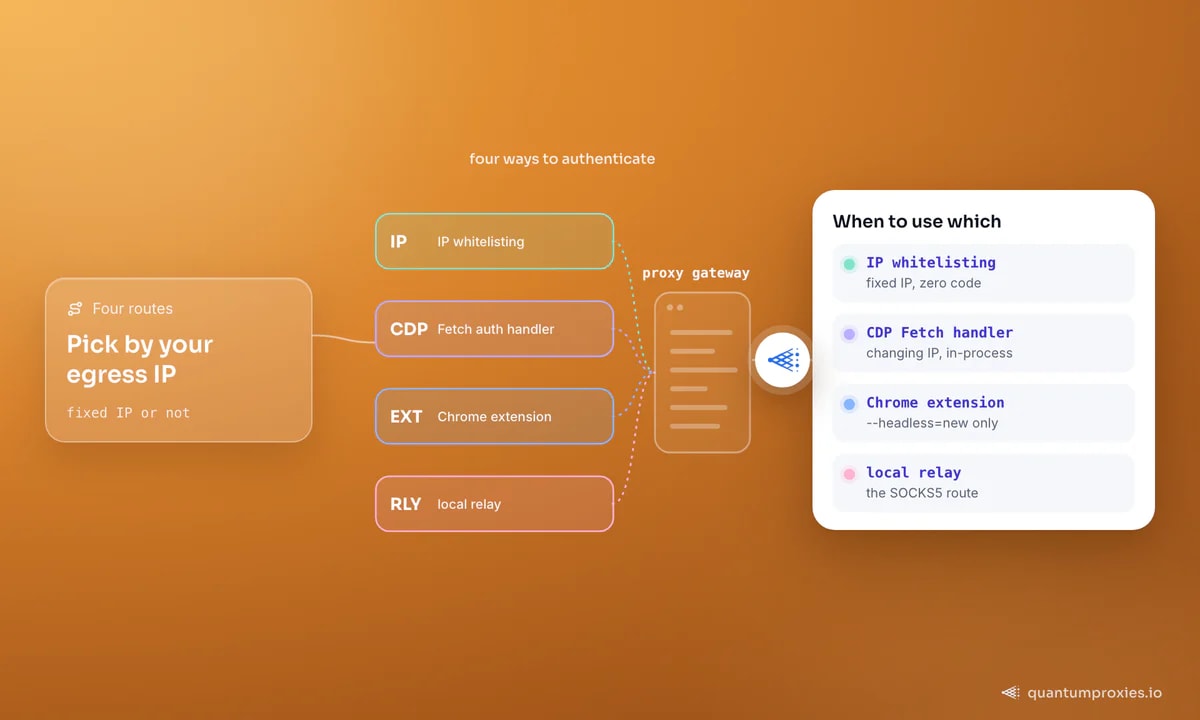
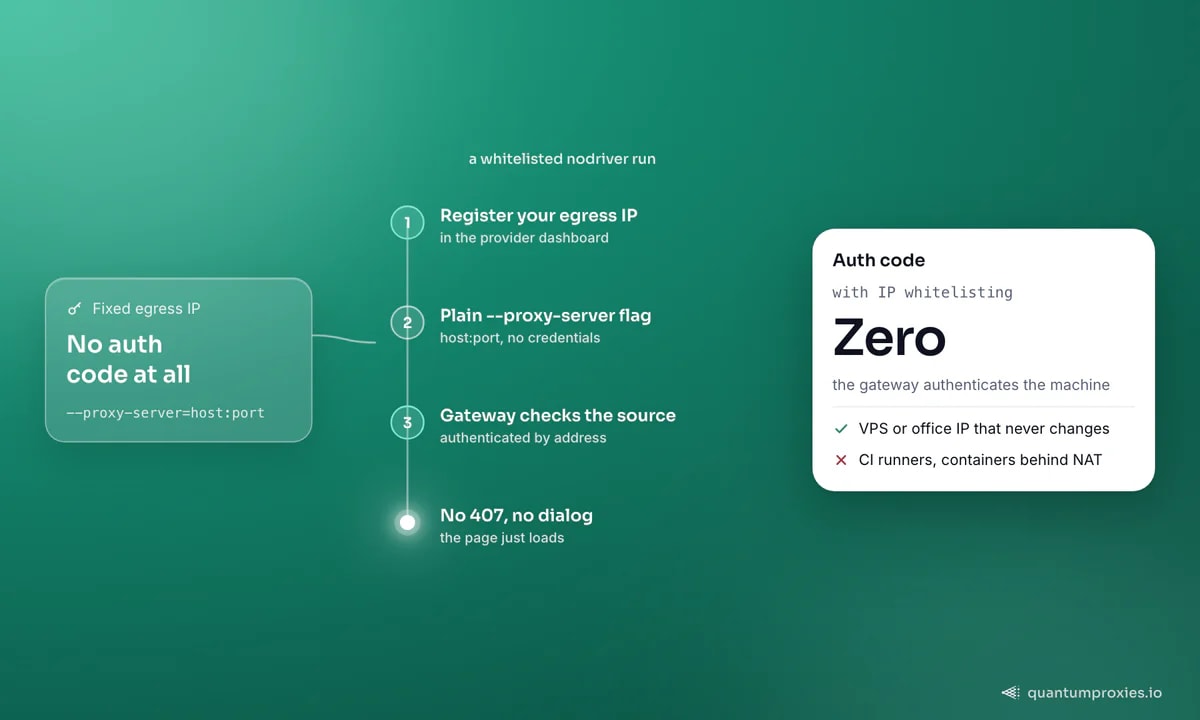
This is the shortcut the GitHub threads never mention, and it is the simplest by a distance. If your scraper runs from a machine with a stable public IP, register that IP in your provider dashboard and drop credentials entirely — the gateway authenticates you by source address. The nodriver code stays the plain --proxy-server snippet above, no auth code at all. Every QuantumProxies plan supports IP whitelisting alongside user:pass on its residential proxies, so this is the recommended path whenever your egress IP is fixed. Its only limit is topological: it authenticates a machine, not a script, so ephemeral cloud runners, containers behind NAT, and CI boxes with changing IPs need one of the next two fixes.
Fix 2: answer the challenge with a CDP Fetch handler
nodriver speaks the Chrome DevTools Protocol directly, so you can intercept the auth challenge in-process — no extension file needed. Enable the Fetch domain with handle_auth_requests=True, then respond to each AuthRequired event with continue_with_auth. Two details, both from the answer on discussion #1798, are the difference between working and hanging:
- Register the handlers before enabling the domain. nodriver's internal
enablecall overrides your handler registration, so if you add them afterwards no events ever fire — the number-one reason people report 'it does nothing'. - Fire and forget the responses. Awaiting the reply inside the handler blocks the event loop and deadlocks the whole browser. Wrap each send in
asyncio.create_taskso it runs without blocking.
import asyncio
import nodriver as uc

PROXY = "residentialpremium.quantumproxies.io:8080"   # host:port for --proxy-server
USER, PASS = "USER", "PASS"

class Scraper:
    def __init__(self):
        uc.loop().run_until_complete(self.run())

    async def run(self):
        browser = await uc.start(browser_args=[f"--proxy-server={PROXY}"])
        self.tab = await browser.get("data:,")        # blank tab first

        # 1) handlers BEFORE enabling the Fetch domain
        self.tab.add_handler(uc.cdp.fetch.RequestPaused, self.on_request)
        self.tab.add_handler(uc.cdp.fetch.AuthRequired, self.on_auth)
        # 2) only now turn on interception with auth handling
        await self.tab.send(uc.cdp.fetch.enable(handle_auth_requests=True))

        page = await browser.get("https://httpbin.org/ip")
        await asyncio.sleep(3)
        print(await page.get_content())

    async def on_auth(self, event):
        # fire-and-forget: awaiting here deadlocks the loop
        asyncio.create_task(self.tab.send(uc.cdp.fetch.continue_with_auth(
            request_id=event.request_id,
            auth_challenge_response=uc.cdp.fetch.AuthChallengeResponse(
                response="ProvideCredentials", username=USER, password=PASS,
            ),
        )))

    async def on_request(self, event):
        asyncio.create_task(self.tab.send(
            uc.cdp.fetch.continue_request(request_id=event.request_id)))

if __name__ == "__main__":
    Scraper()
One caveat surfaced in the same thread: a user found this worked on plain HTTP pages but failed on HTTPS, and the culprit was a low-quality proxy, not the code — swapping to a better exit fixed it. That is the recurring lesson of stealth scraping: the handler answers the challenge, but IP reputation decides whether the site lets you in.
Fix 3: a generated Chrome extension
The other community pattern builds a tiny Chrome extension at startup that both sets the proxy and answers the credential challenge through chrome.webRequest.onAuthRequired — the same trick that works in Selenium and Puppeteer. You write a small manifest plus a background worker into a temp directory and load it via --load-extension:
import nodriver as uc

async def main():
    # ext_dir holds a Manifest V3 extension: manifest.json + worker.js that
    # calls chrome.proxy.settings.set(...) and returns authCredentials from
    # chrome.webRequest.onAuthRequired. Generate it once, then load it:
    browser = await uc.start(browser_args=[
        "--load-extension=" + ext_dir,
        "--headless=new",   # extensions only load in the NEW headless mode
    ])
    page = await browser.get("https://httpbin.org/ip")
    print(await page.get_content())

uc.loop().run_until_complete(main())
The full manifest and worker are identical to the Manifest V3 files in our Selenium proxy authentication guide — copy them verbatim, only the launch call changes. Two gotchas repeat everywhere: extensions load only under --headless=new (plain --headless fails), and an unpacked directory is more reliable across Chrome versions than a packed zip. The extension handles any proxy type, which makes it the fallback when the CDP route is fighting you.
The fourth option: a local relay
If you would rather not touch nodriver at all, run a small local relay that holds the credentials and presents a no-auth endpoint on 127.0.0.1. nodriver then points at the loopback address with the plain flag and never sees a challenge. This is the cleanest route for SOCKS5, where Chromium refuses authenticated proxies outright (tracked as Chromium bug 40829748). We cover the minimal relay, the ready-made tools, and when it is overkill in the proxy relay guide.
A note on SOCKS5
Unauthenticated SOCKS5 works through the flag — --proxy-server=socks5://host:port — but authenticated SOCKS5 does not, and no CDP handler saves you because Chromium has never shipped SOCKS5 username/password support. The practical answers are the same three: whitelist the IP, run a relay, or use the provider's HTTP endpoint instead. Every QuantumProxies plan exposes both HTTP and SOCKS5 proxies on the same gateway, so switching to the HTTP endpoint is often the fastest SOCKS5 fix of all. For anti-detect browsers as a family, the authenticated-proxy map compares nodriver, zendriver and the rest side by side.
Frequently asked questions
Does nodriver support authenticated proxies?
Not natively. You can pass an unauthenticated proxy through browser_args=["--proxy-server=host:port"], but user:pass in that flag is stripped by Chromium. To authenticate you either whitelist your IP with the provider, answer the challenge with a CDP Fetch.AuthRequired handler, generate a proxy-auth Chrome extension, or run a local relay that holds the credentials.
Why does my nodriver auth handler receive no events?
Almost always because you enabled the Fetch domain before registering the handlers. nodriver's internal enable overrides the registration, so events never reach your callback. Add the RequestPaused and AuthRequired handlers first, then call fetch.enable(handle_auth_requests=True). Also wrap your responses in asyncio.create_task so awaiting them cannot block the loop.
Can nodriver use a SOCKS5 proxy with a username and password?
No. Chromium does not support authenticated SOCKS5 (Chromium bug 40829748), and nodriver inherits that limit. Unauthenticated SOCKS5 works via --proxy-server=socks5://host:port. For authenticated SOCKS5, whitelist your IP, run a local relay that adds the credentials, or switch to the provider's HTTP endpoint, which handles Basic auth cleanly.
nodriver or zendriver for authenticated proxies?
Both share the same gap and the same fixes, because zendriver is a community fork of nodriver. zendriver has a more active issue tracker where the auth question is openly discussed, but the working methods are identical. If you are on the fork, the fork-specific setup mirrors everything here — the CDP handler and whitelisting behave the same.
The honest summary: nodriver will not do proxy auth for you, and that is fine once you know the map. Whitelist when your IP is stable, reach for the CDP handler or extension when it is not, and keep a relay in your back pocket for SOCKS5. The code above answers the challenge — but a clean residential exit is what actually gets you through the door.