AI Agent Proxy Bandwidth Cost: The Real Numbers per Task
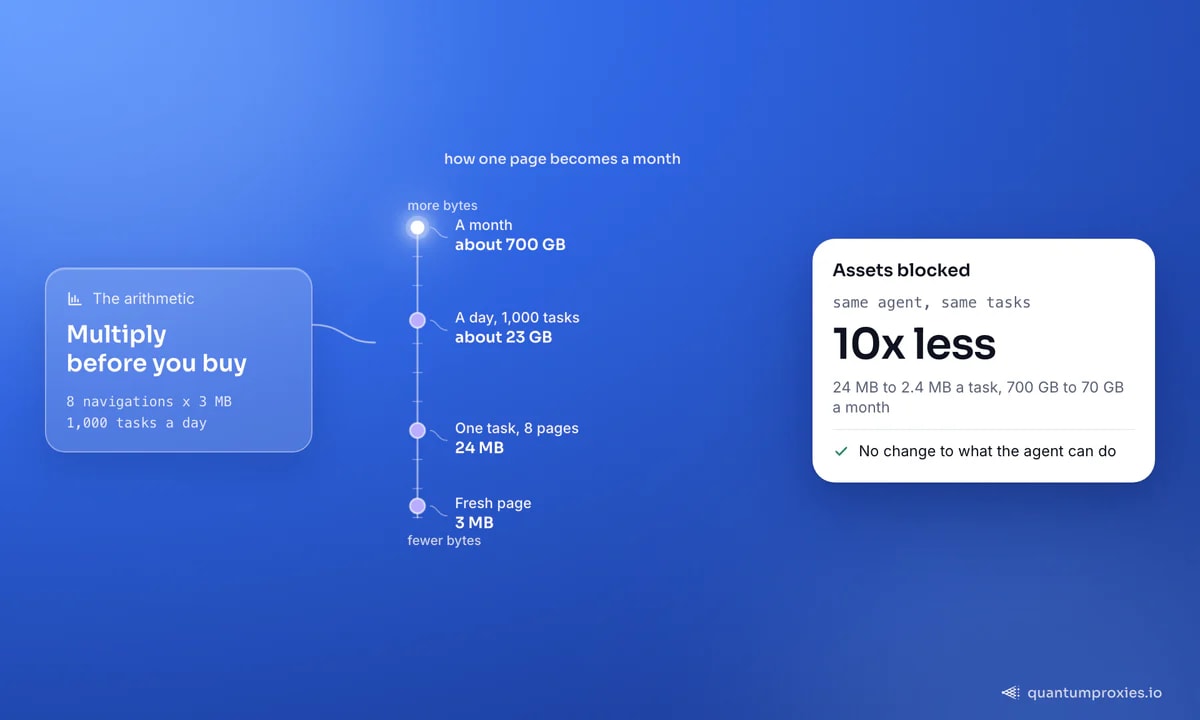
A browser agent downloads every image, font and tracker on every step. At 8 navigations a task that is 24 MB - about 700 GB a month at a thousand tasks a day. Here is where it goes and how to cut it.
The AI agent proxy bandwidth cost nobody budgets for is the one that arrives with the browser. An HTTP scraper fetches the HTML it parses and stops. An agent drives a real Chromium: it downloads the images so the vision step can see them, the web fonts so the layout settles, the analytics beacons because nobody told it not to - and it does that again on every navigation, on every retry, for every task. This post does the arithmetic out loud, shows you how to measure your own number instead of trusting ours, and lists the levers that take a residential gigabyte bill down by roughly 10x.
The arithmetic: page weight times steps times tasks
Start from measurements we have published before: a full browser render of a modern page moves 2-5 MB once images, media, fonts and third-party scripts land, while the same page with assets blocked is often under 150 KB of HTML. Take 3 MB as a working average for a fresh page load. Now count navigations rather than steps - an agent that clicks around inside one page re-downloads very little, but every new URL is a fresh page. A realistic research or price-check task touches about eight of them:
- Per task: 8 navigations x 3 MB = 24 MB across the proxy.
- Per day: 1,000 tasks x 24 MB = 24,000 MB = ~23 GB.
- Per month: 23 GB x 30 = ~700 GB.
- Per invoice: at the $1-6 per GB the residential market runs, that is $700-4,200 a month - about $0.07 a task at a mid-range $3 per GB.
Seven cents a task sounds trivial until it is the largest line in your agent's unit economics. Unlike tokens, it scales with how heavy your targets are rather than how hard your task is: a trivial task on an image-dense marketplace costs more than a complex one on a text site. If per-GB pricing is new to you, our breakdown of what a residential gigabyte actually buys covers the pages-per-GB side of the same equation.
Measure your own AI agent proxy bandwidth cost
Ours is an average; yours depends entirely on your targets. Chromium can write a HAR file of every request it makes, and browser-use exposes that through record_har_path. Use record_har_mode="full" so the size fields are populated, and record_har_content="omit" so you get the byte counts without embedding every response body in the file:
from browser_use import Browser

browser = Browser(
    proxy={
        "server": "http://residentialpremium.quantumproxies.io:8080",
        "username": "USER",
        "password": "PASS",
    },
    record_har_path="./runs/task-01.har",
    record_har_mode="full",     # 'minimal' drops the size fields you need
    record_har_content="omit",  # sizes yes, response bodies no
)
Then sum it. A proxy bills both directions, so request headers count too, and HAR writes -1 when a size is unknown - clamp those to zero rather than letting them silently subtract:
import json, sys

har = json.load(open(sys.argv[1]))
entries = har["log"]["entries"]

def size(d, *keys):
    return sum(max(0, d.get(k, 0) or 0) for k in keys)

total = 0
by_type = {}
for e in entries:
    up = size(e["request"], "headersSize", "bodySize")
    down = size(e["response"], "headersSize", "bodySize")
    total += up + down
    mime = e["response"].get("content", {}).get("mimeType", "?").split(";")[0]
    by_type[mime] = by_type.get(mime, 0) + up + down

print(f"{len(entries)} requests, {total/1_048_576:.2f} MB billed")
for mime, n in sorted(by_type.items(), key=lambda kv: -kv[1])[:8]:
    print(f"  {n/1024:8.0f} KB  {mime}")
Run that on three representative tasks and you have a real cost per task. The per-MIME breakdown is the useful part: on most consumer sites the top rows are images, video, fonts and analytics, and none of them feed your agent's reasoning.
Lever 1: stop downloading what the agent never reads
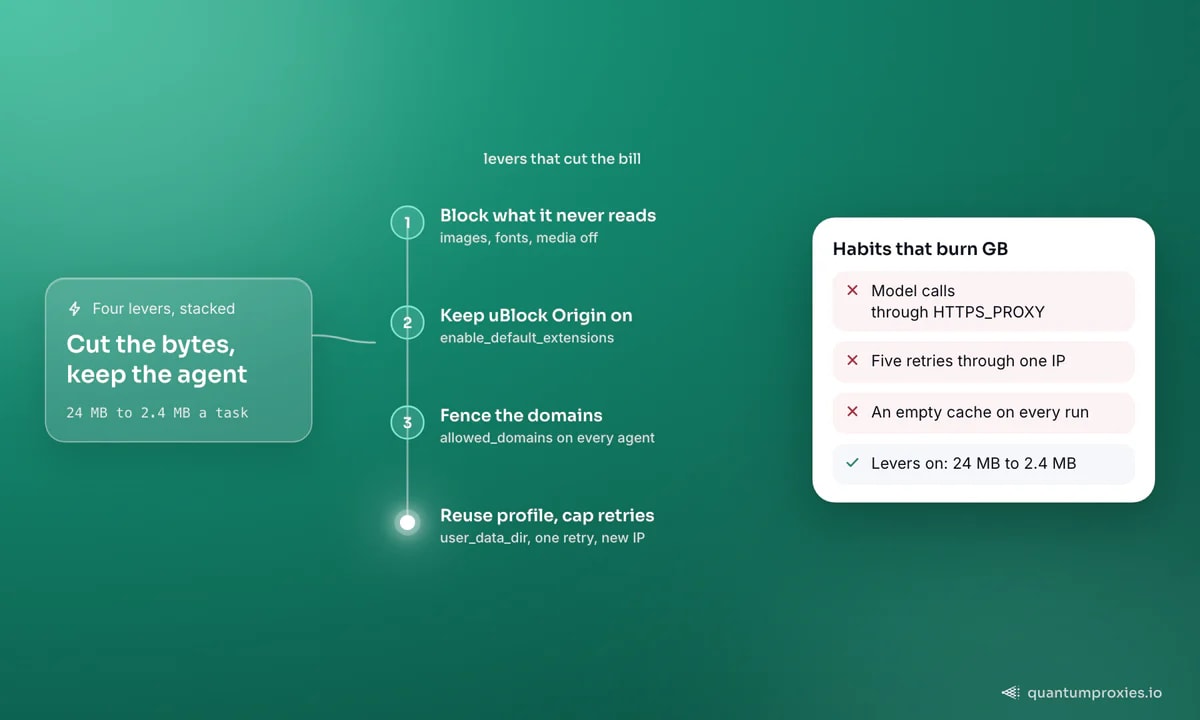
This is the big one and it is worth 5-10x on its own. In Playwright or Puppeteer you intercept requests and abort by resource type - the recipe is in our guide to cutting a proxy GB bill. In browser-use you have two blunter but effective tools: Chromium launch flags through args, and the default extension set, which ships uBlock Origin plus cookie handling and URL cleaning and is enabled by enable_default_extensions. Leave that on - every ad and tracker call it kills is a call you are not billed for.
browser = Browser(
    proxy=PROXY,
    enable_default_extensions=True,   # uBlock Origin: fewer tracker requests
    args=[
        "--blink-settings=imagesEnabled=false",   # no image bytes at all
        "--disable-remote-fonts",                 # no web font downloads
        "--autoplay-policy=user-gesture-required",# no video streaming itself
        "--mute-audio",
    ],
)
One honest caveat: killing images blinds a vision-driven agent. If your agent reasons over screenshots, test it with images off before you ship - many tasks survive because the DOM still carries the text and structure, but a task that identifies products by photo will not. If it breaks, drop imagesEnabled=false and keep the fonts, media and tracker savings, which are still most of the win.
Lever 2: fence the agent in
An agent that gets lost is an agent streaming video through your metered residential gateway. browser-use has allowed_domains and prohibited_domains for exactly this, with allowed_domains taking precedence when you set both. Patterns like *.example.com cover subdomains; wildcards in the TLD position are rejected deliberately, and lists past a hundred entries get optimised into sets. Set it on every production agent - it is a cost control before it is a safety control.
Lever 3: reuse the profile, and cap the retries
A fresh incognito profile per run means an empty HTTP cache, so the agent re-downloads the same logo, stylesheet and framework bundle on every task against the same site. Pointing user_data_dir at a persistent directory lets the cache do its job across runs. The trade-off is identity: a cached, cookie-bearing profile is a stable fingerprint, so pin one profile to one sticky exit IP rather than letting it roam across the pool - the pairing is covered in our browser-use proxy configuration guide.
Retries are the other silent multiplier. Three attempts at a 3 MB page turn one failed navigation into 9 MB, and agents retry more than scrapers because the model keeps deciding to "try again". Cap it at one retry, and make the retry switch exit IP instead of repeating the same request through the same blocked address. Two attempts through two IPs beat five through one, at 40% of the bytes.
See what a gigabyte costs on pay-per-GB residential
Lever 4: do not use an agent you do not need
This is the candid part. An agent earns its cost when the path is unknown - when it has to search, read, decide and navigate its way to data whose URL nobody could have written down in advance. When you already know the URL and the fields, driving a browser to get them is the most expensive way to do it. A Scraper API that returns clean markdown or JSON delivers the same page as roughly 30-60 KB of extracted text instead of 3 MB of render, because the asset stripping and the parsing happen at the edge and you are charged for the result, not the raw traffic. On per-request pricing, which typically runs $1-3 per thousand successful requests across the market, eight pages costs cents.
The pattern that wins in production is hybrid: let the agent explore and decide, then hand the repeatable part to an API path. Once it has discovered that the price lives at a specific URL in a specific field, that lookup should never go through a browser again. Our notes on headless browser versus HTTP requests quantify the same trade-off for classic scraping, and the wider agent stack is in web infrastructure for AI agents.
What the optimised bill looks like
Stack the levers and rerun the arithmetic. Assets blocked takes the average fresh page from 3 MB to roughly 300 KB, so eight navigations become 2.4 MB rather than 24 MB. A thousand tasks a day is then about 2.3 GB a day and 70 GB a month - $70-420 at market rates, against $700-4,200 before. Nothing about the agent's capability changed; it simply stopped paying to download photographs it never looked at.
Frequently asked questions
How much bandwidth does an AI agent use?
Budget around 3 MB per fresh page load with assets on, so roughly 24 MB for a task that touches eight URLs. Video-rich pages run several times higher; text-first sites run lower. Measure yours with a HAR recording rather than assuming - the spread between target sites is larger than the spread between agent frameworks.
Why do agents cost more bandwidth than scrapers?
A scraper fetches one document and parses it. An agent renders the full page - images, fonts, media, analytics - because it needs the page to behave like a page, and it does that again on every navigation and every retry. It also explores: it visits pages a scraper would never request, because it does not know in advance which one holds the answer.
Do the LLM API calls go through the proxy?
They should not. Configure the proxy on the browser session only. If you set HTTP_PROXY or HTTPS_PROXY as environment variables to be thorough, every model request travels through your metered residential gateway as well - prompts and responses, on every step. It is pure waste, and it is one of the easiest large savings to find in an existing agent.
Is a scraping API cheaper than an agent?
For known URLs and known fields, almost always. You receive parsed markdown or JSON measured in tens of kilobytes rather than a multi-megabyte render, and per-request pricing across the market sits around $1-3 per thousand successful calls. The agent is worth its cost when the path has to be discovered - use it to explore, then hand the repeatable lookups to the API.
Should agents use datacenter proxies to save money?
Where the target tolerates them, yes - datacenter bandwidth is several times cheaper per gigabyte and the speed is better. The catch is that agent traffic already looks non-human, so a datacenter IP on a protected site tends to fail, and a failed task costs its bytes twice. Default to datacenter on unprotected targets and reserve residential for the sites that actually filter by IP reputation.
Bandwidth is the quiet line item in agent economics, and it responds to boring engineering: measure with a HAR, block what the agent never reads, fence the domains, reuse the cache, cap the retries, and refuse to render a page whose URL you already know. Do all six and a 700 GB month becomes a 70 GB month with no loss of capability.