Web Infrastructure for AI Agents: What They Actually Need
An agent that can reason is useless if the web hands it a raw HTML dump from a blocked datacenter IP. The web layer decides whether agents work. Here's the infrastructure checklist.
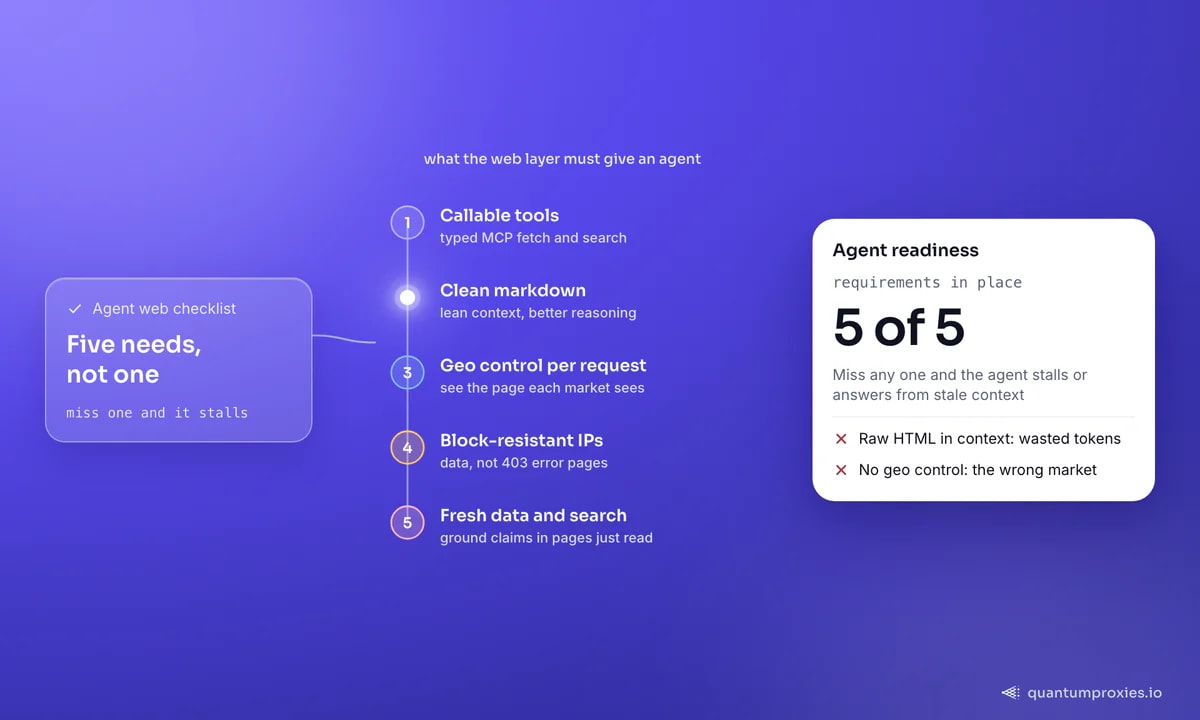
The race to build AI agents that browse the web - Operator, Manus, Project Mariner, browser-use and dozens of open frameworks - has focused almost entirely on the model and the harness. But an agent that can reason brilliantly is useless if the web layer hands it a raw HTML dump from a datacenter IP that just got blocked. The infrastructure underneath the agent decides whether it works at all. This is the checklist for that layer: what AI agents actually need from the web, and how to give it to them.
Two ways agents read the web - and why one is cheaper
Broadly, agents perceive the web in one of two ways. Vision-first agents like WebVoyager take screenshots, overlay numbered boxes on the interactive elements, and act by clicking coordinates - close to how a human browses, but token-heavy and slow. Text-first agents consume the page as structured text and reason over it. The lesson researchers keep rediscovering is that feeding an agent a raw HTML DOM or a full accessibility tree produces overly verbose input that actively hinders its decision-making. Clean, token-lean text wins. That single finding shapes most of the infrastructure decisions below.
1. Callable tools, not a browser bolted on
Agents act by calling tools. The cleanest way to give an agent web access is a typed tool it can invoke - fetch this page, run this search - rather than a bespoke browser integration. The Model Context Protocol (MCP) has become the standard interface for exactly this, and wiring up a web-capable toolset is a few lines of config:
{
  "mcpServers": {
    "quantumproxies": {
      "command": "npx",
      "args": ["-y", "quantumproxies-mcp"],
      "env": { "QUANTUMPROXIES_API_KEY": "qp_live_..." }
    }
  }
}
That gives the agent tools for scraping, search and structured extraction it can call on its own. Our practical guide to the MCP server walks through the full tool set, and you can drop it in from the MCP server page.
Give your agent web tools via MCP
2. Clean markdown instead of raw HTML
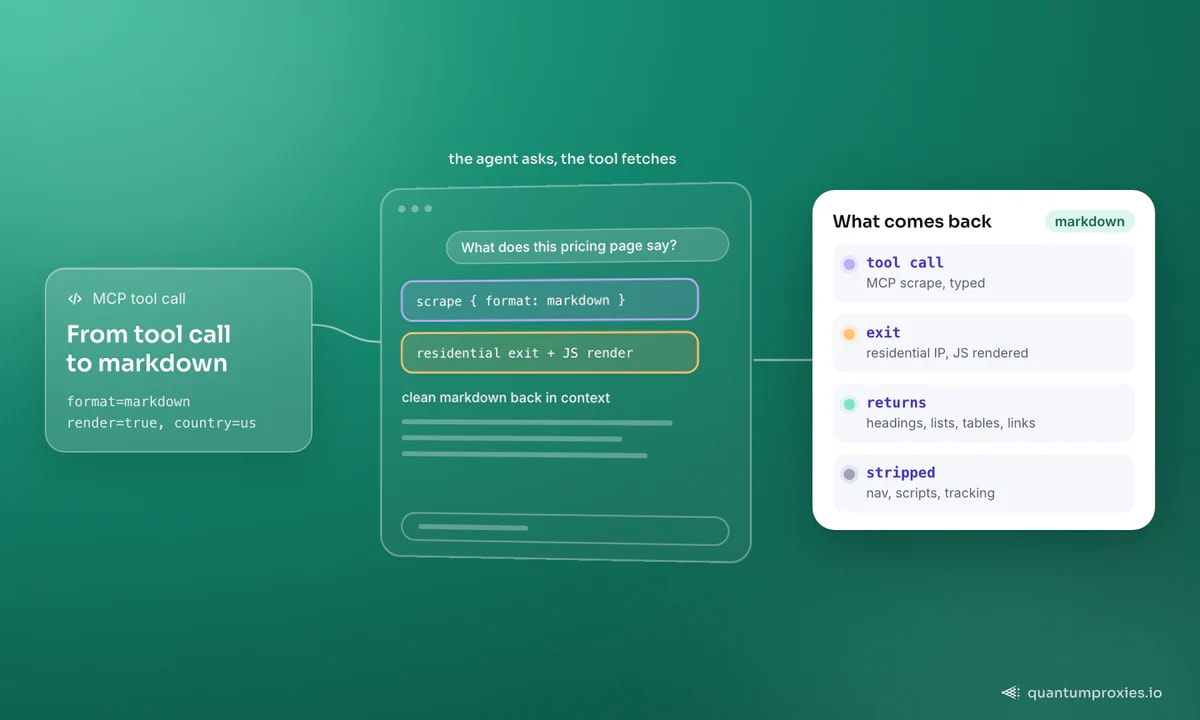
Once the agent can fetch a page, what comes back matters as much as whether it arrives. A modern page can be hundreds of kilobytes of nested divs, scripts and tracking markup - burn that into an agent's context and you waste tokens and degrade its reasoning. The fix is to return the page as clean markdown: headings, lists, tables and links, with the boilerplate stripped. A Scraper API that outputs markdown (or structured JSON) does this at the edge, so the agent receives something it can reason over directly:
curl -X POST "https://api.quantumproxies.io/v1/scraper/extract" \
  -H "Authorization: Bearer qp_live_..." \
  -H "Content-Type: application/json" \
  -d '{"url": "https://example.com/pricing", "format": "markdown", "render": true, "country": "us"}'
The same principle drives retrieval pipelines - our notes on LLM-powered extraction and RAG pipelines that stay fresh both start from markdown-first ingestion for the same reason.
There's a cost dimension too. Rendering a page as a screenshot for a vision model, or dumping raw HTML into context, burns tokens on every step of a multi-step task - and agents take many steps. Returning lean markdown cuts the per-step token bill, which compounds across a long task into real latency and cost savings. Cheaper perception also means the agent can afford to read more pages before it decides, which usually improves the final answer rather than just speeding it up.
3. Geo control per request
The web is not the same everywhere. Prices, availability, search results, language and even which products exist all change by country. An agent doing competitive research, price checks or market analysis needs to see a page the way a user in that market sees it - which means controlling the exit country per request. Residential proxies spanning 200+ countries let an agent ask "what does this look like in Germany?" and get a truthful answer, not a US-centric one. Geo control turns a single agent into one that can reason about any market. It is a correctness issue, not a nicety: an agent that quotes US pricing to a user in Europe is simply wrong, and it has no way to know unless the infrastructure lets it see the right market in the first place.
4. Block-resistance, because agents get blocked too
Anti-bot systems don't distinguish an autonomous agent from a scraper - both are non-human traffic, and both get challenged. An agent that hits a CAPTCHA or a 403 mid-task either stalls or hallucinates around the gap. Block-resistance is therefore an agent capability, not just a scraping concern: trusted residential and mobile IPs, real browser fingerprints, JavaScript rendering and IP rotation are what keep an agent's tools returning data instead of error pages. The web infrastructure carries the disguise so the agent can focus on the task.
5. Freshness and search
Finally, agents are only as trustworthy as their most recent data. A knowledge base scraped once goes stale; an answer citing last quarter's price is wrong. The infrastructure needs a way to pull live pages on demand and to search - a SERP layer for discovery and a scrape layer for retrieval, both fresh. That's the difference between an agent that guesses and one that grounds every claim in a page it just read. For building persistent knowledge, our guide on turning a site into a support-bot knowledge base covers the crawl-and-refresh loop, and feeding LLMs fresh web data covers the grounding economics.
Frequently asked questions
What does an AI agent need to access the web?
Five things: callable tools it can invoke (typically via MCP), page content as clean markdown rather than raw HTML, control over the exit country per request, block-resistant IPs so it isn't stopped by anti-bot systems, and a way to pull fresh data and search on demand. Miss any one and the agent stalls or answers from stale context.
Why give agents markdown instead of raw HTML?
Raw HTML and full DOM trees are verbose and noisy, which wastes context tokens and measurably hurts an agent's decision-making. Clean markdown keeps the headings, lists, tables and links the agent needs to reason and drops the boilerplate - cheaper, faster and more accurate for the same page.
Do AI agents get blocked like scrapers?
Yes. Anti-bot systems see non-human traffic and challenge it regardless of intent, so an autonomous agent hits the same CAPTCHAs and 403s a scraper does. Trusted residential or mobile IPs, real browser fingerprints and JavaScript rendering keep the agent's web tools returning data instead of error pages.
How does MCP help agents use the web?
MCP is a standard interface for exposing tools to an agent. An MCP web server gives the agent typed tools - scrape a page, run a search, extract structured data - that it can call autonomously, with the proxy, rendering and geo handling done behind the tool. It replaces a bespoke browser integration with a clean, callable contract.
The model gets the headlines, but the web layer decides whether an agent is reliable. Give it callable tools, clean markdown, per-request geo, block-resistant IPs and fresh data, and the agent stops fighting the web and starts reasoning about it.