AI Web Scraping: LLM Extraction, Prompt-to-JSON & Cost
LLM extraction turns any page into clean JSON from a plain-English prompt — no selectors to maintain. But the model can't fetch the page and raw HTML burns tokens fast. Here is how to do it right.
AI web scraping means pointing a language model at a page and asking, in plain English, for the fields you want back as JSON — no CSS selectors to write, no parser to maintain when the layout changes. It is genuinely transformative for messy, varied or one-off extraction. It is also widely misunderstood, which is why people end up paying to scrape a few hundred pages and getting hallucinated data back. Two facts fix most of that confusion: a language model cannot fetch a web page — it only reasons over text you hand it — and feeding it raw HTML is the fastest way to burn your token budget. This guide covers the extraction pattern that works, when it beats selectors, and how to keep both cost and hallucination under control.
The thing nobody says: the model can't fetch
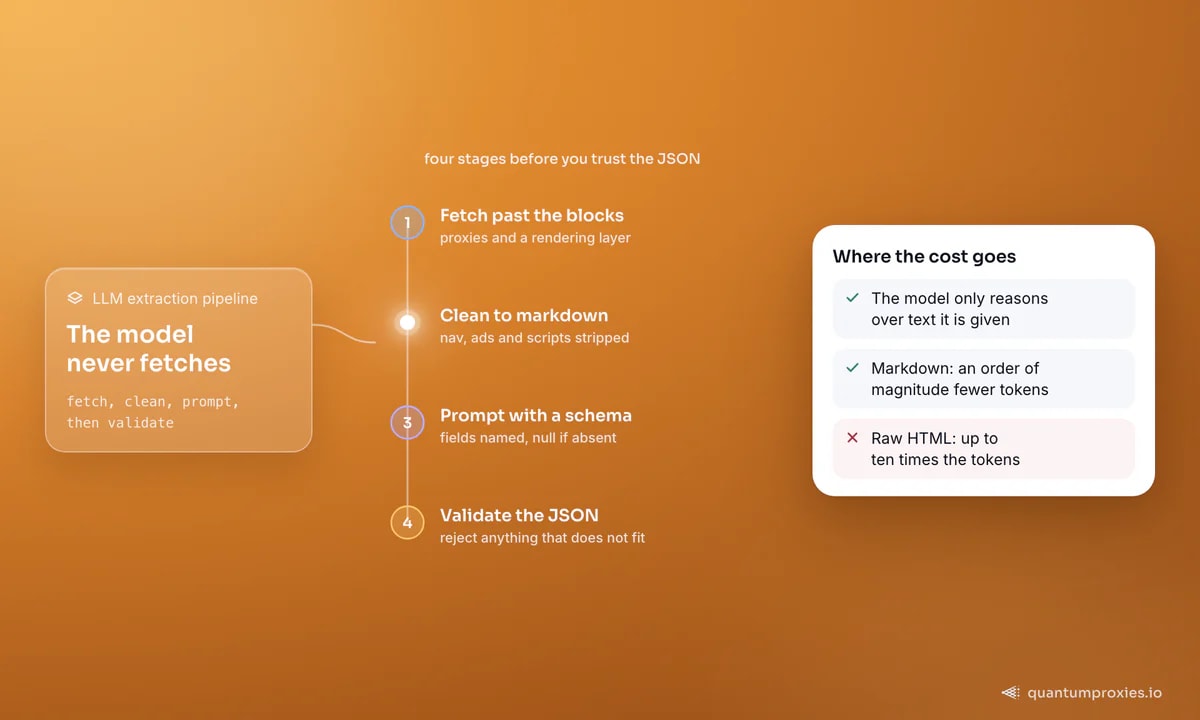
The hard part of AI scraping is not the AI. A chatbot cannot reliably load a live page — it needs a dedicated engine to fetch the HTML first, then it reasons over whatever text you provide. So an LLM extraction pipeline is really a scraping pipeline with a smart parser bolted on the end, and the scraping half is where things break: bot management, JavaScript rendering, IP blocks. Solve the fetch with proxies and a rendering layer, and the extraction becomes the easy part. The clean way to get pages is a scraper API that handles rotation and rendering and returns markdown, which — as the next section shows — is also the cheapest possible input for a model:
import requests

def fetch_markdown(url, api_key):
    r = requests.post(
        "https://api.quantumproxies.io/v1/scraper/extract",
        headers={"Authorization": f"Bearer {api_key}"},
        json={"url": url, "format": "markdown"},
        timeout=(5, 120),
    )
    r.raise_for_status()
    return r.json()["payload"]["content"]  # nav/ads stripped, ready for the model
Why markdown, not HTML, is the real cost lever
The single biggest driver of AI scraping cost is how many tokens you push through the model, and raw HTML is mostly tokens you do not want: inline styles, script tags, tracking attributes, navigation, footers. Convert the page to clean markdown — or extract just the main content — before extraction and you routinely cut input size by an order of magnitude, which cuts cost by the same factor and, as a bonus, reduces hallucination because the model sees the content instead of the chrome. This is why markdown-first is the standard for feeding models, the same principle behind feeding LLMs fresh web data. If you only take one thing from this article: never send a model the raw page source.
Prompt-to-JSON with a schema
Once you have clean text, extraction is a single call: describe the fields you want, pass a schema so the output is structured, and instruct the model to return null rather than invent when a field is absent. An extraction API collapses fetch, clean and extract into one request so you skip the plumbing entirely:
curl -X POST "https://api.quantumproxies.io/v1/scraper/extract" \
  -H "Authorization: Bearer YOUR_API_KEY" \
  -H "Content-Type: application/json" \
  -d '{
    "url": "https://example.com/product/xyz",
    "ai_schema": {
      "type": "object",
      "properties": {
        "title":    {"type": "string"},
        "price":    {"type": "number"},
        "in_stock": {"type": "boolean"},
        "rating":   {"type": ["number", "null"]}
      },
      "required": ["title", "price", "in_stock"]
    },
    "ai_prompt": "Extract the product. Use null for anything not present."
  }'
The schema does double duty: it forces a predictable shape for downstream code, and it constrains the model, which is the first line of defence against hallucinated fields. Validate the response against the same schema and reject anything that does not fit — an invented price is worse than a missing one.
def validate(record, schema):
    for field in schema.get("required", []):
        if record.get(field) is None:
            raise ValueError(f"missing required field: {field}")
    return record  # only trust records that satisfy the schema
When LLM extraction beats CSS selectors — and when it doesn't
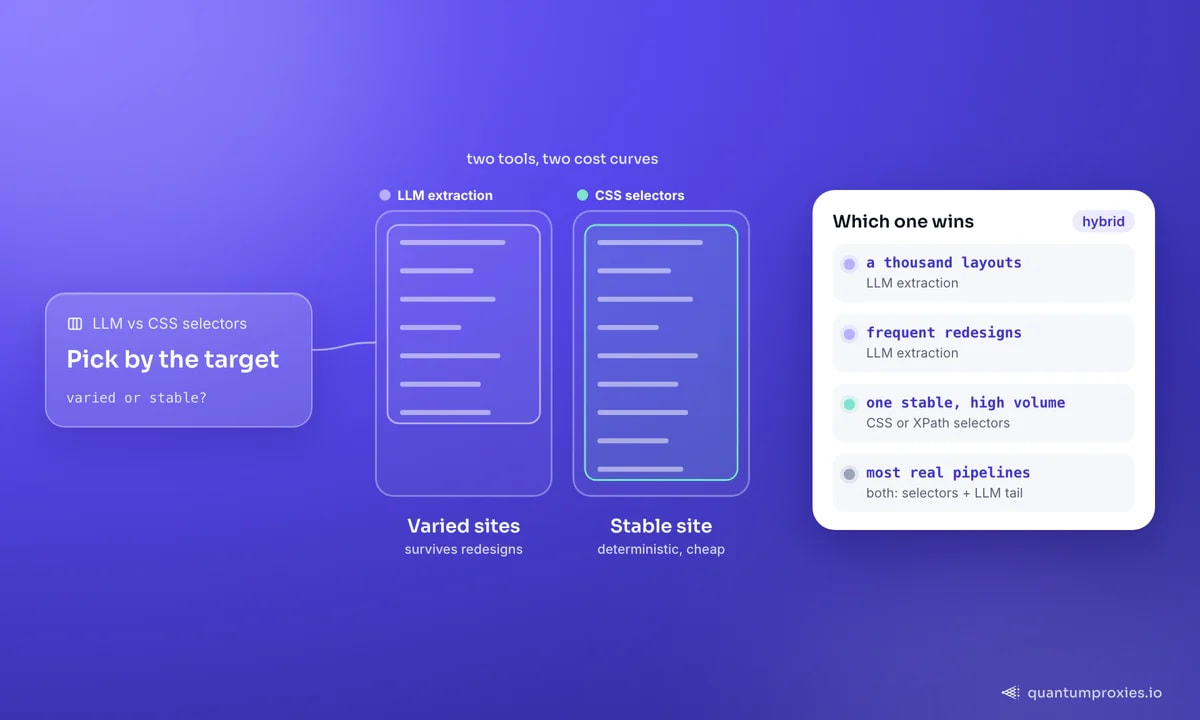
AI extraction is not a universal upgrade; it is a different tool with a different cost curve. Reach for it when the work is varied or unstable — scraping a thousand sites with a thousand layouts, a site that redesigns constantly, unstructured content like reviews or listings where no clean selector exists, or a one-off job where writing selectors is not worth the time. Stick with CSS or XPath selectors when you are hammering one stable site at high volume: selectors are deterministic, effectively free per page, and never hallucinate. The mature pattern is hybrid — selectors for your high-volume core targets, LLM extraction for the long tail and the sites that keep changing.
Cost discipline turns this from an experiment into production. Beyond markdown-first, cache aggressively so you never re-extract an unchanged page, match model size to task difficulty — a small model handles simple field extraction fine — and batch where the API allows. Rendering is its own line item; only render pages that truly need JavaScript, a decision we quantify in render only when you must. Get a blank page instead of content and the fix is usually rendering, covered in empty page, missing data.
A word on the free and open-source route, since it is what most people search for first. Open-source extraction libraries are excellent for learning the pattern and for small jobs, but they hand you back the two hard problems this article opened with: you still have to fetch pages past bot management, and you still pay for whichever model does the extraction. 'Free' usually means free code plus your own proxy and token bills. That is a fine trade for a hobby project or a proof of concept; at production volume the maintenance of the fetch layer is exactly what teams end up outsourcing, a build-versus-buy call we lay out in DIY scraper stack vs a scraper API.
Frequently asked questions
Can ChatGPT scrape a website?
Not on its own. A language model cannot reliably fetch and render a live page — it reasons over text you provide. To use AI for scraping you pair a dedicated scraping engine, which fetches and cleans the page, with the model, which extracts structured data from the result. The scraping engine handles proxies, rendering and blocks; the model handles turning content into JSON.
How do I reduce the cost of AI web scraping?
Convert pages to markdown or extract the main content before sending anything to a model — raw HTML can be ten times the tokens for the same information. Then cache unchanged pages, use a smaller model for simple field extraction, only render JavaScript when a page requires it, and batch requests. Token volume is the dominant cost, so cutting input size is the highest-leverage optimization.
Does AI web scraping hallucinate wrong data?
It can, especially when fed noisy raw HTML or asked for fields that are not on the page. Guard against it by cleaning the input, passing an explicit schema, instructing the model to return null when a value is absent, and validating every response against that schema before you trust it. A missing field you can retry; a confidently invented one silently corrupts your dataset.
Is LLM extraction better than CSS selectors?
It depends on the job. LLM extraction wins when layouts vary or change often and when writing selectors is not worthwhile, because it needs no selectors and survives redesigns. CSS selectors win on a single stable site at high volume: they are deterministic and far cheaper per page. Most production pipelines use selectors for core targets and LLM extraction for the long tail.
AI web scraping is powerful once you stop treating the model as a scraper. Fetch cleanly with proxies, feed markdown not HTML, constrain the output with a schema, and reserve LLM extraction for the jobs where its flexibility earns its token cost. That is the difference between a slick demo and a pipeline you can run every day.