Build a Chatbot Knowledge Base by Scraping a Website: Crawl, Chunk, Cite
A support bot is only as good as what it's fed. Point it at your own site — docs, FAQs, help centre — by crawling to clean markdown and chunking it for retrieval. Here's the pipeline that keeps answers grounded and cited.
A support chatbot is only as good as what it's fed, and the best thing to feed it is usually your own website — the docs, FAQs and help-centre articles you already maintain. The catch is that a bot can't read a website the way a person does; it needs clean, chunked, retrievable text with the source attached to each piece. This guide is the full pipeline: crawl the site to markdown, chunk it, embed it into a vector store, and retrieve cited context at query time — a grounded knowledge base that stays accurate as your site changes.
Why RAG, not a fine-tune
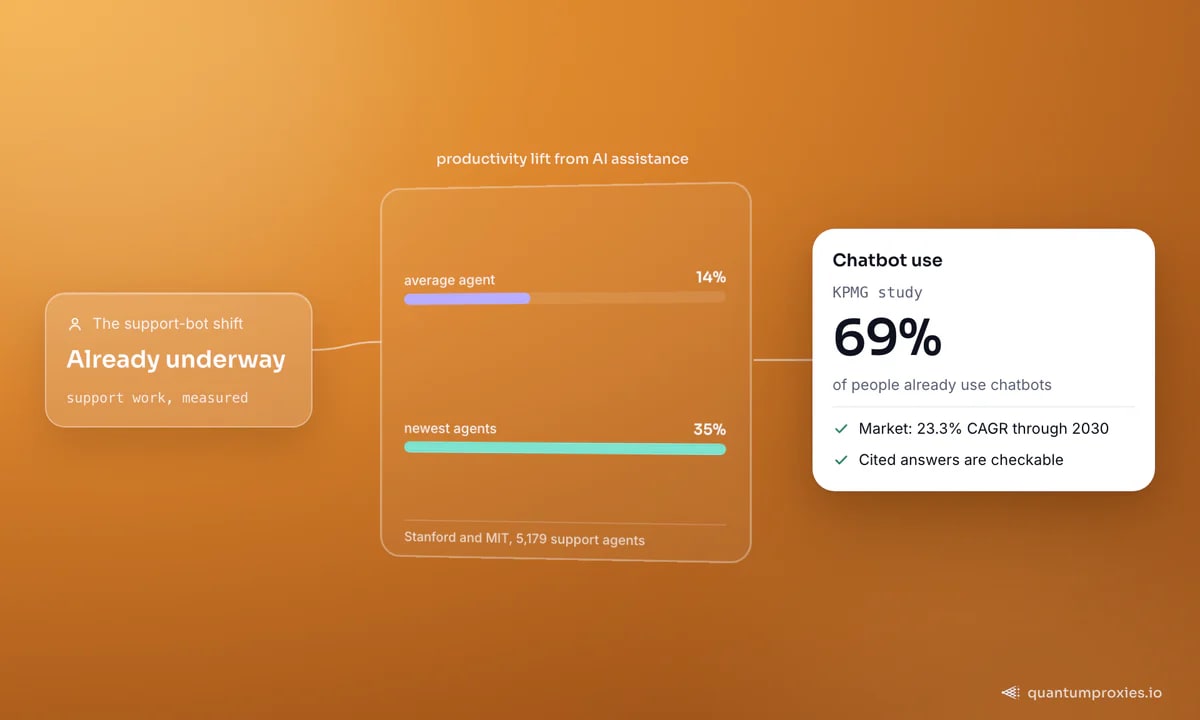
You could fine-tune a model on your content, but for a support bot that's the wrong tool: retraining is slow, expensive, and goes stale the moment you edit a doc. Retrieval-augmented generation (RAG) keeps the knowledge outside the model — chunk your content, embed it, and at question time retrieve the most relevant pieces and hand them to the model as context. Update a doc, re-crawl, and the bot's knowledge updates with it. The demand is real: the chatbot market is projected to grow at a 23.3% CAGR through 2030, a KPMG study found 69% of people already use chatbots, and a Stanford and MIT study of 5,179 support agents measured a 14% average productivity lift from generative AI assistance — 35% for the newest agents.
Step 1: crawl the site to clean markdown
Feeding raw HTML into a RAG pipeline poisons it with navigation, cookie banners and script tags. Crawl straight to markdown instead — it preserves headings, lists and tables while dropping the presentation noise, which is exactly what an LLM ingests best. A Scraper API with a crawl mode walks the site and returns each page as clean markdown:
import time
import requests

API = "https://api.quantumproxies.io/v1/scraper/crawl"
HEAD = {"Authorization": "Bearer YOUR_API_KEY"}

# the crawl runs as a background job: start it, then poll until it is done
job = requests.post(
    API,
    json={"url": "https://docs.example.com", "limit": 300, "format": "markdown"},
    headers=HEAD,
    timeout=120,
).json()["payload"]

pages, since = [], 0
while True:
    job = requests.get(f"{API}/{job['id']}", params={"since": since},
                       headers=HEAD, timeout=120).json()["payload"]
    pages += [{"url": p["url"], "markdown": p.get("content", "")} for p in job["pages"]]
    since = job["nextCursor"]
    if job["status"] != "running" and not job["hasMore"]:
        break
    time.sleep(10)
# pages: each {"url": ..., "markdown": ...}
Crawling your own site is straightforward; crawling docs behind geo or rate limits is where routing through the right IPs matters, so the crawl completes instead of stalling halfway. Markdown-first is the same principle behind feeding LLMs fresh web data.
Step 2: chunk by heading, keep the source
Don't embed whole pages — retrieval works best on focused chunks. Split each page on its headings so every chunk is one coherent topic, and carry the source URL on each so you can cite it later. This is also where a good source doc pays off: articles with clear headings, one idea each, and questions restated in the text chunk far better than a wall of prose (a bot can't infer context a person would):
def chunk_markdown(md, source_url):
    chunks, cur = [], {"heading": "", "text": ""}
    for line in md.splitlines():
        if line.startswith("#"):
            if cur["text"].strip():
                chunks.append({**cur, "source": source_url})
            cur = {"heading": line.lstrip("# ").strip(), "text": ""}
        else:
            cur["text"] += line + "\n"
    if cur["text"].strip():
        chunks.append({**cur, "source": source_url})
    return chunks

all_chunks = [c for p in pages for c in chunk_markdown(p["markdown"], p["url"])]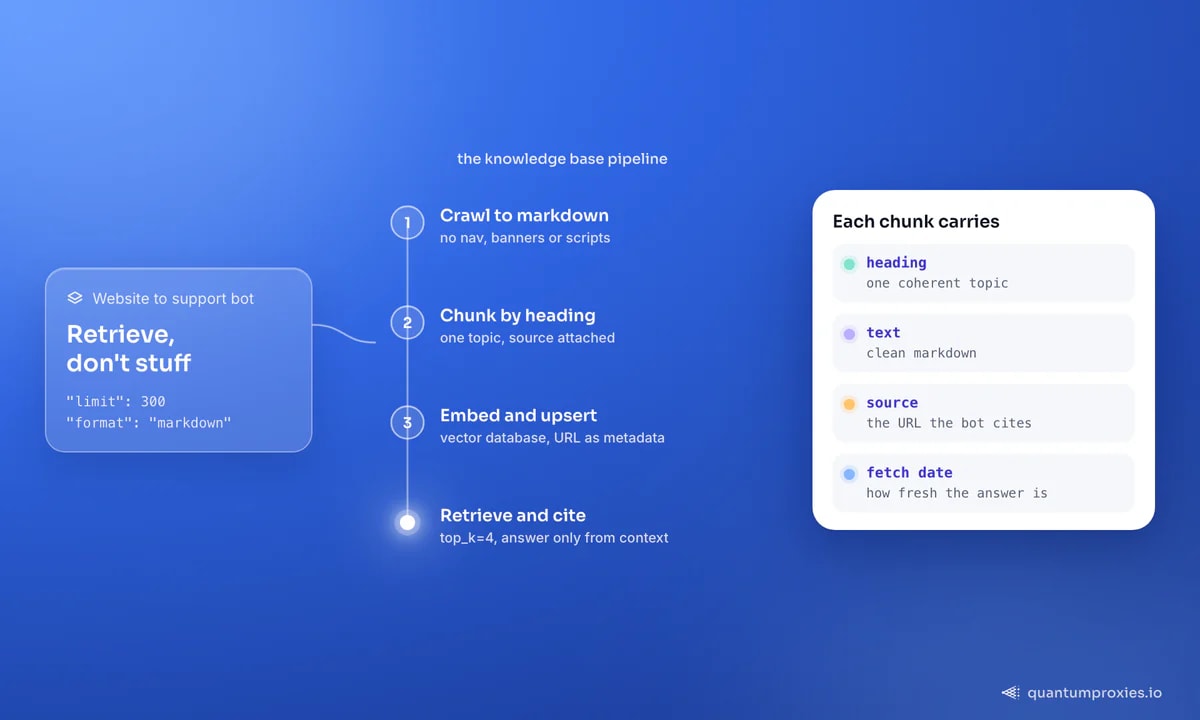
Step 3: embed, store, and retrieve with citations
Embed each chunk into a vector and upsert it into a vector database with the source URL as metadata. At query time, embed the user's question, pull the top few matches, and pass their text to the model as context — and surface the source links so the answer is checkable, not a black box:
# index each chunk with its source as metadata
for c in all_chunks:
    vec = embed(c["heading"] + "\n" + c["text"])
    index.upsert(id=uid(c), values=vec,
                 metadata={"source": c["source"], "text": c["text"]})

# at query time: retrieve, ground, and cite
hits = index.query(embed(user_question), top_k=4)
context = "\n\n".join(h.metadata["text"] for h in hits)
citations = list({h.metadata["source"] for h in hits})
answer = llm(f"Answer using only this context:\n{context}", question=user_question)
Grounding the model in retrieved context — and telling it to answer only from that context — is what stops a support bot from confidently inventing policy. The citations do double duty: they let users verify, and they let you spot when the bot is reaching for the wrong doc. For the deeper mechanics, our guide on RAG pipelines that aren't stale goes further on chunking and retrieval.
Step 4: refresh, or it rots
A knowledge base is a living thing. Docs get rewritten, prices change, new articles appear — and a bot answering from last month's crawl gives wrong answers with full confidence. Schedule a re-crawl, compare each page to its last version, and re-embed only what changed so refresh stays cheap. Keep a fetch date on every chunk so you always know how current the answer's source is. If you'd rather consume a managed, always-fresh feed than run the crawl and refresh yourself, web data built for LLMs handles the collection side.
Crawl any site to clean markdown for your bot
Frequently asked questions
How do I build a chatbot knowledge base from a website?
Crawl the site to clean markdown, split each page into heading-based chunks with the source URL attached, embed the chunks into a vector database, and at query time retrieve the most relevant chunks to ground the model's answer. Schedule a re-crawl to keep it current. This RAG approach means editing a doc updates the bot's knowledge without any retraining.
Do I need to train a model on my content?
No — and for a support bot you shouldn't. Fine-tuning is slow, costly and goes stale whenever your content changes. Retrieval-augmented generation keeps the knowledge in a vector store outside the model, so the bot always answers from the current crawl. You only re-crawl and re-embed when content changes, which is far cheaper than retraining.
Why crawl to markdown instead of HTML?
Raw HTML carries navigation, ads, cookie banners and scripts that add noise and waste your embedding budget. Markdown keeps the meaningful structure — headings, lists, tables — while dropping the presentation layer, which is what LLMs ingest most cleanly. Cleaner input means more relevant retrieval and fewer confused answers. Bots also can't read images or video, so keep key information in text.
How do I keep the knowledge base up to date?
Schedule periodic re-crawls, detect which pages changed, and re-embed only those — full re-crawls waste bandwidth and compute. Store a fetch date on every chunk so you can tell how fresh an answer's source is, and version the index so you can roll back if a bad crawl degrades retrieval. Incremental refresh keeps cost proportional to real change.
The pipeline is the product here: crawl to markdown, chunk by heading, embed with sources, retrieve and cite, then refresh on a schedule. Do that and your support bot answers from your real content, links its sources, and stays current as your site evolves — the difference between a bot people trust and one they learn to route around. To give an AI agent live access to the same data through a standard interface, see our guide to the QuantumProxies MCP server.