Browser-Use Proxy Configuration: Per-Session Exit IPs
Search for a browser-use proxy and Google hands you Chrome's settings dialog. This is the other thing: routing the browser-use AI agent library through authenticated residential IPs, one per agent.
Search for browser-use proxy and Google hands you Chrome's settings dialog, the chrome.proxy extension API and a corporate PAC file tutorial. None of that is what you were looking for. You want to route browser-use - the Python library with 108k GitHub stars that lets an LLM drive a real browser - through an authenticated proxy, so your agent does not hammer a target from your office IP. This is that guide: where the parameter actually lives, why it silently stops working after an upgrade, how to give every parallel agent its own exit IP, and what happens to a long task when the IP moves under it.
Where the browser-use proxy parameter actually lives
The proxy is a property of the browser session, not of the agent. In the current library, Browser is an alias for BrowserSession - the docs are explicit that they are exactly the same class - so any tutorial you find using one name applies to the other. The parameter is proxy, and the docs type it as ProxySettings with four fields: server, bypass, username and password. An equivalent dict works, which is what most people pass:
import asyncio
from browser_use import Agent, Browser
# llm = ...  your model of choice; see the browser-use docs for the import

PROXY = {
    "server": "http://residentialpremium.quantumproxies.io:8080",  # scheme is mandatory
    "username": "USER",
    "password": "PASS",
    "bypass": "localhost,127.0.0.1",                  # keep local calls off the proxy
}

browser = Browser(proxy=PROXY, headless=False)

async def main():
    agent = Agent(
        task="Open https://api.ipify.org?format=json and report the IP you see",
        llm=llm,
        browser_session=browser,
    )
    await agent.run()

asyncio.run(main())
Two details people get wrong. First, credentials belong in the username and password fields, not stuffed into server - Chromium will not answer a proxy auth challenge from a URL-embedded password, and browser-use has no dialog to type it into. Second, server needs a scheme. residentialpremium.quantumproxies.io:8080 is not a proxy URL; http://residentialpremium.quantumproxies.io:8080 is. If credentials are giving you trouble at all, whitelisting your server's IP removes user:pass from the equation entirely - the gateway recognises the caller and the browser never sees a 407.
Why your browser-use proxy config silently does nothing
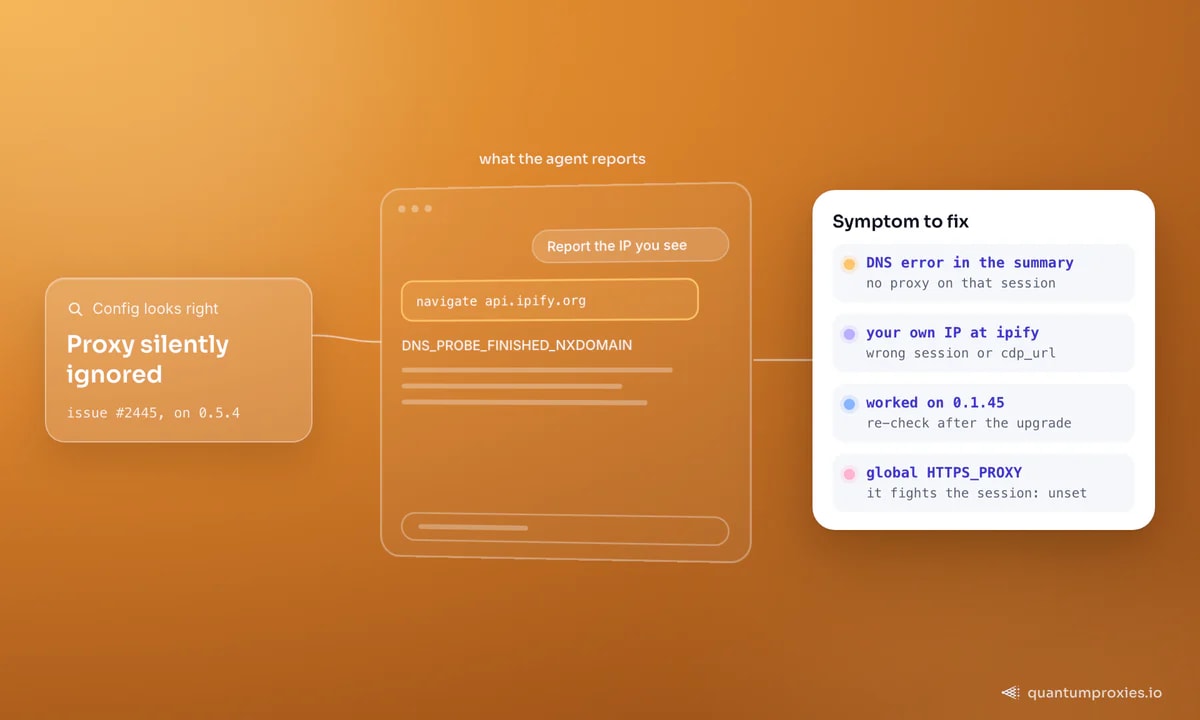
The most-visited page on this topic after the docs is GitHub issue #2445, filed in July 2025: a proxy that worked in 0.1.45 stopped taking effect on 0.5.4, and the only clue was the agent cheerfully reporting DNS_PROBE_FINISHED_NXDOMAIN in its own summary. That failure mode - the agent narrating a network error as if it were a fact about the website - is the signature of a proxy that is half-configured. Work through this list before you burn more tokens:
- You passed
proxy=to a session the agent never received. Create oneBrowser, pass that exact object, and do not let a default session get created behind your back. - You set
cdp_url. Connecting to an already-running Chrome means the proxy belongs to that browser's launch flags (--proxy-server=...), not to your session config - browser-use cannot retrofit it. - A global
HTTP_PROXYorHTTPS_PROXYenv var is fighting the session setting, or worse, quietly routing your LLM API calls through metered bandwidth. - The proxy itself is dead. Test it outside the agent first - it costs nothing and rules out half the search space.
import requests

PROXY_URL = "http://USER:PASS@residentialpremium.quantumproxies.io:8080"
r = requests.get(
    "https://api.ipify.org?format=json",
    proxies={"http": PROXY_URL, "https": PROXY_URL},
    timeout=20,
)
print(r.status_code, r.text)   # must NOT be your own IP
If that prints a foreign IP, the credentials and gateway are fine and the problem is in the session wiring. If it prints your own address, or a 407, fix that first. Our free IP checker tells you what the exit looks like from the other side - ASN, type and reputation - which is the second thing to check when pages load but every one of them is a CAPTCHA.
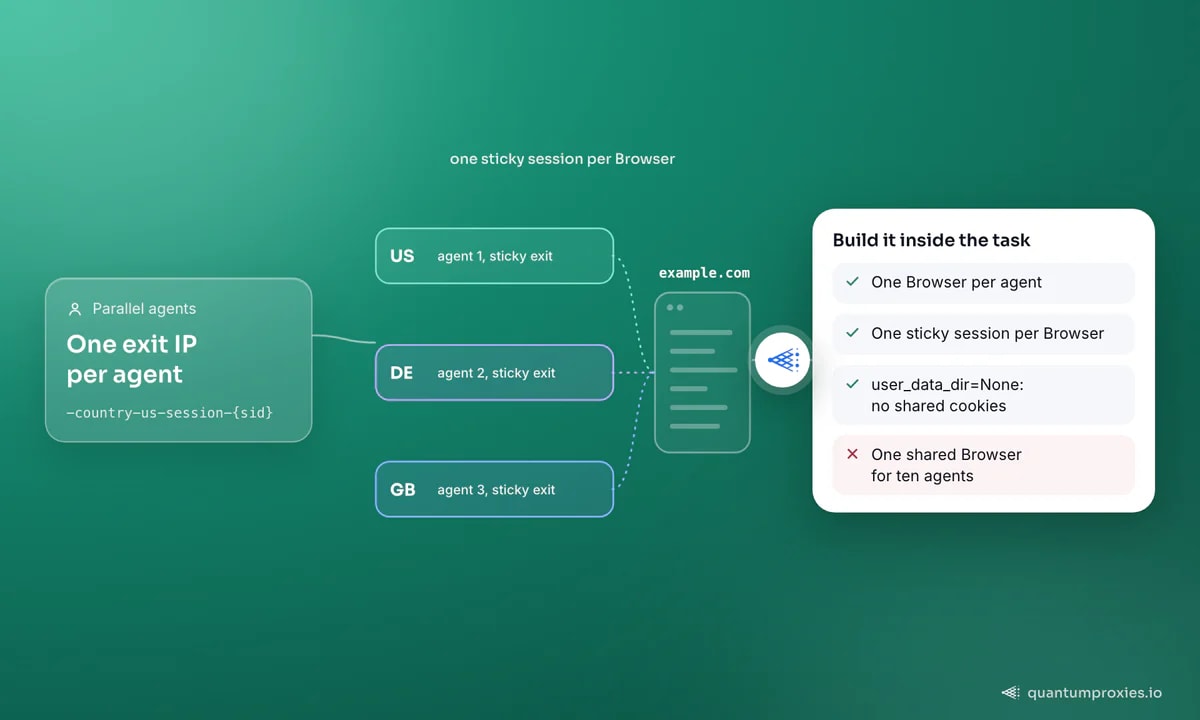
One proxy per session, so parallel agents do not share an exit IP
This is the whole reason the parameter sits on the session rather than on a global config. Run ten agents through one shared Browser and the target sees ten times the traffic from one address, which is the fastest way to get a residential IP burned. Build the session inside the coroutine instead, and give each one its own sticky session identifier so the gateway pins it to a single exit for the life of the task:
import asyncio, secrets
from browser_use import Agent, Browser

def session_proxy(sid: str, country: str = "us"):
    return {
        "server": "http://residentialpremium.quantumproxies.io:8080",
        "username": f"USER-country-{country}-sid-{sid}-ttl-30m",
        "password": "PASS",
    }

async def run_task(task: str, country: str):
    sid = secrets.token_hex(3)                  # e.g. a1b2c3
    browser = Browser(
        proxy=session_proxy(sid, country),
        user_data_dir=None,                     # incognito: no shared cookies
        allowed_domains=["*.example.com"],      # keep the agent on target
    )
    agent = Agent(task=task, llm=llm, browser_session=browser)
    return await agent.run()

async def main():
    await asyncio.gather(
        run_task("Find the price of SKU-1", "us"),
        run_task("Find the price of SKU-1", "de"),
        run_task("Find the price of SKU-1", "gb"),
    )

asyncio.run(main())
Three flags are doing real work there. user_data_dir=None runs incognito, so agents cannot inherit each other's cookies and quietly merge two identities onto one profile. allowed_domains restricts navigation to a pattern list - note that wildcards in the TLD position, like example.*, are rejected on purpose, and lists past a hundred entries are optimised into sets with pattern matching switched off. And the session identifier in the username is what makes the exit IP stable; the exact flag names for country and session live in your dashboard, but the shape is the same everywhere.
Choosing the exit country per task
Agents that shop, compare prices or check availability are wrong by default if they browse from the wrong country. Because the proxy is per session, the country is a per-task argument - swap country-us for country-de and the same task returns German pricing. Pick from the 200+ countries in the pool, and keep the rest of the browser coherent with it: pass a matching language through args (Chromium accepts --lang=de-DE) rather than letting a German exit IP request pages in US English. For mobile-only surfaces and the highest-trust exits, mobile IPs behave differently again, because carrier NAT puts thousands of real users behind the same address.
Give every agent its own residential exit IP
What happens when the IP rotates mid-task
Agents are slow in a way scrapers are not. Between the default 0.5s pause after each action, a 0.25s minimum page-state wait and a 0.5s network-idle wait, browser-use spends over a second per step before the model has said anything - and the model round-trip is usually several seconds more. A fifteen-step task therefore runs for one to two minutes of wall clock. If your exit IP rotates per request, the site will see a different address on every one of those steps: the login drops, the cart empties, and the agent reports that the checkout button vanished.
The fix is a sticky session whose window comfortably exceeds your worst-case task duration, not your average one. Time a few real runs, take the slowest, and add margin - agents retry, and a retry doubles the clock. When a task genuinely needs to outlive any sticky window, shard it: log in and export state, then resume in a fresh session with the cookies you saved via storage_state. And if you are choosing between per-request rotation and sticky at all, our infrastructure checklist for AI agents covers the rest of the layer around this decision.
Keep the proxy off your LLM calls
This one costs real money and almost nobody catches it. Setting HTTPS_PROXY as an environment variable to make the proxy "apply everywhere" also routes every model API call through your residential gateway - prompts and responses, on every step, billed per gigabyte for the privilege of going the long way round. Configure the proxy on the Browser only and leave the process environment alone. While you are counting bytes, note that browser-use loads uBlock Origin by default through enable_default_extensions: leave it on, because every ad request it kills is one you do not pay for. The full arithmetic is in our breakdown of what an AI agent costs in bandwidth, and the classic-scraping version of the trade-off is in headless browser vs HTTP requests.
Frequently asked questions
How do I set a proxy in browser-use?
Pass proxy= when you construct the Browser (also exported as BrowserSession), then hand that object to the Agent. The value carries server with an explicit http:// scheme, plus username, password and an optional bypass list. There is no agent-level proxy setting - it belongs to the session.
Why is my browser-use proxy config not working?
In order of likelihood: the agent is running on a different session from the one you configured, server is missing its scheme, you set cdp_url so the browser was launched elsewhere without proxy flags, or a global proxy env var is overriding you. Verify the proxy with a plain HTTP client first - a DNS error inside the agent log usually means no proxy is attached at all.
Can each browser-use agent use a different IP?
Yes, and you should. Create the Browser inside each task coroutine with its own proxy credentials rather than sharing one instance. Adding a unique session identifier to the gateway username pins each agent to a distinct exit for the duration of its run, so ten parallel agents look like ten users instead of one very busy one.
Which proxy type suits browser-use agents best?
Rotating residential for research and price checks where each task is independent, sticky residential for anything with a login or a cart, and mobile when the target is hostile or mobile-only. Datacenter IPs are fine for internal targets and unprotected pages, and they are far cheaper per gigabyte - which matters, because a browser agent moves a lot of gigabytes.
Does a proxy stop browser-use from being detected?
No. A proxy fixes the IP layer only; the fingerprint of an automated Chromium is a separate problem, and so is the behaviour of an agent that clicks with millisecond precision. Trusted residential exits remove the easiest signal, but pair them with a stealth-oriented browser build if the target runs serious bot management.
Nothing here is exotic: the proxy is a session property, and the two things that break it are a missing scheme and a session you never handed over. Get those right, give each parallel agent its own sticky exit, and keep the gateway away from your model API calls. For the wider picture, see our map of anti-detect frameworks and authenticated proxies.
Run browser-use on 90M+ residential IPs across 200+ countries