Scrape Google Maps Business Data Without the Places API Bill
The official Places API is capped, priced per call, and hides half the fields you want. A maps SERP vertical gives you names, ratings, reviews and contacts — the raw material for lead lists and local market research.
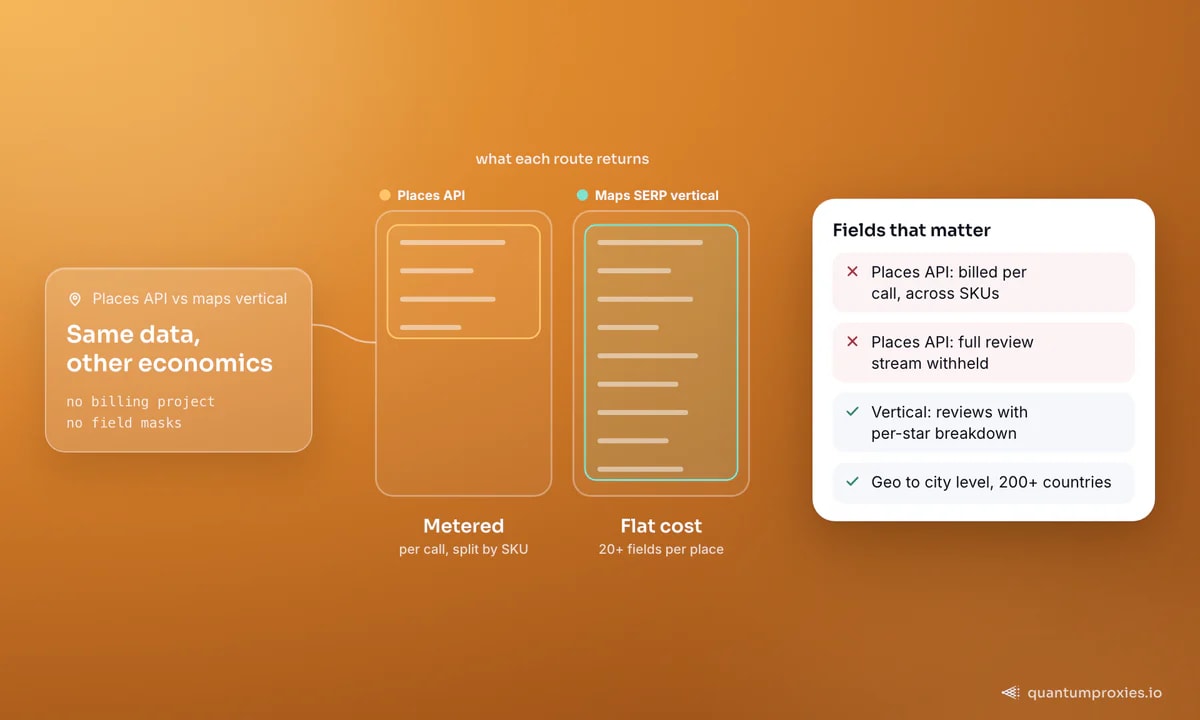
Google Maps is the richest local business dataset on the planet — names, addresses, phone numbers, websites, ratings, review counts, categories, opening hours, coordinates. The official Places API technically exposes some of it, but it is metered per call, split across billing SKUs, and quietly omits fields you actually want, like the full review stream. If you are building lead lists or doing local market research, scraping the maps results directly is cheaper and more complete. This guide covers the maps SERP vertical, the 120-result cap that trips everyone, place details, reviews, and where the legal line sits.
The 120-result cap nobody warns you about
The single most important fact about scraping Google Maps: a single map view returns at most roughly 120 places, no matter how many businesses actually exist in the area. Google paginates the infinite-scroll list to that ceiling. So a naive "restaurants in Chicago" query does not give you every restaurant in Chicago — it gives you 120 and stops. Teams discover this after their lead list plateaus and assume the scraper is broken. It is not; the surface is capped.
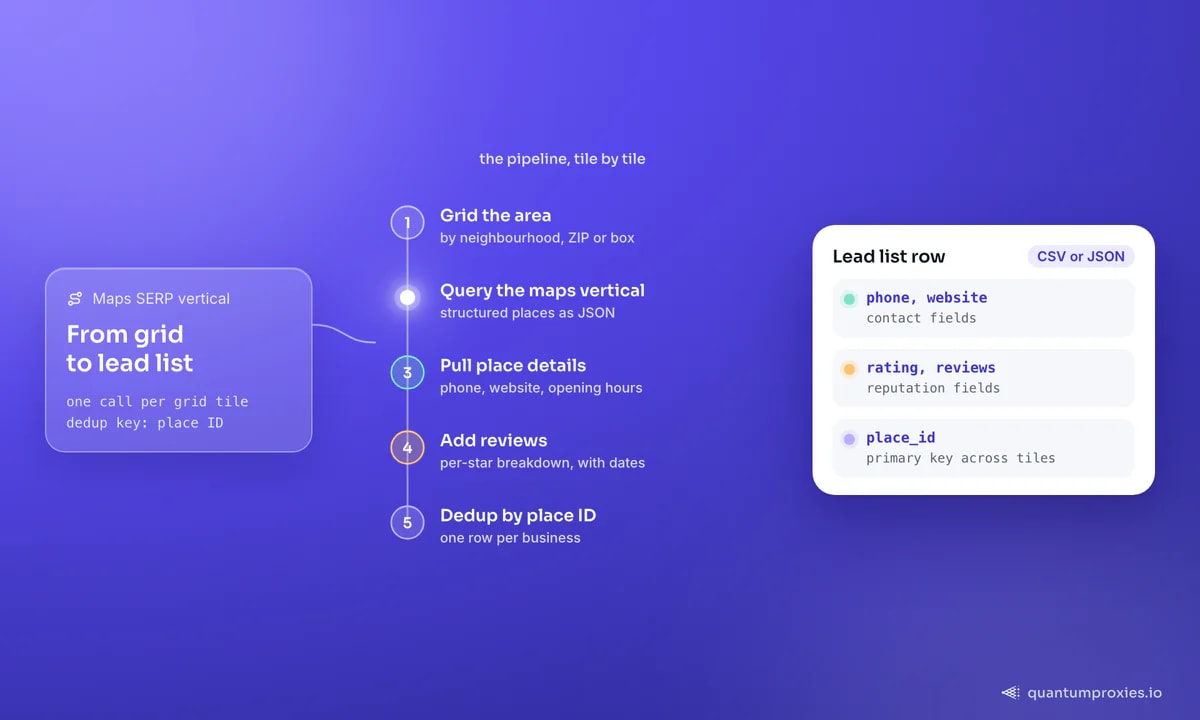
The fix is to grid the search. Instead of one query over a whole city, tile the area into smaller cells — by neighbourhood, by ZIP, or by coordinate boxes — and query each tile. Each tile has its own 120-place budget, so a dense city that would cap at 120 yields thousands of unique places once you dedup across tiles by place ID. Smaller tiles in dense areas, larger tiles in sparse ones. This grid discipline is the difference between a toy scrape and a complete dataset.
The maps SERP vertical: structured places, no browser
Rather than driving a headless browser to scroll Google Maps — slow, fragile, and easy to block — query a maps SERP vertical that returns the results as structured JSON. The QuantumProxies SERP API has a maps vertical alongside Google, Bing and the other verticals (news, images, shopping, jobs, reviews). You send a search term and a location; it returns ranked places with names, addresses, ratings, review counts, categories, coordinates and place IDs — the raw list, already parsed, geo-targeted across 200+ countries down to city level.
# maps vertical: structured places for one grid tile
curl -s -X POST "https://api.quantumproxies.io/v1/scraper/serp" \
  -H "Authorization: Bearer $QP_KEY" \
  -H "Content-Type: application/json" \
  -d '{"query": "coffee shop", "search_type": "maps", "gps_coordinates": "41.8781,-87.6298,14", "country": "us"}'
Loop that call over your coordinate grid, collect the places, and dedup by place ID. Because the SERP API handles rotation, geo and blocking for you, your code stays a simple fetch-and-store loop instead of a browser-automation project. If you want it inside an agent or IDE, the same maps vertical is available through our MCP server with npx -y quantumproxies-mcp.
Pull Google Maps data with the SERP API
Place details and reviews: the fields that matter
The search list gives you the skeleton; place-detail lookups add the flesh. For each place ID you can pull the full record — phone number, website URL, opening hours, price bracket, a review-count-per-star breakdown, coordinates, and the review stream itself with reviewer names, dates and ratings. That review distribution is exactly what the official API tends to withhold, and it is often the whole point: sentiment, reputation trends, and how a competitor's ratings move over time. For multi-location review operations specifically, our guide on monitoring Google reviews across locations builds on this same vertical.
- Contact fields — phone, website, sometimes an email harvested from the linked site — the backbone of a B2B lead list.
- Reputation fields — average rating, total reviews, per-star distribution, individual reviews with dates.
- Operational fields — opening hours, popular times, price bracket, permanently/temporarily closed flags.
- Identity fields — place ID and CID for stable deduplication across runs and tiles.
Turning places into a clean lead list
Lead generation is the most common reason people scrape Maps, and the workflow is straightforward once the grid and dedup are in place: query each tile, keep the place ID as the primary key so the same business scraped from two overlapping tiles collapses to one row, enrich with the website and phone, and optionally follow the website to pull an email and social profiles. Filter by rating or review count to prioritise established businesses, or by category to target a niche. The output is a deduplicated CSV or JSON your sales team can work immediately. It is the local-lead sibling of the wider B2B lead-generation playbook, and it pairs well with cross-referencing against Yelp business data for a fuller picture.
Is scraping Google Maps legal?
Business listings on Maps — names, addresses, ratings, hours — are public data, and collecting public data is broadly treated as lawful in many jurisdictions. The caveats are real, though. Scraping the site directly can conflict with Google's terms of service, and any personal data you touch (reviewer names, harvested emails) brings privacy law such as GDPR into play. Keep collection to genuinely public business information, respect rate limits, and treat personal data carefully. This is informational, not legal advice — consult a professional before large-scale or commercial collection. For the mechanics of how Google serves and rate-limits results, see how SERP scraping works in 2026.
Frequently asked questions
Can you scrape Google Maps data?
Yes. Public business listings — names, addresses, phones, ratings, reviews, hours — can be collected. The cleanest route is a maps SERP vertical that returns the results as structured JSON, geo-targeted by location, rather than driving a headless browser to scroll the map, which is slower and easier to block.
How do I get more than 120 results from Google Maps?
A single map view is capped at about 120 places. To exceed it, split the target area into a grid of smaller tiles — by neighbourhood, ZIP or coordinate box — and query each tile separately. Every tile has its own 120-place budget, so you dedup the combined results by place ID to get thousands of unique businesses.
How is this cheaper than the Google Places API?
The Places API meters per call and splits data across billing SKUs, so a full local dataset with reviews adds up fast — and some fields are withheld entirely. A maps SERP vertical charges a flat per-query cost, returns 20+ fields per place including the review stream, and needs no Google billing project or field masks.
Do I need proxies to scrape Google Maps?
If you scrape the site directly, yes — Google rate-limits by IP and will challenge or block a single address quickly. A SERP API handles the proxy rotation, geo targeting and blocking internally, so you send a query and get structured results without managing a proxy pool yourself.
Google Maps is a lead list and a market map waiting to be read — as long as you grid the area to beat the 120-cap, pull the details and reviews the official API hides, and dedup on place ID. Do that through a maps SERP vertical and the whole thing collapses to a fetch loop.