How to Scrape Yelp Business & Review Data for Market Research
Yelp tightened its anti-bot posture in the last year and its terms forbid scraping outright. Here's how the data is structured, how residential geo IPs reach it, and the compliant routes worth knowing.
Yelp is one of the richest sources of local business intelligence - ratings, review text, contact details and category data across millions of listings. It is also one of the trickier targets to scrape. Yelp's terms forbid scraping outright, and the site tightened its anti-bot posture noticeably in the last year, so casual scripts that worked before now hit walls. This guide covers how Yelp structures its data, how geo-matched residential proxies reach it, the practical limits, and the compliant routes worth knowing before you build anything.
What's worth scraping - and the ToS reality
The valuable fields are the obvious ones: business name, address, phone number, star rating, review count, category, and the review text itself with reviewer sentiment. Aggregated across a metro, that data drives competitor analysis, local market sizing and sentiment tracking. Before you start, be clear-eyed about the rules. Yelp's own support pages state the site does not permit scraping, indexing or mining of its content under Section 6(b) of its Terms of Service. That doesn't make collection technically impossible, but it does mean this is a target where you weigh the value against the terms, prefer public non-personal data, and keep volume modest. Our overview of web scraping legality in 2026 frames the wider picture - and none of this is legal advice.
How Yelp structures its data
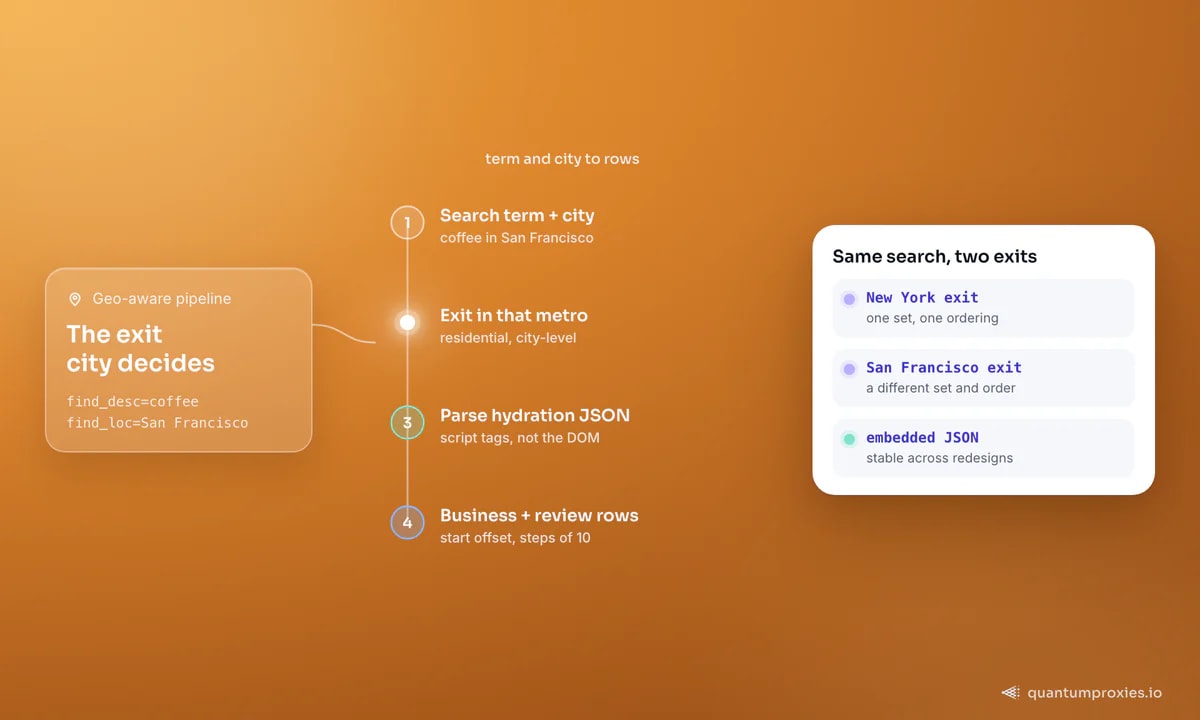
The single most useful thing to know: the data you want is rarely in the visible HTML. Yelp hydrates its pages from JSON embedded in <script> tags, and its review lists load from internal JSON endpoints. So the reliable approach is to grab the embedded payload rather than fight brittle CSS selectors against a React DOM:
import requests, re, json

proxy = "http://USER-country-us:PASS@residentialpremium.quantumproxies.io:8080"  # geo-matched
proxies = {"http": proxy, "https": proxy}
headers = {
    "User-Agent": "Mozilla/5.0 (Macintosh; Intel Mac OS X 10_15_7) "
                  "AppleWebKit/537.36 (KHTML, like Gecko) Chrome/144.0.0.0 Safari/537.36",
    "Accept-Language": "en-US,en;q=0.9",
}

r = requests.get("https://www.yelp.com/biz/example-business-san-francisco",
                 headers=headers, proxies=proxies, timeout=25)

# Yelp embeds page state as JSON inside script tags
for blob in re.findall(r'<script[^>]+application/json[^>]*>(.*?)</script>', r.text, re.S):
    try:
        data = json.loads(blob)
    except ValueError:
        continue
    # inspect data for businessName, rating, reviewCount, phone
Review pages paginate with a start offset that increments in steps of roughly ten. A practical ceiling matters here: automated Yelp collection tends to top out around 240 results per search, because Yelp caps how deep its own result pagination goes. Plan your coverage around that limit - segment by city, category and neighbourhood rather than trying to page endlessly through one broad query:
def yelp_search(term, loc, cap=240):
    """Page a Yelp search via the `start` offset (steps of 10, ~240 ceiling)."""
    results = []
    for start in range(0, cap, 10):
        r = requests.get("https://www.yelp.com/search",
                         params={"find_desc": term, "find_loc": loc, "start": start},
                         headers=headers, proxies=proxies, timeout=25)
        page = parse_hydration(r.text)   # your JSON extractor from above
        if not page:
            break                          # empty page = end of results
        results.extend(page)
    return results
Two parsing notes save hours. Yelp's review text and reviewer metadata sit in the embedded payload alongside the business fields, so once you've located the right JSON blob you rarely need a second request per page. And because the site is a React app, the visible class names change often while the embedded data schema is far more stable - anchor your extraction to the JSON keys, not the DOM, and your scraper survives redesigns that break selector-based tools overnight.
Geo targeting is the whole game
Yelp is a local product, so results depend heavily on where the request appears to come from. A "coffee" search served to a New York exit returns different businesses and ordering than the same search from a San Francisco exit. If your research targets a specific metro, your proxy needs to exit in that metro - anything else returns skewed data. A residential proxy pool with city-level targeting across 200+ countries lets you pin the exit to the market you're analysing, which also keeps you inside the trust band Yelp's anti-bot layer expects for local traffic.
Geo control also unlocks the most valuable analysis Yelp supports: comparing the same category across metros. Run one query - "coffee", "plumbers", "gyms" - across ten cities from ten matching residential exits and you get average ratings, review volume and price tier city by city. That comparative dataset is the backbone of local market sizing, and no single-location scrape can produce it.
Get geo-targeted residential proxies
Getting past the anti-bot crackdown
Since Yelp tightened detection, three things separate a run that completes from one that stalls on challenges. Use residential IPs matched to the target geo, not datacenter ranges. Send a full, coherent browser header set - a real Chrome or Safari User-Agent with matching Accept and Accept-Language, not a default library string. And pace conservatively with jitter, because bursts from one IP are the fastest trigger. When Yelp escalates to JavaScript challenges or CAPTCHAs anyway, that's the signal to stop hand-rolling and hand the page to a Scraper API that renders JavaScript, carries a real browser fingerprint and rotates IPs for you - usually a higher success rate for less code.
Compliant alternatives worth knowing
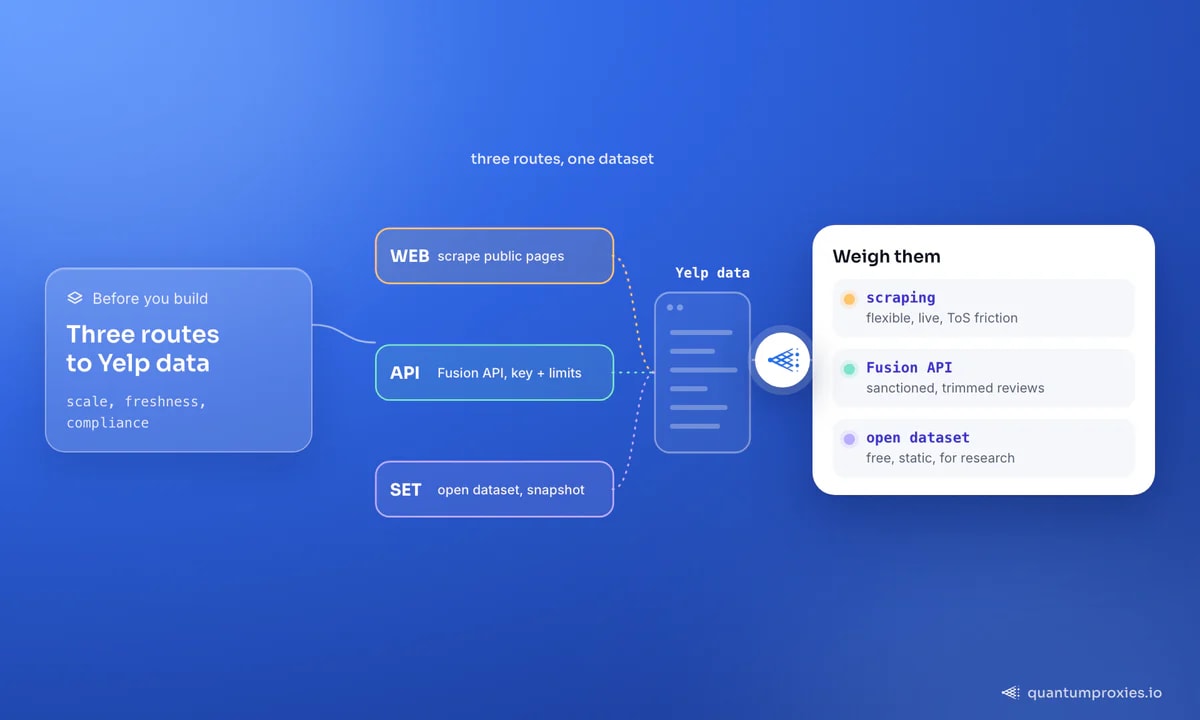
Before committing to scraping, weigh two sanctioned routes. Yelp's official Fusion API returns business details and a trimmed slice of review data under an API key and rate limits - lower flexibility, but no ToS friction. And Yelp publishes an open dataset of millions of reviews, photos and business attributes for research use under its own licence; it's a static snapshot rather than live data, but for model training or historical analysis it's often all you need. For live competitor and review monitoring across sources, the same techniques transfer to Google Maps business data, Trustpilot reviews and TripAdvisor.
Frequently asked questions
Is it legal to scrape Yelp?
Yelp's Terms of Service explicitly prohibit scraping, indexing and mining its content, so collection happens against the site's stated rules even when it targets public pages. Reviewer names are also personal data under GDPR and similar laws. Prefer the Fusion API or open dataset where they fit, keep volume modest, and consult a lawyer for anything at scale. This is not legal advice.
How many results can you scrape per Yelp search?
Roughly 240 businesses per search on average, because Yelp caps how deep its result pagination goes. To cover a market fully, segment your queries by city, category and neighbourhood rather than paging through one broad search - many narrow queries beat one deep one.
Why do I get different Yelp results from different servers?
Because Yelp is location-aware and personalises results by the requesting IP's geography. A search run from a different city or country returns different businesses and ordering. For accurate local research, use a residential proxy that exits in the exact metro you're analysing.
Where is the data on a Yelp page?
Mostly in embedded JSON, not the visible HTML. Yelp hydrates its React pages from JSON inside <script> tags and loads reviews from internal JSON endpoints, so parsing the embedded payload is more reliable than matching CSS selectors against a DOM that changes often.
Yelp is scrapable with the right approach - parse the embedded JSON, exit from the target metro on residential IPs, respect the ~240-per-search ceiling, and pace conservatively. But weigh it against Yelp's terms and the compliant Fusion API and open dataset first. When the anti-bot layer escalates, a managed Scraper API is the pragmatic next step.