How to Scrape Trustpilot Reviews for Reputation Analysis
Trustpilot is a public reputation feed for you and every competitor you have. Here's how the pages are structured, where pagination caps out, and how to turn scraped reviews into a sentiment pipeline.
Trustpilot is a public reputation feed — not just for your own brand, but for every competitor you have. Each company page is a stream of dated, star-rated, geolocated opinions you can mine for reputation tracking, competitor benchmarking, and product feedback. This guide covers how to scrape Trustpilot reviews: how the pages are structured, where pagination caps out, the fields worth capturing, and how to turn the raw text into a sentiment pipeline that scales past manual reading.
How Trustpilot pages are structured
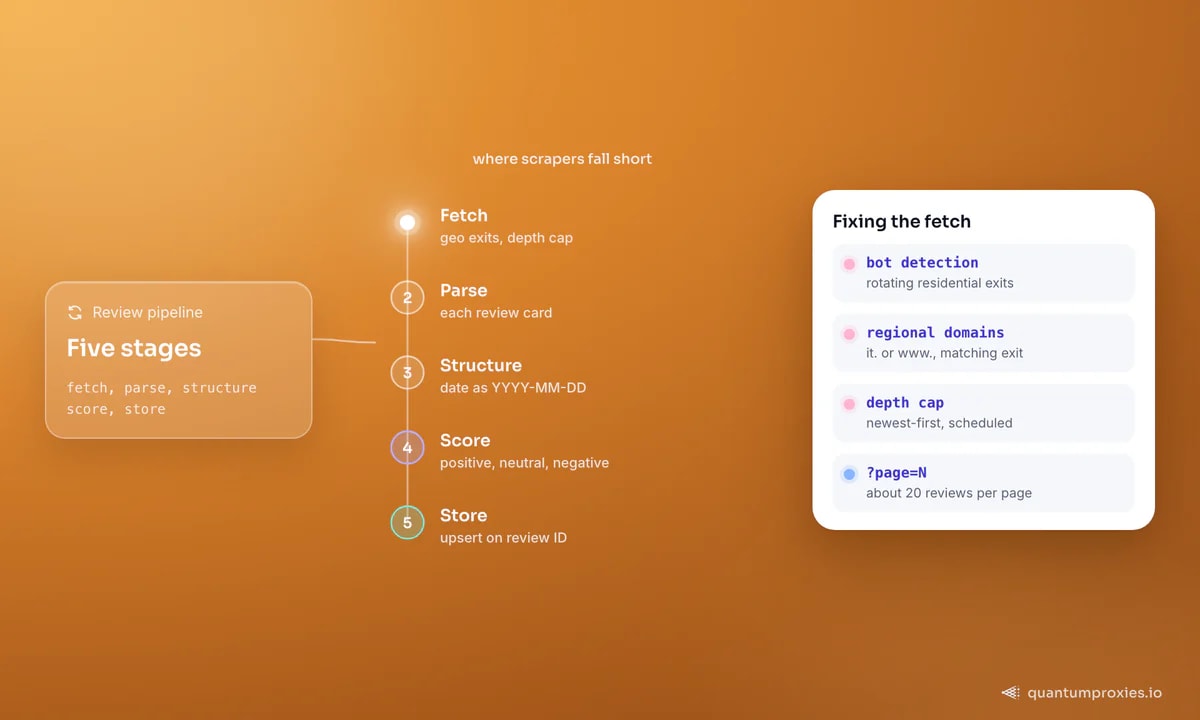
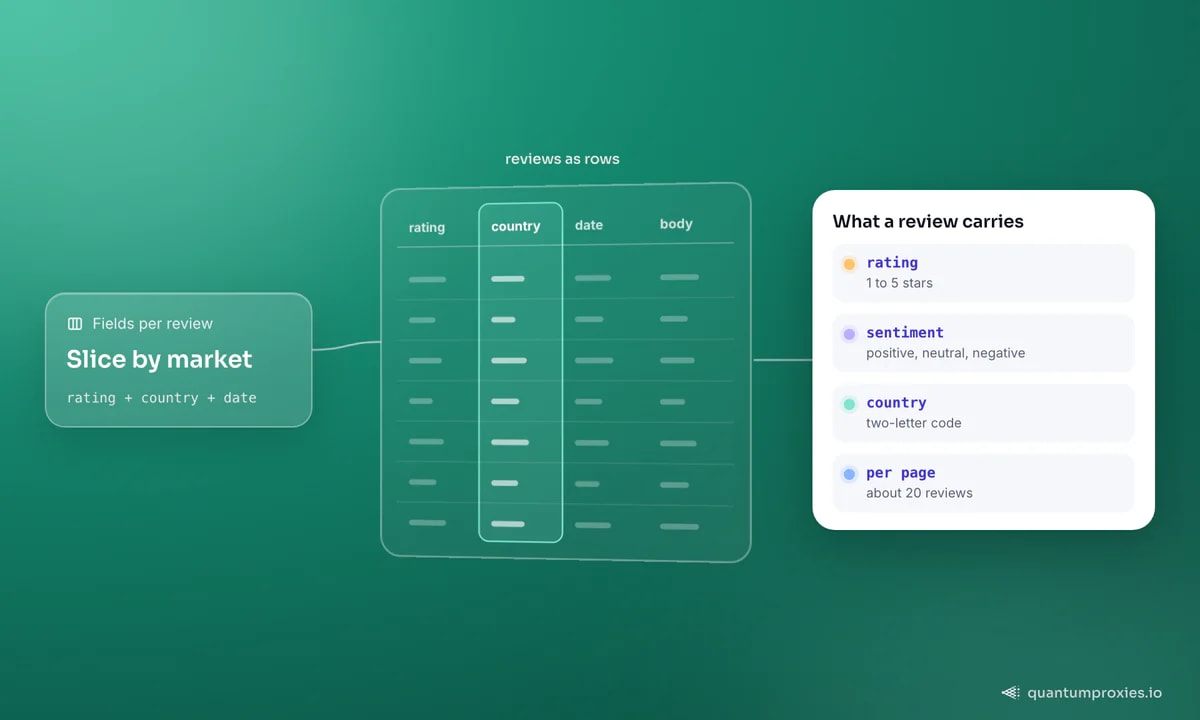
Every company has a review page at trustpilot.com/review/{domain} — for example /review/example.com. Trustpilot runs localized domains too, so it.trustpilot.com and www.trustpilot.com can surface different review sets and sort orders for the same company. That matters: if you want a specific market's reviews, hit the matching regional domain and use an exit IP from that region. Each review renders as a card carrying the reviewer's name, star rating, date, a headline, the full body text, and — usefully — the reviewer's country as a two-letter code.
Pagination and where it caps
Reviews are paginated, roughly 20 per page, with a ?page=N parameter. Two things bite here. First, Trustpilot limits how deep you can page on a single company — the well-known "200-review limit" that off-the-shelf tools advertise beating. Second, sort order changes what you get: newest-first captures recent sentiment, while relevance-sorted pages skew toward highlighted reviews. Decide your sort deliberately, and for very active companies, collect in scheduled passes rather than one deep crawl so you stay under the depth cap and catch new reviews as they land.
Building the scrape
Trustpilot fingerprints automated traffic, so bare requests get challenged quickly. Route through a rotating residential proxy with the right country exit, or hand the fetch to a Scraper API that manages rotation, fingerprint and rendering and returns clean HTML or markdown per page:
import requests

def fetch_page(domain, page, country="gb"):
    r = requests.post(
        "https://api.quantumproxies.io/v1/scraper/extract",
        headers={"Authorization": "Bearer YOUR_API_KEY"},
        json={
            "url": f"https://www.trustpilot.com/review/{domain}?page={page}",
            "country": country,
            "format": "html",
        },
        timeout=120,
    )
    return r.json()["payload"]["content"]

for page in range(1, 11):          # walk pages 1..10
    html = fetch_page("example.com", page)
    # parse each review card: author, rating, date, title, body, country
Parse each card into a record. A newer approach skips brittle CSS selectors entirely and passes the page HTML to an LLM extraction step that returns structured JSON — resilient when Trustpilot tweaks its markup.
The fields to capture
- rating — 1 to 5 stars, the numeric backbone of every trend chart.
- date — normalize to
YYYY-MM-DDso you can bucket by week or month. - author and total reviews — the reviewer and how prolific they are (a one-review account reads differently to a hundred-review one).
- title and body — the headline and full text, your sentiment and keyword source.
- country — a two-letter code that lets you split reputation by market.
Turn reviews into a sentiment pipeline
The star rating is a blunt instrument — a three-star review can be a rave with one complaint. Run each body through a sentiment step that classifies it as positive, neutral, or negative with a confidence score, so you can weight and filter. A typical output looks like {"category": "Positive", "confidence": 0.95}. Append the scored record to a store — a sheet, a database, or a dashboard — keyed on review ID so a re-scrape updates rather than duplicates. That five-stage flow (fetch, parse, structure, score, store) is the whole system.
Fetch Trustpilot pages cleanly with the Scraper API
Reputation and competitor use cases
Once the data lands, the analysis pays for the scrape. Track your own rating over time and alert on a dip before it shows up in sales. Benchmark competitors side by side — average rating, complaint themes, response rate — to find where they're weak. Slice by the country field to see which markets rate you well and which don't. The same review-mining pattern applies to Yelp and Google Maps business data, so a single pipeline can cover every reputation surface at once. This is informational, not legal advice — keep to public review pages and avoid republishing individuals' text verbatim.
Scheduling and keeping the data fresh
Reviews aren't a one-time pull — reputation is a moving target, so collection has to be a schedule, not a script. Run a daily or weekly pass per company, newest-first, and upsert on review ID so new reviews append while existing ones update in place. That side-steps Trustpilot's per-company depth cap — you never need to page deep if you catch reviews as they land — and gives you the time series that makes the data valuable: rating trend lines, complaint spikes after a bad week, and shifts in response rate. Add a simple alert (a drop of more than half a star week over week, or a burst of one-star reviews) and the pipeline stops being a research tool and becomes an early-warning system for your reputation and your competitors'.
Freshness has a cost, though. Re-fetching every company every day burns bandwidth and IPs on data that mostly hasn't changed. Tier it like any monitoring job: watch your own brand and your top few competitors closely, and sweep the long tail weekly or monthly. Weighting the crawl toward companies whose review volume actually moves keeps both the data current and the bill sane.
Frequently asked questions
Can you scrape Trustpilot reviews?
Yes — company review pages are public and paginated, so you can collect the author, rating, date, title, body, and country for each review. The main obstacles are Trustpilot's bot detection, which requires clean rotating IPs, and its per-company depth cap, which you work around by sorting newest-first and collecting in scheduled passes rather than one deep crawl.
Is it legal to scrape Trustpilot?
Scraping publicly visible review pages generally sits in the same gray area as other public-data collection — this isn't legal advice. Stay on public pages, don't attempt to bypass a login, keep your request rate polite, and avoid republishing reviewers' personal data or text verbatim. For aggregate reputation and competitor analysis, the derived metrics matter more than any single review anyway.
How do you scrape all reviews from Trustpilot?
You page through /review/{domain}?page=N until there are no more reviews, but Trustpilot caps how deep it serves for a single company. To get broad coverage, sort newest-first, collect in repeated scheduled runs so fresh reviews are captured over time, and hit the relevant regional domain with a matching country exit if you need a specific market's reviews.
How do you analyze Trustpilot reviews at scale?
Run each review body through a sentiment classifier that returns a category (positive, neutral, negative) and a confidence score, then store the scored records keyed on review ID. From there you can chart rating trends, cluster complaint themes, split by the country field, and benchmark competitors — the sentiment layer turns thousands of reviews into a handful of decisions.
Trustpilot hands you a dated, geolocated, star-rated feed of exactly what customers think — about you and everyone you compete with. The scrape is five stages; the fetch is the one that breaks without clean geo-locked IPs, and the sentiment layer is what turns raw text into a reputation you can actually manage.