How to Scrape Craigslist Listings: Vehicles, Rentals and Gigs
Craigslist is a data goldmine guarded by aggressive IP rate limits. Here is the per-city URL structure, the 120-per-page paging math, the RSS shortcut most people miss, and the proxy setup that keeps you off the ban list.
Craigslist holds an enormous amount of usable public data — used cars, apartment rentals, gigs, for-sale items, services — spread across hundreds of city sites. It is also a beginner's wall of CAPTCHAs and IP bans, because Craigslist rate-limits hard by IP address. The good news: the site's URL structure is simple and predictable, there is an RSS shortcut most guides skip, and the block problem is almost entirely an IP-hygiene problem. This guide covers the per-city URL pattern, the paging math, the parsing, the RSS route, and the proxy setup that keeps a scraper off the ban list. Scrape for personal or research use, respect Craigslist's terms, and treat this as general information rather than legal advice.
The URL pattern is the whole game
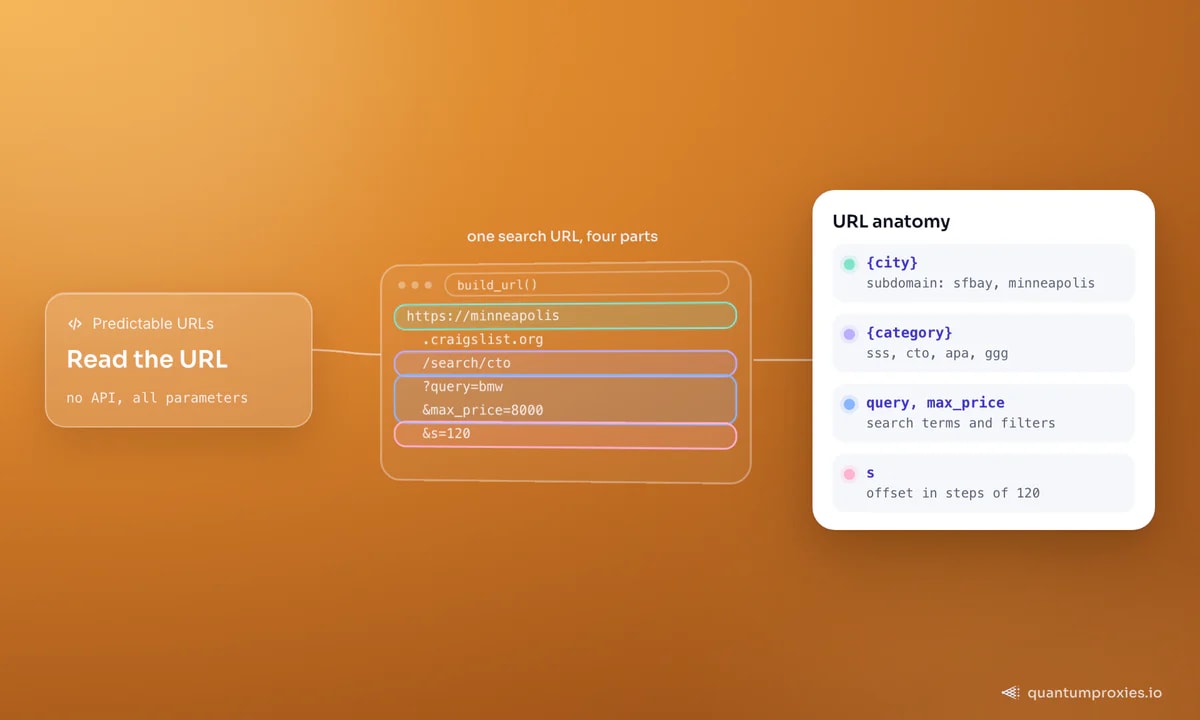
Craigslist splits by city subdomain and category code, and everything else is query parameters. Learn the shape once and you can target any city and section: https://{city}.craigslist.org/search/{category}?query={q}. Category codes are short — sss for all for-sale, cto for cars by owner, apa for apartments, ggg for gigs. Add min_price, max_price and other filters as parameters. Pagination uses the s parameter, and each page shows 120 results — so page two is s=120, page three is s=240, and so on.
import requests
from bs4 import BeautifulSoup

PROXY = "http://USER:PASS@residentialpremium.quantumproxies.io:8080"
PROXIES = {"http": PROXY, "https": PROXY}
UA = ("Mozilla/5.0 (Windows NT 10.0; Win64; x64) AppleWebKit/537.36 "
      "(KHTML, like Gecko) Chrome/133.0.0.0 Safari/537.36")

def build_url(city, category, query, page=0, min_price=None, max_price=None):
    base = f"https://{city}.craigslist.org/search/{category}"
    params = [f"query={query}"]
    if min_price: params.append(f"min_price={min_price}")
    if max_price: params.append(f"max_price={max_price}")
    if page:      params.append(f"s={page * 120}")   # 120 results per page
    return base + "?" + "&".join(params)

url = build_url("minneapolis", "cto", "bmw", page=0, max_price=8000)
r = requests.get(url, headers={"User-Agent": UA}, proxies=PROXIES, timeout=20)
Parsing the listings
Search-result rows are marked with a stable set of classes — the listing block is .result-info, with .result-title, .result-price and .result-date inside. Guard every field, because not every listing has a price:
def parse_listings(html):
    soup = BeautifulSoup(html, "html.parser")
    out = []
    for row in soup.select(".result-info"):
        title_el = row.select_one(".result-title")
        price_el = row.select_one(".result-price")
        date_el  = row.select_one(".result-date")
        if not title_el:
            continue
        out.append({
            "title": title_el.get_text(strip=True),
            "url":   title_el.get("href"),
            "price": price_el.get_text(strip=True) if price_el else None,
            "date":  date_el.get("datetime") if date_el else None,
        })
    return out

listings = parse_listings(r.text)
print(len(listings), "listings on this page")
For richer records — mileage on a car, bedrooms on a rental — follow each listing URL and parse the detail page. That doubles your request count, so it is exactly where pacing and rotation start to matter.
The RSS shortcut most guides skip
Craigslist has no general public API, but it does expose an RSS feed for search results — append &format=rss to any search URL and you get a structured XML feed instead of HTML to parse. It is lighter, less likely to trip anti-bot heuristics than repeatedly loading the full results page, and ideal for monitoring: poll a saved search on a schedule and diff for new items. It returns fewer fields than the HTML page (title, link, timestamp), so use it for freshness monitoring and fall back to HTML when you need price and detail.
import feedparser

# Any Craigslist search becomes a feed with &format=rss
feed_url = build_url("sfbay", "apa", "loft", max_price=3500) + "&format=rss"
raw = requests.get(feed_url, headers={"User-Agent": UA}, proxies=PROXIES, timeout=20)
feed = feedparser.parse(raw.content)

for entry in feed.entries[:5]:
    print(entry.updated, entry.title, entry.link)
Why Craigslist bans you, and how to not get banned
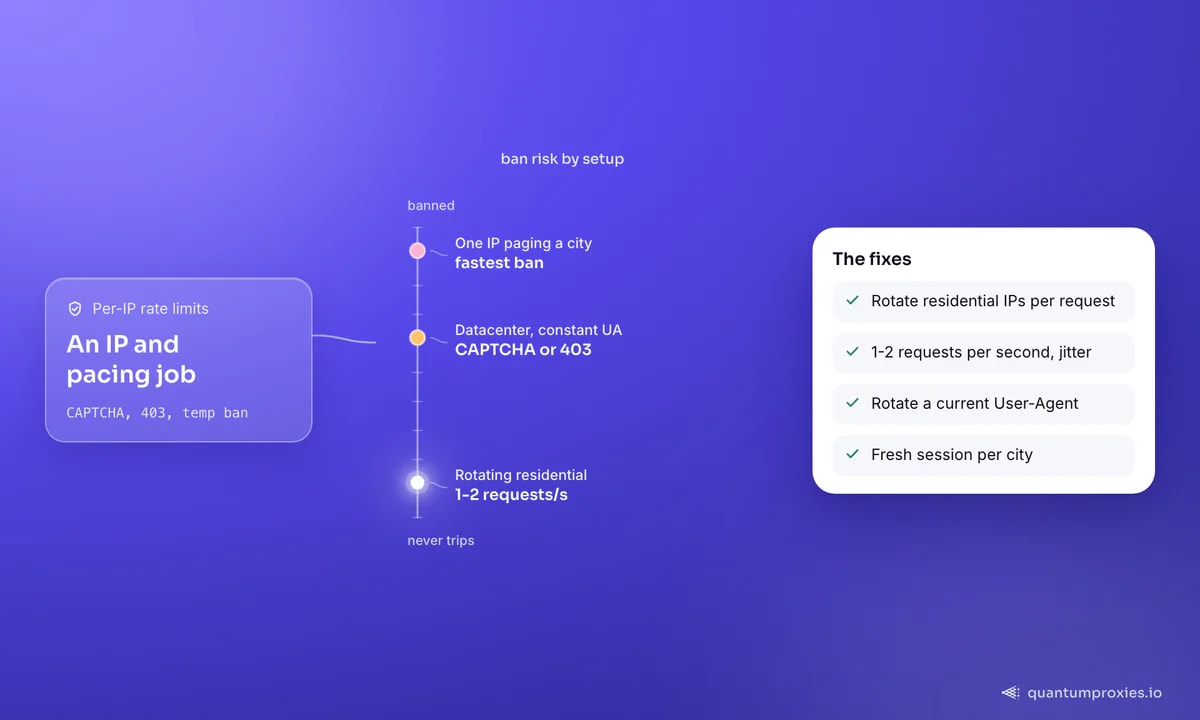
Craigslist stacks several defences, but they share one root: it tracks requests per IP address and blocks addresses that hit it too hard. The specific measures are IP rate limiting, CAPTCHA challenges on suspicious traffic, User-Agent monitoring, session tracking, and temporary IP bans. Every one of them is defeated by looking like many ordinary visitors rather than one relentless machine.
- Rotate IPs and spread load — a single IP paging through a city is the fastest route to a ban. Per-request rotation across a residential pool means no exit looks abnormal.
- Pace requests — 1-2 requests per second is a safe ceiling for small runs; add jitter and back off the moment you see a CAPTCHA or 403.
- Rotate the User-Agent — a constant or default UA is a tell; vary it and keep it current.
- One session per city — start fresh cookies per city or per run rather than carrying one identity across everything.
Because bans are IP-based, the exit IP is doing most of the work. A clean residential proxy pool looks like real home connections, and per-request rotation spreads a multi-city crawl so thinly that Craigslist's per-IP counters never trip. If you are collecting across many cities, our guide on fixing 429 rate limits covers the pacing and concurrency-budget side, and the anti-ban checklist ties it all together.
Scrape Craigslist on clean residential IPs
Scaling across cities
The real power of Craigslist data is cross-city comparison — the same used car or rental priced across a dozen metros. Loop your city list, bind a fresh rotating exit per city, cap concurrency, and store the city alongside every record. For vehicle and rental research specifically, the same patterns feed a comps pipeline; see our guides on scraping car listings and real-estate data for turning raw listings into market signals.
Frequently asked questions
Can you scrape Craigslist?
Yes — the public search and listing pages are scrapeable, and Craigslist even exposes an RSS feed for searches. The obstacle is aggressive per-IP rate limiting, not the parsing. Rotate residential IPs, pace requests to 1-2 per second, and you can collect vehicles, rentals, gigs and for-sale data reliably. Respect Craigslist's terms and scrape only public data.
Does Craigslist have an API?
There is no general public data API, but every search URL can return an RSS feed by appending &format=rss. That gives you a structured XML feed with titles, links and timestamps — perfect for monitoring new listings — while the HTML pages carry the fuller fields like price and description.
How do I avoid getting IP banned scraping Craigslist?
Craigslist bans by IP rate, so the fixes are all about spreading and slowing load: rotate residential IPs per request, keep to 1-2 requests per second with jitter, rotate your User-Agent, use a fresh session per city, and back off immediately when you see a CAPTCHA or 403. A datacenter IP hammering one city gets banned fastest.
How does Craigslist pagination work?
Craigslist shows 120 results per page and pages with the s query parameter as an offset. Page one omits s, page two is s=120, page three s=240, and so on. Increment in steps of 120 until a page returns fewer than 120 results, which marks the end.
Craigslist is easy to read and easy to get banned from — and the second problem is entirely about IP hygiene. Nail the URL pattern, use RSS for monitoring, page in steps of 120, and route everything through rotating residential IPs at a human pace. Do that and the CAPTCHAs simply stop appearing.