Scraping Car Listings: Cars.com, Autotrader and CarGurus for Pricing Intel
Dealer pricing intel lives across Cars.com, Autotrader and CarGurus — the same cars, priced differently by ZIP and cross-posted everywhere. Here's how to scrape them, dedupe by VIN, and get past the anti-bot walls.
Dealer pricing intelligence doesn't live in one place. The same used car is listed on Cars.com, Autotrader and CarGurus at once, priced differently depending on the buyer's ZIP code, and each site guards its pages with anti-bot protection. Scraping this well is less about parsing a page and more about three things: filtering searches so you can actually reach every listing, deduping the same vehicle across sources by VIN, and getting past the walls without a fleet of burned IPs. This guide covers all three, with code you can adapt to any of the big listing sites.
What a car listing gives you
Each vehicle listing is a dense record once you parse it: year, make, model and trim; price and mileage; the VIN; body type, drivetrain, fuel, transmission, cylinders and doors; interior and exterior colour; a stock number; the feature list; images; and dealer details plus a deal rating on sites that compute one. That's a full valuation dataset per row. The fields you build your pipeline around are price, mileage, VIN and dealer — everything else is enrichment.
Filter first: reach every listing
Listing sites paginate in fixed page sizes (commonly 20 per page) and cap how deep a single search goes — often around 1,000 results total. If a search matches more cars than that, the extras are simply unreachable through pagination. The fix is segmentation: split a broad search into narrower ones by make, model, year range, price band or ZIP so each stays under the cap, then union the results. Cars.com, usefully, encodes all of this in the URL, so you build searches programmatically.
from urllib.parse import urlencode

def search_url(zip_code, make="", model="", max_price="", year_min=""):
    params = {
        "stock_type": "used",
        "makes[]": make,
        "models[]": model,
        "list_price_max": max_price,
        "year_min": year_min,
        "maximum_distance": "all",
        "zip": zip_code,
        "page_size": 20,
        "sort": "listed_at_desc",
    }
    return "https://www.cars.com/shopping/results/?" + urlencode(params)

print(search_url("10001", make="toyota", model="camry", year_min=2020))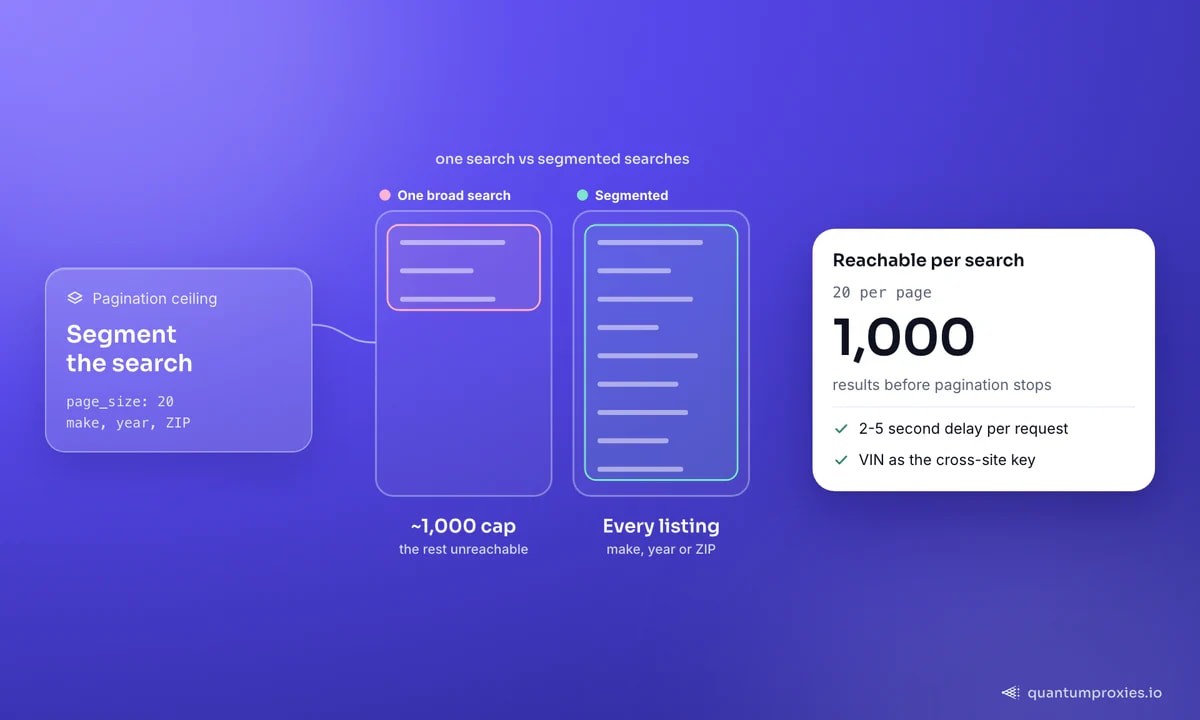
Get past the wall: residential proxies
Cars.com sits behind Cloudflare; other automotive sites use Imperva with hCaptcha or reCAPTCHA that fire under load. A datacenter IP hammering listing pages gets challenged fast. Residential proxies from real ISPs look like ordinary shoppers, and rotating them spreads requests so no single address trips the rate limit. Keep a 2-5 second delay between requests — the pacing matters as much as the IP. For small, occasional pulls a datacenter pool is fine; for continuous monitoring at scale, residential is the difference between a run that finishes and one that stalls on a CAPTCHA.
import requests, time, random

PROXY = "http://USER:PASS@residentialpremium.quantumproxies.io:8080"
proxies = {"http": PROXY, "https": PROXY}
HEADERS = {"User-Agent": "Mozilla/5.0 (Windows NT 10.0; Win64; x64) AppleWebKit/537.36"}

def fetch(url):
    r = requests.get(url, proxies=proxies, headers=HEADERS, timeout=20)
    r.raise_for_status()
    time.sleep(random.uniform(2, 5))   # polite, and harder to fingerprint
    return r.text
If the target renders listings with JavaScript or throws persistent CAPTCHAs, a Scraper API that carries a real browser fingerprint and solves the anti-bot layer for you is less fragile than maintaining your own browser farm. Our guide on getting past Cloudflare in 2026 covers where that line falls.
Get residential proxies for car listing sites
Dedup by VIN across sources
The single most useful column in automotive data is the VIN. Because dealers cross-post the same car to every marketplace, your raw scrape is full of duplicates that look like separate listings. The VIN is a globally unique identifier for the physical vehicle, so keying on it collapses those duplicates into one record — and lets you compare how the same car is priced across Cars.com, Autotrader and CarGurus, or by which dealer. Keep the lowest price per VIN, or keep all of them tagged by source, depending on what you're measuring.
def dedupe_by_vin(rows):
    best = {}
    for r in rows:
        vin = r.get("vin")
        if not vin:
            continue
        price = int(r["price"])
        if vin not in best or price < int(best[vin]["price"]):
            best[vin] = r          # keep the cheapest listing per car
    return list(best.values())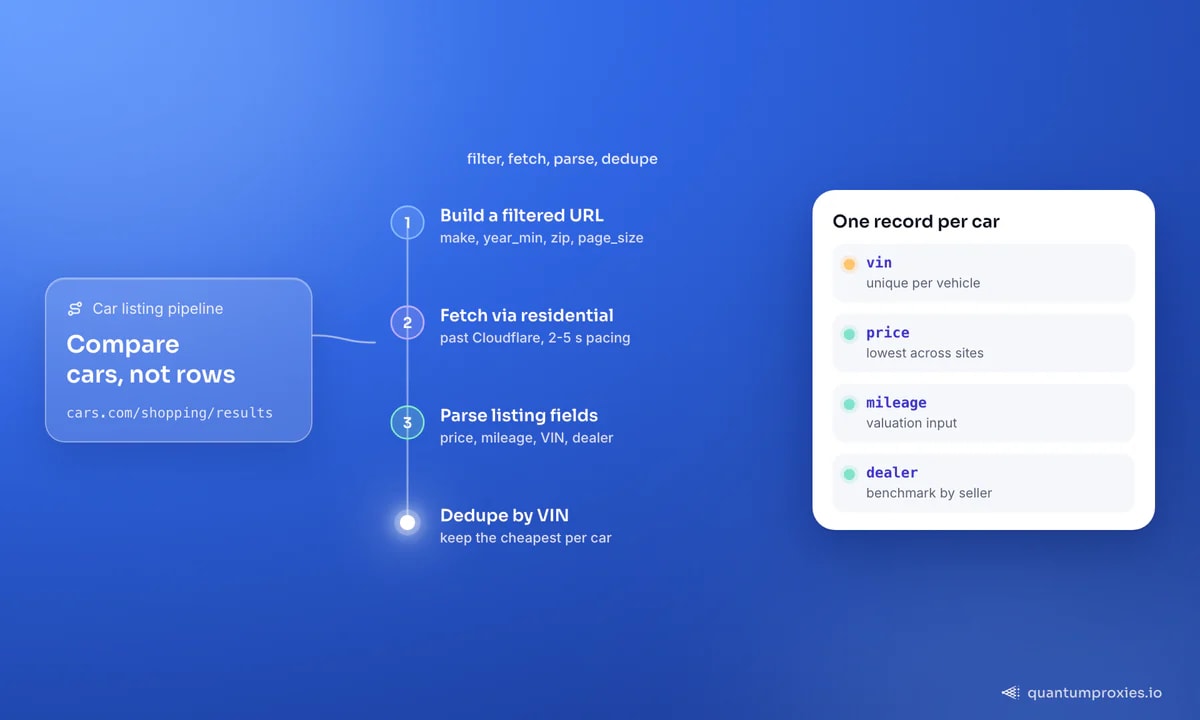
Geo pricing: the same car, different ZIP
Automotive prices are local. The same model shows different prices and inventory depending on the ZIP you search from, because dealers and demand vary by region. To capture that spread, sweep a set of ZIPs and, where the site personalises by the visitor's location, route each request through an exit in the matching region. A residential pool with country and city targeting lets you see prices the way a local buyer does — essential for arbitrage, dealer benchmarking or building a valuation model that isn't skewed to one market.
zips = ["10001", "90001", "60601", "77001"]  # NY, LA, Chicago, Houston
spread = {}
for z in zips:
    url = search_url(z, make="toyota", model="camry", year_min=2021)
    rows = parse_listings(fetch(url))          # exit geo-matched to the ZIP
    spread[z] = [int(r["price"]) for r in rows]

# now compare median price by market
for z, prices in spread.items():
    prices.sort()
    print(z, "median", prices[len(prices)//2])
This is the same location-first pattern behind competitor price monitoring and real estate data collection — wherever price depends on where the buyer sits, geo-targeted exits are non-negotiable.
Auction and wholesale sources
Retail listing sites tell you what dealers ask; auction platforms like Copart tell you what cars actually change hands for at the wholesale level — the other half of a pricing model. These sites are more heavily defended: Copart, for instance, runs Imperva web protection with behavioural fingerprinting, and hCaptcha or reCAPTCHA challenges appear under higher request volumes. The pagination is also tighter — 20 vehicles per page with a hard limit of around 50 pages, so a single search caps at roughly 1,000 lots. Reaching a full inventory means segmenting queries by make, model, year range, auction yard or condition, exactly as with retail sites, and running each segment on its own.
Because these platforms load results and pagination with JavaScript and challenge suspicious traffic, they want residential IPs and a 2-5 second gap between requests at minimum. Datacenter proxies handle small, occasional pulls; anything sustained belongs on residential exits. The payoff is real signal: bid history, sale status and lot condition feed demand forecasting and export-import analysis that retail asking prices alone can't give you.
Monitor, don't just scrape once
A one-off dump ages instantly in a market where listings turn over daily. The durable pattern is a scheduled scrape that snapshots your target searches and diffs consecutive runs — new listings, price drops, and cars that sold. Key each row by VIN so a price change on the same vehicle is unambiguous, timestamp every snapshot, and you have a time series you can trend: how fast specific models depreciate, which dealers cut prices, where inventory is building up. Route those scheduled runs through rotating residential IPs so a daily job from the same address doesn't slowly earn a block.
Frequently asked questions
Can you scrape Cars.com and Autotrader?
Yes — the listing pages show publicly available vehicle data. The practical challenge is anti-bot protection: Cars.com uses Cloudflare and others use Imperva with CAPTCHAs. Residential proxies, realistic headers and a 2-5 second delay between requests keep a scrape running. Respect each site's terms of service and avoid collecting personal data.
How do I avoid getting blocked scraping car listings?
Rotate residential IPs so no single address makes too many requests, pace requests with a 2-5 second randomised delay, send a real browser User-Agent, and segment large searches into smaller ones instead of paging thousands deep. If CAPTCHAs persist, switch to a Scraper API that handles the anti-bot layer and JavaScript rendering.
Why do I get duplicate cars when scraping?
Dealers cross-post the same vehicle to multiple marketplaces, so one physical car appears as several listings. Deduplicate on the VIN, which uniquely identifies the vehicle regardless of site. Keying by VIN turns duplicates into a price comparison for the same car across sources rather than inflated counts.
Do car prices really change by location?
Yes. Inventory and pricing vary by region, and many sites personalise results to the searcher's ZIP. To capture the real spread, search multiple ZIPs and route each request through an exit in the matching region using geo-targeted residential proxies, so you see local prices instead of one skewed national view.
Scraping automotive listings comes down to reaching every car (segment past the ~1,000-result cap), getting past the anti-bot wall (rotating residential IPs, polite pacing), collapsing duplicates by VIN, and capturing geo spreads with location-targeted exits. Build the pipeline around price, mileage, VIN and dealer, and you have dealer pricing intel across every major marketplace at once.