Scrape Best Buy & Target: Store-Level Stock and Price Data
Big-box price and stock data lives behind a store picker and a ZIP code, not just a product URL. Get the store scoping and geo targeting right and Best Buy and Target become clean JSON feeds.
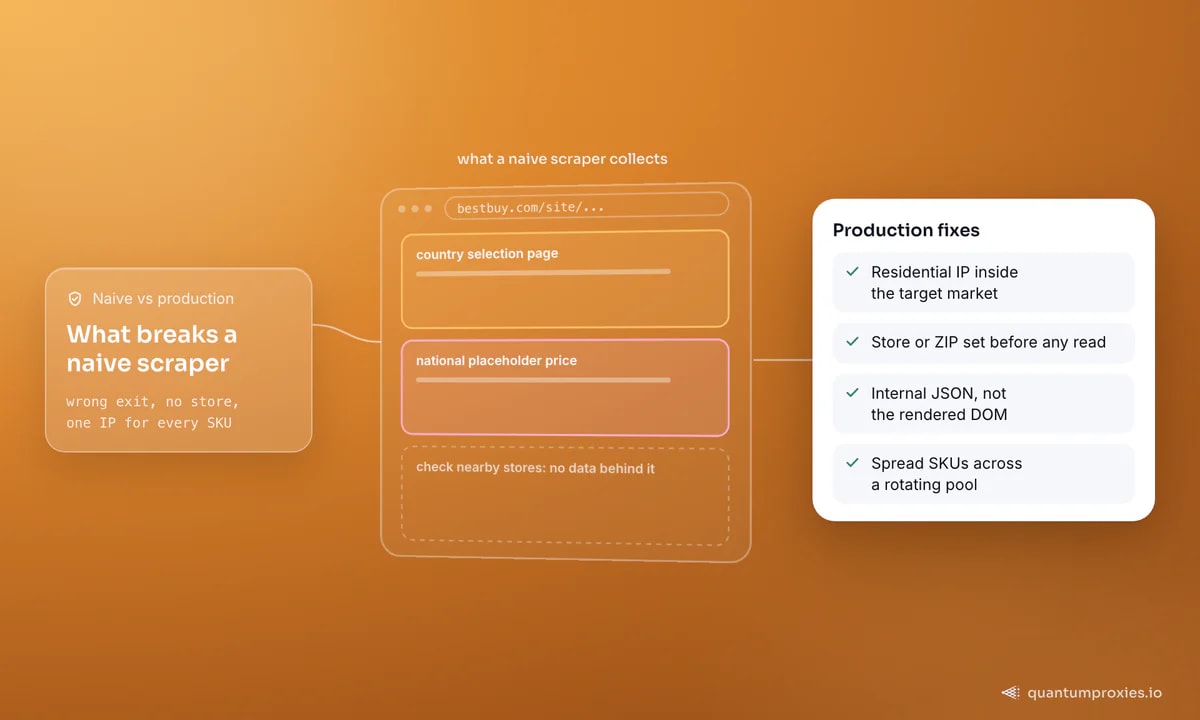
Best Buy and Target look like ordinary product pages until you try to scrape price and stock at scale — then you learn that both answers depend on a store you have not picked yet. A price is national until a ZIP code makes it local; availability is meaningless until a store is scoped. Get the store selection and geo targeting right and these big-box sites turn into clean JSON feeds. Get them wrong and you collect national placeholder prices and "check nearby stores" with no data behind it. This guide covers store-level inventory, geo pricing, the hidden endpoints, and the proxy setup that keeps the whole thing alive.
The first wall: region and store
Best Buy serves only three markets — the United States, Canada and Mexico — and greets an out-of-region IP with a country selection page instead of the product. That alone blocks anyone scraping from the wrong exit. So step one is a residential IP inside the target market. Step two is scoping a store: both retailers key in-store availability and, often, price to a specific store or ZIP. Until you set one, you are reading a national default, not the local truth a restocker or price analyst actually needs.
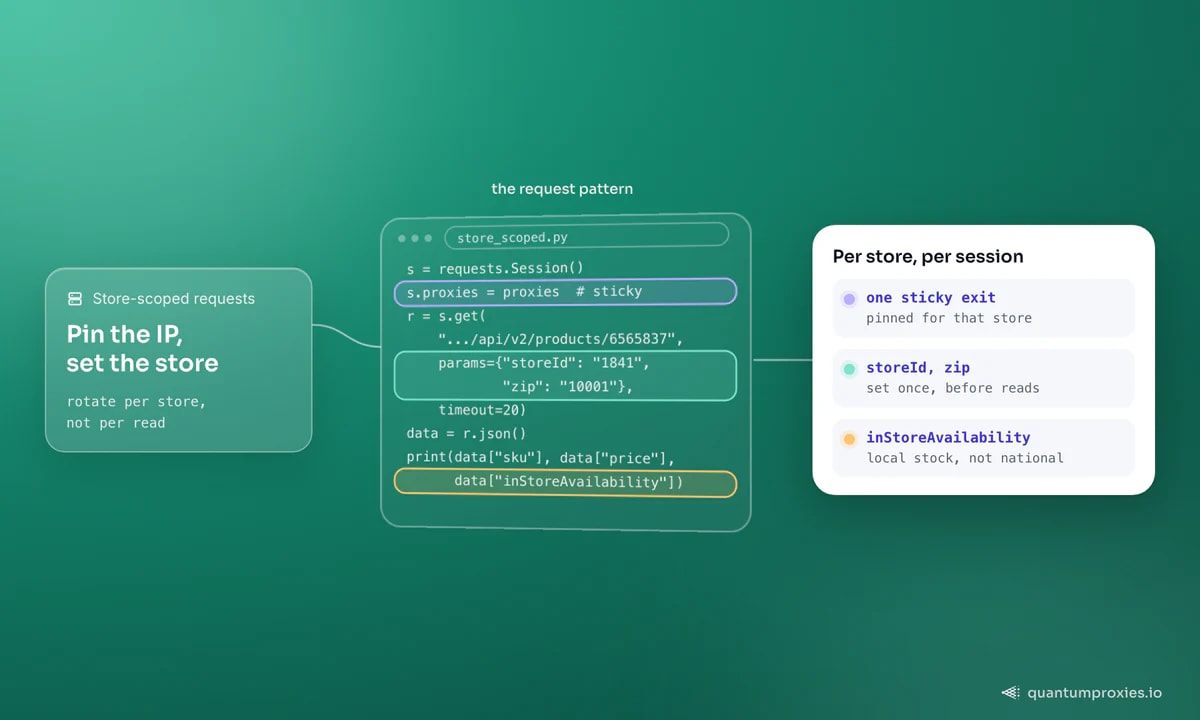
The practical pattern: open a sticky session, pin one residential exit for the duration, set the store or ZIP once, then read every SKU you care about for that store on the same IP. Rotate the IP when you move to the next store, not between reads. That mirrors how a real shopper behaves — one location, many products — and it keeps the site returning that store's stock and price rather than resetting you to the national view.
Read the JSON, not the DOM
Both sites render price, rating and availability client-side, which means the HTML you get from a plain request is often a shell — the numbers arrive later from an internal JSON endpoint the page calls. Parsing the rendered DOM is fragile and frequently empty. The durable approach is to find that endpoint in your browser's network tab and call it directly: it returns structured fields (SKU, price, in-store availability, ship-to-home, pickup eligibility) without any HTML parsing at all, and it changes far less often than the page markup. If you have ever watched a scraper return an empty page, this is usually why.
import requests

# one sticky residential exit, pinned per store
SESSION_IP = "http://USER-sid-store1841-ttl-30m:PASS@residentialpremium.quantumproxies.io:8080"
proxies = {"http": SESSION_IP, "https": SESSION_IP}

s = requests.Session()
s.proxies = proxies
s.headers.update({
    "User-Agent": "Mozilla/5.0 (Windows NT 10.0; Win64; x64) "
                  "AppleWebKit/537.36 (KHTML, like Gecko) "
                  "Chrome/122.0.0.0 Safari/537.36",
    "Accept": "application/json",
})

# 1) scope a store (ZIP or store id) on this session first,
#    then 2) read the product/availability endpoint the page calls
r = s.get("https://www.example-retailer.com/api/v2/products/6565837",
          params={"storeId": "1841", "zip": "10001"}, timeout=20)
data = r.json()
print(data["sku"], data["price"], data["inStoreAvailability"])
Placeholders aside, the shape is the point: set the store, hit the data endpoint, read fields rather than scrape text. A residential proxy with sticky sessions is what makes the store scoping stick.
Get sticky residential proxies for retail data
Geo pricing: the same SKU, different numbers
Big-box pricing is not uniform across a country. Clearance, regional promotions and store-specific markdowns mean the same SKU can carry different prices ZIP to ZIP, and in-store availability is inherently local. If you scrape from a single location you get one slice of a much larger picture — useless for competitive price monitoring or restock alerting that has to be accurate for a shopper in Dallas and another in Seattle.
So drive the location deliberately. Maintain a list of target ZIPs or store IDs, and pair each with an in-region residential exit from the same city or state where you can. Our location coverage spans 200+ countries with city and state targeting, which is what lets you read Best Buy's Los Angeles price and Target's Chicago stock in the same run. This is the same discipline behind serious competitor price monitoring and restock monitoring.
Spread the load, or spend the day blocked
A single IP requesting thousands of SKUs is the fastest way to a block, a CAPTCHA, or a subnet ban. Both retailers watch request velocity per IP. The fix is to spread the work across a rotating residential pool so no single exit carries a suspicious volume, while still pinning one IP per store for the duration of that store's reads. Concurrency lives at the pool level, not the session level. Pace each session like a shopper, and let breadth — many IPs each doing a little — give you the throughput. If you build restock tooling on top of this, our roundup of the best proxies for restock bots covers the pool sizing.
When the API route wins
Direct requests through residential proxies give you the most control and the lowest per-request cost — ideal once you know the endpoints and can maintain them. But when a target adds heavier anti-bot defences, renders everything through JavaScript, or you simply do not want to babysit endpoints, a Scraper API is the shortcut: send the product URL with a geo parameter, let it rotate IPs, carry a real browser fingerprint, render JS and hand back structured data. You trade a little per-call cost for zero maintenance and a higher success rate on the hard days. The honest split, laid out in our guide to JavaScript-heavy sites: raw requests plus residential proxies for clean, known endpoints; the API when defences escalate.
Frequently asked questions
Can you scrape Best Buy and Target product data?
Yes — both expose public product, price and availability data, much of it via internal JSON endpoints the pages call. You need an in-region residential IP (Best Buy serves only the US, Canada and Mexico) and a scoped store or ZIP, because stock and often price are answered per store rather than per product URL.
Why do I get national prices instead of store prices?
Because no store is selected on your session. Big-box sites return a national default until a ZIP or store ID scopes the request. Set the location on a sticky session first, keep the same residential IP for that store's reads, and the endpoint returns the local price and in-store availability.
What proxies work best for big-box retail scraping?
Residential proxies with sticky sessions and city or state geo targeting. You want an in-region exit that stays consistent while you scope a store, then rotation across the pool to spread SKU volume. Datacenter IPs are cheaper but more often walled or CAPTCHA-challenged on these targets.
Is scraping Best Buy or Target legal?
Collecting publicly available product and price data is generally treated as fair use in many jurisdictions, but terms of service and local law vary. This is informational, not legal advice — review each site's terms and consult a professional before large-scale collection or anything involving personal data.
Big-box data is store-shaped, not page-shaped. Scope the store, drive the geo, read the JSON, and spread the load across a clean residential pool — do those four and Best Buy and Target become reliable price and stock feeds instead of a wall of national placeholders.