Proxies for Dropshipping Research: Build the Data Layer Yourself
The paid research tools are just scrapers with a dashboard. Here's how to build the same data layer yourself - competitor catalogues, supplier price and stock, and geo-gated ad libraries - with proxies.
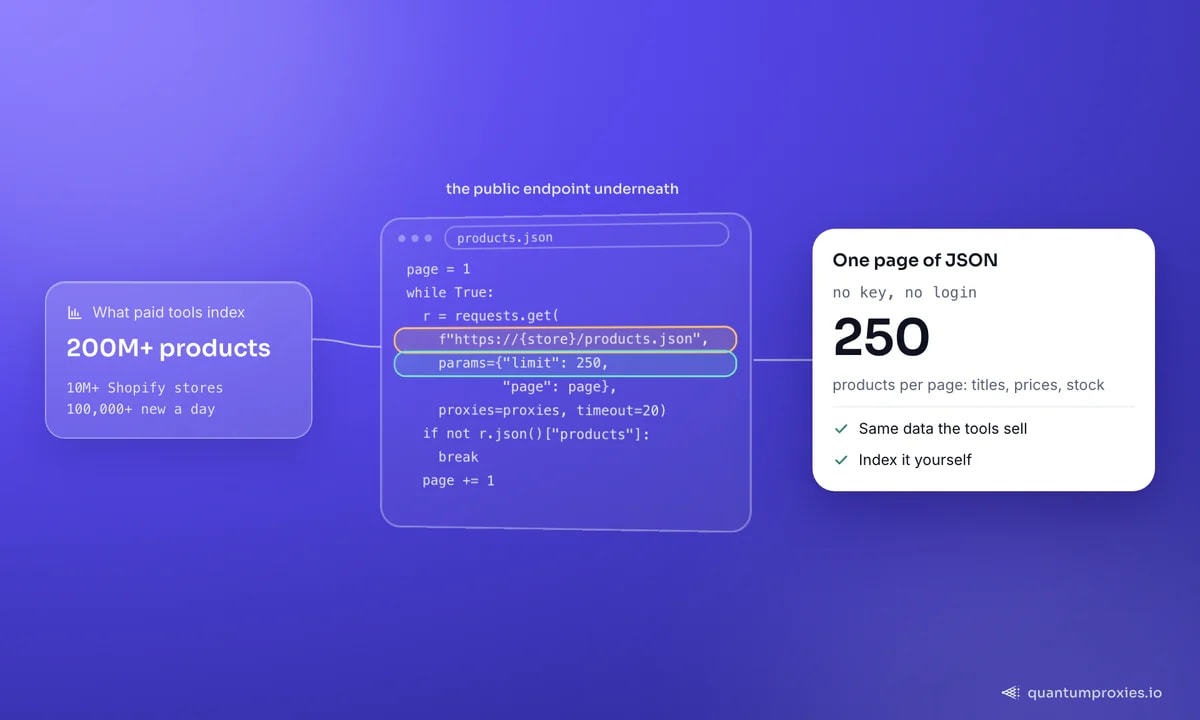
Dropshipping product research tools promise a shortcut: a dashboard that surfaces winning products, tracks competitor stores and spies on ads. Strip away the branding and they are scrapers - the leading ones index 200M+ products across 10M+ Shopify stores, add 100,000+ new products a day, and score them on dozens of factors. All of that runs on public data you can collect yourself. This guide shows how to build the same research layer with proxies: competitor catalogues, supplier price and stock monitoring, and geo-gated ad intelligence - the three signals those tools actually sell.
The endpoint that unlocks competitor catalogues
Almost every Shopify store exposes its entire catalogue at a public /products.json endpoint - no key, no login. It paginates up to 250 products per page and returns titles, variants, prices, inventory availability and images as structured JSON. That single endpoint is the backbone of most "store intelligence" features. Route it through a proxy so you can pull many stores without your own IP getting rate-limited:
import requests

proxy = "http://USER:PASS@residentialpremium.quantumproxies.io:8080"
proxies = {"http": proxy, "https": proxy}

def shopify_catalog(store):
    page, out = 1, []
    while True:
        r = requests.get(f"https://{store}/products.json",
                         params={"limit": 250, "page": page},
                         proxies=proxies, timeout=20)
        products = r.json().get("products", [])
        if not products:
            break
        out += products
        page += 1
    return out

for p in shopify_catalog("examplestore.com"):
    v = p["variants"][0]
    print(p["title"], v["price"], v["available"])
That gives you a competitor's full product line, prices and stock flags in one pass. Our deep dive on the products.json endpoint covers rate limits and edge cases in detail.
Monitor supplier price and stock over time
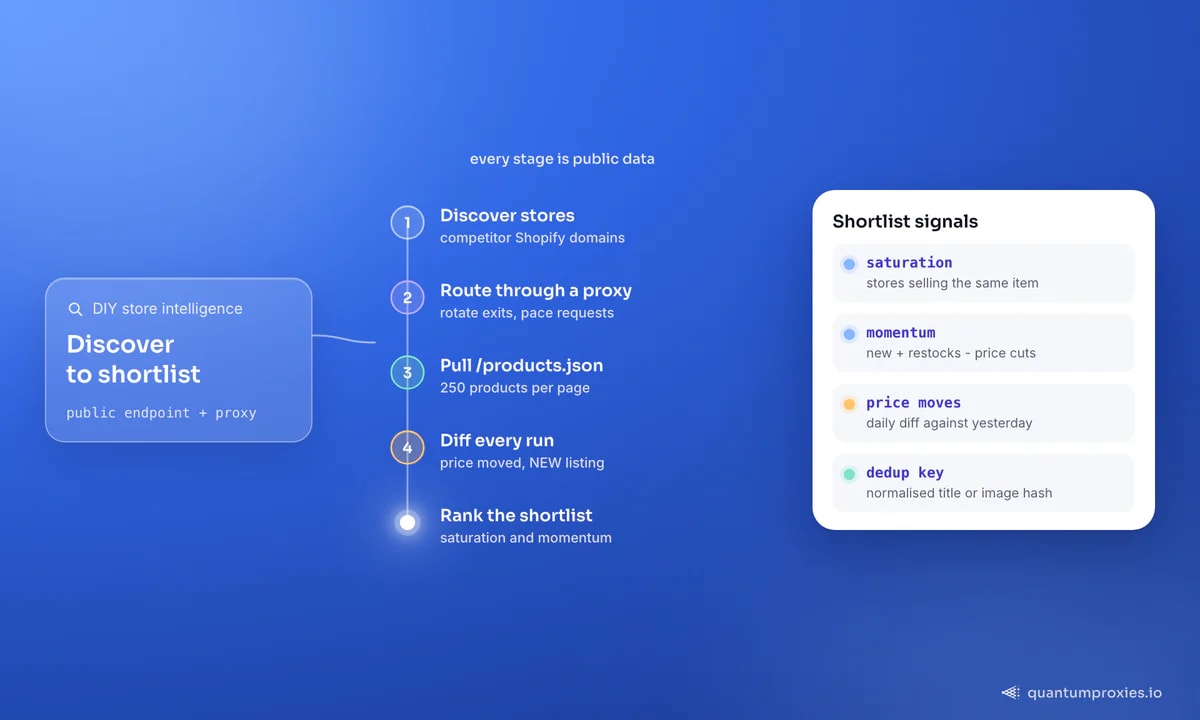
A catalogue snapshot tells you what a store sells today. The edge is in the deltas: which products just went out of stock, which prices moved, which listings are new. Run the catalogue pull on a schedule and diff each run against the last. Price drops on a supplier, a competitor raising margins, or a sudden restock are all early signals - and the store that spots them first has hours of lead time on everyone still checking manually:
import json

prev = json.load(open("yesterday.json"))          # {product_id: price}
today = {p["id"]: p["variants"][0]["price"]
         for p in shopify_catalog("examplestore.com")}

for pid, price in today.items():
    if pid in prev and price != prev[pid]:
        print(pid, "price moved", prev[pid], "->", price)
    elif pid not in prev:
        print(pid, "NEW listing", price)

json.dump(today, open("yesterday.json", "w"))
The same pattern works for supplier marketplaces. Pulling price, stock and shipping matrices from AliExpress or the big marketplaces lets you spot margin windows before they close - the mechanics are the same as competitor price monitoring at scale.
Ad intelligence is geo-gated - so use a geo pool
The other half of product research is ad spying: seeing which creatives and offers competitors are running before a product saturates. Public ad libraries expose this, but they are geo-specific - the ads shown for a country depend on where the request appears to come from. To see what a US audience sees versus a UK one, you need exits in both. A residential proxy pool spanning 200+ countries lets you pull ad libraries and localized storefronts market by market, which is exactly how the paid tools build their regional demand and saturation views.
The same geo pool localises the storefronts themselves. Prices, shipping promises and available variants differ by country, so pulling a competitor's product page from a US, UK and German exit reveals how they price per market - the raw material for your own regional strategy. Read ad libraries and localized storefronts together and you learn not just what sells, but where and at what price it sells.
Get residential proxies for ad and store research
Turning raw data into a shortlist
Data alone isn't a decision. The tools that charge for research add two derived signals you can compute yourself. Saturation is simply how many stores sell the same product - count appearances of a title or image hash across the catalogues you've pulled; low count with rising demand is the sweet spot. Momentum is the rate of change - new listings, restocks and price cuts across your daily diffs. Rank candidates on both and you have a defensible shortlist without paying for a black-box score. Concretely, a momentum score of new listings plus restocks minus price cuts over a rolling week, ranked descending, floats the products gaining traction while still uncrowded to the top - which is exactly the window worth testing before everyone else piles in. For the pricing side, LLM-assisted price matching helps resolve the same product across stores that name it differently.
Schedule it and respect the limits
Research value comes from cadence, so run these pulls on a schedule - daily for prices and stock, weekly for a full catalogue - and store each snapshot. That is what turns a one-off look into a trend line you can act on. Two disciplines keep it healthy. Rotate exits and pace requests so a single store's server never sees a burst from one IP; products.json is public but not unlimited, and a hammered store starts returning errors. And deduplicate products across stores by a stable key - a normalised title or an image hash - so the same item sold by forty stores counts once in your saturation math instead of forty times.
When to render instead of fetch
Most of this pipeline is plain JSON fetching, which is fast and cheap. Some targets - certain storefronts, ad libraries behind JavaScript, or marketplaces with anti-bot layers - won't hand over data to a raw request. For those, a Scraper API that renders JavaScript and rotates IPs saves you from maintaining headless browsers. And if you're automating orders or account actions across marketplaces, our guide on marketplace automation covers the account-hygiene side.
Frequently asked questions
Do I need proxies for dropshipping product research?
For a handful of manual lookups, no. For continuous monitoring - pulling many competitor catalogues, checking supplier prices daily, and viewing geo-specific ad libraries - yes. Volume from a single IP gets rate-limited fast, and ad and store data changes by country, which only a geo-diverse proxy pool can reveal.
How do I see a competitor's full product list?
If they run on Shopify, request /products.json on their domain. It returns the entire catalogue - titles, prices, variants and stock flags - up to 250 products per page, as public JSON. Route it through a proxy to pull many stores without tripping rate limits.
Can I build my own research tool instead of paying for one?
Yes. The paid tools are scrapers with a dashboard. The core data - catalogues via products.json, supplier prices, and geo-gated ad libraries - is public and collectable with a proxy pool and a scheduler. You give up a polished UI but gain control over sources, freshness and cost.
What proxy type is best for dropshipping research?
Residential proxies, because ad libraries and localized storefronts serve different data by geography and residential exits give you accurate country-level views with low block rates. Datacenter proxies can handle high-volume products.json pulls on lenient stores if you want to cut bandwidth cost.
Dropshipping research is a data problem, and the data is public. Competitor catalogues via products.json, supplier price and stock diffs on a schedule, and geo-gated ad libraries through a residential pool give you every signal the paid tools charge for - with full control over what you track and how fresh it stays.