How to Scrape AliExpress Product Data for Dropshipping Research
AliExpress hides its product data in a JavaScript variable, not in the HTML you see. Grab that JSON and you get prices, discounts, ship-from and sales counts in one request — here is how, with the anti-block plumbing.
AliExpress is the biggest global marketplace and a prime source for dropshipping research: price and discount history, what is actually selling, shipping origin, and how offers change by country. In 2026 it leans hard on JavaScript rendering and randomised class names, which scares people into spinning up a full browser. You usually do not need one. The product data is already sitting in the page source inside a JavaScript variable — extract that and you get clean structured data in a single request. This guide shows the hidden-JSON method, the geo dimension that makes AliExpress data valuable, and the proxy plumbing that keeps a scraper alive.
The data is in window.runParams, not the DOM
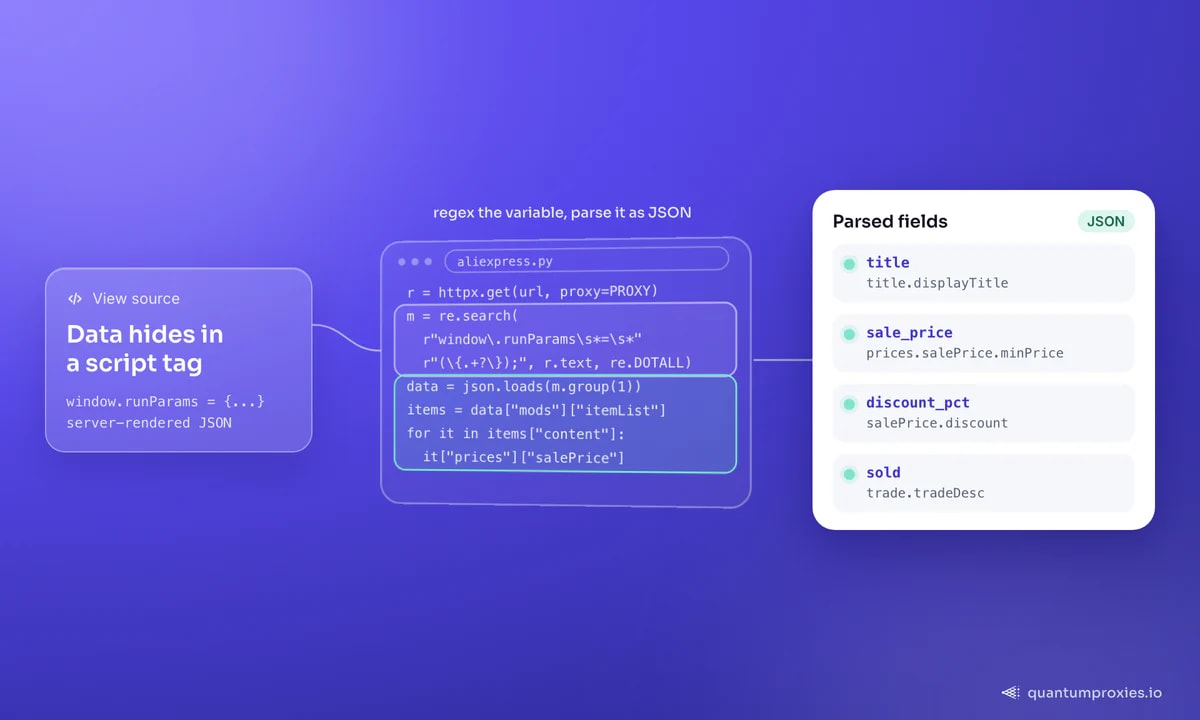
Open a category or search results page and view source. All the product previews are stored in a JavaScript variable called window.runParams, tucked inside a <script> tag. This is a common modern pattern — the server ships the data as JSON and the front end renders it client-side. For a scraper it is a gift: you skip the fragile CSS selectors entirely, pull the script tag with a regex, and parse it like a dictionary. This technique is called hidden web-data scraping, and it is far more durable than chasing class names that change on every deploy.
import re, json, httpx

HEADERS = {
    "user-agent": "Mozilla/5.0 (Windows NT 10.0; Win64; x64) AppleWebKit/537.36 "
                  "(KHTML, like Gecko) Chrome/133.0.0.0 Safari/537.36",
    "accept-language": "en-US,en;q=0.9",
}

PROXY = "http://USER:PASS@residentialpremium.quantumproxies.io:8080"

def get_run_params(html: str) -> dict:
    # The product data lives in window.runParams = {...};
    m = re.search(r"window\.runParams\s*=\s*(\{.+?\});", html, re.DOTALL)
    if not m:
        raise ValueError("runParams not found - page may be blocked or changed")
    return json.loads(m.group(1))

url = "https://www.aliexpress.com/category/.../catName.html"
r = httpx.get(url, headers=HEADERS, proxy=PROXY, timeout=30)
data = get_run_params(r.text)
Parsing the fields that matter for research
The runParams blob is huge, so pull only the fields dropshipping and pricing research actually use: the listing title, original vs sale price, the discount percentage, how many have sold, and — critically — the ship-from country, which drives delivery time and buyer trust. The nesting looks intimidating but it is stable:
def parse_items(data: dict) -> list[dict]:
    items = data.get("mods", {}).get("itemList", {}).get("content", [])
    out = []
    for it in items:
        prices = it.get("prices", {})
        sale = prices.get("salePrice", {})
        orig = prices.get("originalPrice", {})
        out.append({
            "id": it.get("productId"),
            "title": it.get("title", {}).get("displayTitle"),
            "sale_price": sale.get("minPrice"),
            "orig_price": orig.get("minPrice"),
            "discount_pct": sale.get("discount"),
            "currency": sale.get("currencyCode"),
            "sold": it.get("trade", {}).get("tradeDesc"),   # e.g. "1,000+ sold"
            "store_id": it.get("store", {}).get("storeId"),
        })
    return out

for row in parse_items(data)[:5]:
    print(row["title"][:40], row["sale_price"], f"-{row['discount_pct']}%", row["sold"])
That single call gives you a product's economics: a listing showing an original price of $65.85 dropping to a $23.29 sale price is a 64% discount — the kind of margin signal that tells you whether an item is worth sourcing. The "sold" count is your demand proxy; combined across a category it ranks winners without you touching a review page.
Search pagination without hammering the site
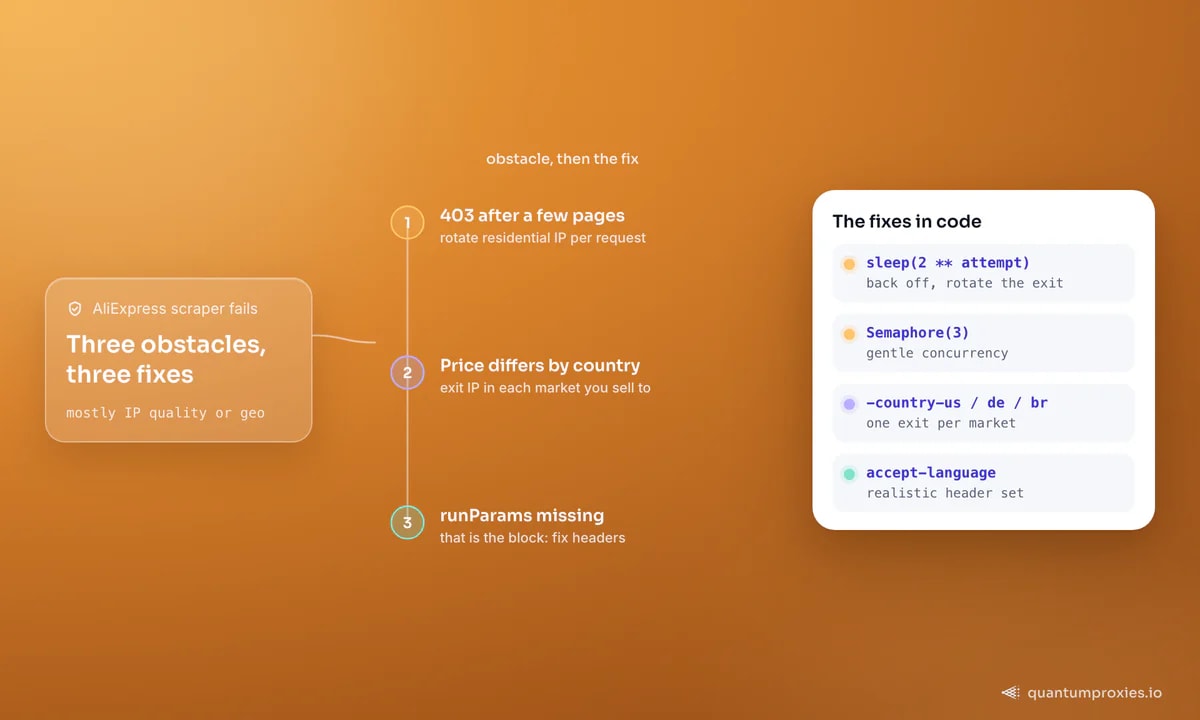
Search pages use known-length pagination, so the efficient idiom is: scrape page one, read the total page count from the response, then fetch the rest concurrently under a cap. Do not fire all pages at once — AliExpress rate-limits aggressively and will start returning 403s. Keep concurrency modest and rotate the exit IP on each request:
import asyncio, httpx

ROTATING = "http://USER:PASS@residentialpremium.quantumproxies.io:8080"

async def fetch_page(client, query, page):
    url = f"https://www.aliexpress.com/w/wholesale-{query}.html?page={page}"
    for attempt in range(3):
        r = await client.get(url, headers=HEADERS, timeout=30)
        if r.status_code == 200:
            return parse_items(get_run_params(r.text))
        if r.status_code == 403:                 # blocked: back off, rotate exit
            await asyncio.sleep(2 ** attempt)
    return []

async def scrape_search(query, max_pages=5):
    async with httpx.AsyncClient(proxy=ROTATING) as client:
        sem = asyncio.Semaphore(3)               # gentle concurrency
        async def guarded(p):
            async with sem:
                return await fetch_page(client, query, p)
        pages = await asyncio.gather(*[guarded(p) for p in range(1, max_pages + 1)])
        return [row for page in pages for row in page]

results = asyncio.run(scrape_search("wireless earbuds"))
print(len(results), "products")
The rotating gateway matters here: one IP fetching page after page is the fastest way to earn a block, whereas per-request rotation across a residential pool spreads the load so no single exit looks abnormal. Exponential backoff on the 403 gives a burned IP time to cycle out.
Scrape AliExpress on 90M+ residential IPs
Geo is the whole point
AliExpress personalises prices, currency, promotions and ship-from warehouse by the visitor's location — the same product can show a US-local card with faster shipping to a US IP and a different price and origin to a European one. For dropshipping research that geo dimension is the data: you want to know what a customer in your target market actually sees. So set the exit country deliberately. Route through an IP in each market you sell to and record the deltas; a product that is cheap and ships locally in one region but slow and pricey in another is a very different bet. Our guide on proxies for dropshipping research goes deeper on turning those matrices into sourcing decisions.
# One product, three markets - compare price and ship-from per geo
MARKETS = {
    "us": "http://USER-country-us:PASS@residentialpremium.quantumproxies.io:8080",
    "de": "http://USER-country-de:PASS@residentialpremium.quantumproxies.io:8080",
    "br": "http://USER-country-br:PASS@residentialpremium.quantumproxies.io:8080",
}
for market, proxy in MARKETS.items():
    r = httpx.get(product_url, headers=HEADERS, proxy=proxy, timeout=30)
    d = get_run_params(r.text)
    # read price + shipFrom from the product detail runParams for this geo
    print(market, "->", extract_price_and_origin(d))
Reviews and stock live in separate calls
Listings give you price and demand, but two high-value fields sit behind their own requests. Customer reviews are not in the product page's runParams — they load from a dedicated feedback endpoint, paginated, so to collect ratings and review text you follow that call per product rather than parsing the main page. Stock signals are similar: the "sold" count on a listing is a cumulative demand proxy, while precise availability per variant (colour, size, ship-from warehouse) comes from the SKU data in the product detail payload. For dropshipping research this matters because a product can look like a winner on price and sales while a specific variant you want to sell is out of stock in the warehouse serving your market.
Treat the two as a second pass: scrape listings first to rank candidates by discount and sold count, then enrich only your shortlist with review pages and per-variant stock. That keeps request volume — and your block risk — proportional to how serious you are about each product, instead of hammering every listing for data you will not use.
When to skip the DIY scraper
The hidden-JSON method is durable, but AliExpress does change payload shapes, gate reviews behind a separate endpoint, and escalate blocks under volume. If you would rather not maintain regex and retry logic, a Scraper API takes a URL and returns parsed JSON — it handles the rendering, rotation and anti-block layer, and you geo-target with a single parameter. It is the pragmatic choice once you are collecting thousands of products across markets on a schedule. For the general pattern of reading data straight from client-side payloads, see our note on why a scraper returns an empty page.
Frequently asked questions
Can you scrape AliExpress product data?
Yes. Publicly visible listing data — titles, prices, discounts, sold counts, images and ship-from — is served into the window.runParams JavaScript variable on category, search and product pages. You extract it with a regex and parse it as JSON, without needing a headless browser for listings. Respect AliExpress's terms and rate limits.
Does AliExpress have a public API?
AliExpress offers affiliate and open-platform APIs, but they require approval, have limited coverage and are tied to a program. For broad research across categories and markets, scraping the public pages gives you more fields and full geo control, which is why most dropshipping researchers extract the on-page JSON instead.
Why do I get 403 errors scraping AliExpress?
A 403 means AliExpress flagged the request — usually too many hits from one IP, a datacenter range, or a thin header set. Rotate residential IPs per request, add exponential backoff on the 403, send a realistic User-Agent and accept-language, and keep concurrency low. If runParams is missing from the HTML, that is the block, not a layout change.
How do I get country-specific AliExpress prices?
Route the request through an exit IP in the target country. AliExpress reads location to set currency, price, promotions and ship-from warehouse, so a US IP and a German IP see different data for the same product. Geo-target the proxy per market and record each version to build a price-by-geo matrix.
The winning approach is boring and durable: read the JSON the page already ships, page politely, rotate clean residential IPs, and geo-target every market you care about. Do that and AliExpress becomes a reliable feed of prices, demand signals and shipping economics rather than a wall of 403s.