Scraping Shopify products.json: The Endpoint Every Store Exposes
Forget parsing HTML. Every Shopify store hands you clean JSON at /products.json — full catalog, prices, variants, stock. Here are the pagination limits, the speed tricks, and how to turn it into competitor monitoring.
Anyone who has scraped e-commerce knows the pain: brittle CSS selectors, nested wrapper divs, layouts that change and break everything overnight. Shopify hands you a way out. Almost every store built on Shopify exposes a public /products.json endpoint that returns the entire catalog as clean, structured JSON — titles, handles, vendors, tags, variants, prices, stock flags and images. No HTML parsing, no headless browser. This guide covers how the endpoint works, its real pagination limits, a trick that makes crawling large stores dramatically faster, and how to turn the whole thing into competitor price and stock monitoring.
The endpoint on every Shopify store
Append /products.json to any Shopify store's root domain and you get a JSON list of products. It's the same data the storefront uses, exposed by design for the Ajax API. Each product carries a stable numeric id, a handle, vendor, product_type, tags, an array of variants (each with its own price, SKU and available boolean), and images. That's everything you'd normally scrape a product page for, delivered in one request.
import requests

url = "https://store.example.com/products.json"
r = requests.get(url, params={"limit": 250, "page": 1}, timeout=15)
products = r.json()["products"]

print(len(products), products[0]["title"])
for v in products[0]["variants"]:
    print(v["sku"], v["price"], v["available"])
Two caveats up front. Shopify caps the public endpoint at 250 products per page — a limit you cannot exceed no matter what you pass, so ignore advice to set limit=1000000 and grab everything in one call. And a minority of stores disable the endpoint (custom builds sometimes turn it off), so check for a valid response before you build a pipeline around it.
Paginate to the end
Because of the 250 cap, a full catalog means walking pages until you hit an empty one. The naive loop increments page and stops when a page comes back empty. It's correct and it's fine for small stores — a shop with a few hundred products is a couple of requests.
def all_products(base):
    page, out = 1, []
    while True:
        r = requests.get(f"{base}/products.json",
                         params={"limit": 250, "page": page}, timeout=15)
        batch = r.json()["products"]
        if not batch:
            break
        out.extend(batch)
        page += 1
    return out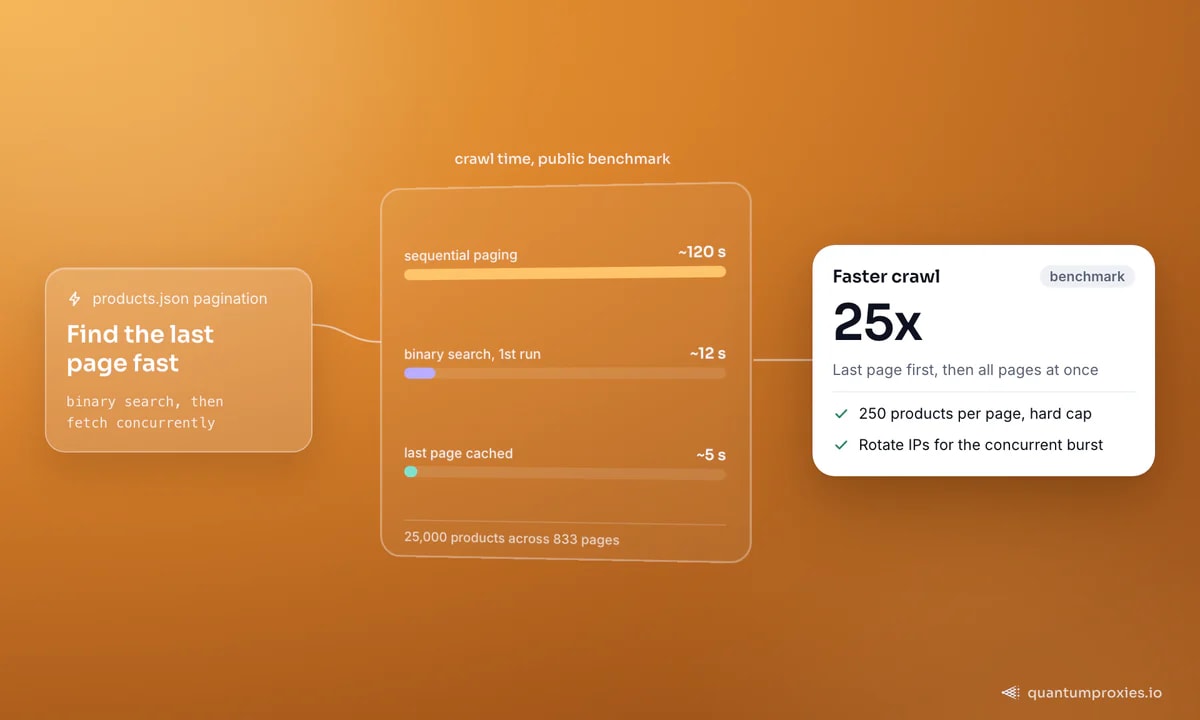
The 25x trick: find the last page first
Sequential paging is slow on big stores because you can't parallelise — you don't know when to stop, so every page waits on the one before it. The fix is a binary search: probe page numbers to find the last non-empty page, then fire all the page requests concurrently. In a public benchmark against a store with 25,000 products across 833 pages, this cut a crawl from roughly 120 seconds to about 12 on the first run and around 5 once the last-page number was cached — a 25x speed-up. Route the probes through rotating IPs so the burst of concurrent requests doesn't trip throttling.
PROXY = "http://USER:PASS@residentialpremium.quantumproxies.io:8080"
proxies = {"http": PROXY, "https": PROXY}

def last_page(base, hi=1000):
    lo, last = 1, 1
    while lo <= hi:
        mid = (lo + hi) // 2
        r = requests.get(f"{base}/products.json",
                         params={"limit": 250, "page": mid},
                         proxies=proxies, timeout=15)
        if r.json()["products"]:
            last, lo = mid, mid + 1   # go higher
        else:
            hi = mid - 1              # go lower
    return last
# then request pages 1..last_page concurrently
As Rob Pike put it, fancy algorithms are slow when n is small — for a 200-product store, skip the binary search and just loop. It earns its keep on catalogs in the thousands, where sequential paging drags.
Narrow the pull: collections and single products
You don't always want the whole catalog. Shopify exposes the same JSON at the collection level: /collections/<handle>/products.json returns just the products in that collection, paginated the same way. That's the efficient path when you only track one category — sneakers, fragrances, a single brand — rather than an entire store. And to inspect one product, append .json to its URL: /products/<handle>.json gives that product's full record, including every variant and its inventory flag, which is handy for tight restock polling on a specific SKU without re-crawling the catalog.
Combining the two keeps request volume — and bandwidth — down. Discover the catalog once with the full endpoint, store the handles you care about, then poll individual products or collections on a tight schedule. That pattern is the difference between a monitor that scales to hundreds of stores and one that quietly burns through your proxy budget re-downloading catalogs that haven't changed.
Turn it into competitor monitoring
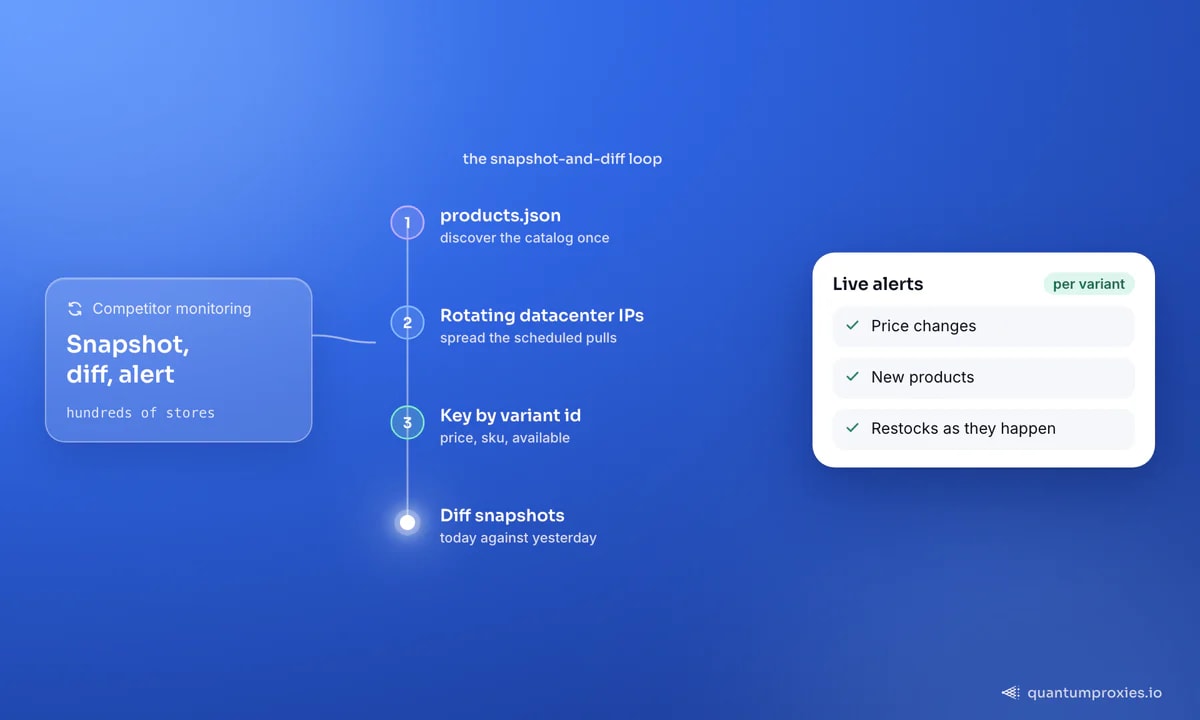
The real value isn't a one-off catalog dump — it's the diff over time. Snapshot a competitor's products.json on a schedule, key by variant id, and compare runs to catch price changes, new products and restocks the moment they happen. Because available and price live on each variant, you get stock and pricing signals without touching a product page.
def snapshot(base):
    rows = {}
    for p in all_products(base):
        for v in p["variants"]:
            rows[v["id"]] = {
                "product": p["title"],
                "sku": v["sku"],
                "price": v["price"],
                "available": v["available"],
            }
    return rows

# diff today's snapshot against yesterday's to flag price + stock moves
def changes(old, new):
    for vid, cur in new.items():
        prev = old.get(vid)
        if prev and (prev["price"] != cur["price"] or prev["available"] != cur["available"]):
            yield cur["sku"], prev, cur
This is the backbone of competitor price monitoring and dropshipping research — both lean on the same snapshot-and-diff pattern across many stores at once.
Get fast datacenter proxies for Shopify scraping
Which proxies you actually need
The products.json endpoint is public JSON, not a hardened checkout flow, so it's forgiving — but scrape hundreds of stores or hammer one on a schedule and you'll hit per-IP rate limits. The economical answer is fast datacenter proxies with rotation: cheap, quick, and enough to spread requests across IPs so no single one gets throttled. Reserve residential IPs for stores that block datacenter ranges outright. If a store has disabled products.json and hides its catalog behind rendered pages or bot protection, a Scraper API that renders and rotates for you is the cleaner fallback. Our guide to when datacenter proxies win covers the decision.
Frequently asked questions
How do I get all products from a Shopify store as JSON?
Request /products.json on the store's domain with ?limit=250&page=N and increment page until a page returns an empty products array. Each response holds up to 250 products with their variants, prices, SKUs and stock flags. For large catalogs, binary-search the last page and fetch pages concurrently.
What is the limit on Shopify products.json?
The public endpoint caps at 250 products per page — the highest value limit accepts. Passing a larger number won't return more; you still page through the catalog. This is a hard Shopify limit, so plan for pagination rather than trying to pull everything in one request.
Is scraping Shopify products.json legal?
The endpoint serves publicly available product data with no login, and US courts have generally upheld scraping public data. That said, respect the store's terms of service, avoid personal data, and don't overload the server. This is general information, not legal advice — check the specifics for your use case and jurisdiction.
Why is products.json returning a 404 or empty response?
Either the store isn't on Shopify, or the merchant has disabled the endpoint on a custom build. Some stores also throttle repeated requests from one IP, which can look like an error. Confirm the store is Shopify, rotate your IP, and add a delay between requests before assuming the endpoint is gone.
The products.json endpoint turns Shopify scraping from a selector-wrangling chore into a clean JSON pull: full catalog, prices and stock in one URL, 250 per page, fast to crawl with a binary search, and trivial to diff into competitor monitoring. Discover once, poll the collections and products that matter, spread requests across rotating datacenter IPs, and you can track hundreds of stores on a schedule without a single blocked run — no HTML parser, no headless browser, no brittle selectors to babysit.