When to Use Datacenter Proxies: The Case For Speed and Price
Datacenter proxies get dismissed as the cheap option. On the right targets they're the smart one - 5 to 15 times cheaper than residential, far faster, and perfectly adequate. Here's exactly when.
Datacenter proxies get dismissed as the cheap, second-best option - fine until you can afford residential. That framing costs teams money. On the right targets, datacenter proxies are not a compromise; they are the correct engineering choice: 5 to 15 times cheaper per gigabyte, dramatically faster, and built for the high-concurrency workloads residential IPs struggle with. The skill is knowing which targets those are. This guide makes the case for datacenter proxies, with a decision matrix, real costs, and a clear line for when to switch.
What a datacenter proxy actually is
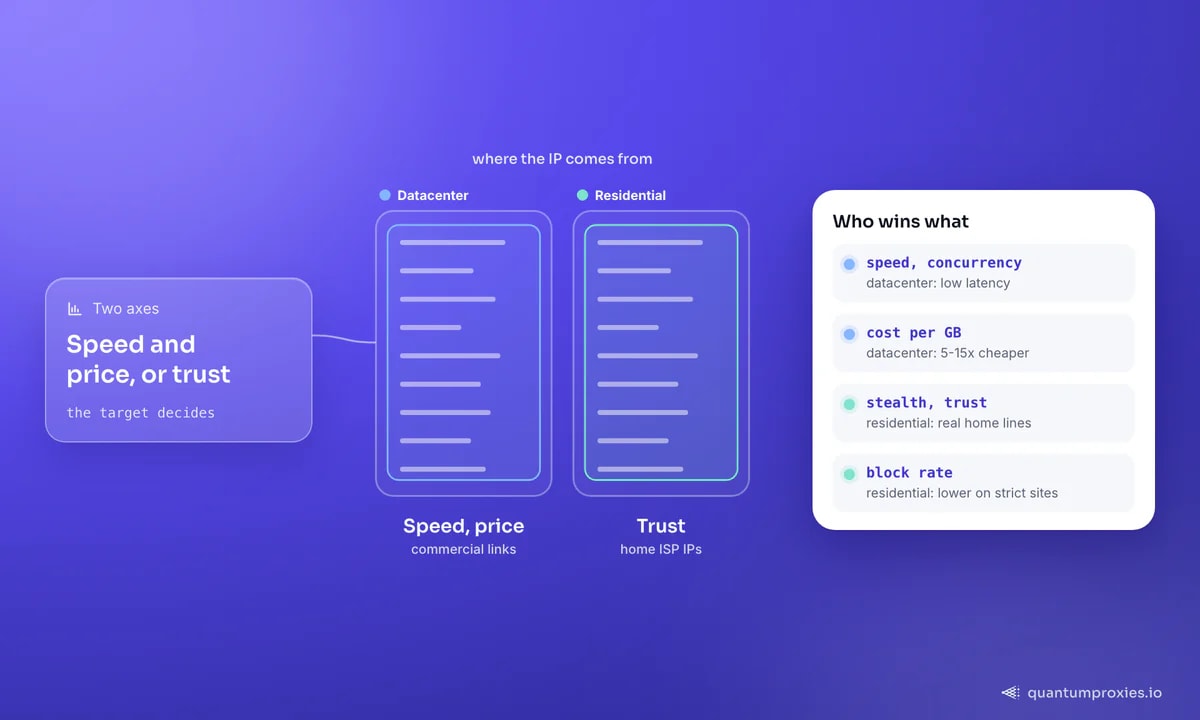
A datacenter proxy routes your traffic through IPs hosted in commercial data centres rather than IPs assigned by a home ISP. That origin is the whole story. Because these IPs sit on powerful hardware with commercial bandwidth, they are fast and cheap. Because they are obviously not residential, some sites flag them - and because providers buy them in contiguous /24 blocks (256 addresses with similar prefixes), one misbehaving IP can get a whole subnet blocked. Speed and price on one side; a higher block rate on unfriendly targets on the other. Everything about choosing them follows from that trade.
The cost gap is not small
Numbers make the case sharper than adjectives. Dedicated datacenter IPs commonly run about $1.00 to $2.50 per IP per month, and shared or rotating datacenter bandwidth runs roughly $0.60 to $1.50 per gigabyte. Residential proxies, priced by bandwidth because it's scarce on home connections, typically cost $4 to $15 per gigabyte. That's a 5-to-15x difference for the same byte moved. When your target doesn't punish datacenter IPs, paying residential rates is simply overpaying. Our breakdown of residential pricing per GB and cheap vs premium proxies shows where each tier pays off.
Put it in project terms. A crawl that moves 500 GB a month costs roughly $300 to $750 on datacenter bandwidth at $0.60-$1.50 per GB, versus $2,000 to $7,500 on residential at $4-$15 per GB. If the target doesn't punish datacenter IPs, that gap is pure waste. The discipline is to test cheap first: run a sample of the target through datacenter proxies and only escalate to residential if the block rate proves it necessary.
The jobs datacenter proxies do best
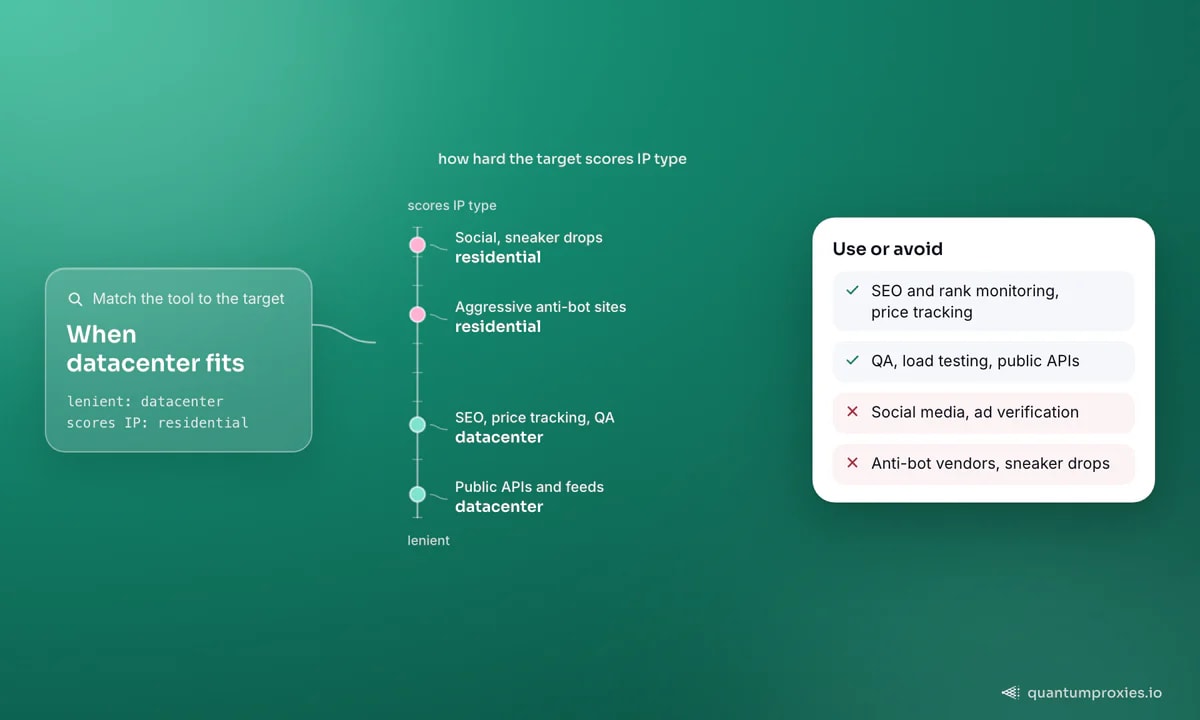
Reach for datacenter proxies whenever speed, concurrency and cost matter more than blending in as a household user:
- SEO and rank monitoring: checking positions and SERP features at volume, where the target tolerates datacenter traffic.
- Price tracking on open sites: retailers and catalogues without aggressive anti-bot layers.
- QA and load testing: hitting your own infrastructure from many IPs and regions, fast.
- Public APIs and feeds: JSON endpoints that key off rate limits, not IP reputation.
- High-volume light scraping: large crawls of lenient targets where bandwidth cost dominates the budget.
For these, the low latency also lets you set tight timeouts and push concurrency hard. A quick example - a public API through a datacenter exit needs almost no ceremony:
import requests

# Datacenter proxy: fast and cheap, ideal for a public API or lenient site
proxy = "http://USER-type-datacenter:PASS@datacenterboson.quantumproxies.io:10000"
proxies = {"http": proxy, "https": proxy}

r = requests.get("https://api.example.com/v1/products?page=1",
                 proxies=proxies, timeout=10)   # low latency = tight timeout
print(r.status_code, len(r.json()))
There's a speed dividend beyond cost. Because datacenter IPs sit on commercial links with low, consistent latency, you can run far higher concurrency and set tighter timeouts than a residential pool tolerates - a crawl that would take a residential setup all night can finish in an hour. For QA and load testing, where you're hitting your own infrastructure from many regions at once, that headroom is the entire point.
One more advantage worth naming is predictability. A dedicated datacenter IP behaves the same on every request - same latency, same route, same address - which makes it far easier to reason about failures and set alerting than a residential pool whose exits change constantly. For monitoring jobs that must run on a fixed schedule and report cleanly, that stability is a feature in itself, not a limitation. It's why so much SEO tracking and uptime monitoring runs on datacenter IPs even when residential is available.
When to avoid them
The flip side is just as clear. Anywhere a site scores IP type as part of its trust model, datacenter IPs start with a handicap. Social media platforms, sites behind aggressive anti-bot vendors, ad verification that must look like a real consumer, and sneaker or limited-drop targets all expect residential or mobile trust. Forcing datacenter proxies there means fighting CAPTCHAs and blocks that residential IPs would sail past - a false economy. If you're unsure how a target profiles you, our guide on how websites detect proxies lists the signals, including the ASN and subnet checks that out datacenter ranges.
Get fast, private datacenter proxies
Dedicated beats shared, and ISP splits the difference
Two upgrades change the maths. First, choose private or dedicated datacenter IPs over shared ones where reputation matters - a dedicated IP isn't dragged down by whatever other users did on a shared one, which meaningfully lowers block rates while keeping the speed and price advantage. Second, if you want datacenter speed with residential trust, ISP proxies (static residential) are the middle ground: hosted for performance but registered to a consumer ISP, so sites treat them as real users. Our post on ISP proxies covers when that premium is worth it, and the full proxy-type comparison maps every tier to a use case.
Frequently asked questions
What are datacenter proxies used for?
SEO and rank monitoring, price tracking on open sites, QA and load testing, hitting public APIs, and high-volume scraping of lenient targets. Anywhere speed, concurrency and low bandwidth cost matter more than looking like a residential user, datacenter proxies are the efficient choice.
Are datacenter proxies better than residential?
Neither is universally better - they optimise for different things. Datacenter proxies win on speed, concurrency and cost (5 to 15 times cheaper per GB). Residential proxies win on trust and low block rates. Pick datacenter for lenient targets and residential for sites that score IP type.
Why do datacenter proxies get blocked more?
Their IPs are visibly non-residential and are sold in contiguous subnet blocks, so anti-bot systems can flag an entire /24 when one address misbehaves and can identify datacenter ASNs directly. On sites that weight IP type, that lowers the starting trust score. Private, dedicated IPs reduce the risk.
Can I get unlimited-bandwidth datacenter proxies?
Yes - dedicated datacenter IPs are often sold per IP per month with no per-gigabyte metering, which is why they suit bandwidth-heavy jobs like load testing and large light crawls. Shared and rotating datacenter plans are usually priced per GB but at a fraction of residential rates.
Datacenter proxies aren't the budget compromise - they're the right tool for lenient targets, APIs, QA and volume work where speed and price win. Reserve residential for the sites that actually score IP type. Match the proxy to the target's defences and you stop overpaying for stealth you don't need.