Camoufox Proxy and GeoIP: Your Exit IP Is the Fingerprint
Turn on geoip and Camoufox derives your timezone, locale, coordinates and spoofed WebRTC address from the proxy's exit IP. That makes a mislabelled proxy louder than no proxy at all.
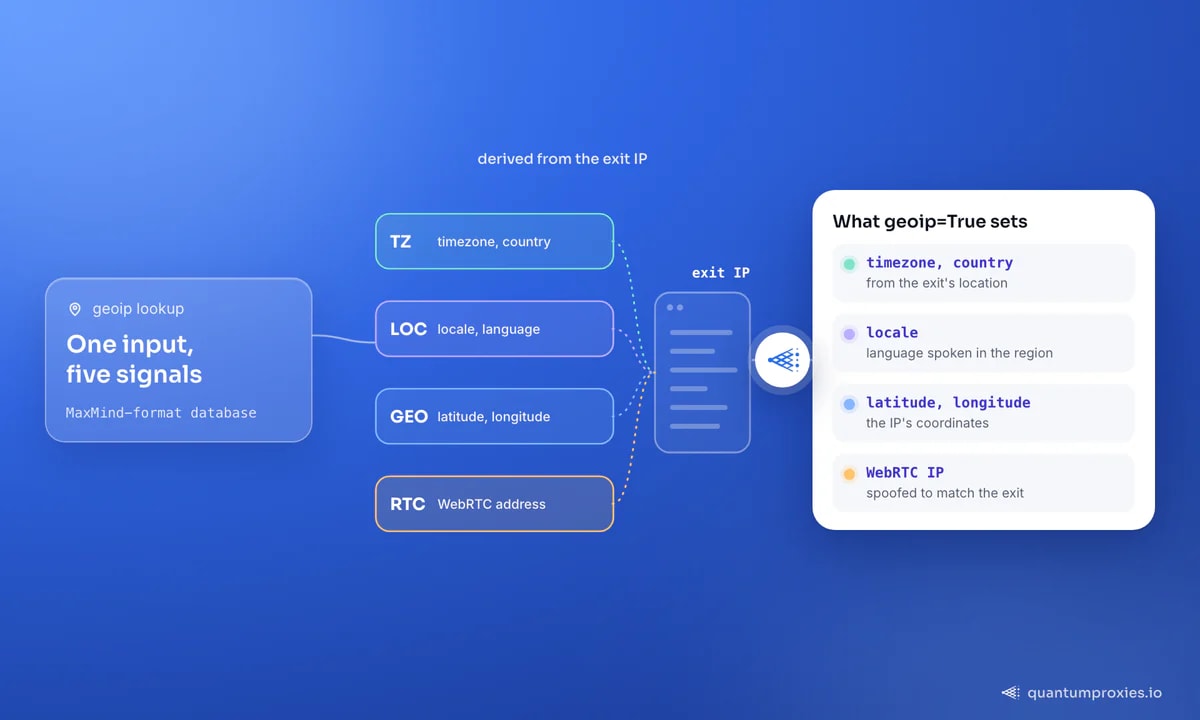
Most Camoufox proxy tutorials stop at the two lines that set proxy and geoip=True. The consequence is what nobody writes down: with geoip enabled, Camoufox derives your timezone, locale, latitude, longitude and the spoofed WebRTC address from the proxy's exit IP. The proxy stops being a network hop and becomes the source of truth for the whole identity. Feed it a mislabelled or recycled exit and Camoufox builds a perfectly coherent fingerprint around a lie — a stronger signal than no spoofing at all. Here is the setup, the errors people paste into Google, the SOCKS5 gap, and how to check an exit first.
What geoip actually derives from your proxy
Camoufox is an anti-detect Firefox build that wraps Playwright's Python API, so the proxy config is Playwright-shaped. The geo layer is what makes it different. Per the project docs, geoip=True (or a target IP address) makes Camoufox use the target IP's longitude, latitude, timezone, country and locale, and spoof the WebRTC IP address — then goes further, calculating the browser language from the distribution of language speakers in that region rather than defaulting to the country's official language. The lookups run against a MaxMind-format database that ships as an optional extra:
pip install -U "camoufox[geoip]"
python -m camoufox fetch
The [geoip] extra is optional in the packaging sense only — the docs call it heavily recommended if you are using proxies, and that is understated. Without it you get a stealth browser running on your host machine's timezone and locale while its IP claims to be in another country. Here is the minimal working setup with an authenticated HTTP gateway:
from camoufox.sync_api import Camoufox

with Camoufox(
    geoip=True,
    humanize=True,          # cursor movement, not a fingerprint setting
    headless=False,
    proxy={
        "server": "http://residentialpremium.quantumproxies.io:8080",
        "username": "USER",
        "password": "PASS",
    },
) as browser:
    page = browser.new_page()
    page.goto("https://httpbin.org/ip")
    print(page.text_content("body"))   # should be the exit IP, not yours
Note the shape of the proxy dict: credentials go in separate username and password fields, never inside the server URL. That is inherited from Playwright and it is the reason authenticated proxies are painless here — no extension shim, no auth dialog to dismiss. The async API is identical via AsyncCamoufox. For how this compares with the other stealth stacks, see our map of authenticated proxy support across anti-detect frameworks.
Why the wrong proxy unmasks you
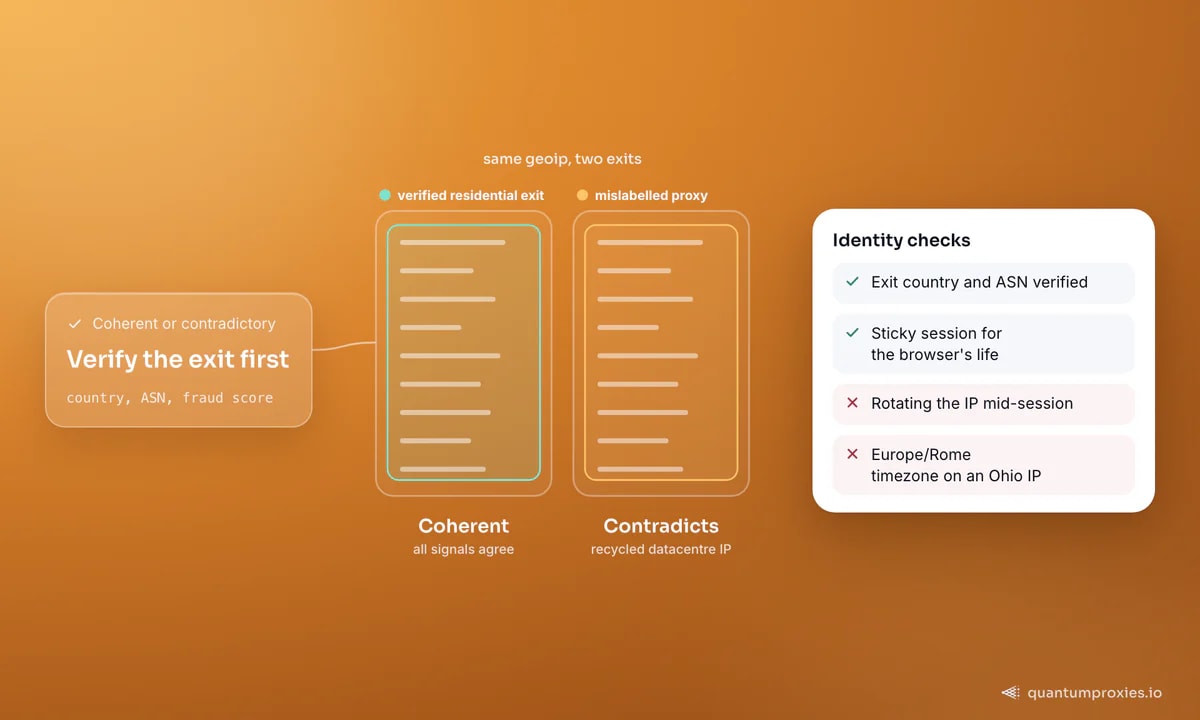
Anti-bot systems rarely hunt for a single bad value. They hunt for contradictions — two signals that cannot both be true of the same human. A browser reporting Europe/Rome from an IP that geolocates to Ohio is one. Camoufox's geoip feature exists to kill that class of contradiction, and it does the job well. The catch is that it always resolves the contradiction in favour of the IP. If the database says your exit is in Germany but the address is a recycled datacentre range that half the internet already flags as a proxy, Camoufox will dutifully dress your browser as a German home user sitting on an ASN no German home user has ever used.
That makes exit quality a fingerprinting problem, not only a blocking one. Two checks belong in every run: the exit's real ASN and country, and whether the IP already carries a fraud or proxy score. Our free IP quality checker answers both, and residential proxies on real ISP ranges in 200+ countries are what make the derived identity plausible at all. None of it exempts you from the layer below — the engine still emits a TLS handshake, and JA3/JA4 fingerprinting reads it before your spoofed values are ever sent.
The Camoufox proxy errors you will actually hit
Three failures dominate the issue tracker, and none of them mean your credentials are wrong:
InvalidProxy: Failed to connect to proxy— raised before the browser starts, and it is a geoip side effect. Camoufox resolves your exit address through a list of public IP APIs so it knows what to look up. Those endpoints are HTTPS, so a proxy that cannot CONNECT-tunnel TLS fails the check even when plain HTTP through it succeeds (discussion #397). Dropgeoipand the same proxy 'works' — exactly the wrong fix.Page.goto: NS_ERROR_PROXY_CONNECTION_REFUSED— the Firefox-level refusal. Issue #294 documents it forlaunch_server(): a proxy string that works in a normal launch fails when the browser is started as a server and driven over its WebSocket endpoint, credentials valid. Verify the proxy in a direct launch first so you know which layer is broken.- geoip plus an IPv6 exit — the lookup errors out where the same database is fine for IPv4 (discussion #241). On an IPv6 pool, resolve the address yourself and pass it in.
The clean workaround for the first and third case is documented but under-used: geoip accepts an IP address, not only True. Resolve the exit yourself through the same proxy, then hand Camoufox the answer. You skip the internal lookup entirely, and as a bonus you get to log which exit each session ran on:
import requests
from camoufox.sync_api import Camoufox

HOST = "residentialpremium.quantumproxies.io:8080"
USER, PASS = "USER-sid-a1b2-ttl-30m", "PASS"     # sticky session id in the username

PROXY = {"server": f"http://{HOST}", "username": USER, "password": PASS}
url = f"http://{USER}:{PASS}@{HOST}"          # percent-encode odd characters

# 1) resolve the exit through the same gateway and session
exit_ip = requests.get(
    "https://api.ipify.org", proxies={"http": url, "https": url}, timeout=15
).text.strip()

# 2) hand Camoufox the address instead of letting it discover one
with Camoufox(geoip=exit_ip, proxy=PROXY, humanize=True) as browser:
    page = browser.new_page()
    page.goto("https://browserscan.net")
    print("session exit:", exit_ip)
Two details matter. Use a sticky session so the IP resolved in step one is still the exit in step two — under per-request rotation those are different addresses and the derived geo is wrong from the first page load. And percent-encode credentials containing @, : or #: the dict form is immune, the URL form is not.
Camoufox and SOCKS5: the WebRTC and auth gap
SOCKS5 is where Camoufox users get stuck, and the reason is more interesting than a missing feature. Issue #368 frames it exactly right: without a proxy that carries UDP, WebRTC can expose you. WebRTC negotiates over UDP, HTTP proxies are TCP-only, and SOCKS5 is the one common protocol with a UDP association mode — which is why people want it here specifically. Camoufox's answer is to spoof the WebRTC address from the geoip data instead of routing the media path, and that covers the common leak. The block_webrtc option removes the surface altogether, at the cost of looking like a browser with WebRTC disabled.
Authenticated SOCKS5 is the harder gap. Discussion #334 is a user asking for the trick and reporting that the only thing that worked was running a local proxy server to forward browser traffic into a SOCKS5 endpoint with login and password. That is still the state of play, and it leaves you three options, in order of preference:
- Authenticate by IP whitelist. Add your machine or server address to the allowed list and the SOCKS5 endpoint needs no credentials at all. Every QuantumProxies plan exposes HTTP and SOCKS5 endpoints and supports whitelisting as an alternative to user:pass, which makes this the one-line fix rather than the exotic one.
- Use the HTTP port of the same gateway. Unless you specifically need UDP, HTTP(S) with credentials in the dict is less trouble. Our breakdown of SOCKS5 versus HTTP proxies covers when the difference matters.
- Run a local relay that accepts an unauthenticated connection on
127.0.0.1and adds credentials upstream — the workaround from #334. Point Camoufox atsocks5://127.0.0.1:1080and let the relay authenticate.
Get SOCKS5 endpoints with IP whitelisting
A pre-flight checklist before you trust geoip
- Resolve the exit IP through the proxy and log it with the session id. If you cannot name the address a run used, you cannot debug the block it got.
- Check the exit's real country and ASN against what the pool claims. Country mismatches poison every derived signal.
- Pin a sticky session for the whole browser lifetime. Rotating mid-session changes the IP under a fingerprint computed for the old one.
- Load a fingerprint test page once per pool, not once per project — the timezone, locale and WebRTC values change with the exit.
- Pick
block_webrtcor geoip-based WebRTC spoofing per target, and keep it consistent within a session.
Frequently asked questions
How do I set a proxy in Camoufox?
Pass a Playwright-style dict to the Camoufox() constructor: proxy={"server": "http://host:port", "username": "USER", "password": "PASS"}. Credentials belong in the separate fields, not in the server URL. Add geoip=True alongside it so timezone, locale and coordinates are derived from that exit instead of your host machine.
Does Camoufox support SOCKS5 proxies?
The proxy dict accepts a socks5:// server, but authenticated SOCKS5 is the known sore point — discussion #334 reports a local relay as the only reliable route, and full SOCKS5 support is still an open enhancement request (#368). The practical fix is IP whitelisting, which removes the credential requirement entirely, or using the gateway's HTTP port.
What does geoip=True do in Camoufox?
It looks the exit IP up in a MaxMind-format database and uses the result to set the browser's longitude, latitude, timezone, country and locale, spoof the WebRTC address, and pick a plausible language for the region. It needs the camoufox[geoip] extra installed. You can also pass an IP string instead of True to skip the self-discovery step.
Why do I get InvalidProxy: Failed to connect to proxy?
Because the geoip pre-check could not reach a public IP API through your proxy. Those endpoints are HTTPS, so the proxy must support CONNECT tunnelling; a gateway that only forwards plain HTTP fails here while appearing to work elsewhere. Test with an HTTPS request through the same proxy, or resolve the exit yourself and pass it as geoip="1.2.3.4".
Camoufox's geoip option is the best argument in the ecosystem for spending money on IP quality instead of on more evasion code. It takes the hardest part of fingerprint consistency — making the browser agree with the network — and solves it automatically, on the condition that the network is telling the truth. Buy the exit first, then turn geoip on. If you need Chromium rather than Firefox, the same discipline carries over to our Patchright proxy setup guide. This is technical guidance, not legal advice: scrape within the law and the target's terms.