How to Scrape Walmart Product Data: JSON, Geo Prices, Blocks
Walmart has no public API, personalises every page, and gates scrapers with a press-and-hold CAPTCHA. But its Next.js JSON hands you clean structured data — if your IP survives the door. Here's the whole method.
Walmart is the world's largest retailer, which makes its pricing a live economic signal — and there is no public Walmart API to read it. So people scrape. The good news: Walmart is a Next.js site, and every product page carries a single JSON blob with the full, clean data already parsed. The bad news: a datacenter IP hits a press-and-hold CAPTCHA before it ever sees that JSON. This guide covers the reliable method — read the hydration JSON instead of styled HTML, get past HUMAN's bot defence with the right IP, and pull store-level geo pricing.
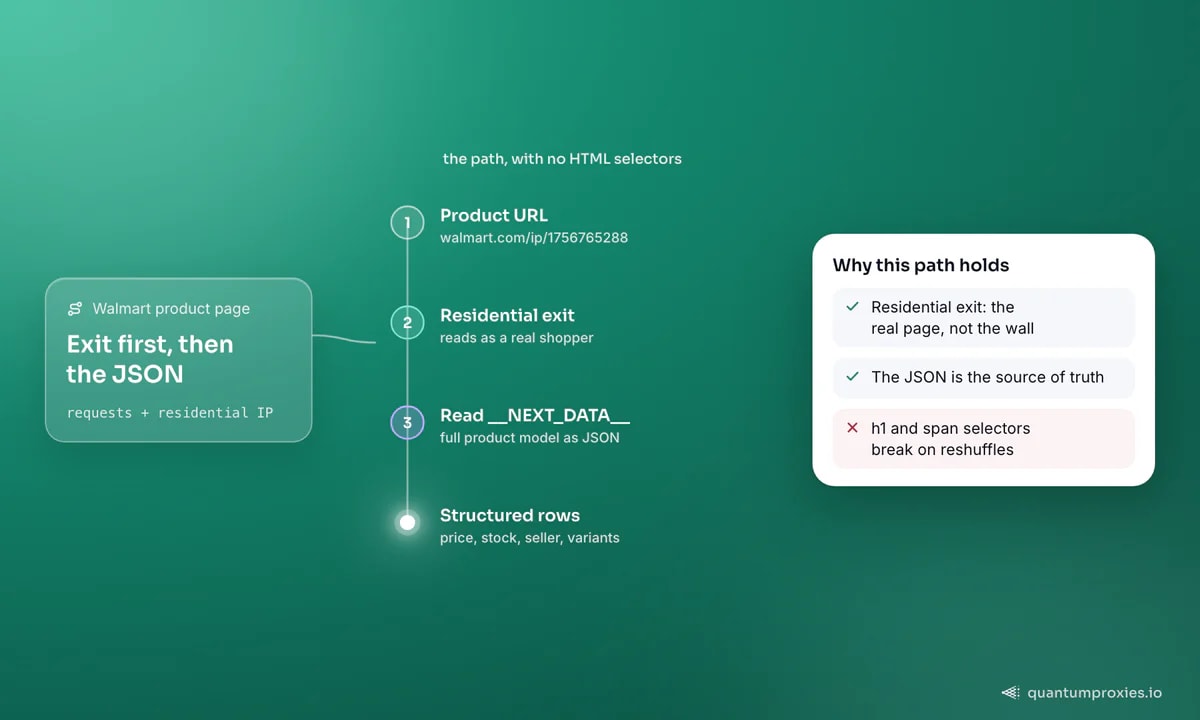
Stop parsing tags. Read the __NEXT_DATA__ JSON
Most tutorials teach you to find the h1 for the title and a span for the price. That works until Walmart reshuffles its class names, which is often. The durable approach: Walmart renders React from a script tag with id="__NEXT_DATA__" containing the entire product model as JSON. Grab that once and every field is structured:
import requests, json
from bs4 import BeautifulSoup

headers = {
    "User-Agent": "Mozilla/5.0 (Windows NT 10.0; Win64; x64) AppleWebKit/537.36 "
                  "(KHTML, like Gecko) Chrome/146.0.0.0 Safari/537.36",
    "Accept-Language": "en-US,en;q=0.9",
}
proxies = {"http": "http://USER:PASS@residentialpremium.quantumproxies.io:8080",
           "https": "http://USER:PASS@residentialpremium.quantumproxies.io:8080"}

url = "https://www.walmart.com/ip/1756765288"
r = requests.get(url, headers=headers, proxies=proxies, timeout=20)

soup = BeautifulSoup(r.text, "html.parser")
blob = soup.find("script", id="__NEXT_DATA__")
data = json.loads(blob.string)
product = data["props"]["pageProps"]["initialData"]["data"]["product"]
print(product["name"], product["priceInfo"]["currentPrice"]["price"])
The exact key path shifts over time, so print the top-level keys once and navigate from there. But the principle holds: the JSON is the source of truth, and it includes price, availability, seller, variants and ratings in one place — no per-field selector to break.
The door: "Robot or human?"
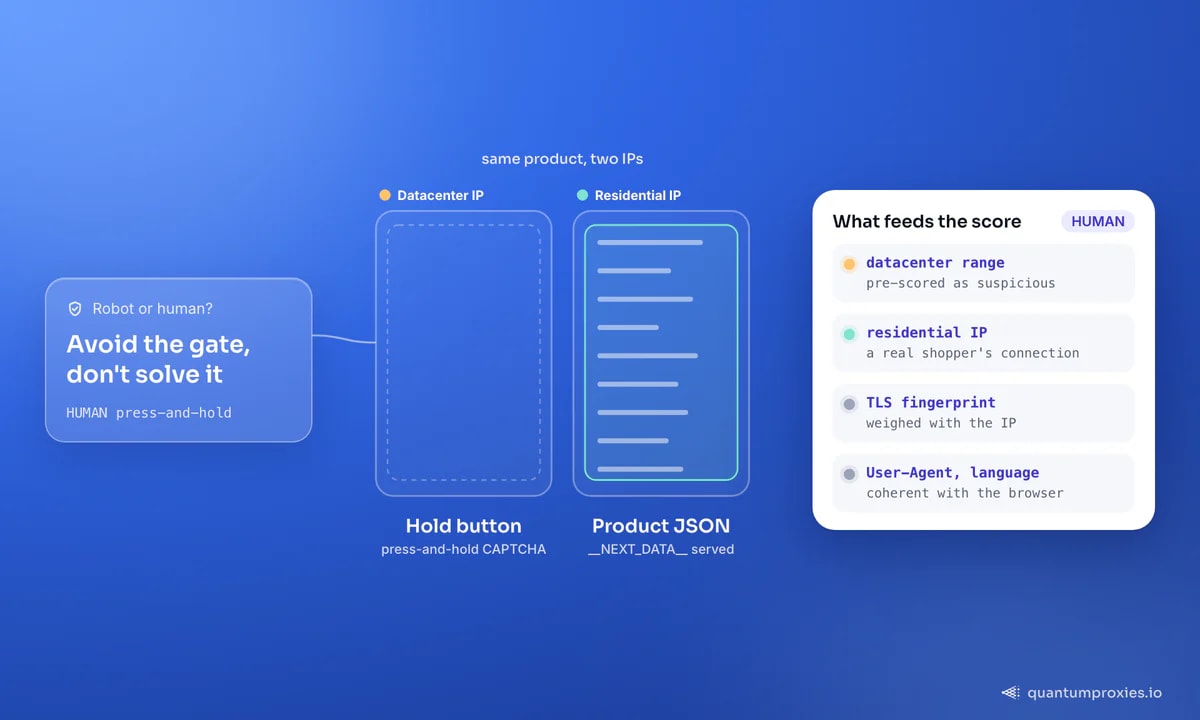
Run the request from a bare datacenter IP and you won't get product JSON — you'll get a page that says "Robot or human? Activate and hold the button to confirm that you're human." That's HUMAN (formerly PerimeterX), the bot-defence layer Walmart runs. It weighs IP reputation, TLS fingerprint and headers together, and a press-and-hold challenge is what it serves when the score is low.
You don't solve that CAPTCHA; you avoid triggering it. The single biggest lever is the IP. A residential proxy presents as a real Walmart shopper's connection, which keeps the score high enough to serve the real page. Datacenter ranges are pre-scored as suspicious and get the wall on request one. Our breakdown of how HUMAN detects automation covers what else feeds that score.
Geo pricing: one product, many prices
Walmart prices and stock are store-specific. The same item shows a different price and availability depending on the shopping location, so a scraper with no location set is reading one arbitrary store. Set the location by ZIP to control which store you're pricing — Walmart persists it in a location cookie, so send it on every request:
# pin the store location by US ZIP before reading price/stock
cookies = {"assortmentStoreId": "3081", "locationData": '{"postalCode":"10001"}'}

r = requests.get(url, headers=headers, cookies=cookies,
                 proxies=proxies, timeout=20)
# now priceInfo + availabilityStatus reflect that store
To compare a product across markets, loop your ZIP list and pair each with a residential exit in that region — a New York shopper reading NYC store prices is far more coherent than a request that claims one location but exits somewhere else. That geo consistency is exactly what competitor price monitoring lives or dies on.
Search pages and pagination
For catalog work, scrape search results, not just product pages. Two things to know: Walmart personalises search ordering per user, so don't expect a stable rank across runs, and results span multiple pages you page through with a page parameter. The same __NEXT_DATA__ pattern applies — the search JSON carries the full list of items with prices and IDs, so you rarely need to touch the product page unless you want variant-level detail:
def search(query, pages=5):
    items = []
    for page in range(1, pages + 1):
        url = f"https://www.walmart.com/search?q={query}&page={page}"
        html = requests.get(url, headers=headers, cookies=cookies,
                            proxies=proxies, timeout=20).text
        blob = BeautifulSoup(html, "html.parser").find("script", id="__NEXT_DATA__")
        data = json.loads(blob.string)
        stacks = data["props"]["pageProps"]["initialData"]["searchResult"]["itemStacks"]
        for stack in stacks:
            items += stack["items"]
    return items
When to stop hand-rolling it
Raw requests plus residential IPs get you a long way on Walmart. The point where it stops paying off is scale: rotating exits per request, retrying the ones that still hit the wall, and keeping the store-cookie logic coherent across thousands of ZIPs is a real maintenance load. A Scraper API that carries the browser fingerprint, rotates residential IPs and can return parsed JSON collapses that into a single call — you send a Walmart URL and get the product model back, blocks handled. If your page comes back as the CAPTCHA shell instead of data, that's the classic empty-page symptom and it's a rendering-and-IP problem, not a parser bug.
Get residential IPs that reach Walmart
Frequently asked questions
Does Walmart have a product data API?
There's no open public API for arbitrary product and price data, which is why scraping is the common route. Walmart's affiliate and marketplace-seller APIs exist but are gated and limited in scope. For broad product, price and availability collection, reading the page's __NEXT_DATA__ JSON through residential IPs is the practical method.
How do I scrape Walmart prices without getting blocked?
Route requests through residential proxies so HUMAN's bot defence scores you as a real shopper, send a coherent browser User-Agent and Accept-Language, and read the hydration JSON rather than hammering many selector requests. Pin the store by ZIP cookie and keep the exit region consistent with it. That combination avoids the press-and-hold CAPTCHA on most requests.
Why does Walmart show different prices for the same product?
Walmart prices and stock are store-level. The price you see depends on the location set for the session, so two requests with different ZIP locations legitimately return different prices. To collect comparable data, fix the ZIP explicitly and match your proxy exit to that region rather than letting Walmart guess from the IP.
Is the __NEXT_DATA__ JSON better than parsing HTML?
Yes, for durability. Walmart's visible class names change frequently, breaking CSS-selector scrapers, but the Next.js hydration JSON is a stable structured model of the product with price, variants, seller and availability in one object. Parse the JSON once and you avoid a stack of fragile per-field selectors.
Walmart isn't hard because the data is hidden — it's right there in the page JSON. It's hard because the door checks who's knocking. Read __NEXT_DATA__ instead of tags, set the store by ZIP, and knock with a residential IP, and you get clean, comparable product data at scale. For big-box price work more broadly, the same playbook extends to Best Buy and Target.