Grocery Price Scraping: Store and ZIP-Level Data at Scale
Grocery prices are hyper-local: the same item costs different amounts by store and ZIP. Capturing that means geo-targeted requests and UPC matching. Here is how to build a store-level price dataset that holds up.
Grocery pricing is one of the most hyper-local datasets on the web. The same box of cereal can cost $4.29 at one chain and $5.19 at another a few miles away, and delivery platforms quote different prices depending on the store and the ZIP code you set. That variability is exactly why the data is valuable — for CPG brands tracking retail execution, for comparison tools, for anyone measuring inflation at the shelf. But it also means you cannot just scrape a national price; you have to capture prices per store and per ZIP, which is a geo-targeting and product-matching problem. This guide covers how to collect store-level grocery prices, match products by UPC, and build a basket index that holds up. It is general information, not legal advice — respect each site's terms.
Why the spread is the opportunity
The numbers make the case. When Consumer Reports commissioned a basket comparison across chains in six representative US cities, the gap between the cheapest and priciest mainstream store in each city topped 33% — and grew wider once warehouse clubs and specialty grocers were included. Food prices rose 25.5% between December 2020 and December 2024 per Bureau of Labor Statistics data analysed by the St. Louis Fed, with coffee alone up about 20% year over year. Weekly indexes that track this pull from over 150,000 stores. A dataset that captures who is cheapest, where, and how that changes week to week is genuinely hard to assemble by hand — which is what makes it defensible once you automate it.
Location controls the price, so it controls the request
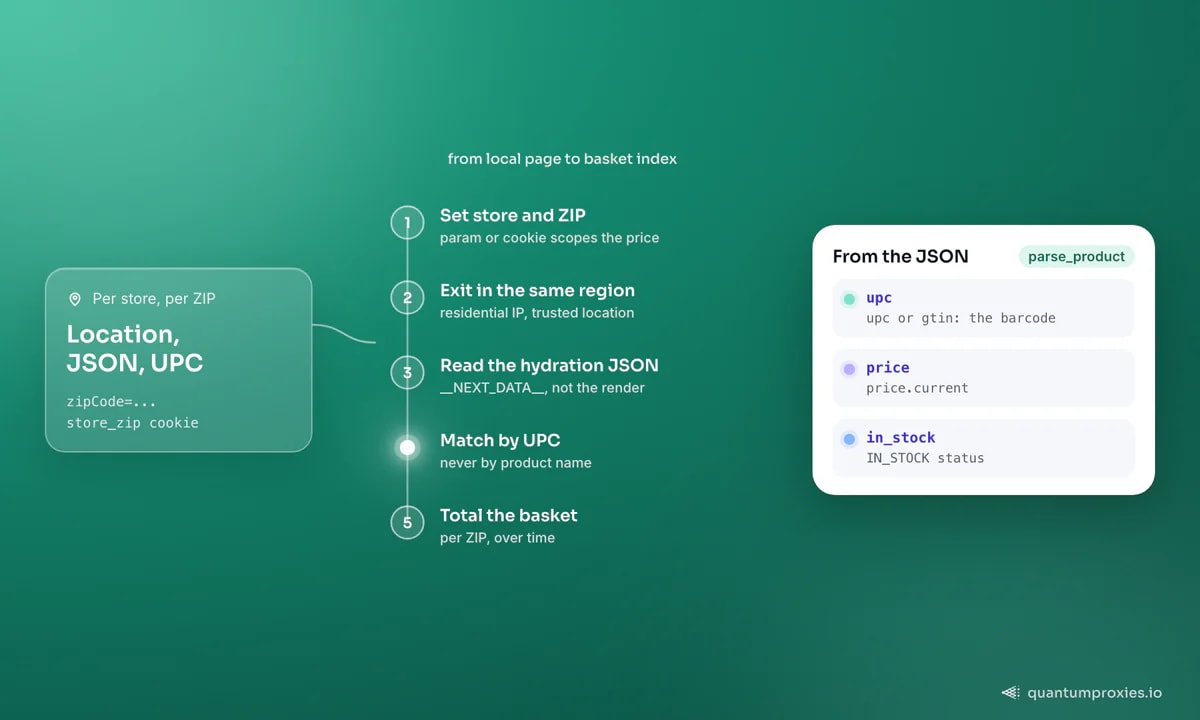
The core technique: to see a store's local prices you must present as a shopper in that store's area. On most grocery and delivery sites, prices only resolve once you set a delivery ZIP or pick a specific store, and the site keys that to your session and often your IP's location. So the request has two moving parts — the store/ZIP you set in the payload, and an exit IP that sits in the same region so the site trusts the location. A residential IP in the target metro is what unlocks the correct local pricing; a datacenter IP in another state can get you a default or blocked view.
import httpx

# A residential exit in the target region unlocks that region's prices
def region_proxy(state):
    return f"http://USER-country-us-region-{state}:PASS@residentialpremium.quantumproxies.io:8080"

HEADERS = {
    "user-agent": "Mozilla/5.0 (Windows NT 10.0; Win64; x64) AppleWebKit/537.36 "
                  "(KHTML, like Gecko) Chrome/133.0.0.0 Safari/537.36",
    "accept": "application/json",
}

def fetch_store_price(store_api_url, zip_code, state):
    # Many stores accept the ZIP as a cookie/param that scopes pricing
    r = httpx.get(
        store_api_url,
        params={"zipCode": zip_code},
        headers={**HEADERS, "cookie": f"store_zip={zip_code}"},
        proxy=region_proxy(state),
        timeout=30,
    )
    return r.json()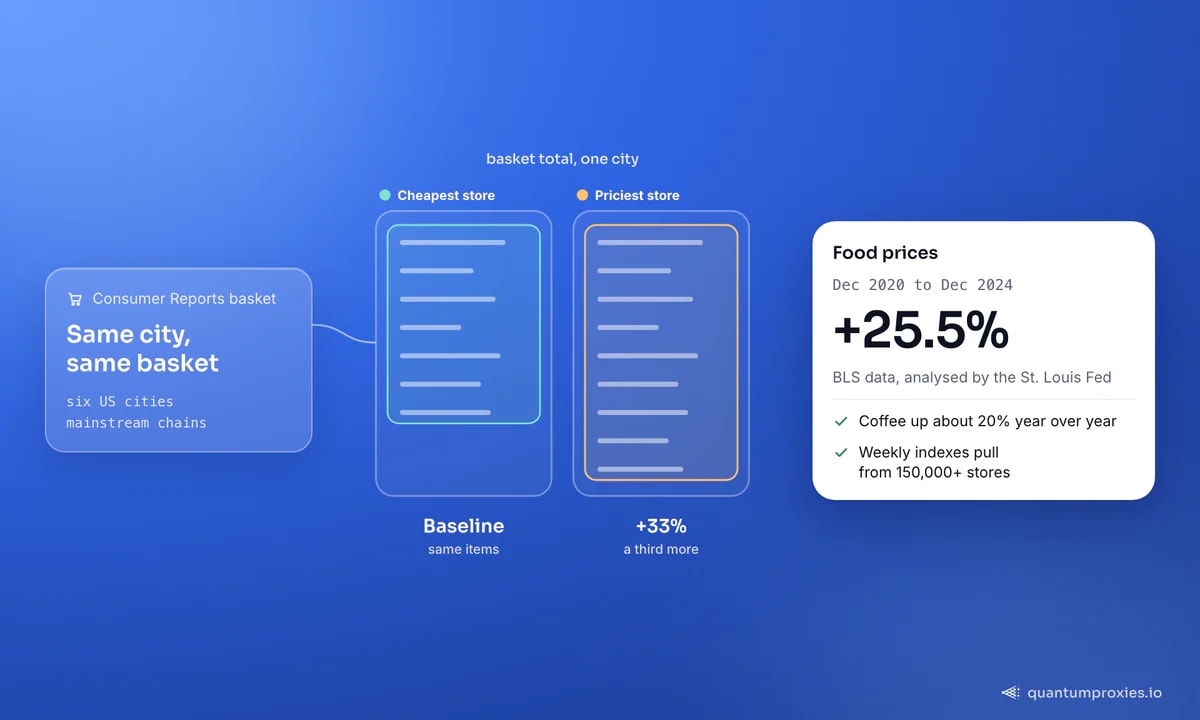
Read the hydration JSON, not the rendered price
Modern grocery sites are heavily client-rendered, and — like most large ecommerce apps — they embed the product data as JSON in the page rather than only painting it to the screen. Look for a hydration payload (often in a <script> tag such as __NEXT_DATA__ or a store-specific state object) that carries the price, stock status and, crucially, the UPC or GTIN. Reading that JSON is far more robust than scraping a rendered price element, and it gives you the barcode you need for matching. Our note on why a scraper returns an empty page covers finding these payloads when the visible HTML looks bare.
import re, json

def extract_hydration(html: str) -> dict:
    m = re.search(r'<script id="__NEXT_DATA__"[^>]*>(\{.+?\})</script>',
                  html, re.DOTALL)
    if not m:
        raise ValueError("hydration payload not found")
    return json.loads(m.group(1))

def parse_product(state_json: dict) -> dict:
    p = state_json["props"]["pageProps"]["product"]
    return {
        "upc": p.get("upc") or p.get("gtin"),
        "name": p.get("name"),
        "price": p["price"]["current"],
        "in_stock": p.get("availabilityStatus") == "IN_STOCK",
    }
Match by UPC, never by name
The single biggest mistake in grocery price data is matching products by name. "Cheerios Family Size," "Cheerios Family Size 18oz" and "General Mills Cheerios (Family Size)" are the same item with three labels across three stores — match on the name and your comparison is noise. Match on the UPC/GTIN barcode instead, which is the same regardless of how each store titles the product. Every serious grocery comparison tool does this; it is what makes a cross-store basket meaningful.
from collections import defaultdict

# Group scraped rows by barcode so each item lines up across stores
def compare_by_upc(rows: list[dict]) -> dict:
    by_upc = defaultdict(dict)
    for r in rows:                      # r = {store, upc, price, ...}
        if r.get("upc"):
            by_upc[r["upc"]][r["store"]] = r["price"]
    # cheapest store per item
    return {upc: min(prices, key=prices.get) for upc, prices in by_upc.items()}
From barcode-matched rows you can build the metric that matters: a basket index. Define a fixed basket of common items, price it at each store per ZIP, and total it — that single number, tracked over time, is what reveals the 33% spreads and the week-to-week inflation. Because you are running the same collection across many locations and stores, per-request rotation across a residential proxy pool keeps any one exit from looking abnormal while preserving the geo you set.
Collect local grocery prices on geo-targeted IPs
Scaling to a real dataset
A production grocery price feed is a matrix: stores × ZIPs × products × time. That is a lot of requests, and it is where DIY scraping gets heavy — you are juggling geo-bound sessions, hydration payloads that shift between deploys, and anti-bot layers on the bigger chains. A Scraper API that renders when needed, rotates geo-targeted IPs and returns clean JSON collapses most of that into one call, so you spend your effort on the basket logic instead of the plumbing. For the pricing-strategy side of the same data, see our guides on competitor price monitoring and building a price-comparison data layer.
Frequently asked questions
How do I scrape grocery prices by location?
Set the store or delivery ZIP in the request (usually a parameter or cookie) and route through a residential proxy whose exit IP sits in that region, so the site trusts the location and returns local pricing. Then read the price and UPC from the page's hydration JSON rather than the rendered element. Repeat per ZIP to build a geo matrix.
Why match grocery products by UPC instead of name?
Because stores title the same item differently — sizes, brand ordering and abbreviations all vary — so name matching produces false mismatches and noisy comparisons. The UPC or GTIN barcode is identical across retailers for the same product, so matching on it lets you line up prices for the exact same item across every store you scrape.
Do grocery delivery prices really differ by ZIP?
Yes. Grocery and delivery platforms scope pricing, promotions and availability to a store, and stores are tied to your delivery ZIP, so the same product can show different prices in neighbouring areas. Consumer Reports found basket spreads above 33% between the cheapest and priciest chains in a single city, which is why location-specific collection matters.
Is scraping grocery prices legal?
Collecting publicly visible prices is common — news outlets and price indexes do it weekly — but it depends on the site's terms and your jurisdiction. Stick to public product pages, avoid personal data and logged-in areas, pace your requests, and get legal advice for commercial use. This is general information, not legal advice.
Grocery price data lives and dies on location and identity. Set the store and ZIP, present from a residential IP in the region, read the hydration JSON, and match on UPC — then total the basket and track it over time. Do that across enough stores and ZIPs and you own a dataset that a manual comparison could never keep up with.