Build a Price Comparison Website: The Data Layer
Anyone can build the front end of a price comparison site. The data layer — sourcing, matching the same product across stores, and refreshing it economically — is the actual business. Here's how to build it.
You can build the front end of a price comparison site in a weekend — search, filters, listing pages, a checkout redirect. That's not the business. The business is the data layer: where the prices come from, how you prove two listings are the same product, and how you keep it fresh without your costs eating the affiliate revenue. Google Shopping alone is used as a price comparison tool by 59% of American shoppers, and around 60% regularly check a few comparison sites before buying — the demand is enormous, and the moat is entirely in the data. Here's how to build that layer.
The site is the easy part; the data is the business
A comparison site doesn't sell anything. It collects product data and prices from many stores, presents them side by side, and links out to the merchant — earning on the click or the resulting sale. That means your entire value proposition is the accuracy, breadth, and freshness of your data. A beautiful UI over stale or wrongly-matched prices is worthless; a plain UI over a clean, current dataset is a real product. Build outward from the data, not inward from the design.
Where the prices come from
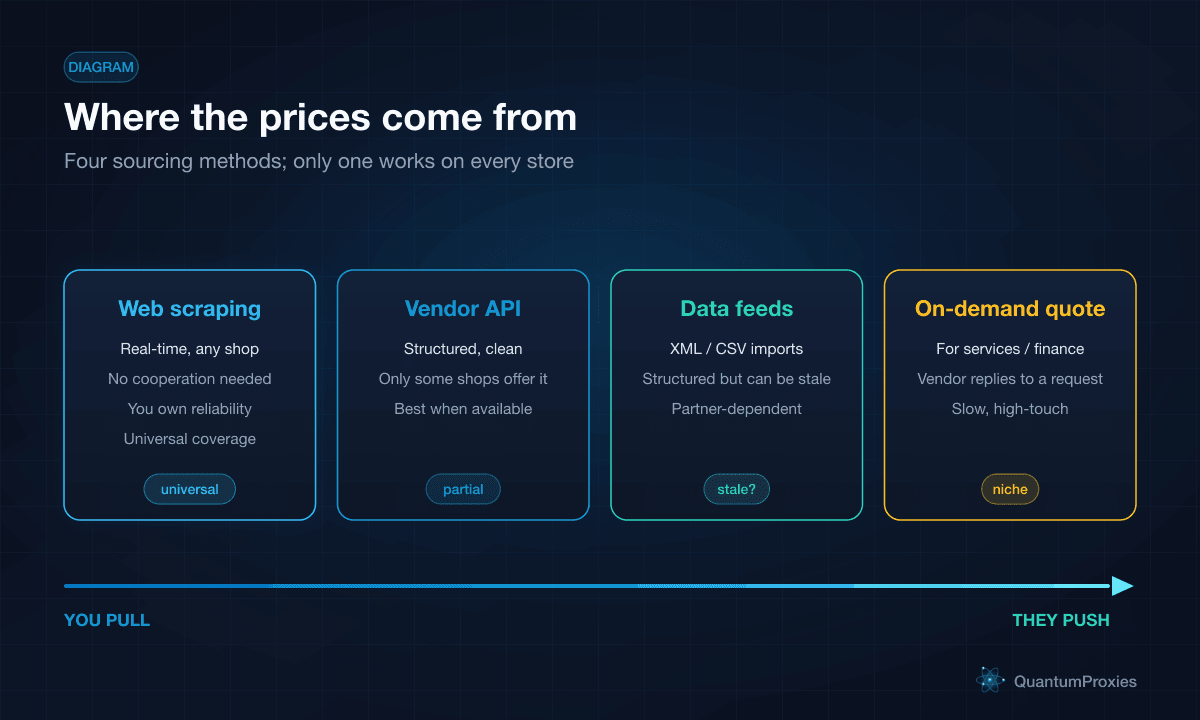
There are four ways to source prices, and they trade coverage against effort:
- Web scraping — automated collection from any store's public pages, in real time, with no cooperation required. The only universal method; you own its reliability.
- Vendor API — structured data straight from the merchant. Clean when available, but only some stores offer one.
- Data feeds — partners hand you XML or CSV. Structured, but only as fresh as the last export.
- On-demand quoting — for services, insurance, or finance, where the site relays a request and the vendor replies. Slow and high-touch.
In practice, scraping is the backbone because it's the only method that works on every store regardless of whether they cooperate. APIs and feeds are welcome bonuses where you can get them, layered on top of a scraping foundation.
The normalization problem
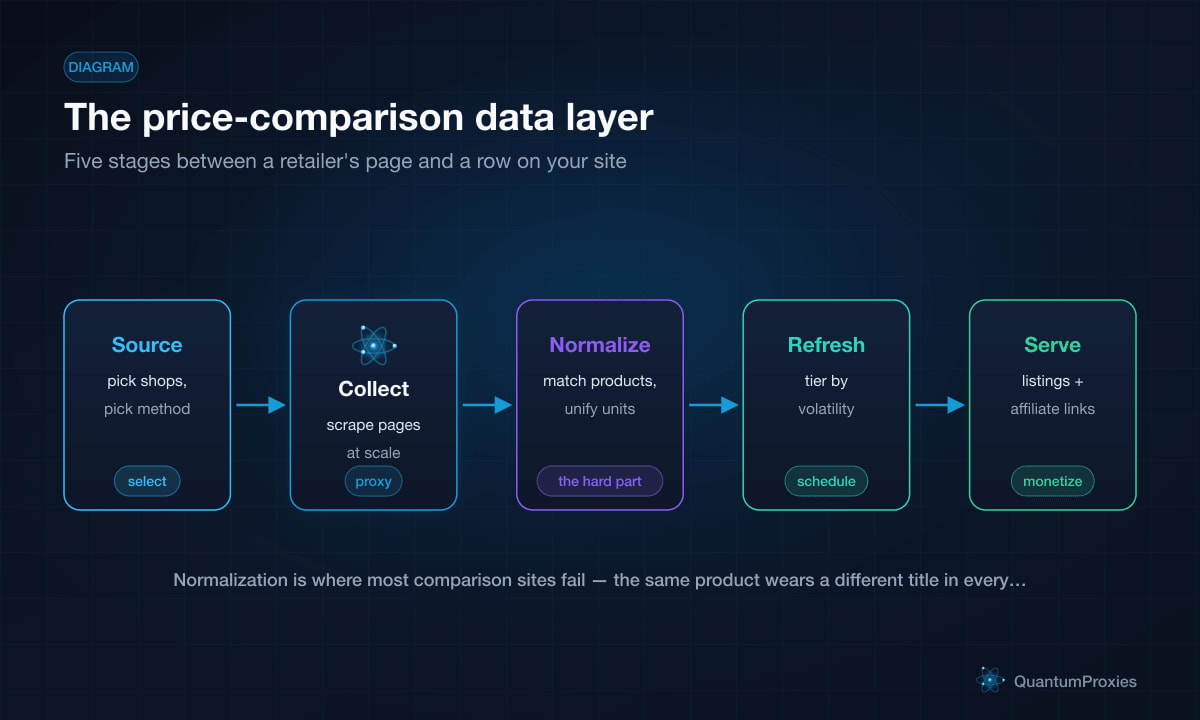
This is the stage that sinks most comparison sites. The same product wears a different title, a different SKU, and different photos in every store. Before you can show "this item, cheapest here," you have to prove those listings are the same product — that's entity resolution, and it's the genuinely hard part. You also normalize the mundane: currencies to one unit, sizes and quantities to comparable units, and variant handling so a colour option isn't counted as a separate product. Modern matching leans on attribute-and-image models rather than exact identifiers; our guide on AI product matching covers the technique in depth.
def normalize(offer):
    return {
        "key": product_key(offer["title"], offer.get("brand"), offer.get("gtin")),
        "price_cents": to_cents(offer["price"], offer["currency"]),  # unify currency
        "unit_price": offer["price"] / offer["qty"] if offer.get("qty") else None,
        "store": offer["store"],
        "url": offer["url"],
    }
# group offers by 'key' -> one product, many stores, ready to compare
Store the normalized offers grouped by that product key and the comparison view becomes a trivial query: one product, every store that sells it, sorted by price. All the difficulty lives upstream — in proving the key is right. Budget most of your engineering there, because a mismatched key shows a shopper the wrong "cheapest" price and quietly destroys the trust the whole site runs on.
Refresh economics
Prices go stale fast, but re-scraping every product every hour is how you go broke. The answer is tiered refresh: hot, volatile, or popular products get frequent updates; the long tail gets refreshed rarely. Weight your crawl budget by how often a price actually changes and how often users view it. Bandwidth is the cost driver here — pulling full HTML for millions of products adds up — so block assets you don't need and prefer lighter endpoints where they exist. Our post on cutting proxy bandwidth costs shows how to trim that bill by most of its size.
Build the collection layer on a Scraper API
Collecting without getting blocked
Retailers actively detect and block scrapers, and price data is exactly what they least want harvested — so bare requests get 403s and challenges quickly. Route collection through residential proxies so requests read as real shoppers, and use geo-targeted exits when a store shows different prices by region. Past a certain scale, a Scraper API that handles rotation, fingerprinting, and rendering in one call removes the whole anti-bot maintenance burden from your roadmap. Our guide on monitoring prices at scale covers the collection patterns in detail.
Monetization and affiliate integration
The data layer pays for itself through the links it serves. Cost-per-click referral links are the most common model, and affiliate commissions typically bring in the largest share of revenue — you earn on clicks, sales, or any agreed action. Layer on featured listings, advertising, and optional subscriptions for premium features. Two engagement multipliers are worth the build: reviews, which around 90% of buyers trust, and coupons, which about 85% of shoppers use — both keep visitors on your site longer and lift the click-through that pays you. Wire affiliate IDs into every outbound link at the normalization stage so tracking is automatic, not an afterthought.
Frequently asked questions
How do price comparison websites get their data?
Mostly by web scraping, because it's the only method that works on every store without cooperation. Where merchants offer them, vendor APIs and structured data feeds (XML or CSV) supplement the scraped data with cleaner, sometimes fresher records. On-demand quoting covers services and finance. In practice a comparison site runs a scraping backbone with APIs and feeds layered on top wherever available.
How do you build a price comparison website?
Start with the data layer, not the UI: choose your niche and stores, build reliable collection (scraping plus any APIs), then solve normalization — matching the same product across stores and unifying currencies and units. Add a tiered refresh schedule, then build the front end (search, filters, listings, alerts) over the clean dataset. Monetize with affiliate links wired in at the data stage.
How do price comparison websites make money?
Primarily through referral links: cost-per-click and affiliate commissions, where you earn when a visitor clicks through or buys from a listed merchant. Affiliate commissions usually generate the biggest share. Additional revenue comes from featured (paid) listings, on-site advertising, and premium subscriptions. Reviews and coupons boost engagement and click-through, indirectly lifting all of these.
How often should price comparison data refresh?
It depends on volatility and popularity — there's no single interval. Tier it: fast-moving or high-traffic products refresh often (hourly to a few times a day), while the long tail refreshes rarely. Refreshing everything constantly wastes bandwidth and money; weighting the crawl budget toward products that actually change price, or that users actually view, keeps the data current and the costs sane.
A price comparison site is a data company with a shopping-flavoured front end. The winners aren't the ones with the prettiest UI — they're the ones whose data is broad, correctly matched, and fresh at a cost the affiliate revenue can cover. Build the sourcing, normalization, and refresh layers first, collect through infrastructure that doesn't get blocked, and the front end becomes the easy part it always was.