curl_cffi vs requests: What It Fixes and What It Cannot
Swapping requests for curl_cffi turns a lot of 403s into 200s. It also does nothing at all for a burnt IP. Here is the line between the two, and a fifteen-minute test that tells you which side your problem is on.
The curl_cffi vs requests question usually arrives mid-incident: a scraper that ran for months starts returning 403 on the first call, someone on Reddit says to swap the client, and it works. That is a real effect with a real explanation — but the way it gets repeated ("just use curl_cffi") hides both what is happening and where it stops helping. requests is not slow or badly written. It has exactly one disadvantage in a scraping context, it is a big one, and it has nothing to do with the API you type. This is where the two clients genuinely differ, what changes when you switch, and the one thing impersonation will never fix no matter which library you pick.
The one difference that matters
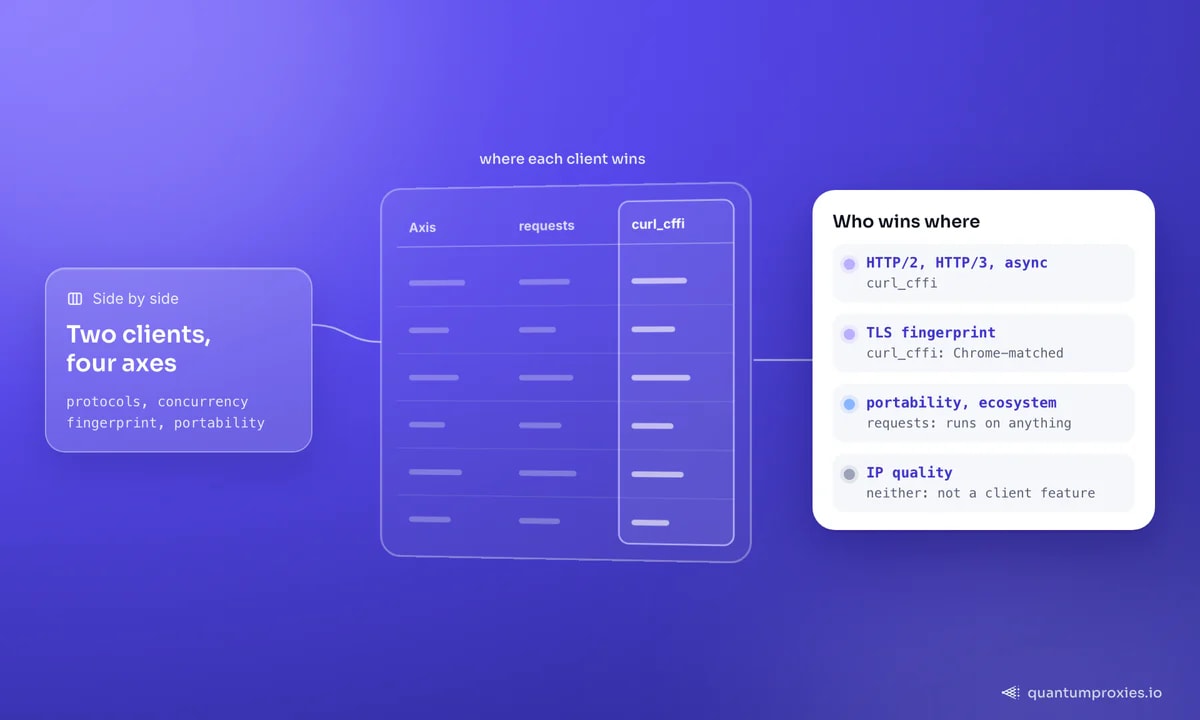
Both libraries send the same headers. The difference is one layer down, in the TLS handshake that opens the connection before a single HTTP byte moves. requests sits on urllib3 and OpenSSL, which advertise a cipher list, extension set and ordering that belong to Python and nothing else. curl_cffi is a binding to a patched fork of curl that reproduces a browser's ClientHello byte for byte, along with its HTTP/2 SETTINGS frame — so its JA3, JA3N and Akamai hashes match real Chrome rather than a scripting library. Anti-bot vendors keep databases of these signatures; a mismatch between a Chrome User-Agent header and a Python handshake is a contradiction you cannot talk your way out of. We unpacked the mechanics in JA3 and JA4 fingerprinting, and the same effect explains why curl gets a 403 where your browser gets a 200 on an identical URL.
Everything else in the comparison follows from the implementation. Because curl_cffi wraps libcurl, it inherits HTTP/2, HTTP/3, websockets and asyncio, none of which requests has ever supported. Because requests is pure Python, it installs on anything and has a decade of ecosystem behind it. Both statements are true at once, and which one dominates depends entirely on your target.
A reproducible test you can run in five minutes
Do not take anyone's pass-rate table on faith, including ours. The fingerprint difference is directly observable: point both clients at a TLS-echo endpoint and compare the hashes they report back. If the two lines match, your build is not impersonating anything.
# pip install requests curl_cffi
import requests
import curl_cffi

URL = "https://tls.browserleaks.com/json"

a = requests.get(URL, timeout=30).json()
b = curl_cffi.get(URL, impersonate="chrome", timeout=30).json()

print("requests   ja3n:", a["ja3n_hash"], "| akamai:", a.get("akamai_hash", "-"))
print("curl_cffi  ja3n:", b["ja3n_hash"], "| akamai:", b.get("akamai_hash", "-"))

# Two different ja3n hashes = impersonation is working. The curl_cffi README
# documents aa56c057ad164ec4fdcb7a5a283be9fc as a Chrome-matched ja3n value.
# The akamai (HTTP/2) fingerprint is usually empty for requests: it is
# HTTP/1.1 only, so there is no SETTINGS frame to fingerprint in the first place.
Since v0.15 there is a one-liner version of the same check: curl-cffi get tls.browserleaks.com/json --impersonate chrome. Run it before you debug anything else — it separates "my impersonation is misconfigured" from "my impersonation is fine and something else is blocking me", which are two completely different afternoons.
What curl_cffi does not fix: IP reputation
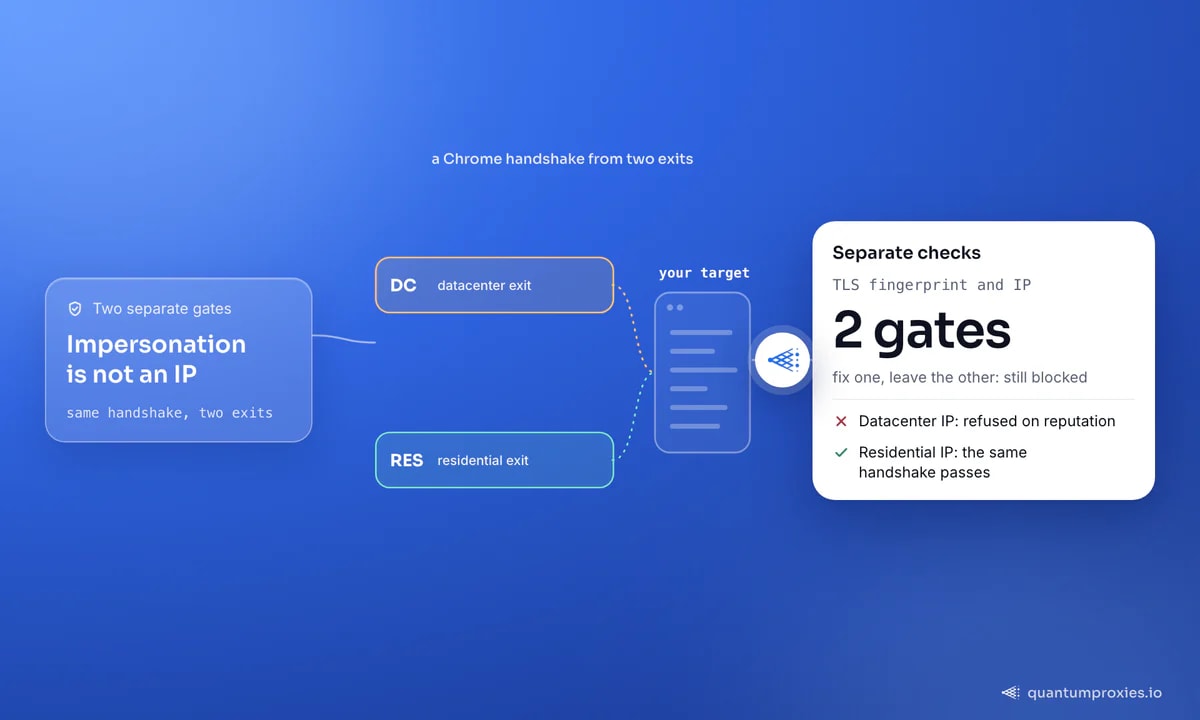
Here is the part the swap-the-library advice leaves out. A TLS fingerprint answers the question "what software is this?". It says nothing about "where is this coming from?" — and that second question is answered by a separate lookup against your exit IP: which ASN owns it, is it a hosting provider or a consumer ISP, has it appeared in abuse feeds, how many other sessions have hit this site from the same address in the last hour. A flawless Chrome handshake arriving from a cloud VM in a datacenter range is a Chrome browser that has apparently been installed in a server rack. That is not more convincing than python-requests. In some cases it is less, because the contradiction is sharper.
The project's own FAQ puts IP quality first in its list of factors, ahead of request rate and JavaScript fingerprints, when explaining why impersonation alone may not be enough. That ordering is not an accident: reputation is the cheapest signal for a defender to evaluate and the hardest for an attacker to fake, because unlike a header or a cipher list you cannot generate it locally. If your requests-based scraper was already running through a datacenter pool and getting blocked, moving to curl_cffi on the same pool changes one of two failing checks. You will see partial improvement on soft targets and no improvement at all on hard ones — which is exactly the confused outcome people report.
The fix for that axis is address quality, not code: residential IPs from real consumer ISP allocations, which is what 90M+ addresses across 200+ countries buys you. If you want to check what your current exit looks like before changing anything, our free IP quality checker reports the ASN and classification a target would see.
The 2x2 that tells you which axis is broken
Rather than guessing, test both variables independently against your real target. Four requests, four lines of output, and the result names your problem:
import requests
import curl_cffi

TARGET = "https://your-target.example/api/items"
DC  = "http://USER:PASS@your-datacenter-gateway:PORT"
RES = "http://USER:PASS@residentialpremium.quantumproxies.io:8080"

def probe(label, fn):
    try:
        print(f"{label:26} -> {fn().status_code}")
    except Exception as e:
        print(f"{label:26} -> {type(e).__name__}")

probe("requests  + datacenter",
      lambda: requests.get(TARGET, proxies={"https": DC}, timeout=30))
probe("curl_cffi + datacenter",
      lambda: curl_cffi.get(TARGET, proxy=DC, impersonate="chrome", timeout=30))
probe("requests  + residential",
      lambda: requests.get(TARGET, proxies={"https": RES}, timeout=30))
probe("curl_cffi + residential",
      lambda: curl_cffi.get(TARGET, proxy=RES, impersonate="chrome", timeout=30))
Read the four results like a truth table:
- Only the datacenter rows fail — it is IP reputation. The client is irrelevant; buy better exits.
- Only the requests rows fail — it is the TLS fingerprint. Switch client and keep your existing pool.
- Only the last row passes — both checks are live. You need impersonation and clean IPs together; this is the common case on serious targets.
- All four fail — you are past what any HTTP client can do. That means a JavaScript challenge, a token you are not generating, or an account-level block. Reach for a real browser or a managed Scraper API.
- All four pass — you never had a fingerprint problem. Do not add the dependency.
Run it a few dozen times rather than once. Both blocking layers are probabilistic, and a single 200 tells you almost nothing.
Test the residential row with real household IPs
When the extra dependency is not worth it
Candour is cheaper than a rewrite. Stay on requests when:
- You are calling an API you are authorised to call. Documented endpoints with your own key do not fingerprint you. Adding impersonation there is cargo cult.
- Your deployment target is awkward. curl_cffi ships compiled wheels and needs Python 3.10 or newer since v0.14. requests runs on effectively anything, including old images and constrained embedded environments.
- You depend on the requests ecosystem. Custom adapters, requests-cache, requests-oauthlib and similar all hook the transport layer that curl_cffi deliberately does not expose.
- You need status-code retries out of the box. urllib3's
Retrywithstatus_forcelistretries on 429 and 503; curl_cffi'sretryparameter only re-runs on transport exceptions. - Your blocks are behavioural. Rate limits, account bans and per-session quotas do not care about the handshake at all.
And there is a middle path most people miss: you do not have to abandon requests to get the handshake. The maintainers point at curl-adapter, which mounts curl_cffi as a requests transport adapter, and httpx-curl-cffi on PyPI, which does the same for httpx. You keep your existing code and ecosystem, and only the bytes on the wire change.
Migration gotchas worth knowing first
The API is close enough that most scripts run after changing the import, but the compatibility page lists real differences and it pays to read them before a large port. Redirect response bodies are not retained in Response.history. Cookies with empty domains can be lost across redirects. Streaming response objects cannot be pickled, although normal responses can. The files API differs slightly. And there are no transports or adapters at all, because the library is deliberately welded to libcurl-impersonate. Proxy configuration also differs in a small way that trips people up:
# requests: dict, and retries mounted on an adapter
import requests
from requests.adapters import HTTPAdapter
from urllib3.util.retry import Retry

s = requests.Session()
s.mount("https://", HTTPAdapter(max_retries=Retry(total=4, status_forcelist=[429, 503])))
r = s.get(url, proxies={"https": "http://USER:PASS@residentialpremium.quantumproxies.io:8080"}, timeout=30)

# curl_cffi: single proxy string preferred, retries are a session parameter
from curl_cffi import Session
from curl_cffi.requests import RetryStrategy

s = Session(
    impersonate="chrome",
    proxy="http://USER:PASS@residentialpremium.quantumproxies.io:8080",
    retry=RetryStrategy(count=4, delay=1.0, backoff="exponential"),
    timeout=30,
)
r = s.get(url)  # note: retry fires on transport errors, not on 429/503
The full proxy surface — dict keys, proxy_auth, per-request rotation, async and the https:// prefix that produces an unhelpful WRONG_VERSION_NUMBER error — is covered step by step in our curl_cffi proxy guide. If you are staying put, the equivalent reference for the other side is our Python Requests proxy guide.
Frequently asked questions
Is curl_cffi faster than requests?
Yes, and the project's benchmarks put it on par with aiohttp and pycurl rather than with requests. The gain comes from libcurl doing the work in C plus HTTP/2 multiplexing, not from clever Python. For a handful of sequential calls the difference is invisible; at high concurrency, especially with async, it is substantial.
Is curl_cffi safe to use?
It is MIT licensed, widely deployed and ships precompiled wheels, so there is no build step to audit. One caveat is worth acting on: a v0.15.0 advisory covers redirect-based SSRF. If you fetch URLs supplied by other people, set allow_redirects="safe" or disable redirects. Impersonating a browser is a technical measure, not permission to ignore a site's terms.
Does curl_cffi bypass Cloudflare?
It removes the TLS and HTTP/2 fingerprint tell, which clears basic protection levels. It cannot execute a JavaScript challenge, solve Turnstile, or fix a flagged exit IP. The maintainers say as much in their FAQ, and recommend a better proxy pool plus browser automation for the higher tiers.
curl_cffi vs httpx or tls_client — which should I use?
httpx gives you HTTP/2 and async but no fingerprint impersonation, so it lands between requests and curl_cffi on stealth. tls_client also spoofs TLS profiles and benchmarks similarly; curl_cffi has the larger community and adds HTTP/3 and websockets. If httpx is already in your stack, the httpx-curl-cffi transport gets you impersonation without a rewrite.
The short version: switch to curl_cffi when your target reads handshakes, stay on requests when it does not, and never expect either choice to launder a datacenter IP. The clients differ on one axis, the proxies on another, and blocked scrapers are almost always a story about both. Run the four probes, read the truth table, and fix the axis the data points at instead of the one the internet shouted about.