Website Change Monitoring: Diffing, Alerts and Archiving
Watching a competitor's page for changes is easy until the alerts become noise or the IP gets blocked. Here's how to diff visual, DOM and text properly, archive evidence, and monitor at scale.
Website change monitoring sounds trivial — fetch a page, compare it to last time, send an alert. It stays trivial for about a week, until the alerts become noise you learn to ignore, or the target starts blocking your monitoring IP, or a change fires and you have no record of what the page said before. Doing it well means choosing the right diffing method, scoping it to the part of the page you actually care about, archiving evidence, and crawling in a way that doesn't get you blocked. This guide covers all four, whether you're tracking competitor pricing, watching for restocks, or monitoring policy pages for compliance.
Three ways to diff a page (and when each wins)
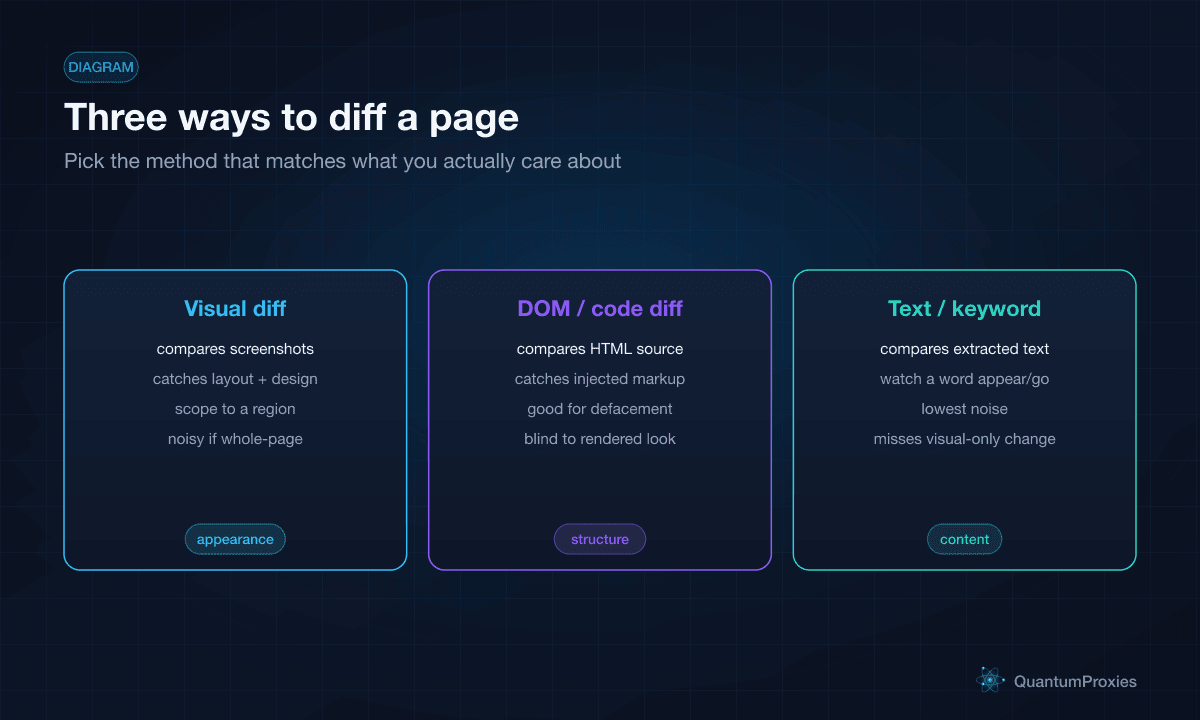
There isn't one "detect changes" — there are three methods, and picking the wrong one is why monitoring gets noisy. Visual diffing captures a screenshot each run and compares appearance; it catches layout and design changes a text diff would miss, but a whole-page visual diff fires on every rotating banner and ad. DOM or code diffing compares the raw HTML source; it's how you catch injected markup or defacement, but it's blind to how the page actually renders. Text or keyword diffing extracts the visible text and watches for a phrase appearing or disappearing — the lowest-noise method, ideal for "tell me when this says out of stock," but it misses purely visual changes. The best setups combine them: watch text for content, DOM for structure, visual for design.
The real skill is scoping
The single biggest lever against false alerts is scope. Monitoring a whole page means every timestamp, ad rotation, view counter and "customers also bought" carousel triggers a change. Instead, target the specific region that matters — the price box, the stock badge, a competitor's feature list, a pricing-tier table — and diff only that. Most changes you care about live in a small, stable part of the DOM; pin your diff to that element and the noise largely vanishes. Set a sensitivity threshold too, so a one-pixel or one-character shift doesn't count as a change worth waking someone for.
import hashlib, requests
from bs4 import BeautifulSoup

PROXY = "http://USER:PASS@residentialpremium.quantumproxies.io:8080"

def watched_value(url, selector):
    r = requests.get(url, proxies={"http": PROXY, "https": PROXY},
                     headers={"User-Agent": "Mozilla/5.0 ..."}, timeout=20)
    el = BeautifulSoup(r.text, "html.parser").select_one(selector)
    text = el.get_text(strip=True) if el else ""
    return text, hashlib.sha256(text.encode()).hexdigest()

# Diff only the region you care about, not the whole page.
text, digest = watched_value("https://competitor.com/pricing", "#pro-plan .price")
if digest != last_digest:      # a real change in the scoped element
    alert(f"Pro plan price changed to: {text}")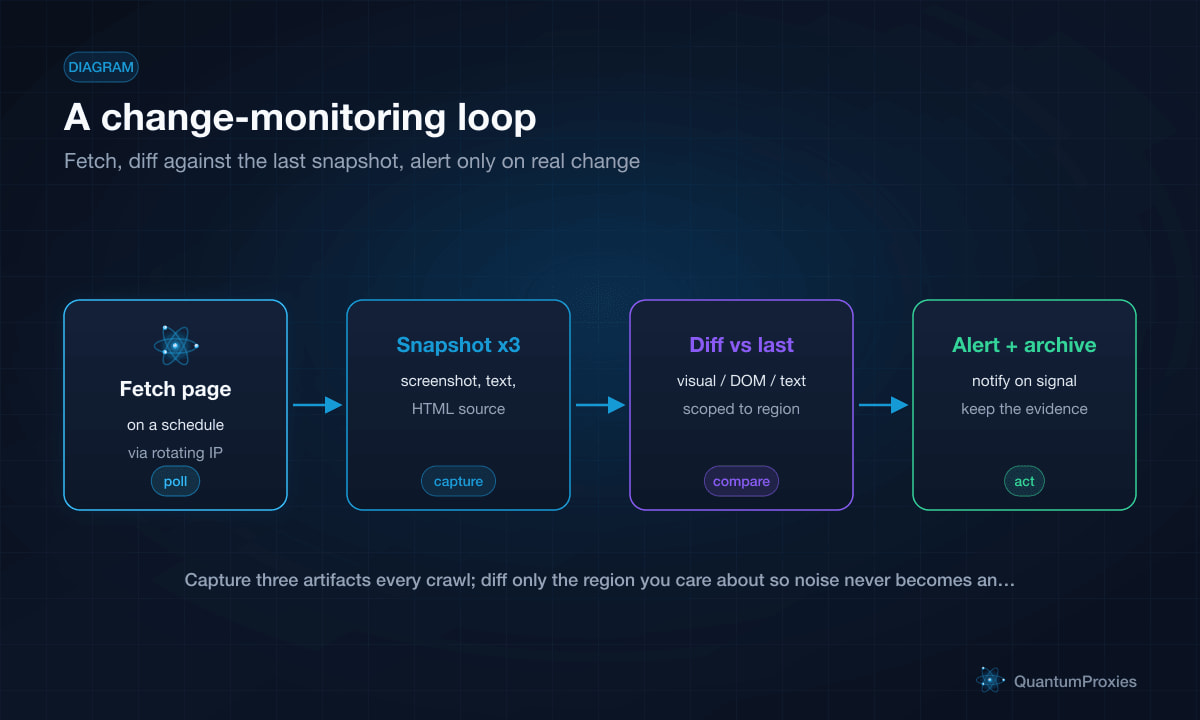
Polling intervals: fresh vs polite
How often you check is a trade-off between freshness and load. A restock or flash-sale watcher might poll every few minutes; a policy or terms-of-service page needs only daily or weekly checks. Faster polling catches changes sooner but multiplies your request volume, which raises both your bandwidth cost and your block risk. Match the interval to how fast the thing you're watching actually moves — checking a competitor's careers page every five minutes is wasted requests. When you're monitoring many pages, stagger the schedule so you're not hammering one target in bursts, which is a fast way to get flagged.
Archive the evidence, not just the alert
An alert that says "the page changed" is half the value. The other half is being able to prove what it changed from — for competitive records, compliance, or a dispute. So capture three artifacts on every crawl and keep them timestamped: a full-page screenshot, a text snapshot of the content, and the raw HTML source. With all three archived you can show the before-and-after state visually, in text, and in code, and reconstruct exactly what a page looked like on a given date. This is what turns monitoring into an audit trail. For a version that focuses on structured extraction rather than raw archiving, our competitor price monitoring guide covers the data side.
Why monitoring needs proxies
Change monitoring is repetitive by nature — the same URLs, over and over, on a schedule. That regular pattern from a single IP is one of the easiest things for an anti-bot system to spot, and once your monitoring IP is flagged you get stale or blocked responses without necessarily knowing it. Two reasons to route monitoring through a rotating pool. First, spreading requests across many IPs keeps the pattern from concentrating on one address. Second, if you're monitoring geo-specific content — regional pricing, localised offers, country-restricted pages — you need to check from the right location, which means a rotating proxy with geo control. And validate responses: a monitor that silently starts receiving a block page will happily report "no change" forever.
Monitor reliably with rotating proxies
Buy vs build
Off-the-shelf monitoring tools are fine for watching a handful of pages with email alerts. You build your own when you need custom scope per page, structured output feeding a database, geo-specific checks, or volume beyond what a consumer tool allows. The build isn't complex — a scheduler, a fetch layer, a diff function and an alert channel — but the fetch layer is where naive builds fail, because that's the part that gets blocked. Handing the fetch to a Scraper API that rotates IPs, renders when needed and returns clean content lets you focus on the diffing and alerting logic instead of babysitting proxies. Our note on running scrapers as production software covers the scheduling and reliability side.
Frequently asked questions
How does website change detection work?
A monitor fetches a page on a schedule and compares it against the previous snapshot. It can diff three ways: visually (comparing screenshots), by DOM/code (comparing raw HTML), or by text (comparing extracted content). When the compared region differs beyond a set sensitivity threshold, it fires an alert. Scoping the diff to a specific element is what keeps it from firing on every ad or timestamp.
How do I monitor a website for changes without false alerts?
Scope the diff to the exact element you care about — the price, the stock badge, a specific paragraph — instead of the whole page, which is full of rotating content. Use text or keyword diffing where possible since it's the least noisy, set a sensitivity threshold to ignore trivial shifts, and combine methods only where you genuinely need visual or structural detection.
How often should I check a page for changes?
Match the interval to how fast the content moves. Restock and flash-sale pages justify checks every few minutes; pricing pages hourly or daily; policy and terms pages weekly. Faster polling catches changes sooner but multiplies requests, cost and block risk, so avoid checking slow-moving pages on a fast schedule, and stagger many pages to spread the load.
Do I need proxies for change monitoring?
For anything beyond a few pages, yes. Repeatedly hitting the same URLs from one IP is an easy pattern to flag, and a blocked monitor silently reports no changes. Rotating proxies spread the requests and let you check geo-specific content from the right location. Always validate that responses are real pages, not block pages, so stale data can't masquerade as stability.
Good change monitoring is mostly about discipline: diff the right way, scope tightly so alerts mean something, archive all three artifacts so you can prove what changed, and rotate IPs so the crawl survives. Get those right and monitoring stops being a noisy toy and becomes a reliable early-warning system for whatever you're watching.