How to Schedule and Monitor Web Scrapers Like Production Software
Scheduling a scraper is the easy 20%. Keeping it alive — catching the day it silently returns empty rows or a creeping block-rate — is the job. Here's how to run scrapers like production software.
Getting a scraper to run on a schedule takes about five lines of code. Keeping it producing correct data for months — through layout changes, new access controls and creeping block-rates — is the actual engineering. A scheduled scraper is production software, and the failure you should fear is not a loud crash but a silent one: a run that returns 200 OK and empty rows while everyone downstream assumes the data is fresh. This guide covers scheduling, freshness SLAs, quality gates, drift detection and alerting.
Scheduling: local, then cloud
For a single machine, the cleanest options are the Python schedule library for intuitive in-process timing, or system cron on macOS and Linux (Task Scheduler on Windows). schedule reads almost like English:
import schedule, time
from my_scraper import run_job

schedule.every().day.at("06:30").do(run_job)     # daily pull
schedule.every(10).minutes.do(run_job)            # or a tight loop

while True:
    schedule.run_pending()
    time.sleep(1)
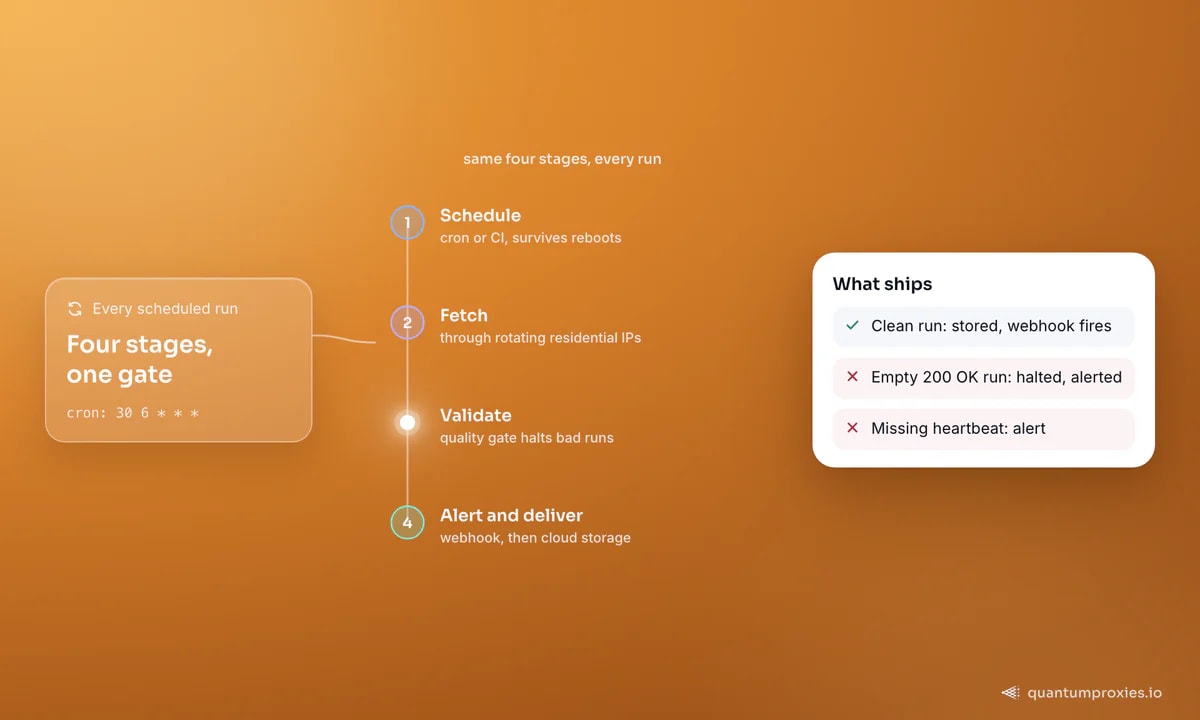
The problem with in-process scheduling is that it dies with the process. For anything that matters, move to a scheduler that survives reboots. Cron is the simplest; a free CI runner like GitHub Actions is the most portable, since it version-controls the scraper and the schedule together:
# crontab -e : run the scraper every day at 06:30, log output
30 6 * * *  cd /srv/scraper && /usr/bin/python run.py >> /var/log/scraper.log 2>&1
# .github/workflows/scrape.yml (GitHub Actions, free minutes)
name: daily-scrape
on:
schedule:
- cron: '30 6 * * *' # 06:30 UTC daily
jobs:
run:
runs-on: ubuntu-latest
steps:
- uses: actions/checkout@v4
- run: pip install -r requirements.txt
- run: python run.py
env:
PROXY_URL: ${{ secrets.PROXY_URL }} # USER:PASS@residentialpremium.quantumproxies.io:8080Cloud runners (GitHub Actions, managed functions, hosted schedulers) also give you retries and logs for free. Whatever you pick, keep the proxy credentials in a secret store, not the repo.
The real problem is drift, not scheduling
Scrapers written against specific HTML selectors are almost impossible to keep alive indefinitely, because the target changes underneath them. Sites restructure their markup, add access controls, tighten rate limits or update robots.txt, and any of these can turn a working scraper into one that returns nothing — usually without throwing an error. This is why monitoring matters more than scheduling: the scheduler runs the job, but only monitoring tells you the job stopped producing data. A scraper that keeps returning empty results after a layout change is the classic case of a page that renders differently than you expect.
Make drift detectable, not just survivable. Record the row count and the fill-rate of each field on every run and keep that history — a simple graph of records-per-run turns a silent layout change into an obvious cliff. Pair it with a canary: scrape one known page whose correct output you have hardcoded, and fail loudly the moment the parser returns something different. Catching drift on a single canary page is far cheaper than discovering it a week later, after bad data has already spread through every downstream report and model.
Set a freshness SLA
Decide how old your data is allowed to be and enforce it. If a downstream model or dashboard needs data no older than 24 hours, that is a freshness SLA — and it needs an alert, not a hope. Timestamp every record at collection, track the age of the newest row per source, and fire an alert when the latest successful pull exceeds your threshold. Stale data is silent poison precisely because nothing breaks; the numbers just quietly stop moving. A continuous-monitoring model — check for changes and only capture what moved — beats re-scraping everything blindly and is far kinder to your block budget.
Quality gates catch what crashes don't
The most valuable guard in a scraping pipeline is a validation gate that halts a run when the output drifts from normal. Set explicit thresholds: a minimum record count per run (a job that usually returns ~2,000 rows but returns 400 is an infrastructure failure), a maximum share of empty pages (say 3%), and per-column fulfilment rules (title and price 100%, an optional field like discount only 5%). Halt on breach instead of writing bad data downstream:
def quality_gate(rows, min_rows=2000, max_empty=0.03):
    empty = sum(1 for r in rows if not r.get("title"))
    if len(rows) < min_rows:
        raise RuntimeError(f"too few rows: {len(rows)} < {min_rows}")
    if empty / max(len(rows), 1) > max_empty:
        raise RuntimeError(f"empty pages {empty/len(rows):.0%} over {max_empty:.0%}")
    if any(r.get("price") in (None, "") for r in rows):
        raise RuntimeError("price column not 100% filled")
    return rows   # only clean runs reach storage and alerts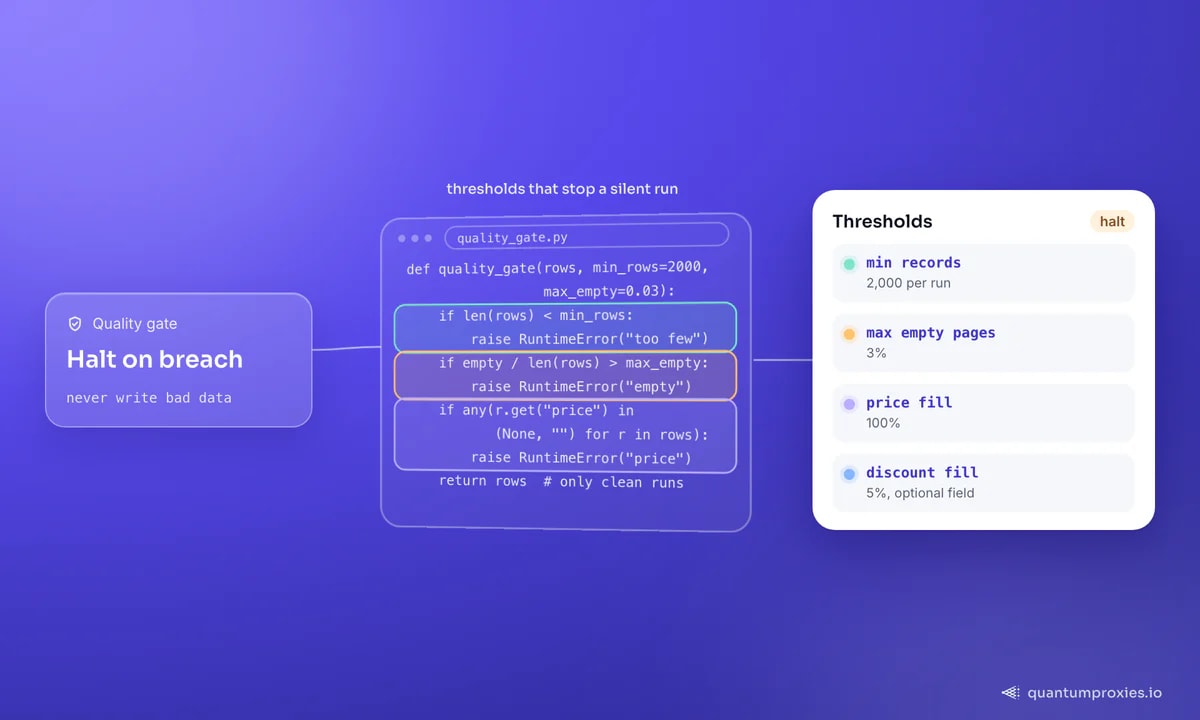
Alert on block-rate, not just errors
A scraper that suddenly gets blocked often still exits cleanly — it just returns fewer, thinner results. Track the ratio of blocked or challenged responses (403s, 429s, CAPTCHA pages) to total requests, and alert when it crosses a threshold. A rising block-rate is the earliest signal that your IPs or fingerprint are being flagged, and it lets you react before the dataset degrades. The durable fix for block-rate is upstream: route through rotating residential IPs and let a Scraper API handle rendering, rotation and retries so a target change does not silently starve your pipeline. When 429s creep in, our rate-limit guide covers the backoff and pacing side.
Keep scheduled scrapers unblocked with the Scraper API
Webhooks and delivery
Close the loop with push notifications instead of polling. A webhook that fires the moment a run finishes — with status, record count and job id — lets downstream systems react immediately and gives you a heartbeat you can alert on if it goes missing. Deliver validated output to cloud storage (S3, GCS, a warehouse) rather than local files, so a run that passes the quality gate flows straight into analysis. For the queues and retries underneath a fleet of scheduled jobs, see our guide on large-scale scraping architecture.
Frequently asked questions
How do I schedule a web scraper?
For a single machine, use the Python schedule library or system cron; for anything durable, use a scheduler that survives reboots, such as cron on a server or a free CI runner like GitHub Actions with a cron trigger. Cloud runners also give you retries and logs. Keep proxy credentials in a secret store, and version-control the scraper alongside its schedule.
How do I know if my scheduled scraper broke?
Do not rely on crashes — a broken scraper often exits cleanly with empty or partial data. Add a quality gate that checks minimum record count, empty-page share and per-column fulfilment, and alert when any threshold is breached. Also track block-rate and data freshness, since a scraper can silently return stale or blocked results while appearing to succeed.
Why do scheduled scrapers stop working?
The target changes: sites restructure their HTML, add access controls, tighten rate limits or update robots.txt, and selector-based scrapers break against the new page. Network failures and rising block-rates add to it. This is why monitoring — freshness SLAs, quality gates and block-rate alerts — matters more than the schedule itself; scheduling runs the job, monitoring proves it still works.
What is a data freshness SLA?
A freshness SLA is the maximum age your data is allowed to reach before it is considered stale — for example, no record older than 24 hours. Enforce it by timestamping each record at collection, tracking the newest row per source, and alerting when the latest successful pull exceeds the limit. It catches the quiet failure where a scraper stops updating without erroring.
Schedule with a scheduler that survives reboots, then spend your effort where the failures actually hide: freshness SLAs, quality gates, drift detection and block-rate alerts. Run the collection on infrastructure that absorbs target changes, and your scrapers behave like the production software they are.