Web Unlocker vs Residential Proxy vs Mobile Proxy: When You Need Which
We fetched the same URLs from a datacenter server, through a plain residential proxy and through a web unlocker. Some sites needed nothing, some only needed a residential IP, some only opened for the unlocker, and five stayed blocked. Here is what each layer fixes, and where the mobile tier fits.
A residential proxy changes where your request comes from. A web unlocker also changes what the request looks like: it sends it under a real browser TLS fingerprint, retries on fresh IPs and runs a headless browser when a JavaScript challenge appears. You need the unlocker only when a clean residential IP still gets blocked. Otherwise the proxy is enough.
That is the theory. To check it, we fetched the same URLs three ways on 29 September 2026 and kept the results site by site. Some pages needed nothing at all, some only needed a residential IP, some only opened for the unlocker, and five stayed blocked whatever we did. The tables below show which was which.
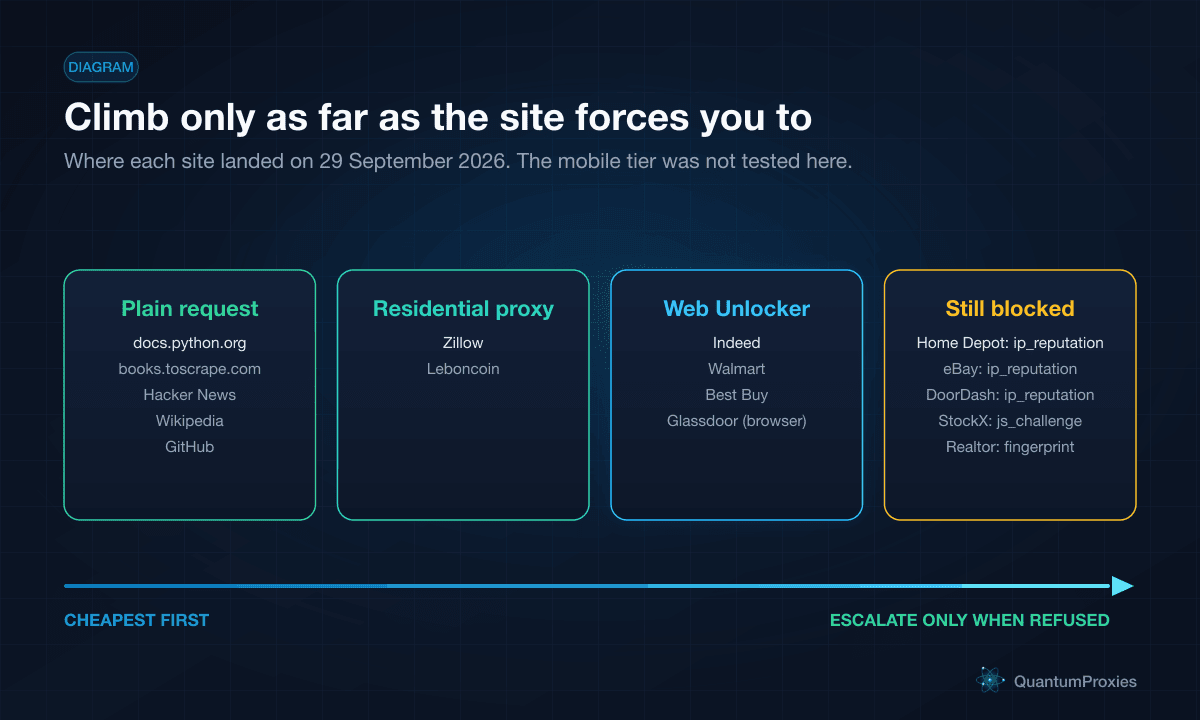
- No proxy needed: docs.python.org, books.toscrape.com, Hacker News, Wikipedia and GitHub answered a plain request from a datacenter server.
- A residential proxy was enough: Zillow and Leboncoin blocked the datacenter server but served the real page through a plain residential proxy.
- Only the unlocker got through: Indeed, Glassdoor, Walmart and Best Buy refused both plain clients and returned the page through the unlocker.
- Still blocked: Home Depot, eBay, DoorDash, StockX and Realtor.com, each reported with an error status and a block class instead of a fake 200.
- Mobile exits were not part of this test. We explain where they fit, but we have no measurements for them to show you.
How we tested
Each URL was fetched three ways on 29 September 2026. First, plain curl from a datacenter server in Frankfurt with a Chrome User-Agent. Second, the same plain curl through a QuantumProxies.io residential proxy with a US exit (a French exit for Leboncoin). Third, through the Web Unlocker forward proxy on the residential tier, with the same exit country. The status is the final HTTP status the client saw. Times are wall-clock for one unlocker request.
This is one run from one place on one day, not a benchmark. Anti-bot rules change weekly, and a site that passed on Monday can refuse on Tuesday. Rows where the harness or the unlocker itself returned an internal error are left out: they are neither passes nor blocks, and counting them either way would mislead you. Use the tables for the pattern, and retest the sites you care about.
What each layer fixes
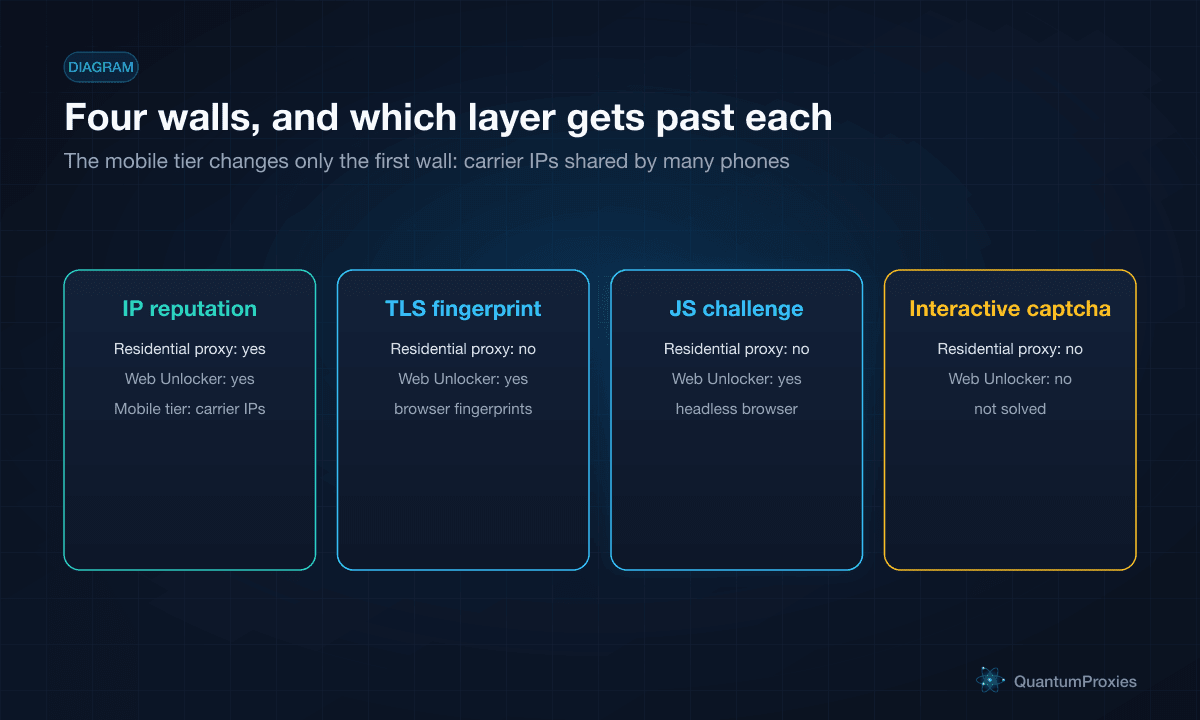
A modern bot wall checks several things before it sends a page, and each tool fixes a different subset. Knowing which wall you are hitting tells you what to buy.
| Wall | What the site checks | Plain residential proxy | Web Unlocker (residential) | Web Unlocker, Mobile tier |
|---|---|---|---|---|
| IP reputation | The network the IP belongs to and its history | Fixes datacenter-range blocks | Residential exits, a fresh IP on each retry | 4G/5G carrier IPs shared by many phones |
| TLS and HTTP fingerprint | The handshake, HTTP/2 settings and header order | No change: it is still your client | Browser fingerprints, rotated on retry | Same as residential |
| JavaScript challenge | Whether the client runs the page's script and keeps its cookie | No | Escalates to a headless browser | Same as residential |
| Interactive captcha | A task meant for a human | No | Not solved; reported as a failure, never a 200 | Not solved |
The first row is where most scrapers start and where a residential proxy earns its price. Hosting ranges are easy to recognise, and many sites refuse them outright. The second row is why a clean IP is sometimes not enough: the TLS handshake of curl, Python or Node looks nothing like Chrome's, and Cloudflare documents JA3/JA4 fingerprints as a way to identify clients by exactly that. Our guide to TLS fingerprinting covers it in depth. The third row needs a real JavaScript engine. The fourth row needs a human, and no product on this page supplies one.
Sites that needed no proxy at all
Start here, because it is the cheapest outcome. These pages answered a plain request from a datacenter server. Sending them through anything else costs money and adds latency for no gain.
| Site | Plain, datacenter server | Plain, residential proxy | Web Unlocker |
|---|---|---|---|
| docs.python.org | 200 | 200 | 200, 1.6 s |
| books.toscrape.com | 200 | 200 | 200, 1.9 s |
| news.ycombinator.com | 200 | 200 | 200, 4.1 s |
| en.wikipedia.org | 200 | 200 | 200, 1.9 s |
| github.com (repository page) | 200 | 200 | 200, 2.0 s |
| bbc.com (Technology) | 302 redirect | 302 redirect | 200, 1.4 s |
The BBC 302 is a redirect, not a block. Our test client did not follow redirects, and any client that does lands on the page.
Where a plain residential proxy was enough
| Site | Plain, datacenter server | Plain, residential proxy | Web Unlocker |
|---|---|---|---|
| Zillow (Austin listings) | 403, PerimeterX 'Access to this page has been denied' | 200, real listings page | 200, 1 attempt, 2.7 s |
| Leboncoin (search, French exit) | 403, captcha page | 200, real results page | 200, 1 attempt, 1.4 s |
| Amazon (product page) | 200, product page | 200, product page | 200, 2 attempts + browser, 10.2 s |
Zillow and Leboncoin are the case a residential proxy was built for. The datacenter IP was refused, and the same request from a home IP got the page. The unlocker also worked, but it added nothing you needed.
Amazon is the cautionary row. Both plain clients got the product page on this run, yet the unlocker needed two attempts and a browser before it returned, and took 10.2 seconds. The unlocker bills every byte it moves, retries and browser loads included. On a page that did not need it, you pay for that extra work. This is one request on one day, so do not read it as a rule about Amazon. Read it as a rule about testing plain first.
Where only the web unlocker got through
| Site | Plain, datacenter server | Plain, residential proxy | Web Unlocker |
|---|---|---|---|
| Indeed (job search) | 403, 'Security Check' page | 403, 'Enable JavaScript and cookies to continue' | 200, 1 attempt, 2.6 s |
| Glassdoor (company reviews) | 403, 'Security' page with captcha | 403, 'Enable JavaScript and cookies to continue' | 200, 2 attempts + browser, 17.2 s |
| Walmart (search) | 307 redirect, no results page | 307 redirect, no results page | 200, 1 attempt, 4.8 s |
| Best Buy (laptop category) | Connection failed, no response | Connection failed, no response | 200, 1 attempt, 6.3 s |
Here the residential IP alone did not help. Indeed, Walmart and Best Buy passed on the unlocker's first TLS attempt, without a browser. The unlocker's exit was a different residential IP from the one our plain test used, so this is not a controlled experiment. Still, the plain residential column already had a clean home IP and failed, and the obvious remaining difference is what the request looked like. Glassdoor went further: it wanted JavaScript, so the unlocker needed two TLS attempts and then a headless browser, which is why it took 17.2 seconds.
Walmart needs a caveat of its own. We did not record where its 307 redirect pointed. We only know that neither plain client received the results page and the unlocker did.
Use the Web Unlocker on residential exits
What still failed, and what the block class tells you
An honest comparison needs the failures too. These five refused both plain clients and the unlocker. The unlocker came back with an error status and told us why, instead of passing a block page through as a 200:
| Site | Plain, datacenter / residential | Web Unlocker status | x-qp-block-class | x-qp-vendor |
|---|---|---|---|---|
| Home Depot (category page) | 403 / 403 | 403 after 2 attempts | ip_reputation | akamai |
| eBay (search) | 403 / 403 | 403 after 2 attempts | ip_reputation | akamai |
| DoorDash (city page) | 403 / 403 | 403 after 2 attempts | ip_reputation | cloudflare |
| StockX (product page) | 403 / 403 | 403, 'Just a moment...' | js_challenge | cloudflare |
| Realtor.com (search) | 429 / 429 | 429 after 2 attempts | fingerprint | kasada |
The block class is the useful part. ip_reputation on Home Depot, eBay and DoorDash means the exit IPs themselves were refused, so a better fingerprint would not have helped. js_challenge on StockX means Cloudflare's challenge page was still there after the browser attempt. fingerprint on Realtor.com, which answered 429 (RFC 6585 defines it as Too Many Requests), means the client itself was refused. Each one points to a different next step, and one of them is where the mobile tier comes in.
Where the mobile tier fits
Mobile carriers put many phones behind each public IP (carrier-grade NAT), so a site that blocks a carrier address risks blocking real customers with it. That is why carrier IPs tend to carry more trust than residential ranges. We explain the mechanism in why mobile proxies are trusted: CGNAT.
The Web Unlocker has a Mobile tier that runs the same logic (browser fingerprints, retries, browser escalation, block reporting) on 4G/5G carrier exits. You select it with -tier-mobile in the proxy username, or "tier": "mobile" on the REST endpoint. It has its own prepaid GB balance, it is slower, and it costs more per GB than the residential tier. It is meant for sites that refuse residential ranges too, which is exactly what an ip_reputation block on the residential tier suggests.
To be plain about the limits of this article: we did not run the Mobile tier in this test. We cannot tell you whether it gets the Home Depot, eBay or DoorDash pages, and we are not going to guess. If those are your targets, test them on the Mobile tier before you buy volume. It will not help with a captcha or a fingerprint block, because those are not about the IP. For the general question of mobile versus residential versus ISP proxies without an unlocker in front, our comparison of mobile, residential and ISP proxies covers it.
A cost-aware escalation ladder in Python
The tables point to one rule: climb only as far as the site forces you to. This function tries each rung in order and stops at the first one that returns a real page. It moves to the Mobile tier only when the residential tier reports an ip_reputation block. HEADERS and looks_blocked() are the helpers from our web unlocker API tutorial in Python.
import os
import requests
import urllib3

urllib3.disable_warnings(urllib3.exceptions.InsecureRequestWarning)

RESIDENTIAL = os.environ["QP_RESIDENTIAL_PROXY"]   # http://USER:PASS@HOST:PORT from your residential plan
UNLOCK_USER = os.environ["QP_UNLOCK_USER"]         # unlock-XXXXXXXX
UNLOCK_PASS = os.environ["QP_UNLOCK_PASSWORD"]


def unlocker(extra: str = "") -> dict:
    u = f"http://{UNLOCK_USER}-country-us{extra}:{UNLOCK_PASS}@unlock.quantumproxies.io:9000"
    return {"http": u, "https": u}


LADDER = [
    # name,              proxies,                                      verify, timeout
    ("plain",            {},                                           True,   30),
    ("residential",      {"http": RESIDENTIAL, "https": RESIDENTIAL},  True,   30),
    ("unlocker",         unlocker(),                                   False, 120),
    ("unlocker-mobile",  unlocker("-tier-mobile"),                     False, 120),
]


def climb(url: str):
    last = None
    for name, proxies, verify, timeout in LADDER:
        try:
            r = requests.get(url, headers=HEADERS, proxies=proxies, verify=verify, timeout=timeout)
        except requests.RequestException:
            continue                        # no response at all counts as a block
        last = r
        if not name.startswith("unlocker"):
            if not looks_blocked(r):
                return name, r
            continue
        if "x-qp-unlocker-blocked" not in r.headers:
            return name, r
        if r.headers.get("x-qp-block-class") != "ip_reputation":
            break                           # a different IP will not fix this wall
    return "blocked", last
In production, remember the rung per domain once you know it, so you do not pay for the failed rungs on every request. The unlocker may also send an x-qp-hint header with a suggestion, which is worth logging next to the block class.
How to decide, in five questions
- Does a plain request from your server return the real page? Then you need neither. Stop there.
- Does it fail from a datacenter IP but work from a residential one? Buy residential proxies and keep your own client.
- Does it still fail from a clean residential IP, with a 403, a 'Just a moment' or 'Enable JavaScript' page, or a dropped connection? That is the unlocker's job.
- Does the unlocker report
ip_reputationon residential exits? Test the Mobile tier on that site before committing volume. - Does it report
captchaorfingerprint? No proxy tier fixes those reliably. Reconsider the source, the rate, or whether an official API exists.
Frequently asked questions
Should I buy residential proxies or use a web unlocker?
Test your targets first. If a plain request from a residential IP returns the real page, as Zillow and Leboncoin did in our 29 September 2026 test, residential proxies are enough and cheaper to run. If a clean residential IP still gets a 403 or a JavaScript challenge, as Indeed and Glassdoor did, you need the unlocker.
Do I need residential proxies, or would any proxy work?
It depends on the site. Wikipedia, GitHub and Hacker News answered a plain datacenter request in our test, so no proxy was needed. Zillow and Leboncoin refused the datacenter IP and accepted a residential one. Datacenter proxies share the first problem, because hosting ranges are easy for sites to recognise and refuse.
Are mobile proxies more reliable than residential proxies for web scraping?
Carrier IPs are shared by many phones through CGNAT, so sites are more reluctant to block them, and that helps against IP-reputation blocks. They do not change your TLS fingerprint or solve JavaScript challenges on their own, and they are slower and cost more per GB. We did not measure mobile exits in this test.
Do mobile proxies reduce captchas?
They can reduce captchas that are triggered by IP reputation, because a carrier address looks like many ordinary phone users. They do nothing for captchas triggered by the client fingerprint or by request rate. The Web Unlocker does not solve interactive captchas on either tier: it reports them with the block class captcha.
Why is a web unlocker slower than a residential proxy?
Because it does more work per request when a site pushes back: it retries on fresh IPs under different fingerprints and, if a JavaScript challenge appears, loads the page in a headless browser. In our test, Indeed passed in 2.6 seconds on one attempt, while Glassdoor needed a browser and took 17.2 seconds.
How is the web unlocker billed compared with a residential proxy?
Both are billed per GB. The unlocker counts every byte it moves on your behalf, including retries, blocked pages and the browser's page load, and it uses its own prepaid balance per tier: residential exits and mobile carrier exits. The current price per GB is shown in the dashboard.
Residential proxies fix where a request comes from. The web unlocker also fixes what it looks like and whether it can run JavaScript. The Mobile tier changes the IP again for sites that refuse residential ranges. None of them turns a human captcha into a page. Buy the lowest rung your targets accept, and let the block class tell you when to climb.
Compare the Web Unlocker tiers
Targets that refuse residential ranges? See the Web Unlocker on mobile exits.