How to Scrape Twitch Data: Viewers, Categories and Sponsorship Signals
The official Helix API caps what you can pull and hides the data researchers actually want. Here's how to get viewer counts, follower totals and category trends from Twitch's own GraphQL endpoint — and the proxies that keep it running.
Twitch sits on a goldmine of public data — live viewer counts, category rankings, follower totals, clips, stream titles and tags — that marketers, analysts and sponsorship scouts all want. The catch is that the official Helix API gives you a curated slice of it, rate-limited and missing the metrics people ask for most (like follower counts per game or historical viewer trends). This guide covers how to scrape the rest: what the API won't give you, how to get it from Twitch's own web endpoints, and the proxy setup that keeps a scheduled scraper from getting blocked.
Where the Helix API stops
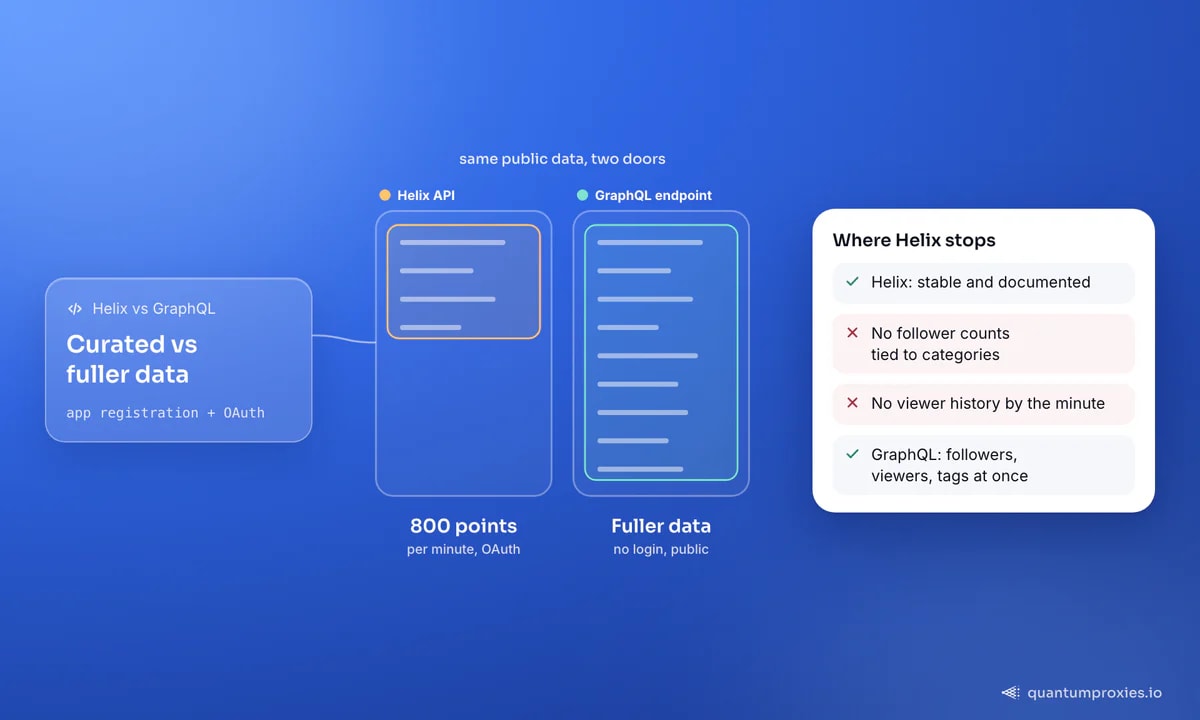
Helix is the sanctioned route and you should prefer it where it covers you: it's stable, documented, and returns clean data for streams, users, games and clips. But it has hard edges. It requires an app registration and OAuth, it meters you against a points bucket (the default is 800 points per minute), and it simply doesn't expose some things people want — you can't ask it "how many followers does this game's top channel have" or reconstruct a viewer-count curve over the last hour. The moment your question falls outside its schema, you're scraping.
Scraping Twitch means pulling that same public data — the numbers you can see on the site without logging in — with code instead of by hand. Nothing here touches private data or authenticated pages; it's the directory, the category pages and the public channel views that any visitor sees.
The fast path: Twitch's GraphQL endpoint
Twitch's own web client talks to a public GraphQL endpoint using a well-known Client-ID that ships in the site's JavaScript. Hitting it directly is the fastest, lightest way to scrape: no login, no headless browser, structured JSON straight back. You send a query with the public Client-ID header and get streams, viewer counts, tags and clips in one call. Because it's the same API the website uses, it returns exactly what a visitor sees — and far more per request than page scraping.
import requests

PROXY = "http://USER:PASS@residentialpremium.quantumproxies.io:8080"
proxies = {"http": PROXY, "https": PROXY}

# public web Client-ID shipped in Twitch's own frontend
HEADERS = {"Client-ID": "kimne78kx3ncx6brgo4mv6wki5h1ko", "Content-Type": "application/json"}

query = {
    "query": """
      query($name: String!) {
        user(login: $name) {
          displayName
          followers { totalCount }
          stream { title viewersCount game { name } }
        }
      }""",
    "variables": {"name": "somestreamer"},
}

r = requests.post("https://gql.twitch.tv/gql", json=query,
                  headers=HEADERS, proxies=proxies, timeout=15)
print(r.json()["data"]["user"])
One request returns the display name, total follower count, and — if the channel is live — the stream title, current viewers and category. That follower total is the exact field the Helix API makes awkward to get at scale, and here it's a single query.
The channel object is rich beyond the basics. A typical record carries the numeric channelId, the login slug and displayName, the profile description, whether the channel holds partner status, and — for live channels — the current game, viewer count and the stream's tags. Tags matter more than they look: they're how you segment streamers by language, region or content type when you're building a shortlist for outreach. Pull the same query across a list of logins and you have a comparable dataset — follower size, partner status, live category — in one pass, no per-channel page loads.
The directory: category and viewer trends
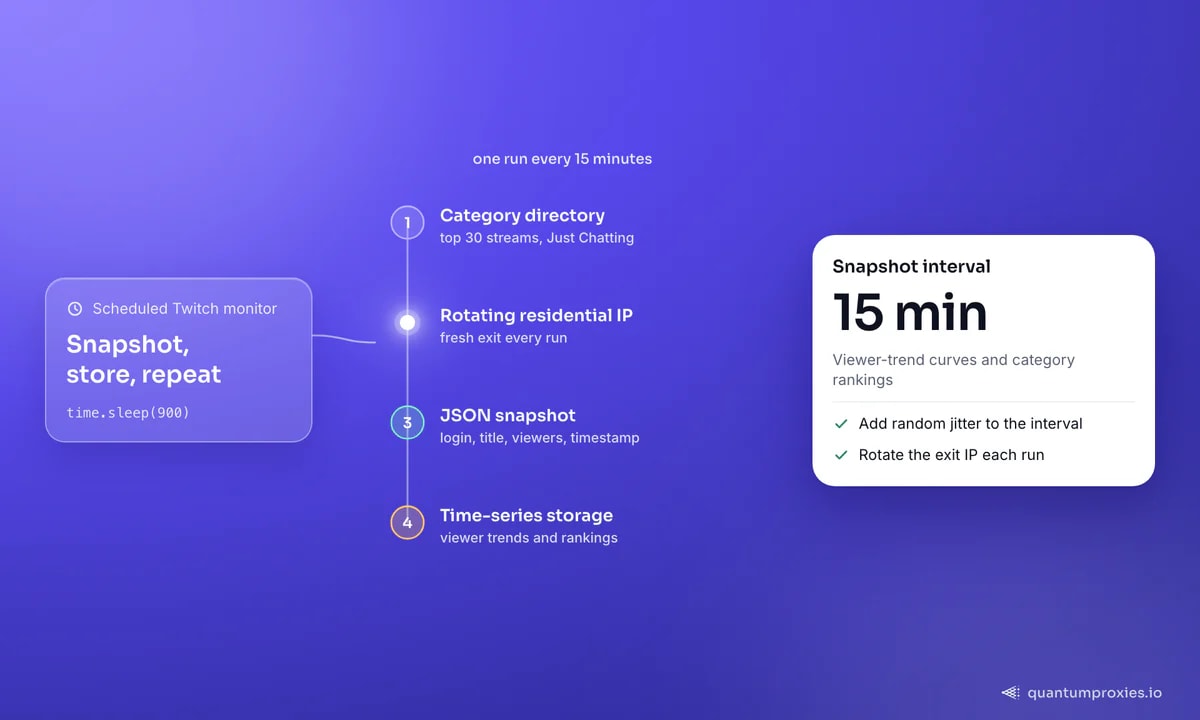
For market-level signals — which games are hot, how viewership shifts through the day — the category directory is the source. The pattern that works well is to snapshot a category page (say, Just Chatting) on a fixed interval and store the top streams with their titles, streamers and viewer counts plus a timestamp. Do that every 15 minutes and you build viewer-trend curves and category rankings the official API never hands you. A lightweight scheduler and a browser or GraphQL query is all it takes; the discipline is in the interval and the storage, not the fetch.
import requests, time
from datetime import datetime, timezone

def snapshot_category(slug):
    payload = {
        "query": "query($slug: String!){ game(slug:$slug){ streams(first:30){ edges{ node{ title viewersCount broadcaster{ login } } } } } }",
        "variables": {"slug": slug},
    }
    r = requests.post("https://gql.twitch.tv/gql", json=payload,
                      headers=HEADERS, proxies=proxies, timeout=15)
    ts = datetime.now(timezone.utc).isoformat()
    rows = []
    for e in r.json()["data"]["game"]["streams"]["edges"]:
        n = e["node"]
        rows.append({"ts": ts, "login": n["broadcaster"]["login"],
                     "title": n["title"], "viewers": n["viewersCount"]})
    return rows

# run on a schedule (e.g. every 15 min) and append to storage
while True:
    save(snapshot_category("just-chatting"))
    time.sleep(900)
Get residential proxies for Twitch scraping
Why residential proxies matter here
Twitch monitors traffic like any large platform. A scheduled scraper firing from one datacenter IP every 15 minutes is an obvious pattern, and the GraphQL endpoint will start returning errors or empty results once it flags you. Residential IPs from real ISPs blend into normal viewer traffic, and rotating them per run spreads the requests so no single address looks like a bot. For location-sensitive research — some categories and clips surface differently by region — you'll also want specific-country exits, which a residential pool across 200+ countries gives you. Mobile IPs are the strongest option for the most aggressive targets; our guide to proxies for social platforms covers when to reach for them.
What you can build with it
The use cases follow the data. Follower counts and category presence power influencer discovery and sponsorship scouting — finding the right streamers before a campaign, sized correctly. Viewer-trend snapshots feed gaming-industry research: which titles are gaining, when audiences peak, how a launch performs hour by hour. Clip and title data supports content and trend analysis. Commercial Twitch scrapers charge roughly five dollars per thousand results for this; running it yourself with your own proxies is a fraction of that once you have the pipeline, and you own the raw data. The same snapshot-and-diff approach powers our other platform guides, like mining YouTube data beyond the API quota.
Frequently asked questions
Can you scrape data from Twitch?
Yes — public data like stream titles, viewer counts, follower totals, categories and clips is visible without logging in and can be collected with code. Twitch's own web client uses a public GraphQL endpoint you can query directly. Respect the platform's terms, avoid private or authenticated data, and pace your requests.
Why not just use the Twitch Helix API?
Use Helix where it fits — it's official and stable. But it requires OAuth, meters you against an 800-points-per-minute bucket, and omits fields researchers want, such as follower counts tied to categories or minute-by-minute viewer history. When your question falls outside its schema, scraping the public web endpoints fills the gap.
Do I need proxies to scrape Twitch?
For a one-off query, no. For anything scheduled or at scale, yes. A repeated pattern from a single IP gets flagged and the endpoint returns errors or empty data. Rotating residential proxies spread requests across real-ISP addresses so your monitor keeps returning full results, and let you pull region-specific views.
How often can I snapshot Twitch data?
For viewer trends, every 10-15 minutes is a good balance — frequent enough to see intraday shifts without hammering the endpoint. Add small random jitter to the interval, rotate your exit IP each run, and store timestamps so you can reconstruct trends. Tighter intervals raise your block risk for little extra signal.
Twitch's public data is far richer than the Helix API exposes, and its own GraphQL endpoint hands most of it back in single queries — follower totals, viewer counts, category directories, clips. Wrap that in a polite schedule, route it through rotating residential IPs, and you have a monitor that surfaces trends and sponsorship signals the official API keeps out of reach.