Scrape YouTube Comments and Data Beyond the API Quota
The YouTube Data API gives you 10,000 quota units a day — and serious comment research burns through that in hours. Here's the quota math, and how scraping public data steps around the wall.
YouTube comments are one of the largest pools of unfiltered public opinion on the internet — the exact words your audience uses about a product, a creator, or a trend. The official YouTube Data API can read them, but it was built for light integrations, not research at volume. The moment you try to scrape YouTube comments across many videos, you hit a quota wall. This guide covers the quota math, what scraping public data gets you past it, and how to do it without getting blocked.
The quota math that stops you
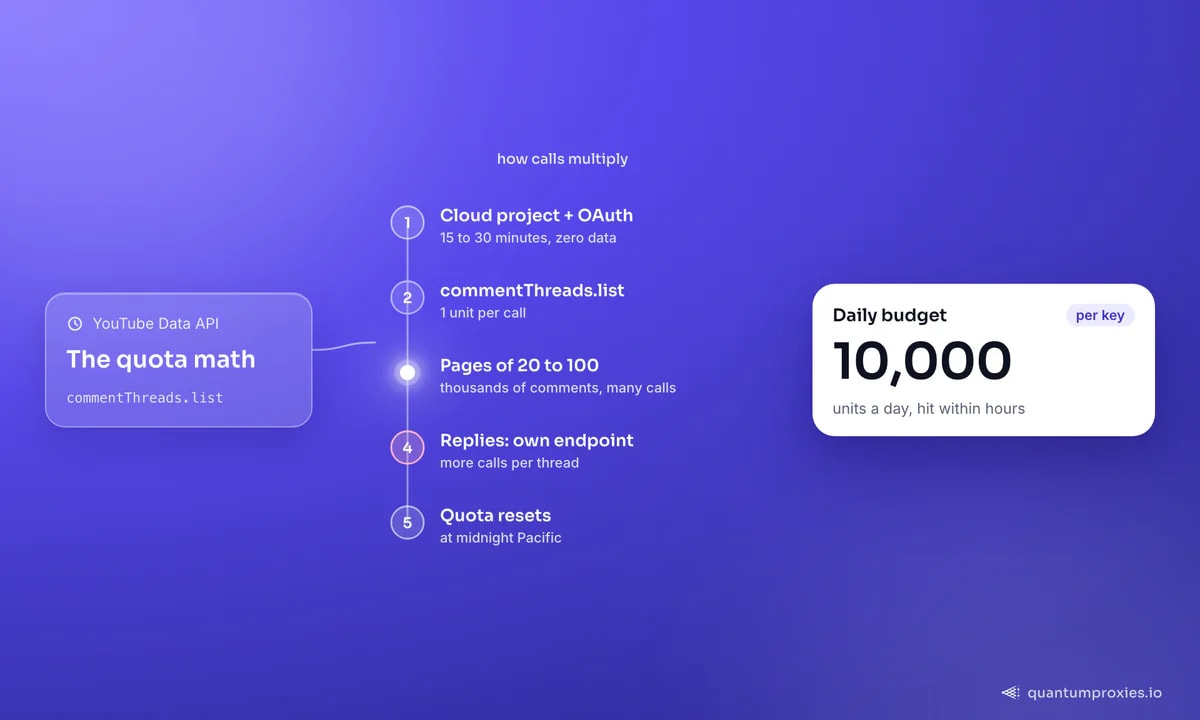
The Data API enforces a hard daily cap of 10,000 quota units per key. A single commentThreads.list call costs 1 unit, which sounds generous until you add reply threads, pagination, and per-video lookups. The API returns comments in pages of 20 to 100, so a video with thousands of comments is many paginated calls, and nested replies live on a separate endpoint. Before any of that, you need a Google Cloud project, API credentials, and OAuth consent configured — 15 to 30 minutes of setup for zero data. Heavy research hits the ceiling within hours, and then you wait until the quota resets at midnight Pacific.
What scraping gets you past the wall
Scraping the public front end sidesteps the quota entirely. There's no key, no OAuth, and no per-project ceiling — you resolve a video's ID, walk the comment pagination layer that the page itself uses, and normalize the results into a flat table. You're limited by your own infrastructure, not by a Google budget. The trade-off is that you're on public data only (no private or unlisted videos, and live-chat replays aren't exposed), and you carry the responsibility of pacing and clean IPs yourself. Scraping public comments for research, analysis, or business intelligence is generally regarded as permissible; anonymise author identities where you don't need them.
How comment scraping works
The mechanics are the same whatever tool you use: resolve the URL to a video ID, request the first page of comments, follow the continuation token to the next page, and repeat until there are no more. Replies hang off each top-level comment as a nested thread. Because YouTube serves comments through a JSON continuation API rather than static HTML, you either drive a headless browser or call the continuation endpoint directly. Both work; the second is far cheaper at volume.
The fields you can extract
A complete comment record carries more signal than just the text:
- Comment text — the full body, including line breaks and emoji.
- Author name and channel URL — for follow-up or de-duplication.
- Published timestamp — ISO 8601, so you can sort chronologically and measure recency.
- Like count and reply count — weight sentiment by community agreement and discussion depth.
- Thread nesting — whether a row is a top-level comment or a reply, plus the parent, so you can reconstruct conversations.
- Author verification — flags for verified accounts and whether the commenter is the video's creator.
Because comments load client-side, a raw HTTP fetch of the watch page often returns an empty shell. Route the request through a residential proxy and, for the continuation calls, keep the geography consistent so YouTube serves the same regional variant throughout the crawl:
import requests

proxy = "http://USER:PASS@residentialpremium.quantumproxies.io:8080"
proxies = {"http": proxy, "https": proxy}

# Fetch the watch page (or continuation JSON) through a clean residential exit
r = requests.get(
    "https://www.youtube.com/watch?v=VIDEO_ID",
    proxies=proxies,
    timeout=20,
    headers={"Accept-Language": "en-US,en;q=0.9"},
)
print(r.status_code)  # extract the continuation token, then page the comments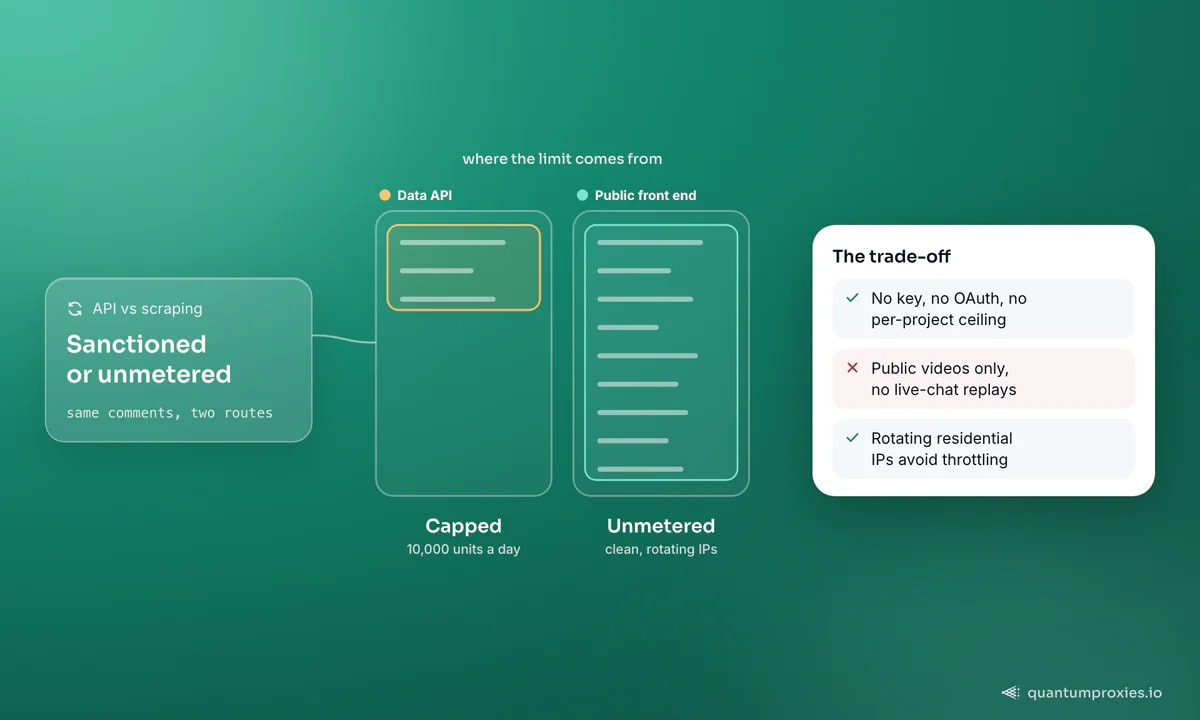
Render YouTube pages and pull comments via API
What people build with scraped comments
The data becomes valuable once it leaves YouTube. Teams feed structured comments into NLP pipelines for sentiment analysis, mine them for the exact phrasing an audience uses (straight into ad copy and landing pages), build labelled datasets for training and fine-tuning models, and run competitor intelligence by reading what a rival's audience praises and complains about. The same reach extends to other platforms — see our notes on TikTok public data for the mobile-first variant.
Why proxies matter here
Comment scraping is high-volume by nature — a single popular video is hundreds of paginated requests, and a channel is thousands. Send all of that from one IP and YouTube throttles you fast. Rotating residential IPs spread the load so no single address looks abusive, and a consistent regional exit keeps the served content stable across a long crawl. If you're also collecting from Instagram or X, the same infrastructure covers social media automation across platforms.
Beyond comments: transcripts and trends
Comments are the loudest signal, but not the only one worth collecting. Public video transcripts — the auto-generated or uploaded captions — are a dense, searchable record of what a creator actually said, ideal for keyword research, content analysis, and building retrieval datasets. They live behind the same timed-text endpoints the player uses, reachable without the Data API. Trending and search-result pages add a third layer: which topics are surging in a given region right now, and how ranking differs market to market. Because all three surfaces are geo-sensitive, a consistent regional exit keeps the picture coherent — a US IP sees US trending, a German IP sees German. Collect comments, transcripts, and trend signals together and you have the raw material for genuine audience research rather than a single-metric snapshot.
Frequently asked questions
How do I scrape YouTube comments for free?
For a one-off video, a browser extension or a free web tool will export the first few hundred comments to CSV. For anything at scale — many videos, full threads, repeated runs — you'll want your own pipeline: resolve the video ID, page the comment continuation API, and route through rotating IPs to avoid throttling. The API's 10,000-unit daily cap makes free official access unworkable for volume.
Is scraping YouTube comments legal?
Collecting publicly visible comments for research, academic analysis, or business intelligence is generally treated as permissible, since the data is public and non-private. This isn't legal advice. Stay on public videos, respect reasonable pacing, and anonymise author identities when you don't need them — especially for datasets you plan to share or publish.
Can you scrape YouTube comments without the API?
Yes. The watch page loads comments through a continuation API you can call directly or via a headless browser, with no key or OAuth. This avoids the 10,000-unit quota entirely. The catch is that you own the pacing and IP hygiene — high request volume from a single address gets throttled, so rotating residential proxies are effectively required at scale.
How many YouTube comments can you scrape?
Through the official API, you're bounded by the 10,000 daily units — a few hundred comment-heavy videos and you're done for the day. Through scraping, there's no per-key ceiling; the practical limit is your proxy pool and pacing. Popular videos with tens of thousands of comments are fully collectable given enough rotating IPs and time.
The YouTube Data API is fine for a light integration and a poor fit for research — the 10,000-unit ceiling was never meant for exhaustive comment collection. Scraping the public front end removes the quota but hands you the pacing and IP-hygiene problem in return. Solve that with a clean rotating pool and you can collect at the scale your analysis actually needs.