Scrape Google Autocomplete for Keyword Research Data
Google Autocomplete is a free, real-time keyword-research feed - if you use the right endpoint. Here's the unofficial complete/search API, its geo and cursor params, and how to cluster the output.
Google Autocomplete is the most honest keyword-research source there is: the suggestions are real queries, ranked by what people actually type, updated in real time and geo-specific. And you can pull them for free from an unofficial endpoint - if you know which one. Most search results for "google autocomplete api" send you to the paid Google Places address-autofill product, which is a completely different thing. This guide covers the real query-autocomplete endpoint, its geo and cursor parameters, how to cluster a single seed into hundreds of queries, and how to run it at scale without getting blocked.
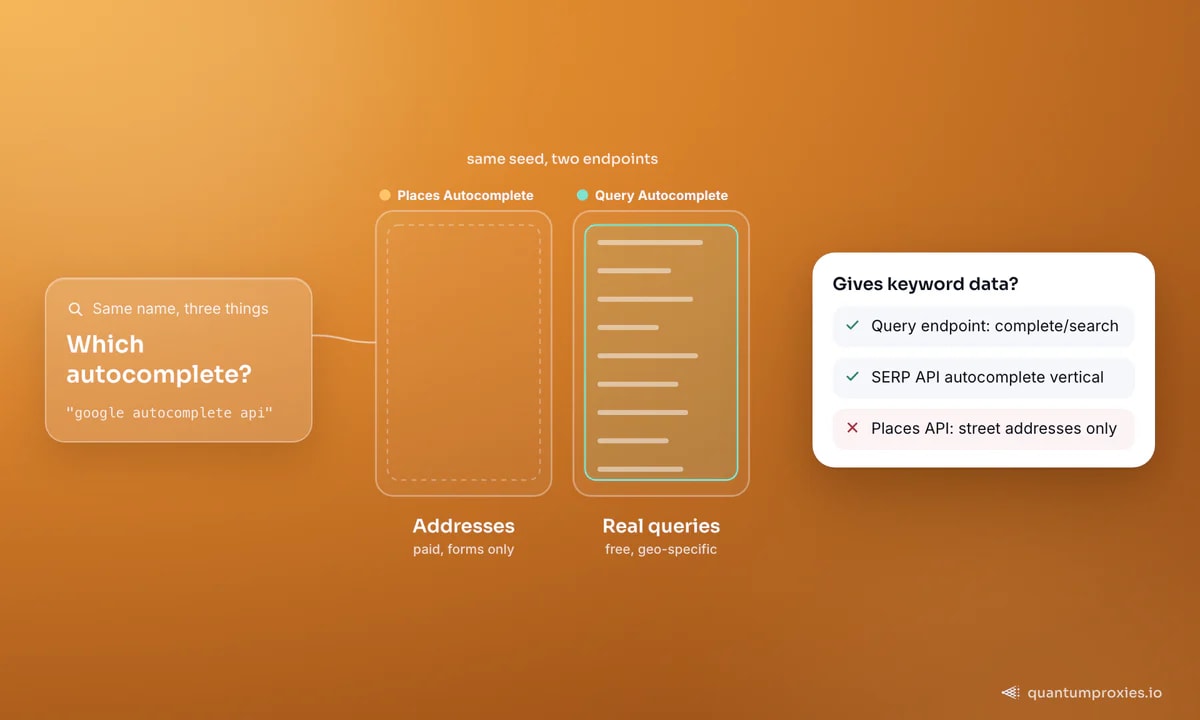
First, clear up the confusion
There are three different things wearing the "autocomplete" name, and mixing them up wastes days:
- Query Autocomplete - the search-box suggestions at
google.com/complete/search. Unofficial, free, and the actual keyword-research goldmine. - Places Autocomplete - the Google Places API (new) for address autofill in forms. Official, paid, and useless for keyword research.
- A SERP API autocomplete vertical - a managed endpoint that returns the same query suggestions as JSON, with geo and language handling and no blocking.
If you want keyword ideas, you want the first (for control) or the third (for scale). The Places API will never give you "best running shoes for flat feet" - it only knows street addresses.
The unofficial endpoint, with code
The query-autocomplete endpoint is https://www.google.com/complete/search. Set client=chrome and it returns a JSON array where the second element is your list of suggestions. Two parameters make it a research tool rather than a toy: gl (a two-letter country code) and hl (a two-letter language code), which localise the suggestions:
import requests

proxy = "http://USER:PASS@residentialpremium.quantumproxies.io:8080"
proxies = {"http": proxy, "https": proxy}

def autocomplete(seed, gl="us", hl="en"):
    r = requests.get("https://www.google.com/complete/search",
                     params={"q": seed, "client": "chrome", "gl": gl, "hl": hl},
                     proxies=proxies, timeout=15)
    return r.json()[1]  # chrome client: index 1 holds the suggestions

print(autocomplete("running shoes", gl="gb"))
print(autocomplete("running shoes", gl="us"))  # compare markets
Run those two lines and you'll see the geo effect immediately - the UK and US suggestion sets differ, because Autocomplete reflects what each market searches. There's also a cp parameter ("cursor pointer") that sets where the cursor sits in the query, which refines completions - useful for teasing out mid-phrase suggestions. Switching client between chrome, firefox and gws-wiz changes the response shape and sometimes the results, so pick one and stay consistent.
Turn one seed into hundreds of keywords
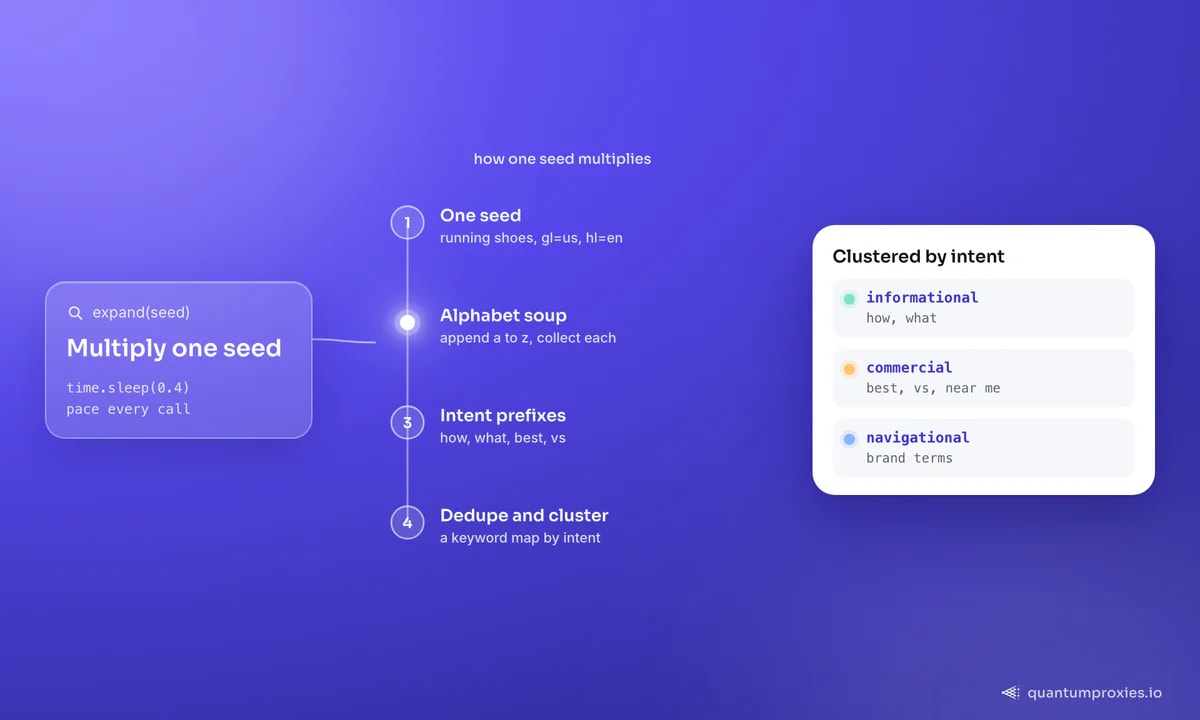
A single call returns maybe ten suggestions. The technique that multiplies them is alphabet soup: append each letter a-z to the seed and collect every completion. Layer in prefixes (how, what, best, vs) and suffixes (near me, for, 2026) and one seed becomes a broad, intent-rich map:
import string, time

def expand(seed, gl="us"):
    found = set(autocomplete(seed, gl))
    for c in string.ascii_lowercase:          # a-z soup
        found.update(autocomplete(f"{seed} {c}", gl))
        time.sleep(0.4)                         # pace the requests
    for p in ("how", "what", "best", "vs"):    # intent prefixes
        found.update(autocomplete(f"{p} {seed}", gl))
        time.sleep(0.4)
    return sorted(found)

keywords = expand("running shoes", gl="us")
print(len(keywords), "suggestions")
Cluster the output by intent - informational (how, what), commercial (best, vs, near me) and navigational (brand terms) - and dedupe. That's a real keyword map grounded in live search behaviour, not a tool's estimate. Feeding these seeds back into full SERPs is how you build a rank tracker; our guide to building your own rank tracker covers that next step.
Read the relevance scores
The chrome client returns more than strings - each suggestion carries a relevance score, and the ordering reflects real demand. Use it. Sort your expanded set by relevance and the head of the list is where search volume concentrates; the long tail below it is where low-competition opportunities hide. You get a rough demand ranking for free, before you ever pull a single monthly-volume figure from a paid keyword tool - which makes autocomplete a fast first-pass filter even when you own other data sources.
Scaling without getting blocked
Alphabet-soup expansion is dozens of requests per seed, and hundreds of seeds means thousands of calls to the same Google endpoint. That's exactly the volume that gets an IP throttled. Two ways through. The hands-on route: spread requests across a rotating proxy pool with geo matching, and pace them - the same discipline in avoiding IP blocks during keyword research at scale. The managed route: use a SERP API with an autocomplete vertical that handles rotation, geo and parsing for you and returns clean JSON - no throttling to babysit. Under the hood our 2026 SERP scraping breakdown explains why that infrastructure is non-trivial to run yourself.
Pull autocomplete at scale with the SERP API
What to do with the data
Autocomplete data feeds more than a content calendar. Run the same seeds across markets with gl and hl to localise a site properly, track how suggestions shift over time to catch rising trends early, and mine long-tail commercial queries competitors haven't targeted. Because the suggestions come straight from search behaviour, they're a leading indicator - often surfacing demand before it shows up in monthly keyword-volume tools. Piping the expanded seeds into a SERP API to capture the live results for each - titles, People Also Ask, and AI Overviews - turns a flat keyword list into a full content brief in a single pass. For AI and SEO products consuming this at volume, our note on choosing a SERP API for AI/SEO tools covers the verticals and JSON shape to look for, and monitoring SERP changes globally covers the tracking side.
Frequently asked questions
Is there a free Google Autocomplete API?
There's no official free API, but the unofficial endpoint at google.com/complete/search?client=chrome&q=... returns suggestions as JSON and is free to call. It rate-limits under volume, so for anything beyond light use you'll need proxies or a managed SERP API. Note this is different from the paid Places autocomplete for addresses.
How do I get Google suggestions for a specific country?
Pass the gl parameter with a two-letter country code (us, gb, de) and hl with a language code (en, de, fr). Suggestions are geo-specific, so the same seed returns different results per market - and your proxy exit should match the country you're querying for accurate data.
Why does my autocomplete scraper get blocked?
Alphabet-soup expansion fires dozens of requests per seed at one Google endpoint, which throttles a single IP quickly. Spread the calls across a rotating proxy pool, add delays between requests, and match the exit geo to your gl value - or use a SERP API that handles rotation and pacing for you.
Is Google Autocomplete good for keyword research?
Excellent, because the suggestions are real queries ranked by actual search demand, updated live and localised by country. Alphabet-soup and prefix expansion turn one seed into hundreds of intent-rich terms - often surfacing long-tail and trending queries before they appear in monthly-volume keyword tools.
Google Autocomplete is a free, real-time, geo-aware keyword feed once you use the query endpoint rather than the address one. Pull it with complete/search, localise with gl and hl, multiply seeds with alphabet soup, and cluster by intent. To run it at scale, put a rotating pool or a SERP API behind it and let the infrastructure handle the throttling.